
telerik reporting 在.net core api 使用
工具要求:telerik reporting R3 2019、.net core 2.2 、vs2017 最新版
从官网下载下来的的telerik reporting 的.net core 例子是无法成功预览报表的,可能内部程序有问题,
以下为正确操作步骤
1.打开nuget 包管理源,新建程序包源(https://nuget.telerik.com/nuget),如下:
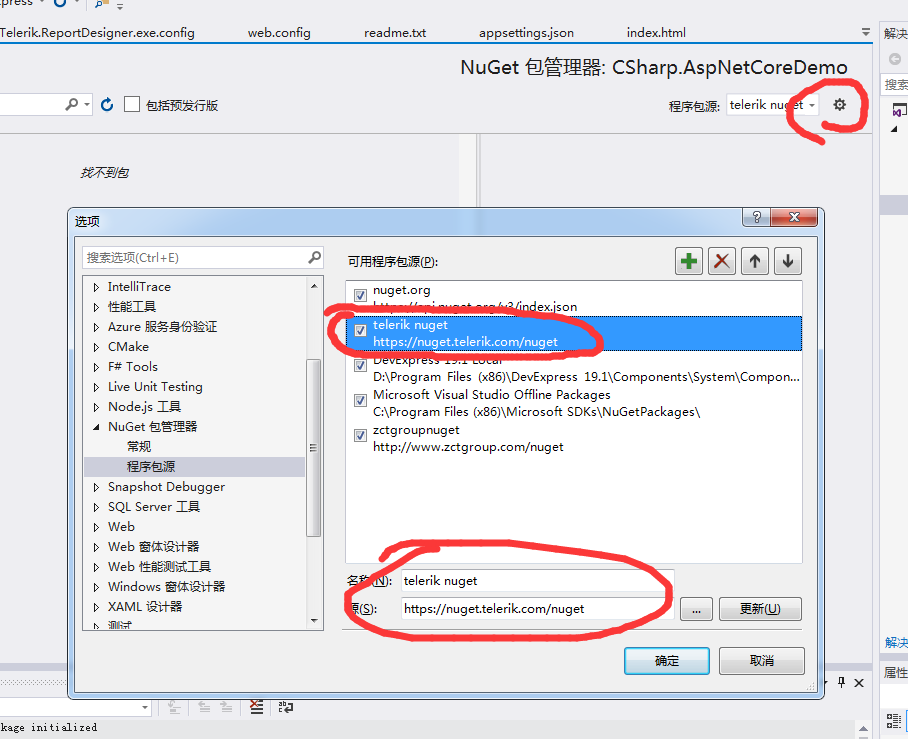
2.切换程序包源,选择telerik reporting 安装包,如下:
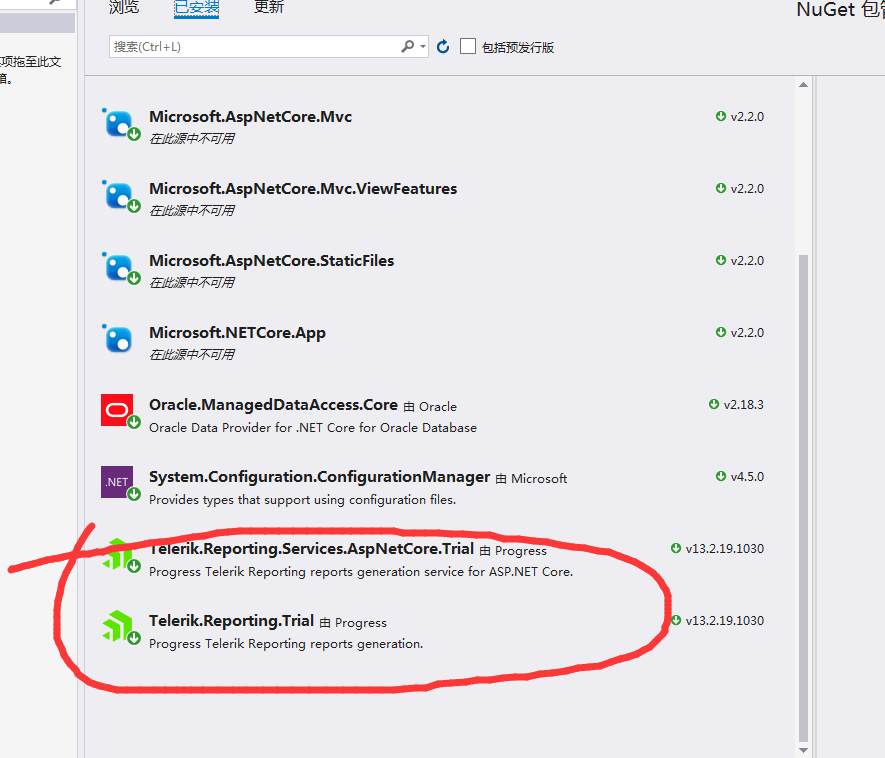
3.api代码:
 namespace CSharp.AspNetCoreDemo.Controllers

 {

     using System.Collections.Generic;

     using System.IO;

     using System.Linq;

     using Microsoft.AspNetCore.Mvc;

     using Telerik.Reporting.Services;

     using Telerik.Reporting.Services.AspNetCore;

     using System.Net;

     using System.Net.Mail;

     using Telerik.Reporting.Cache.File;

     using Microsoft.AspNetCore.Authorization;

     [Route("api/reports")]

     public class ReportsController : ReportsControllerBase

     {

         readonly string reportsPath = string.Empty;

         public ReportsController(ConfigurationService configSvc)

         {

             this.reportsPath = Path.Combine(configSvc.Environment.WebRootPath, "report");

             this.ReportServiceConfiguration = new ReportServiceConfiguration

             {

                 ReportingEngineConfiguration = configSvc.Configuration,

                 HostAppId = "Html5DemoAppCore",

                 Storage = new FileStorage(),

                 ReportResolver = new ReportTypeResolver()

                 .AddFallbackResolver(new ReportFileResolver(this.reportsPath)),

             };

         }

         [HttpGet("reportlist")]

         public IEnumerable<string> GetReports()

         {

             //return Directory

             //    .GetFiles(this.reportsPath)

             //    .Select(path =>

             //        Path.GetFileName(path));

             List<string> list = new List<string>();

             foreach (var item in Directory.GetFiles(this.reportsPath))

             {

                 var fileName=  Path.GetFileName(item);

                 list.Add(fileName);

             }

             return list;

         }

         protected override HttpStatusCode SendMailMessage(MailMessage mailMessage)

         {

             throw new System.NotImplementedException("This method should be implemented in order to send mail messages");

             //using (var smtpClient = new SmtpClient("smtp01.mycompany.com", 25))

             //{

             //    smtpClient.DeliveryMethod = SmtpDeliveryMethod.Network;

             //    smtpClient.EnableSsl = false;

             //    smtpClient.Send(mailMessage);

             //}

             //return HttpStatusCode.OK;

         }

     }

 }
4:前端代码
 <!DOCTYPE html>

 <html xmlns="http://www.w3.org/1999/xhtml">

 <head>

     <title>Telerik HTML5 Report Viewer Demo</title>

     <meta http-equiv="X-UA-Compatible" content="IE=edge" />

     <meta name="viewport" content="width=device-width, initial-scale=1, maximum-scale=1" />

     <script src="https://code.jquery.com/jquery-3.3.1.min.js"></script>

     <link href="http://kendo.cdn.telerik.com/2018.2.620/styles/kendo.common.min.css" rel="stylesheet" id="common-css" />

     <link href="http://kendo.cdn.telerik.com/2018.2.620/styles/kendo.blueopal.min.css" rel="stylesheet" id="skin-css" />

     <script src="/Scripts/themeSwitcher.js"></script>

     <script src="/api/reports/resources/js/telerikReportViewer"></script>

     <style>

         body {

             font-family: Verdana, Arial, sans-serif;

             margin: 5px;

         }

         #reportViewer1 {

             position: absolute;

             left: 5px;

             right: 5px;

             top: 40px;

             bottom: 5px;

             overflow: hidden;

             clear: both;

         }

         #theme-switcher {

             float: right;

             width: 12em;

             height: 30px;

         }

     </style>

 </head>

 <body>

     <select id="theme-switcher"></select>

     <div id="reportViewer1">

         loading...

     </div>

     <script type="text/javascript">

         $(document).ready(function () {

             //Theme switcher

             themeSwitcher(

                 '#theme-switcher',

                 '#common-css',

                 '#skin-css');

             $("#reportViewer1")

                 .telerik_ReportViewer({

                     // The URL of the service which will serve reports.

                     // The URL corresponds to the name of the controller class (ReportsController).

                     // For more information on how to configure the service please check http://www.telerik.com/help/reporting/telerik-reporting-rest-conception.html.

                     serviceUrl: "api/reports/",

                     // The URL for the report viewer template. The template can be edited -

                     // new functionalities can be added and unneeded ones can be removed.

                     // For more information please check http://www.telerik.com/help/reporting/html5-report-viewer-templates.html.

                     // templateUrl: 'ReportViewer/templates/telerikReportViewerTemplate.html',

                     //ReportSource - report description

                     reportSource: {

                         // The report can be set to a report file name (.trdx or .trdp report definition)

                         // or CLR type name (report class definition).

                         report: "Report.trdp",

                         // Parameters name value dictionary

                         //parameters: {}

                     },

                     //parameters: {

                     //    editors: {

                     //        singleSelect: telerikReportViewer.ParameterEditorTypes.COMBO_BOX,

                     //        multiSelect: telerikReportViewer.ParameterEditorTypes.COMBO_BOX,

                     //    }

                     //},

                     // Specifies whether the viewer is in interactive or print preview mode.

                     // PRINT_PREVIEW - Displays the paginated report as if it is printed on paper. Interactivity is not enabled.

                     // INTERACTIVE - Displays the report in its original width and height without paging. Additionally interactivity is enabled.

                     viewMode: telerikReportViewer.ViewModes.INTERACTIVE,

                     // Sets the scale mode of the viewer.

                     // Three modes exist currently:

                     // FIT_PAGE - The whole report will fit on the page (will zoom in or out), regardless of its width and height.

                     // FIT_PAGE_WIDTH - The report will be zoomed in or out so that the width of the screen and the width of the report match.

                     // SPECIFIC - Uses the scale to zoom in and out the report.

                     scaleMode: telerikReportViewer.ScaleModes.SPECIFIC,

                     // Zoom in and out the report using the scale

                     // 1.0 is equal to 100%, i.e. the original size of the report

                     scale: 1.0,

                     //Enables or disables the accessibility features of the report viewer and its contents.

                     enableAccessibility: false,

                     //If set to true shows the Send Mail Message toolbar button

                     sendEmail: { enabled: true }

                 });

         });

     </script>

 </body>

 </html>
5. 本人使用的是oracle ,所以是引用Oracle.ManagedDataAccess.Core ,这个dll 不需要按照oracle 的客户端。配置文件添加数据库连接
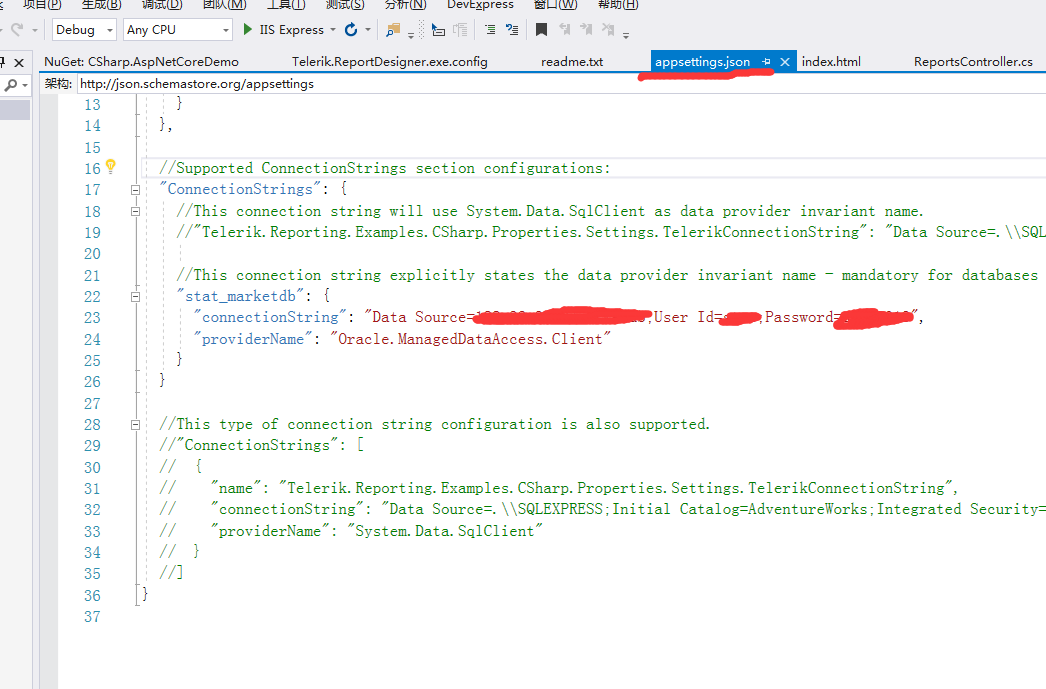
6. 若是想在报表设计器预览 又不想安装oracle 客户端,操作如下:
1)修改设计器的Telerik.ReportDesigner.exe.config ,在connectionStrings 前添加以下内容
<system.data>

<DbProviderFactories>

<remove invariant="Oracle.ManagedDataAccess.Client" />

<!-- If any should be in the machine.config -->

<add name="Oracle.ManagedDataAccess" invariant="Oracle.ManagedDataAccess.Client" description="Oracle Data Provider for .NET" type="Oracle.ManagedDataAccess.Client.OracleClientFactory, Oracle.ManagedDataAccess, Version=4.121.1.0, Culture=neutral" />

</DbProviderFactories>

</system.data>
2)在设计器Telerik.ReportDesigner.exe同级目录放入:
Oracle.ManagedDataAccess.dll
源码 地址:https://download.csdn.net/download/h4715582/11956099
telerik reporting 在.net core api 使用的更多相关文章
- 修复Telerik reporting 在网页中使用时的样式
在ASP.NET 网页或ASP MVC中嵌入Telerik Reporting时,报表出来的样式是有问题的,按扭的位置错位了. 在页面中引入以下CSS文件可以将报表样式修复从而回到正常的报表样式. . ...
- AspNet Core Api Restful 实现微服务之旅 (一)
(一)了解微服务(二)搭建VS项目框架 (三)创建AspNet Core Api VS2017 安装包 链接:https://pan.baidu.com/s/1hsjGuJq 密码:ug59 创 ...
- 【从零开始搭建自己的.NET Core Api框架】(七)授权认证进阶篇
系列目录 一. 创建项目并集成swagger 1.1 创建 1.2 完善 二. 搭建项目整体架构 三. 集成轻量级ORM框架——SqlSugar 3.1 搭建环境 3.2 实战篇:利用SqlSuga ...
- .net core api +swagger(一个简单的入门demo 使用codefirst+mysql)
前言: 自从.net core问世之后,就一直想了解.但是由于比较懒惰只是断断续续了解一点.近段时间工作不是太忙碌,所以偷闲写下自己学习过程.慢慢了解.net core 等这些基础方面学会之后再用.n ...
- 【从零开始搭建自己的.NET Core Api框架】(一)创建项目并集成swagger:1.1 创建
系列目录 一. 创建项目并集成swagger 1.1 创建 1.2 完善 二. 搭建项目整体架构 三. 集成轻量级ORM框架——SqlSugar 3.1 搭建环境 3.2 实战篇:利用SqlSuga ...
- 【从零开始搭建自己的.NET Core Api框架】(四)实战!带你半个小时实现接口的JWT授权验证
系列目录 一. 创建项目并集成swagger 1.1 创建 1.2 完善 二. 搭建项目整体架构 三. 集成轻量级ORM框架——SqlSugar 3.1 搭建环境 3.2 实战篇:利用SqlSuga ...
- 详解ASP.NET Core API 的Get和Post请求使用方式
上一篇文章帮助大家解决问题不彻底导致博友使用的时候还是遇到一些问题,欢迎一起讨论.所以下面重点详细讲解我们常用的Get和Post请求( 以.net core2.2的Http[Verb]为方向 ,推荐该 ...
- ASP.NET Core API 接收参数去掉烦人的 [FromBody]
在测试ASP.NET Core API 项目的时候,发现后台接口参数为类型对象,对于PostMan和Ajax的Post方法传Json数据都获取不到相应的值,后来在类型参数前面加了一个[FromBody ...
- telerik reporting报表
Telerik Reporting是一个非常人性化的控件,一个报表的生成几乎不用写代码,都是通过"所见即所得"模式完成.由于客户需要在实际的项目中运用Telerik Reporti ...
随机推荐
- mysql那些事(5)建表存储引擎的选择
在mysql见表的时候,会遇到选择存储引擎:MyISAM和InnoDB.究竟用哪种存储引擎好呢? 1.MyISAM:表锁:支持全文索引:读并发性能较好. 2.InnoDB:行锁:支持事务,支持外键:写 ...
- FastAdmin的基本使用
FastAdmin是一款基于ThinkPHP5+Bootstrap的极速后台开发框架. 1.在线命名管理 (1)菜单的生成 (2)一键 crud 首先要安装在线命名 在翡翠分类生成菜单,如下: 它的 ...
- mac mysql start ERROR! The server quit without updating PID file
在mac下安装完mysql,启动时出现error: ERROR! The server quit without updating PID file (/usr/local/var/mysql/nal ...
- 灵魂拷问:Java 的 substring() 是如何工作的?
在逛 programcreek 的时候,我发现了一些小而精悍的主题.比如说:Java 的 substring() 方法是如何工作的?像这类灵魂拷问的主题,非常值得深入地研究一下. 另外,我想要告诉大家 ...
- 移动开发在路上-- IOS移动开发系列 网络交互四(1)
最近一段时间上班忙的没日没夜的,不是披星戴月,就是头天早上出门,第二天早上回家...一直没出处时间来更新博客,码农之苦,说了都是泪,废话不多说,直接本主题,经过之前三篇的讲述,ios开发的东西大家或多 ...
- Day 08 可变与不可变对象/列表与字典内置方法
目录 可变对象与不可变对象 可变对象 不可变对象 列表的内置方法 字典内置方法 可变对象与不可变对象 可变对象 对象指向的内存中的值会改变,当更改这个变量的时候,还是指向原来内存中的值,并且在原来的内 ...
- 【JS】312- 复习 JavaScript 严格模式(Strict Mode)
点击上方"前端自习课"关注,学习起来~ 注:本文为 < JavaScript 完全手册(2018版) >第30节,你可以查看该手册的完整目录. 严格模式是一项 ES5 ...
- vue实现双向绑定的基础方法
Vue2的组件props通信方式 在Vue2中组件的props的数据流动改为了只能单向流动,即只能由组件外(调用组件方)通过组件的DOM属性attribute传递props给组件内,组件内只能被动接收 ...
- 大数据学习笔记——Spark工作机制以及API详解
Spark工作机制以及API详解 本篇文章将会承接上篇关于如何部署Spark分布式集群的博客,会先对RDD编程中常见的API进行一个整理,接着再结合源代码以及注释详细地解读spark的作业提交流程,调 ...
- 【MyBatis-Plus】使用学习
[MyBatis-Plus]使用学习 ============================================== 1.插入和更新字段空和非空控制 2.插入和更新字段填充策略 ==== ...