
[转]UiPath Keyboard Shortcuts
本文转自:https://docs.uipath.com/studio/docs/keyboard-shortcuts
The complete list of keyboard shortcuts for UiPath Studio:
File Management
Ctrl + Shift + N - Creates a new Blank Process.
Ctrl + O - Enables you to open a previously created workflow, either the .xaml or project.json file.
Ctrl + L - Opens the folder where the Log files are stored.
Ctrl + S - Saves the currently opened workflow.
Ctrl + Shift + S - Saves all the workflows that are currently open.
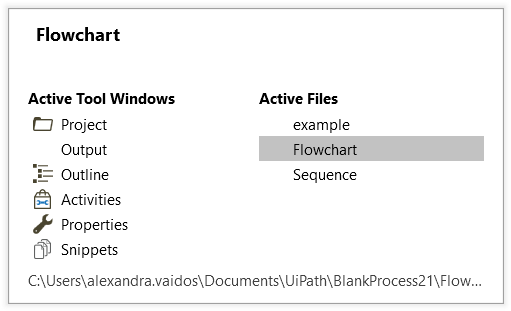
Ctrl + Tab - Moves focus between workflows opened in the Designer panel. Upon pressing the shortcut, the following window appears, allowing you to select between active files and panels in Studio.
Comment
Ctrl + D - Ignores the activity that is currently selected by placing it into a Comment Out container.
Ctrl + E - Removes the activity from the Comment Out container it was placed in.
Debugging
F7 - Runs the currently opened workflow in debug mode.
F8 - Checks the currently opened workflow for validation errors.
F9 - Marks the selected activity with a breakpoint.
Shift + F9 - Removes all the breakpoints in the currently opened workflow.
F11 - When debugging, enables you to step into a block of activities and executes the first one.
Shift + F11 - When debugging, steps over the execution of a block of activities in the currently selected workflow.
Recording
Alt + Ctrl + W - Opens the Web Recording toolbar.
Alt + Ctrl + B - Opens the Basic Recording toolbar.
Alt + Ctrl + C - Opens the Citrix Recording toolbar.
Alt + Ctrl + D - Opens the Desktop Recording toolbar.
F2 - Adds delay during a recording activity.
F3 - Lets you specify a custom recording region.
F4 - Lets you choose the UI Framework to record, which can be Default, AA, and UIA.
Workflow Execution
F5 - Runs the workflow that is currently open.
Pause - Pauses the execution of the current workflow, in both normal and debug mode.
F12 - Stops the execution of the current workflow, in both normal and debug mode.
Selected Activity
Ctrl + T - Places the activity inside the Try section of a Try Catch activity.
Ctrl + N - Creates a new Sequence Diagram in the current project.
Ctrl + C - Copies the selected activity or activities to the clipboard.
Ctrl + V - Pastes the copied activity or activities inside the selected item.
Ctrl + K - Creates an variable of the same type as the required type of the activity.
Ctrl + M - Creates an In argument of the same type as the required type of the activity.
Ctrl + Shift + M - Creates an Out argument of the same type as the required type of the activity.
Ctrl + Space - Opens the IntelliPrompt window.
Miscellaneous
F1 - Enables you to access a help topic associated with the currently selected element.
Ctrl + Alt + F - Sets the focus to the search box in the Activities panel to search for an activity.
Ctrl + P - Opens the Manage Packages window.
Esc - Closes the Publish, Manage Packages, File Diff windows.
[转]UiPath Keyboard Shortcuts的更多相关文章
- Mousetrap - Keyboard shortcuts in Javascript
Mousetrap is a simple library for handling keyboard shortcuts in Javascript. It is around 2kb minifi ...
- OS X: Keyboard shortcuts
Using keyboard shortcuts To use a keyboard shortcut, press a modifier key at the same time as a char ...
- [No0000113]Keyboard shortcuts for Windows Visual Studio Code
General 常用Ctrl+Shift+P, F1 Show Command Palette 显示命令行Ctrl+P Quick Open, Go to File… 快速打开Ctrl+Shift+N ...
- keyboard shortcuts & Xcode 10
keyboard shortcuts & Xcode 10 Xcode Keyboard Shortcuts https://swifteducation.github.io/assets/p ...
- MBP 2018 & Mac keyboard shortcuts
MBP 2018 & Mac keyboard shortcuts https://support.apple.com/en-us/HT201236 delete key === Contro ...
- Google Chrome Keyboard Shortcuts
Navigation To do this Press this Open a new window Ctrl + N Open a new tab Ctrl + T Open a new windo ...
- [转]33 useful Keyboard Shortcuts for Run commond
原文: http://www.shortcutworld.com/en/win/Run-command.html 1. Calling Run CommandWin + r ...
- SQL Server Management Studio Keyboard shortcuts
一些平时在SQL Server Management Studio 使用到的快捷键 F5 (Ctrl+x)执行选中部分的语句,没有选中则全文执行 Ctrl+L 现实执行计划(估计) Ctrl+M 在运 ...
- RStudio Keyboard Shortcuts
Console Description Windows & Linux Mac Move cursor to Console Ctrl+2 Ctrl+2 Clear console Ctrl+ ...
随机推荐
- RabbitMQ的三大交换器
pom文件都是相同的 <?xml version="1.0" encoding="UTF-8"?> <project xmlns=" ...
- EasyUI整合SpringBoot,Spring Data对数据的分页操作
EasyUI的用法可以看中文官网,看插件是如何使用的 EasyUI中文官网 前端页面 <table id="dg" title="My Users" cl ...
- Spring代理模式(jdk动态代理模式)
有动态代理和静态代理: 静态代理就是普通的Java继承调用方法. Spring有俩种动态代理模式:jdk动态代理模式 和 CGLIB动态代理 jdk动态代理模式: 代码实现: 房东出租房子的方法(继承 ...
- 强化学习七 - Policy Gradient Methods
一.前言 之前我们讨论的所有问题都是先学习action value,再根据action value 来选择action(无论是根据greedy policy选择使得action value 最大的ac ...
- PlantUML Viewer Chrome 插件 画时序图
PlantUML通过简单直观的语言来定义示意图 使用 Chrome+ PlantUML Viewer的插件画图 1,打开chrome网上应用店 2,搜索plantuml viewer 并添加 3,扩展 ...
- FPGA_VIP_V101 摄像头视频采集 调试总结之SDRAM引起的水平条纹噪声问题
FPGA_VIP_V101 摄像头视频采集 调试总结之SDRAM引起的水平条纹噪声问题 此问题困扰我很近,终于在最近的项目调整中总结了规律并解决了. 因为之前对sdram并不熟悉,用得也不是太多,于是 ...
- Python3 类的继承小练习
1.打印并解释结果 class Parent(object): x = 1 class Child1(Parent): pass class Child2(Parent): pass print(Pa ...
- 【JS】297-[译]正确使用 sort() 方法
点击上方"前端自习课"关注,学习起来~ 英文原文:[<Usar correctamente el método sort()>]文章地址:查看阅读原文.注意:内容有做精 ...
- git 中的 merge 和 rebase
示例分支:master . dev 把 dev 分支上的新内容合并到 master 上 先切换分支到master git checkout master 合并操作 git merge dev 或者 g ...
- redis(6)--redis集群之分片机制(redis-cluster)
Redis-Cluster 即使是使用哨兵,此时的Redis集群的每个数据库依然存有集群中的所有数据,从而导致集群的总数据存储量受限于可用存储内存最小的节点,形成了木桶效应.而因为Redis是基于内存 ...