
Python开发【初始篇】:Linux下安装Python3
Linux系统默认自带python2.6的版本,这个版本被系统很多程序所依赖,所以建议不要轻易删除,除非你能解决其他程序的依赖问题。如果使用最新的Python3需要进行编译安装源码包,这样就对系统默认的包没有任何影响。
- [root@test-c2c-console01 ~]# cat /etc/redhat-release
- CentOS release 6.6 (Final)
- [root@test-c2c-console01 ~]# uname -a
- Linux test-c2c-console01.bj 2.6.32-504.el6.x86_64 #1 SMP Wed Oct 15 04:27:16 UTC 2014 x86_64 x86_64 x86_64 GNU/Linux
- [root@test-c2c-console01 ~]# python -V
- Python 2.6.6
Python官网下载pthon3源码包,https://www.python.org/

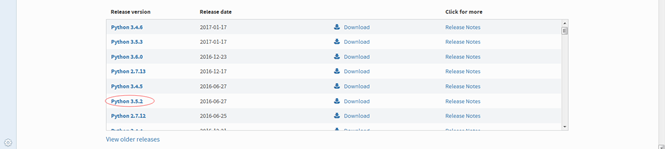
选择自己需要的版本
选择源码包
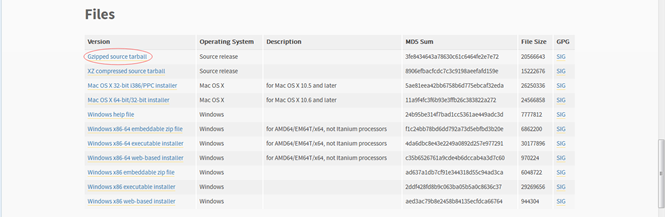
下载到本地然后上传到linux或者复制下载链接直接通过wget下载
- [root@test-c2c-console01 tools]# wget -q https://www.python.org/ftp/python/3.5.2/Python-3.5.2.tgz
- [root@test-c2c-console01 tools]# ll Python-3.5.2.tgz
- -rw-r--r-- 1 root root 20566643 Jun 26 2016 Python-3.5.2.tgz
解压并安装
- [root@test-c2c-console01 tools]# tar xf Python-3.5.2.tgz
- [root@test-c2c-console01 tools]# cd Python-3.5.2
- [root@test-c2c-console01 Python-3.5.2]# ./configure --prefix=/application/Python-3.5.2/ #指定安装目录
- [root@test-c2c-console01 Python-3.5.2]# make && make install
创建软连接
- [root@test-c2c-console01 Python-3.5.2]# cd /application/
- [root@test-c2c-console01 application]# ln -s Python-3.5.2/ Python3
- [root@test-c2c-console01 application]# ll
- total 4
- lrwxrwxrwx 1 root root 13 Mar 1 09:08 Python3 -> Python-3.5.2/
- drwxr-xr-x 6 root root 4096 Mar 1 09:03 Python-3.5.2
到此python3就安装好了,启动pyhon3。
- [root@test-c2c-console01 application]# /application/Python3/bin/python3
- Python 3.5.2 (default, Mar 1 2017, 09:02:01)
- [GCC 4.4.7 20120313 (Red Hat 4.4.7-11)] on linux
- Type "help", "copyright", "credits" or "license" for more information.
- >>>
由于这样启动比较麻烦可以通过配置环境变量解决。
- [root@test-c2c-console01 application]# vim /etc/profile # 文件末尾添加python3路径
- PATH="/application/Python3/bin/:$PATH"
- [root@test-c2c-console01 application]# source /etc/profile # 更新环境变量
- [root@test-c2c-console01 application]# which python3
- /application/Python3/bin/python3
- [root@test-c2c-console01 application]# which python
- /usr/bin/python
- [root@test-c2c-console01 application]# python3 -V
- Python 3.5.2
- [root@test-c2c-console01 application]# python -V
- Python 2.6.6
启动系统默认的python
- [root@test-c2c-console01 application]# python
- Python 2.6.6 (r266:84292, Aug 18 2016, 15:13:37)
- [GCC 4.4.7 20120313 (Red Hat 4.4.7-17)] on linux2
- Type "help", "copyright", "credits" or "license" for more information.
- >>>
启动python3
- [root@test-c2c-console01 application]# python3
- Python 3.5.2 (default, Mar 1 2017, 09:02:01)
- [GCC 4.4.7 20120313 (Red Hat 4.4.7-11)] on linux
- Type "help", "copyright", "credits" or "license" for more information.
- >>>
Python开发【初始篇】:Linux下安装Python3的更多相关文章
- 【转】在Linux下安装python3
原文链接:http://www.cnblogs.com/feng18/p/5854912.html 1.linux下安装python3 a. 准备编译环境(环境如果不对的话,可能遇到各种问题,比如wg ...
- Python3.x:Linux下安装python3.6
Python3.x:Linux下安装python3.6 下载 #先进入download文件夹 cd /home/download #输入命令(下载到当前目录) wget https://www.pyt ...
- Linux下安装Python3.3.0
Linux下安装Python3.3.0_路易_新浪博客 Linux下安装Python3.3.0 (2013-01-08 11:45:37)
- linux下安装python3(转)
一.Linux下安装Python 二.Linux下Python安装完成后如何使用pip命令 三.Linux下Python安装完成后如何使用yum命令 四.Linux下安装Anaconda 五.Linu ...
- Linux下安装python3.3.2及configrue、make、make install
一.安装python3.3.2 raspberry的/usr/local/src目录没有权限,可执行如下命令 pi@raspberrypi:~$ sudo chmod -R 777 /usr/loca ...
- python 基础1.1--windows/linux 下安装python
一.windows下安装python 1>windows上python后缀是.msi的,下载下来后,直接双击运行.会在c盘生成python.exe的文件,把python.exe的文件加入到win ...
- Linux下安装Python3.6.8并安装包
一.问题在Linux下面安装Python3.6.8,由于在Linux中的Python是2.7.x的版本因此,我们需要在Linux中新下载一个Python 二.解决1.python的安装(1)下载包利用 ...
- 环境准备—之—linux下安装python3和pip3
转自 上海悠悠 https://www.cnblogs.com/yoyoketang/p/10195102.html 前言 centos7 自带有 python,但是却是 python2 版本的 py ...
- Linux下安装python3环境搭建
Linux下python3环境搭建 Linux安装软件有哪些方式? rpm软件包 手动安装 拒绝此方式 需要手动解决依赖关系 yum自动化安装 自动处理依赖关系 非常好用 源代码编译安装,可自定义的功 ...
- 37、linux下安装python3.6和django
37.1.安装python: 1.python介绍: python是一种面向对象的,解释型的计算机语言,它的特点是语法简介,优雅,简单易学.1989年诞生,Guido(龟叔)开发. 编译型语言:代码在 ...
随机推荐
- note10 元组
元组 Tuple +元组即不可变(immutable)列表 除了可改变列表内容的方法外,其他方法均适用于元组 因此,索引.切片.len().print等均可用 但是,appeng.extend.del ...
- mysql通过now()获取的时间不对
先用now()获取系统时间,发现时间不对(差8个小时): mysql> select now(); +---------------------+ | now() | +------------ ...
- iptables禁止某个mac地址上网
iptables -I FORWARD -m mac --mac-source 60:14:B3:7D:6B:39 -j DROP 上面这条命令测试过是可行,禁止这个mac地址上网,马上禁止马上生 ...
- golang 结构体中的匿名接口
golang 结构体中的匿名接口 代码示例 golang 中,可以给结构体增加匿名field,可参考 unknwon 大神的书. 匿名字段和内嵌结构体 但,golang同时也可以给结构体定义一个匿名i ...
- How to compile tensorflow on CentOS
Tensorflow is a very effective machine learning library implemented by C++, we can use tensorflow wi ...
- 随手用JQ写个选项卡
<div class="box"> <ul> <li class="one">选项卡1</li> <li& ...
- linux centos 中访问linux 共享文件方法
mount -t cifs -o username="administrator",password="" //192.168.1.101/cp /mnt/nt ...
- JNI内存泄露JNI ERROR (app bug): local reference table overflow (max=512)
原因是没即时释放对象,原本的代码是这样 static jobject getMaps(JNIEnv *env,jclass obj) { jclass stringbuilder_class = (* ...
- <<让你自己的APP成为系统应用>>所遇到的问题及解决方法
1.adb connect 10.100.1.772.adb -s 10.100.1.77 shell remount3.让你自己的APP成为系统应用 adb push xxx.apk system/ ...
- Java 公平锁与非公平锁学习研究
最近学习研究了一下Java中关于公平锁与非公平锁的底层实现原理,总结了一下. 首先呢,通过其字面意思,公平与非公平的评判标准就是付出与收获成正比(和社会中的含义差不多一个意思).放到程序中,尤其是 在 ...