
【NIFI】 Apache NiFI 使用技巧
本章介绍NIFI组件的使用。
主要有:Nginx反向代理NIFI,配置SSLContextService
Nginx反向代理NIFI
使用nginx反向代理NIFI配置如下
 upstream nifi_server {

     ip_hash;

     server 127.0.0.1:18002;

 }

 server {

     listen       80;

     server_name  nifi.example.com;

     charset utf-8;

     location / {

         proxy_pass      http://nifi_server;

         proxy_set_header Host $host;

         proxy_set_header X-Real-IP $remote_addr;

         proxy_set_header X-Forwarded-For $proxy_add_x_forwarded_for;

         proxy_set_header X-ProxyScheme http;

         proxy_set_header X-ProxyHost nifi.example.com

         proxy_set_header X-ProxyPort 80;

         proxy_set_header X-ProxyContextPath /;

     }

 }
配置SSLContextService
SSLContextService,可以用来发送https请求
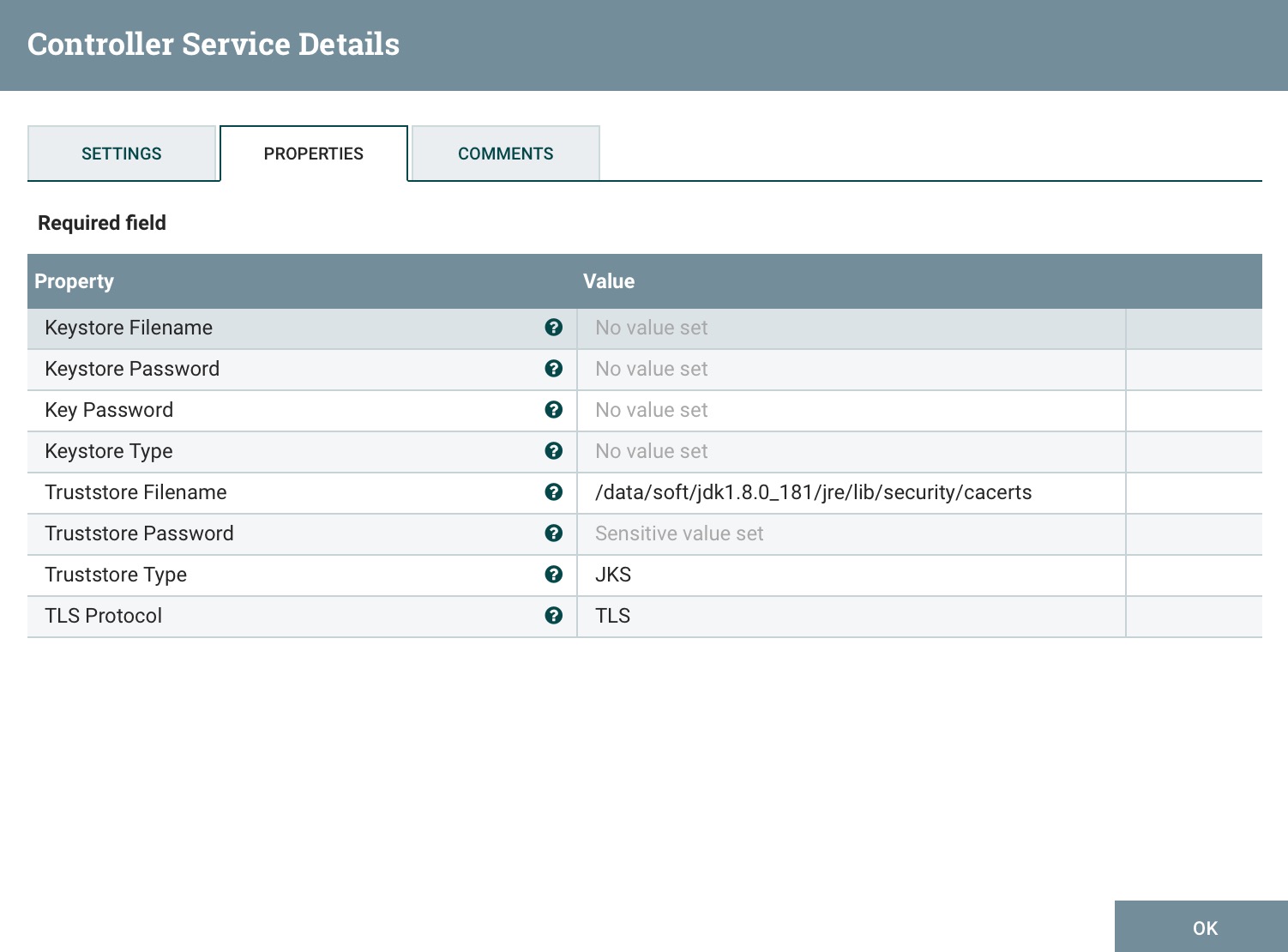
SSL Context Service实例配置信任库属性:
- Truststore文件名:Java安装中的cacerts文件
- 如果在您的系统上设置了$JAVA_HOME,它应该有助于指向正确的方向。如果不是,cacerts的位置根据环境而变化,但是对于它们各自的OS大致如下
- OS X: /Library/Java/JavaVirtualMachines/jdk<version>.jdk/Contents/Home/jre/lib/security/cacerts
- Windows:C:\Program Files\Java\jdk <version>\jre\lib\security\ cacerts
- Linux:/usr/local/java-<version>/jre/lib/security/cacerts
- 如果在您的系统上设置了$JAVA_HOME,它应该有助于指向正确的方向。如果不是,cacerts的位置根据环境而变化,但是对于它们各自的OS大致如下
- Truststore类型:JKS
- Truststore密码:如果您使用的是默认Java密钥库,则默认密码为"changeit"
案例
GetHTTP
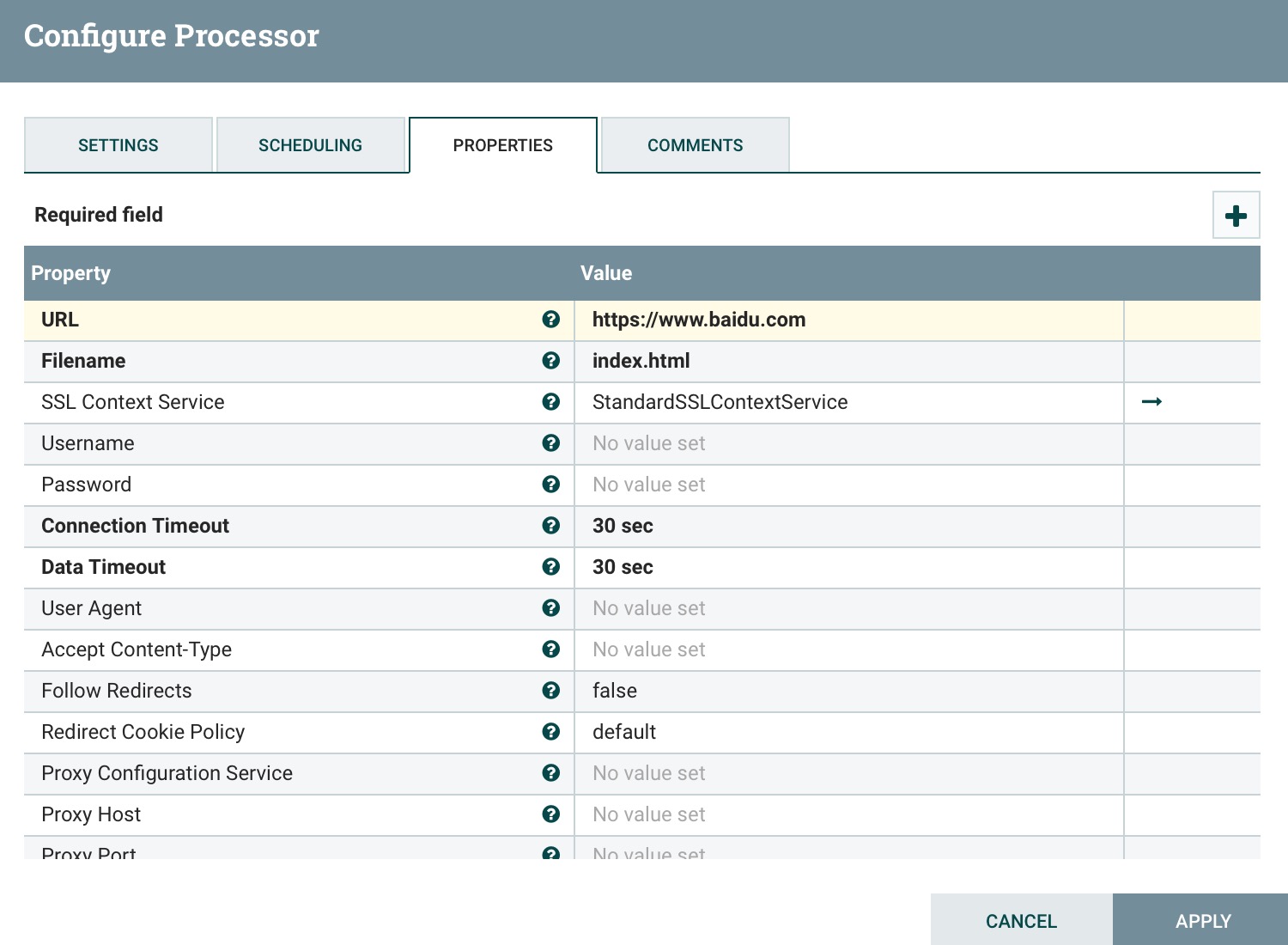
StandardSSLContextService
模版
<?xml version="1.0" encoding="UTF-8" standalone="yes"?>
<template encoding-version="1.2">
<description></description>
<groupId>620351d1-0168-1000-78a0-bf68b5b23177</groupId>
<name>Https-Demo</name>
<snippet>
<connections>
<id>c27e6613-7e35-3d9c-0000-000000000000</id>
<parentGroupId>25bb3a09-a84a-3df9-0000-000000000000</parentGroupId>
<backPressureDataSizeThreshold>1 GB</backPressureDataSizeThreshold>
<backPressureObjectThreshold>10000</backPressureObjectThreshold>
<destination>
<groupId>25bb3a09-a84a-3df9-0000-000000000000</groupId>
<id>a557eeeb-009b-316d-0000-000000000000</id>
<type>PROCESSOR</type>
</destination>
<flowFileExpiration>0 sec</flowFileExpiration>
<labelIndex>1</labelIndex>
<loadBalanceCompression>DO_NOT_COMPRESS</loadBalanceCompression>
<loadBalancePartitionAttribute></loadBalancePartitionAttribute>
<loadBalanceStatus>LOAD_BALANCE_NOT_CONFIGURED</loadBalanceStatus>
<loadBalanceStrategy>DO_NOT_LOAD_BALANCE</loadBalanceStrategy>
<name></name>
<selectedRelationships>success</selectedRelationships>
<source>
<groupId>25bb3a09-a84a-3df9-0000-000000000000</groupId>
<id>e132b9d2-4ae9-3941-0000-000000000000</id>
<type>PROCESSOR</type>
</source>
<zIndex>0</zIndex>
</connections>
<controllerServices>
<id>43bd3854-302f-30dd-0000-000000000000</id>
<parentGroupId>25bb3a09-a84a-3df9-0000-000000000000</parentGroupId>
<bundle>
<artifact>nifi-ssl-context-service-nar</artifact>
<group>org.apache.nifi</group>
<version>1.8.0</version>
</bundle>
<comments></comments>
<descriptors>
<entry>
<key>Keystore Filename</key>
<value>
<name>Keystore Filename</name>
</value>
</entry>
<entry>
<key>Keystore Password</key>
<value>
<name>Keystore Password</name>
</value>
</entry>
<entry>
<key>key-password</key>
<value>
<name>key-password</name>
</value>
</entry>
<entry>
<key>Keystore Type</key>
<value>
<name>Keystore Type</name>
</value>
</entry>
<entry>
<key>Truststore Filename</key>
<value>
<name>Truststore Filename</name>
</value>
</entry>
<entry>
<key>Truststore Password</key>
<value>
<name>Truststore Password</name>
</value>
</entry>
<entry>
<key>Truststore Type</key>
<value>
<name>Truststore Type</name>
</value>
</entry>
<entry>
<key>SSL Protocol</key>
<value>
<name>SSL Protocol</name>
</value>
</entry>
</descriptors>
<name>StandardSSLContextService</name>
<persistsState>false</persistsState>
<properties>
<entry>
<key>Keystore Filename</key>
</entry>
<entry>
<key>Keystore Password</key>
</entry>
<entry>
<key>key-password</key>
</entry>
<entry>
<key>Keystore Type</key>
</entry>
<entry>
<key>Truststore Filename</key>
<value>/data/soft/jdk1.8.0_181/jre/lib/security/cacerts</value>
</entry>
<entry>
<key>Truststore Password</key>
</entry>
<entry>
<key>Truststore Type</key>
<value>JKS</value>
</entry>
<entry>
<key>SSL Protocol</key>
</entry>
</properties>
<state>ENABLED</state>
<type>org.apache.nifi.ssl.StandardSSLContextService</type>
</controllerServices>
<processors>
<id>a557eeeb-009b-316d-0000-000000000000</id>
<parentGroupId>25bb3a09-a84a-3df9-0000-000000000000</parentGroupId>
<position>
<x>0.0</x>
<y>250.0</y>
</position>
<bundle>
<artifact>nifi-standard-nar</artifact>
<group>org.apache.nifi</group>
<version>1.8.0</version>
</bundle>
<config>
<bulletinLevel>WARN</bulletinLevel>
<comments></comments>
<concurrentlySchedulableTaskCount>1</concurrentlySchedulableTaskCount>
<descriptors>
<entry>
<key>Regular Expression</key>
<value>
<name>Regular Expression</name>
</value>
</entry>
<entry>
<key>Replacement Value</key>
<value>
<name>Replacement Value</name>
</value>
</entry>
<entry>
<key>Character Set</key>
<value>
<name>Character Set</name>
</value>
</entry>
<entry>
<key>Maximum Buffer Size</key>
<value>
<name>Maximum Buffer Size</name>
</value>
</entry>
<entry>
<key>Replacement Strategy</key>
<value>
<name>Replacement Strategy</name>
</value>
</entry>
<entry>
<key>Evaluation Mode</key>
<value>
<name>Evaluation Mode</name>
</value>
</entry>
</descriptors>
<executionNode>ALL</executionNode>
<lossTolerant>false</lossTolerant>
<penaltyDuration>30 sec</penaltyDuration>
<properties>
<entry>
<key>Regular Expression</key>
<value>(?s)(^.*$)</value>
</entry>
<entry>
<key>Replacement Value</key>
<value>$1</value>
</entry>
<entry>
<key>Character Set</key>
<value>UTF-8</value>
</entry>
<entry>
<key>Maximum Buffer Size</key>
<value>1 MB</value>
</entry>
<entry>
<key>Replacement Strategy</key>
<value>Regex Replace</value>
</entry>
<entry>
<key>Evaluation Mode</key>
<value>Entire text</value>
</entry>
</properties>
<runDurationMillis>0</runDurationMillis>
<schedulingPeriod>0 sec</schedulingPeriod>
<schedulingStrategy>TIMER_DRIVEN</schedulingStrategy>
<yieldDuration>1 sec</yieldDuration>
</config>
<executionNodeRestricted>false</executionNodeRestricted>
<name>ReplaceText</name>
<relationships>
<autoTerminate>false</autoTerminate>
<name>failure</name>
</relationships>
<relationships>
<autoTerminate>false</autoTerminate>
<name>success</name>
</relationships>
<state>STOPPED</state>
<style/>
<type>org.apache.nifi.processors.standard.ReplaceText</type>
</processors>
<processors>
<id>e132b9d2-4ae9-3941-0000-000000000000</id>
<parentGroupId>25bb3a09-a84a-3df9-0000-000000000000</parentGroupId>
<position>
<x>0.0</x>
<y>0.0</y>
</position>
<bundle>
<artifact>nifi-standard-nar</artifact>
<group>org.apache.nifi</group>
<version>1.8.0</version>
</bundle>
<config>
<bulletinLevel>WARN</bulletinLevel>
<comments></comments>
<concurrentlySchedulableTaskCount>1</concurrentlySchedulableTaskCount>
<descriptors>
<entry>
<key>URL</key>
<value>
<name>URL</name>
</value>
</entry>
<entry>
<key>Filename</key>
<value>
<name>Filename</name>
</value>
</entry>
<entry>
<key>SSL Context Service</key>
<value>
<identifiesControllerService>org.apache.nifi.ssl.SSLContextService</identifiesControllerService>
<name>SSL Context Service</name>
</value>
</entry>
<entry>
<key>Username</key>
<value>
<name>Username</name>
</value>
</entry>
<entry>
<key>Password</key>
<value>
<name>Password</name>
</value>
</entry>
<entry>
<key>Connection Timeout</key>
<value>
<name>Connection Timeout</name>
</value>
</entry>
<entry>
<key>Data Timeout</key>
<value>
<name>Data Timeout</name>
</value>
</entry>
<entry>
<key>User Agent</key>
<value>
<name>User Agent</name>
</value>
</entry>
<entry>
<key>Accept Content-Type</key>
<value>
<name>Accept Content-Type</name>
</value>
</entry>
<entry>
<key>Follow Redirects</key>
<value>
<name>Follow Redirects</name>
</value>
</entry>
<entry>
<key>redirect-cookie-policy</key>
<value>
<name>redirect-cookie-policy</name>
</value>
</entry>
<entry>
<key>proxy-configuration-service</key>
<value>
<identifiesControllerService>org.apache.nifi.proxy.ProxyConfigurationService</identifiesControllerService>
<name>proxy-configuration-service</name>
</value>
</entry>
<entry>
<key>Proxy Host</key>
<value>
<name>Proxy Host</name>
</value>
</entry>
<entry>
<key>Proxy Port</key>
<value>
<name>Proxy Port</name>
</value>
</entry>
</descriptors>
<executionNode>ALL</executionNode>
<lossTolerant>false</lossTolerant>
<penaltyDuration>30 sec</penaltyDuration>
<properties>
<entry>
<key>URL</key>
<value>https://www.baidu.com</value>
</entry>
<entry>
<key>Filename</key>
<value>index.html</value>
</entry>
<entry>
<key>SSL Context Service</key>
<value>43bd3854-302f-30dd-0000-000000000000</value>
</entry>
<entry>
<key>Username</key>
</entry>
<entry>
<key>Password</key>
</entry>
<entry>
<key>Connection Timeout</key>
<value>30 sec</value>
</entry>
<entry>
<key>Data Timeout</key>
<value>30 sec</value>
</entry>
<entry>
<key>User Agent</key>
</entry>
<entry>
<key>Accept Content-Type</key>
</entry>
<entry>
<key>Follow Redirects</key>
<value>false</value>
</entry>
<entry>
<key>redirect-cookie-policy</key>
<value>default</value>
</entry>
<entry>
<key>proxy-configuration-service</key>
</entry>
<entry>
<key>Proxy Host</key>
</entry>
<entry>
<key>Proxy Port</key>
</entry>
</properties>
<runDurationMillis>0</runDurationMillis>
<schedulingPeriod>10 sec</schedulingPeriod>
<schedulingStrategy>TIMER_DRIVEN</schedulingStrategy>
<yieldDuration>1 sec</yieldDuration>
</config>
<executionNodeRestricted>false</executionNodeRestricted>
<name>GetHTTP</name>
<relationships>
<autoTerminate>false</autoTerminate>
<name>success</name>
</relationships>
<state>STOPPED</state>
<style/>
<type>org.apache.nifi.processors.standard.GetHTTP</type>
</processors>
</snippet>
<timestamp>01/19/2019 02:06:56 CST</timestamp>
</template>
【NIFI】 Apache NiFI 使用技巧的更多相关文章
- 【NIFI】 Apache NiFI 授权配置
当NIFI未配置需要单向SSL(例如LDAP,OpenId Connect等)的替代认证机制时,NiFi的Web服务器将要求访问用户界面的用户使用基于证书的客户端身份验证.启用备用身份验证机制会将We ...
- 【NIFI】 Apache NiFI 集群搭建
NiFI 集群介绍 NiFi集群架构 NiFi采用Zero-Master Clustering范例.集群中的每个节点对数据执行相同的任务,但每个节点都在不同的数据集上运行.其中一个节点自动选择(通过A ...
- 【NIFI】 Apache NiFI 安装及简单的使用
NiFI介绍 NiFi(NiagaraFiles)是为了实现系统间数据流的自动化而构建的.虽然术语“数据流”用于各种上下文,但我们在此处使用它来表示系统之间的自动和管理信息流 官网地址:http:// ...
- 【NIFI】 Apache NiFI 之 ExecuteScript处理(二)
本例介绍NiFI ExecuteScript处理器的使用,使用的脚本引擎ECMScript 接上一篇[NIFI] Apache NiFI 之 ExecuteScript处理(一) ExecuteScr ...
- 【NIFI】 Apache NiFI 之 ExecuteScript处理(一)
本例介绍NiFI ExecuteScript处理器的使用,使用的脚本引擎ECMScript FlowFile I / O简介 NiFi中的流文件由两个主要组件构成,即属性和内容.属性是关于内容/流文件 ...
- 【NIFI】 Apache NiFI 与 SQL 操作
本里需要基础知识:[NIFI] Apache NiFI 安装及简单的使用 查询SQL 1.拖入一个 Processor:ExecuteSQLRecord(执行sql记录) 2.配置,SETTINGS的 ...
- Apache Nifi在Windows环境下搭建伪群集及证书登录
代码地址如下:http://www.demodashi.com/demo/11986.html 前些时间做了关于Apache Nifi分布式集群的搭建分享,但很多时候要搭建分布式集群机器资源是个问题, ...
- Apache Nifi 开发
Apache NiFi是由美国过国家安全局(NSA)贡献给Apache基金会的开源项目.其设计目标是自己主动化系统间的数据流.基于其工作流式的编程理念.NiFi很易于使用,强大.可靠及高可配置. 两个 ...
- Apache NiFi 开发 安装说明
系统环境: vmware安装的centos6.7虚拟机 jdk1.8版本 maven库3.3.9版本(在使用源码编译启动的时候需要修改配置文件与当前使用的maven版本匹配,最低使用版本好像是3.1. ...
随机推荐
- 嵌入式linux——汇编、C语言基础(一)
一.汇编语言基础 (断断续续的记录自己的笔记...2018-10-11) 1. mov指令 基本用法: mov r0, #0 mov指令是赋值指令,用法如上,把立即数0放入到寄存器r0中. 2. bl ...
- Windows下查看自己电脑的网关mac以及手动获取新的地址
场景:正在上班时,工作电脑突然无法连接网络了.查看配置发现DNS服务器地址被分配到了192.168.1.1,瞬间懵了? 过程:(1)进入cmd.使用ipconfig /all查看网关地址; (2)使用 ...
- MyBatis 配制文件层次表
- Mac系统如何显示隐藏文件?
显示全部文件 defaults write com.apple.finder AppleShowAllFiles -bool true osascript -e 'tell application & ...
- SQL Server死锁诊断--同一行数据在不同索引操作下引起的死锁
死锁概述 对于数据库中出现的死锁,通俗地解释就是:不同Session(会话)持有一部分资源,并且同时相互排他性地申请对方持有的资源,然后双方都得不到自己想要的资源,从而造成的一种僵持的现象.当然,在任 ...
- python 命令行颜色
#coding=utf-8 import ctypes,sys STD_INPUT_HANDLE = -10 STD_OUTPUT_HANDLE = -11 STD_ERROR_HANDLE = -1 ...
- springBoot、SpringCloud 常用注解
1,@SpringBootApplication是springboot启动类的入口注解,标注在主启动类上:2,@EnableEurekaServer 是eureka服务端启动,接受其他服务注册进来,标 ...
- 安装oracle [INS-32025] 所选安装与指定 Oracle 主目录中已安装的软件冲突” 的问题
删除C:\Program Files (x86)\Oracle\Inventory\下的Oracle文件夹即可解决问题
- SSM商城项目(十三)
1. 学习计划 1.订单系统 2.提交订单 3.MyCAT 2. 订单系统 2.1. 功能分析 1.在购物车页面点击“去结算”按钮跳转到订单确认页面. a) 展示商品列表 b) ...
- Spring 初学笔记
Spring 初学笔记: https://blog.csdn.net/weixin_35909255/article/category/7470388