
SQLite事务、错误与自动回滚
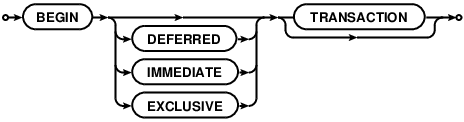
BEGIN TRANSACTION
begin-stmt: hide
commit-stmt: hide

rollback-stmt: hide

No changes can be made to the database except within a transaction. Any command that changes the database (basically, any SQL command other than SELECT) will automatically start a transaction if one is not already in effect. Automatically started transactions are committed when the last query finishes.
Transactions can be started manually using the BEGIN command. Such transactions usually persist until the next COMMIT or ROLLBACK command. But a transaction will also ROLLBACK if the database is closed or if an error occurs and the ROLLBACK conflict resolution algorithm is specified. See the documentation on the ON CONFLICT clause for additional information about the ROLLBACK conflict resolution algorithm.
END TRANSACTION is an alias for COMMIT.
Transactions created using BEGIN...COMMIT do not nest. For nested transactions, use the SAVEPOINT and RELEASE commands. The "TO SAVEPOINT name" clause of the ROLLBACK command shown in the syntax diagram above is only applicable to SAVEPOINT transactions. An attempt to invoke the BEGIN command within a transaction will fail with an error, regardless of whether the transaction was started by SAVEPOINT or a prior BEGIN. The COMMIT command and the ROLLBACK command without the TO clause work the same on SAVEPOINT transactions as they do with transactions started by BEGIN.
Transactions can be deferred, immediate, or exclusive. The default transaction behavior is deferred. Deferred means that no locks are acquired on the database until the database is first accessed. Thus with a deferred transaction, the BEGIN statement itself does nothing to the filesystem. Locks are not acquired until the first read or write operation. The first read operation against a database creates a SHARED lock and the first write operation creates a RESERVED lock. Because the acquisition of locks is deferred until they are needed, it is possible that another thread or process could create a separate transaction and write to the database after the BEGIN on the current thread has executed. If the transaction is immediate, then RESERVED locks are acquired on all databases as soon as the BEGIN command is executed, without waiting for the database to be used. After a BEGIN IMMEDIATE, no other database connection will be able to write to the database or do a BEGIN IMMEDIATE or BEGIN EXCLUSIVE. Other processes can continue to read from the database, however. An exclusive transaction causes EXCLUSIVE locks to be acquired on all databases. After a BEGIN EXCLUSIVE, no other database connection except for read_uncommitted connections will be able to read the database and no other connection without exception will be able to write the database until the transaction is complete.
An implicit transaction (a transaction that is started automatically, not a transaction started by BEGIN) is committed automatically when the last active statement finishes. A statement finishes when its prepared statement is reset or finalized. An open sqlite3_blob used for incremental BLOB I/O counts as an unfinished statement. The sqlite3_blob finishes when it is closed.
The explicit COMMIT command runs immediately, even if there are pending SELECT statements. However, if there are pending write operations, the COMMIT command will fail with an error code SQLITE_BUSY.
An attempt to execute COMMIT might also result in an SQLITE_BUSY return code if an another thread or process has a shared lock on the database that prevented the database from being updated. When COMMIT fails in this way, the transaction remains active and the COMMIT can be retried later after the reader has had a chance to clear.
In very old versions of SQLite (before version 3.7.11 - 2012-03-20) the ROLLBACK will fail with an error code SQLITE_BUSY if there are any pending queries. In more recent versions of SQLite, the ROLLBACK will proceed and pending statements will often be aborted, causing them to return an SQLITE_ABORT or SQLITE_ABORT_ROLLBACK error. In SQLite version 3.8.8 (2015-01-16) and later, a pending read will continue functioning after the ROLLBACK as long as the ROLLBACK does not modify the database schema.
If PRAGMA journal_mode is set to OFF (thus disabling the rollback journal file) then the behavior of the ROLLBACK command is undefined.
Response To Errors Within A Transaction
If certain kinds of errors occur within a transaction, the transaction may or may not be rolled back automatically. The errors that can cause an automatic rollback include:
- SQLITE_FULL: database or disk full
- SQLITE_IOERR: disk I/O error
- SQLITE_BUSY: database in use by another process
- SQLITE_NOMEM: out or memory
For all of these errors, SQLite attempts to undo just the one statement it was working on and leave changes from prior statements within the same transaction intact and continue with the transaction. However, depending on the statement being evaluated and the point at which the error occurs, it might be necessary for SQLite to rollback and cancel the entire transaction. An application can tell which course of action SQLite took by using thesqlite3_get_autocommit() C-language interface.
It is recommended that applications respond to the errors listed above by explicitly issuing a ROLLBACK command. If the transaction has already been rolled back automatically by the error response, then the ROLLBACK command will fail with an error, but no harm is caused by this.
Future versions of SQLite may extend the list of errors which might cause automatic transaction rollback. Future versions of SQLite might change the error response. In particular, we may choose to simplify the interface in future versions of SQLite by causing the errors above to force an unconditional rollback.
https://sqlite.org/lang_transaction.html
SQLite事务、错误与自动回滚的更多相关文章
- flask-sqlalchemy、pytest 的单元测试和事务自动回滚
flask-sqlalchemy.pytest 的单元测试和事务自动回滚 使用 flask-sqlalchemy 做数据库时,单元测试可以帮助发现一些可能意想不到的问题,像 delete-cascad ...
- mysql 事务中如果有sql语句出错,会导致自动回滚吗?
事务,我们都知道具有原子性,操作要么全部成功,要么全部失败.但是有可能会造成误解. 我们先准备一张表,来进行测试 CREATE TABLE `name` ( `id` int(11) unsigned ...
- Spring事务为什么不会自动回滚?Spring事务怎样才会自动回滚?事务自动回滚条件及手动回滚
原文:https://blog.csdn.net/qq_32331073/article/details/76508147 更多Spring事务问题请访问链接:Spring事务回滚问题疑难详解 在此, ...
- spring事务什么时候会自动回滚
在java中异常的基类为Throwable,他有两个子类xception与Errors.同时RuntimeException就是Exception的子类,只有RuntimeException才会进行回 ...
- MockMvc 进行 controller层单元测试 事务自动回滚 完整实例
package com.ieou.ms_backend.controller; import com.google.gson.Gson; import com.ieou.ms_backend.dto. ...
- DDL, DML不是所有SQL都是可以自动回滚的
因为DDL没有事务性,所以DDL不能回滚. 要实现自动回滚.(begin,commit,rollback),则SQL语句中只能包括DML. 这样,自动化发布就会受限规范格式. 故而,一刀切的办法是,假 ...
- MySql数据库事务正常提交,回滚失败
问题:在初次练习Mysql数据库事务时,事务正常提交,但是在遇到异常应当回滚时,回滚失败. 代码如下: //2.更新操作. public void update(Connection conn, St ...
- spring 在service中需要抛出异常才能自动回滚
在spring 事务配置中,如果service方法捕获了异常,则程序报错也不会自动回滚, 1.手动开启关闭事务 2.抛出异常,可以先捕获异常,然后自定义runtime异常,可不用声明
- Spring+Junit,测试事务时,一直回滚
研究了好长时间,都不知道原因,也不能解决. 控制台又没有报异常,但是就是一直回滚.注释掉spring声明式配置的代码,就能正确的更新数据. 从网上看了,别人的文章 http://blog.csdn.n ...
随机推荐
- vs2010 编译平台 X86 X64 anycpu
X86既32位程序,X64既64位程序,anycpu会根据当前的操作系统位数决定 但是如果应用程序编译成anycpu,会由操作系统位数决定,如果是dll之类的,会由调用dll的主程序位数决定 所以一般 ...
- [android] xml文件的序列化
生成xml文件,模拟备份短信,创建短信的业务bean,创建一个domain的包放业务bean,这个业务bean里面,定义成员属性,生成get set方法,生成有参和无参的构造方法. 生成随机数,实例化 ...
- git error: RPC failed; result=56, HTTP code = 200
突然发现git pull 后出现几次都无果,百度后, 发现是curl的postBuffer 默认值较小的原因,配置下这个值,就不会出现该错误了.解决如下: git config --global ht ...
- Java线程池 Executor框架概述
线程池的意义 循环利用线程资源,避免重复创建和销毁线程 线程池的任务是异步执行的,只要提交完成就能快速返回,可以提高应用响应性 Java线程池还有一个很重要的意义:Java线程池就是JDK 5 推出的 ...
- java关于字符串的一些实用操作工具类方法
package cn.edu.stdu; import java.util.ArrayList; import java.util.LinkedHashSet; import java.util.Se ...
- mvc中查询字符串请求过长
最近在mvc中做导出Excel功能,通过页面把字段id和对应的中文名称通过a标签传给控制器的过程中,总是报错. 1.第一次错误截图 具体解决方案: 可以配置 IIS 服务器以拒绝查询字符串长度大于指定 ...
- bootstrap网站后台从设计到开发
前言 毕业后在一家小公司找的工作是做前端,小公司必须要身兼多职,会多门技术,所以为了工作需要自学ps,做过微信运营,后来为了做erp管理系统,又开始学习c# ,之后公司有新项目要用wpf ,我又开始学 ...
- HTML5效果:Canvas 实现圆形进度条并显示数字百分比
实现效果 1.首先创建html代码 <canvas id="canvas" width="500" height="500" styl ...
- Jenkins Jenkins结合GIT Maven持续集成环境配置
Jenkins结合GIT Maven持续集成环境配置 by:授客 QQ:1033553122 安装Git插件 1 安装Git客户端 1 安装JAVA JDK及MAVEN 2 Jenkins JDK ...
- DES数据解密
/// <summary> /// DES数据解密 /// </summary> /// <param name="targetValue">& ...