
SQLite事务、错误与自动回滚
BEGIN TRANSACTION
begin-stmt: hide
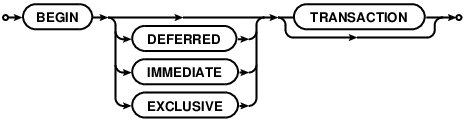
commit-stmt: hide

rollback-stmt: hide

No changes can be made to the database except within a transaction. Any command that changes the database (basically, any SQL command other than SELECT) will automatically start a transaction if one is not already in effect. Automatically started transactions are committed when the last query finishes.
Transactions can be started manually using the BEGIN command. Such transactions usually persist until the next COMMIT or ROLLBACK command. But a transaction will also ROLLBACK if the database is closed or if an error occurs and the ROLLBACK conflict resolution algorithm is specified. See the documentation on the ON CONFLICT clause for additional information about the ROLLBACK conflict resolution algorithm.
END TRANSACTION is an alias for COMMIT.
Transactions created using BEGIN...COMMIT do not nest. For nested transactions, use the SAVEPOINT and RELEASE commands. The "TO SAVEPOINT name" clause of the ROLLBACK command shown in the syntax diagram above is only applicable to SAVEPOINT transactions. An attempt to invoke the BEGIN command within a transaction will fail with an error, regardless of whether the transaction was started by SAVEPOINT or a prior BEGIN. The COMMIT command and the ROLLBACK command without the TO clause work the same on SAVEPOINT transactions as they do with transactions started by BEGIN.
Transactions can be deferred, immediate, or exclusive. The default transaction behavior is deferred. Deferred means that no locks are acquired on the database until the database is first accessed. Thus with a deferred transaction, the BEGIN statement itself does nothing to the filesystem. Locks are not acquired until the first read or write operation. The first read operation against a database creates a SHARED lock and the first write operation creates a RESERVED lock. Because the acquisition of locks is deferred until they are needed, it is possible that another thread or process could create a separate transaction and write to the database after the BEGIN on the current thread has executed. If the transaction is immediate, then RESERVED locks are acquired on all databases as soon as the BEGIN command is executed, without waiting for the database to be used. After a BEGIN IMMEDIATE, no other database connection will be able to write to the database or do a BEGIN IMMEDIATE or BEGIN EXCLUSIVE. Other processes can continue to read from the database, however. An exclusive transaction causes EXCLUSIVE locks to be acquired on all databases. After a BEGIN EXCLUSIVE, no other database connection except for read_uncommitted connections will be able to read the database and no other connection without exception will be able to write the database until the transaction is complete.
An implicit transaction (a transaction that is started automatically, not a transaction started by BEGIN) is committed automatically when the last active statement finishes. A statement finishes when its prepared statement is reset or finalized. An open sqlite3_blob used for incremental BLOB I/O counts as an unfinished statement. The sqlite3_blob finishes when it is closed.
The explicit COMMIT command runs immediately, even if there are pending SELECT statements. However, if there are pending write operations, the COMMIT command will fail with an error code SQLITE_BUSY.
An attempt to execute COMMIT might also result in an SQLITE_BUSY return code if an another thread or process has a shared lock on the database that prevented the database from being updated. When COMMIT fails in this way, the transaction remains active and the COMMIT can be retried later after the reader has had a chance to clear.
In very old versions of SQLite (before version 3.7.11 - 2012-03-20) the ROLLBACK will fail with an error code SQLITE_BUSY if there are any pending queries. In more recent versions of SQLite, the ROLLBACK will proceed and pending statements will often be aborted, causing them to return an SQLITE_ABORT or SQLITE_ABORT_ROLLBACK error. In SQLite version 3.8.8 (2015-01-16) and later, a pending read will continue functioning after the ROLLBACK as long as the ROLLBACK does not modify the database schema.
If PRAGMA journal_mode is set to OFF (thus disabling the rollback journal file) then the behavior of the ROLLBACK command is undefined.
Response To Errors Within A Transaction
If certain kinds of errors occur within a transaction, the transaction may or may not be rolled back automatically. The errors that can cause an automatic rollback include:
- SQLITE_FULL: database or disk full
- SQLITE_IOERR: disk I/O error
- SQLITE_BUSY: database in use by another process
- SQLITE_NOMEM: out or memory
For all of these errors, SQLite attempts to undo just the one statement it was working on and leave changes from prior statements within the same transaction intact and continue with the transaction. However, depending on the statement being evaluated and the point at which the error occurs, it might be necessary for SQLite to rollback and cancel the entire transaction. An application can tell which course of action SQLite took by using thesqlite3_get_autocommit() C-language interface.
It is recommended that applications respond to the errors listed above by explicitly issuing a ROLLBACK command. If the transaction has already been rolled back automatically by the error response, then the ROLLBACK command will fail with an error, but no harm is caused by this.
Future versions of SQLite may extend the list of errors which might cause automatic transaction rollback. Future versions of SQLite might change the error response. In particular, we may choose to simplify the interface in future versions of SQLite by causing the errors above to force an unconditional rollback.
https://sqlite.org/lang_transaction.html
SQLite事务、错误与自动回滚的更多相关文章
- flask-sqlalchemy、pytest 的单元测试和事务自动回滚
flask-sqlalchemy.pytest 的单元测试和事务自动回滚 使用 flask-sqlalchemy 做数据库时,单元测试可以帮助发现一些可能意想不到的问题,像 delete-cascad ...
- mysql 事务中如果有sql语句出错,会导致自动回滚吗?
事务,我们都知道具有原子性,操作要么全部成功,要么全部失败.但是有可能会造成误解. 我们先准备一张表,来进行测试 CREATE TABLE `name` ( `id` int(11) unsigned ...
- Spring事务为什么不会自动回滚?Spring事务怎样才会自动回滚?事务自动回滚条件及手动回滚
原文:https://blog.csdn.net/qq_32331073/article/details/76508147 更多Spring事务问题请访问链接:Spring事务回滚问题疑难详解 在此, ...
- spring事务什么时候会自动回滚
在java中异常的基类为Throwable,他有两个子类xception与Errors.同时RuntimeException就是Exception的子类,只有RuntimeException才会进行回 ...
- MockMvc 进行 controller层单元测试 事务自动回滚 完整实例
package com.ieou.ms_backend.controller; import com.google.gson.Gson; import com.ieou.ms_backend.dto. ...
- DDL, DML不是所有SQL都是可以自动回滚的
因为DDL没有事务性,所以DDL不能回滚. 要实现自动回滚.(begin,commit,rollback),则SQL语句中只能包括DML. 这样,自动化发布就会受限规范格式. 故而,一刀切的办法是,假 ...
- MySql数据库事务正常提交,回滚失败
问题:在初次练习Mysql数据库事务时,事务正常提交,但是在遇到异常应当回滚时,回滚失败. 代码如下: //2.更新操作. public void update(Connection conn, St ...
- spring 在service中需要抛出异常才能自动回滚
在spring 事务配置中,如果service方法捕获了异常,则程序报错也不会自动回滚, 1.手动开启关闭事务 2.抛出异常,可以先捕获异常,然后自定义runtime异常,可不用声明
- Spring+Junit,测试事务时,一直回滚
研究了好长时间,都不知道原因,也不能解决. 控制台又没有报异常,但是就是一直回滚.注释掉spring声明式配置的代码,就能正确的更新数据. 从网上看了,别人的文章 http://blog.csdn.n ...
随机推荐
- python_文件操作
说明:如有转载,请标明出处!! 一.文件操作 1.文件常用操作方法 open() f=open('文件名','r',encoding='utf-8') #三个参数,第一个文件详细路径,需要写明文件格式 ...
- JSP使用过滤器防止SQL注入
什么是SQL注入攻击?引用百度百科的解释: sql注入_百度百科: 所谓SQL注入,就是通过把SQL命令插入到Web表单提交或输入域名或页面请求的查询字符串,最终达到欺骗服务器执行恶意的SQL命令.具 ...
- Mybatis框架可视化(1)
Mybatis整体架构视图: 接 口 层 SqlSession (定义了Mybatis暴露给应用程序调用的API) 核 心 处 理 层 配置解析 (加载核心配置.映射配置. mapper接口注解信息, ...
- @Tranactional 注解分析
Spring可以通过注解@Transactional来为业务逻辑层的方法(调用DAO完成持久化动作)添加事务能力,如下是@Transactional注解的定义 @Tranactional注解分析 作用 ...
- mysql中需要注意的编码问题
- Android图片的Base64编码与解码
Base64是网络上最常见的用于传输8Bit字节码的编码方式之一,Base64就是一种基于64个可打印字符来表示二进制数据的方法. Base64编码是从二进制到字符的过程,可用于在HTTP环境下传递较 ...
- readLine()的注意点
我在用socket做即时通讯的时候,读取服务器返回的信息用了BufferedReader,用起来挺方便的. BufferedReader br = new BufferedReader(new Inp ...
- ubuntu12.0.4开启root用户登陆
1.命令:sudo passwd root 为root分配密码,按提示进行设置就好. 2.打开终端,输入以下命令: sudo -s 进入root账户下: cd /etc/lightdm g ...
- C++反射机制:可变参数模板实现C++反射
1. 概要 本文描述一个通过C++可变参数模板实现C++反射机制的方法.该方法非常实用,在Nebula高性能网络框架中大量应用,实现了非常强大的动态加载动态创建功能.Nebula框架在Github ...
- 商品描述里包含了英文双引号,ERP无法同步菜品信息
1. 2.因菜品描述里包含英文双引号,破坏了json格式,导致json格式错乱,ERP无法解析,所以无法同步数据.