
期货大赛项目|四,MVC的数据验证
上图先看下效果
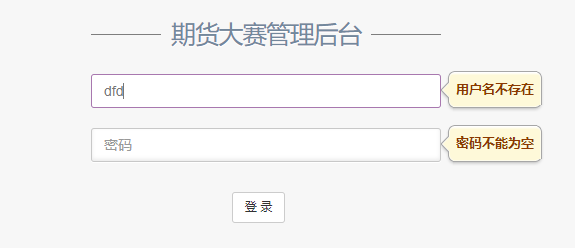
样式先不说,先了解下数据验证是怎么实现的
一 必须是强类型的视图
二 这些显示提示的话语,都在强类型的实体中
三 必须使用Html.BeginForm或者Html.AjaxBeginForm
四 提交方式必须是form的submit
上代码
@model FuturesContest.ViewModel.User.UserViewModel

@{

    Layout = null;

}

<!DOCTYPE html>

<html lang="en">

<head>

    <meta http-equiv="Content-Type" content="text/html; charset=UTF-8">

    <!-- Meta, title, CSS, favicons, etc. -->

    <meta charset="utf-8">

    <meta http-equiv="X-UA-Compatible" content="IE=edge">

    <meta name="viewport" content="width=device-width, initial-scale=1">

    <title>期货大赛管理后台登录! | </title>

    <!-- Bootstrap -->

    <link href="~/Content/bootstrap.min.css" rel="stylesheet" />

    <!-- Font Awesome -->

    <link href="~/Content/vendors/font-awesome/css/font-awesome.min.css" rel="stylesheet" />

    <!-- NProgress -->

    <link href="~/Content/vendors/nprogress/nprogress.css" rel="stylesheet">

    <!-- Animate.css -->

    <link href="~/Content/vendors/animate.css/animate.min.css" rel="stylesheet">

    <!--poshytip.css-->

    <link href="~/Content/vendors/poshytip-1.2/src/tip-yellow/tip-yellow.css" rel="stylesheet" />

    <!-- Custom Theme Style -->

    <link href="~/Content/Gentelella/custom.min.css" rel="stylesheet" />

</head>

<body class="login">

<div>

    <a class="hiddenanchor" id="signup"></a>

    <a class="hiddenanchor" id="signin"></a>

    <div class="login_wrapper">

        <div class="animate login_form">

            <section class="login_content">

                @{

                    Html.EnableClientValidation();

                }

                @using (Html.BeginForm("Index", "Login", FormMethod.Post))

                {

                    <h1>期货大赛管理后台</h1>

                    <div>

                        @Html.TextBoxFor(m => m.Account, new {@class = "form-control", placeholder = "用户名", autocomplete="off"})

                        @Html.ValidationMessageFor(m => m.Account)

                    </div>

                    <div>

                        @Html.PasswordFor(m => m.Password, new {@class = "form-control", placeholder = "密码", autocomplete = "off" })

                        @Html.ValidationMessageFor(m => m.Password)

                    </div>

                    <div>

                        <a id="sub_login" class="btn btn-default submit">登 录</a>

                    </div>

                    <div class="clearfix"></div>

                }

            </section>

        </div>

    </div>

</div>

</body>

</html>

<script src="~/Scripts/jquery-1.9.1.min.js"></script>

<script src="~/Scripts/bootstrap.min.js"></script>

<script src="~/Content/vendors/poshytip-1.2/src/jquery.poshytip.min.js"></script>

<script src="~/Scripts/jquery.validate.min.js"></script>

<script src="~/Scripts/jquery.validate.unobtrusive.js"></script>

<script src="~/Scripts/common.js"></script>

<script type="text/javascript">

    $("#sub_login").click(function() {

        $("form").submit();

    });

    document.onkeydown = function() {

        if (event.keyCode === 13) {

            $("form").submit();

        }

    }

</script>
          @{

                    Html.EnableClientValidation();

                }
启动客户端验证
@using (Html.BeginForm("Index", "Login", FormMethod.Post))
benginForm提交
               @Html.TextBoxFor(m => m.Account, new {@class = "form-control", placeholder = "用户名", autocomplete="off"})

                        @Html.ValidationMessageFor(m => m.Account)
ValidationMessageFor错误信息会显示在这里
<script src="~/Scripts/jquery-1.9.1.min.js"></script>

<script src="~/Scripts/bootstrap.min.js"></script>

<script src="~/Content/vendors/poshytip-1.2/src/jquery.poshytip.min.js"></script>

<script src="~/Scripts/jquery.validate.min.js"></script>

<script src="~/Scripts/jquery.validate.unobtrusive.js"></script>

<script src="~/Scripts/common.js"></script>
千万不要忘记unobtrusive.js
后台
[HttpPost]

        public ActionResult Index(UserViewModel user)

        {

            var model = user.ToEntity();

            if (!_bll.IsRightPassword(model))

                ModelState.AddModelError("Password", "密码错误或该用户被禁用");

            if (!ModelState.IsValid)

                return View(user);

            //登录成功,将登录信息存入session

            var loginInfo = _bll.GetUserByAccount(model.Account);

            Session["LoginInfo"] = loginInfo;

            //将登录信息存储到cookies

            _bll.SaveCookie(loginInfo);

            return RedirectToAction("Index", "Back");

        }
ModelState.AddModelError 可以添加一个错误信息
ModelState.IsValid 表示所有数据通过验证
在看看viewModel验证的几种类型
using System;

using System.ComponentModel;

using System.ComponentModel.DataAnnotations;

using System.Web.Mvc;

namespace FuturesContest.ViewModel.User

{

    public class UserAddViewModel

    {

        public int Id { get; set; }

        [DisplayName("用户名")]

        [Required(ErrorMessage = "{0}不能为空")]

        [Remote("CheckAccount", "Back", ErrorMessage = "{0}已存在")]

        public string Account { get; set; }

        [DisplayName("密码")]

        [Required(ErrorMessage = "{0}不能为空")]

        [RegularExpression(@"^[0-9A-Za-z]{6,20}$",ErrorMessage = "{0}格式为6-20位字母或数字")]

        public string Password { get; set; }

        [DisplayName("昵称")]

        [Required(ErrorMessage = "{0}不能为空")]

        [Remote("CheckNickName", "Back", ErrorMessage = "{0}已存在")]

        public string NickName { get; set; }

        [DisplayName("有效状态")]

        public int IsEnabled { get; set; }

        [DisplayName("创建时间")]

        public DateTime AddTime { get; set; }

        [DisplayName("最后登录时间")]

        public DateTime LastTime { get; set; }

        [DisplayName("头像")]

        public string HeadThumb { get; set; }

        [DisplayName("排序")]

        [Required(ErrorMessage = "{0}不能为空")]

        [Range(, , ErrorMessage="{0}取值范围为0-99")]

        public int OrderId { get; set; }

    }

}
DisplayName-------------- 在用labelFor的时候,会显示后面的名称
[Required(ErrorMessage = "{0}不能为空")] ------------非空验证
[Remote("CheckAccount", "Back", ErrorMessage = "{0}已存在")] ---------Ajax验证,需要后台有一个CheckAccount的方法
[RegularExpression(@"^[0-9A-Za-z]{6,20}$",ErrorMessage = "{0}格式为6-20位字母或数字")]----------正则验证
[Range(0, 99, ErrorMessage="{0}取值范围为0-99")]------------范围验证
ajax验证的案例
     //Ajax验证用户名是否存在

        public JsonResult CheckAccount(string account)

        {

            var result = _bll.ExistAccount(account);

            return Json(result, JsonRequestBehavior.AllowGet);

        }
返回的一定是一个布尔值,才能知道是否通过
好啦!现在应该已经可以正常的显示数据验证的错误信息了!但样式不好看,所以我们要修改样式
我用的是poshytip插件,类似于tips的插件
引入对应的css和js
修改源码
找到jquery.validate.unobtrusive.js
找到function onError(error, inputElement)函数,稍微改改就可以 我贴个全的
function onError(error, inputElement) {  // 'this' is the form element

        var container = $(this).find("[data-valmsg-for='" + escapeAttributeValue(inputElement[0].name) + "']"),

            replaceAttrValue = container.attr("data-valmsg-replace"),

            replace = replaceAttrValue ? $.parseJSON(replaceAttrValue) !== false : null;

        //------为container添加tips样式 start--------

        var $customErrorTip = container.attr("data-forerrortip");

        //------为container添加tips样式 end----------

        container.removeClass("field-validation-valid").addClass("field-validation-error");

        error.data("unobtrusiveContainer", container);

        //-----添加提示消息 start -------

        var elem = $("#" + inputElement[0].name.replace(".", "_"));

        //-----添加提示消息 end ---------

        if (replace) {

            container.empty();

            //add start

            if (error.html() != "") {

                if ($customErrorTip) {

                    $("#" + $customErrorTip).poshytip("destroy");

                } else {

                    elem.poshytip("destroy");

                }

                var direction = "right";

                //左边+元素宽+提示的文字+提示两边的空白

                if ((elem[0].offsetLeft + elem.width() + error.length * 10 + 20) > $(document).width()) {

                    direction = "left";

                }

                var errorConfig = {

                    content: error,

                    alignTo: 'target',

                    alignX: direction,

                    alignY: 'center',

                    showOn: 'none',

                    bgImageFrameSize: 7,

                    offsetX: 5

                };

                if ($customErrorTip) {

                    $("#" + $customErrorTip).poshytip(errorConfig).poshytip('show');

                } else {

                    elem.filter(':not(.valid)').poshytip(errorConfig).poshytip('show');

                }

            } else {

                if ($customErrorTip) {

                    $("#" + $customErrorTip).poshytip("destroy");

                } else {

                    elem.poshytip("destroy");

                }

            }

            //add end

            //error.removeClass("input-validation-error").appendTo(container);

        }

        else {

            error.hide();

        }

    }
这样我们就解决了通过微软的这个js进行前端验证的样式修改
注意:这种验证没有到服务器验证,只是JS拦截
但!!!!还是不够,Ajax方法的后台验证样式并不通过这个js,它是后端验证,直接返回到前端的
所以我封装了一个js,捕获返回的数据进行修改
common,js
$(function () {

    $(".field-validation-error").each(function () {

        var $this = $(this);

        var thisid = $this.attr("data-valmsg-for").replace(".", "_");

        var direction = "right";

        // 左边+元素宽+提示的文字+提示两边的空白

        if (($this[0].offsetLeft + $this.width() + $this.text().length * 10 + 20) > $(document).width()) {

            direction = "left";

        }

        $this.hide();

        setTimeout(function () {

            $("#" + thisid).poshytip({

                content: $this.text(),

                alignTo: 'target',

                alignX: direction,

                alignY: 'center',

                showOn: 'none',

                offsetX: 5

            }).poshytip('show');

        }, 100);

    });

});
到这时,我们才完成了MVC的数据验证!!!
期货大赛项目|四,MVC的数据验证的更多相关文章
- 期货大赛项目|十,MVC对js和css的压缩
在Global.asax中添加两行代码 //默认在调试期间,不会启用js和css的压缩 //下面的语句确保了在调试期间也压缩css和js BundleTable.EnableOptimizations ...
- MVC中数据验证
http://www.studyofnet.com/news/339.html http://www.cnblogs.com/kissdodog/archive/2013/05/04/3060278. ...
- <转>ASP.NET学习笔记之MVC 3 数据验证 Model Validation 详解
MVC 3 数据验证 Model Validation 详解 再附加一些比较好的验证详解:(以下均为引用) 1.asp.net mvc3 的数据验证(一) - zhangkai2237 - 博客园 ...
- MVC 多种 数据验证 post
技术:c# .net 采用mvc框架,实现model的数据验证. 刚开始觉得数据验证很方便,可以判断非空.数据正确性,但是后来发现很多需要数据库的判定还是需要post请求做,但是就想mvc的数据验证 ...
- MVC Model数据验证
概述 上节我们学习了Model的数据在界面之间的传递,但是很多时候,我们在数据传递的时候为了确保数据的有效性,不得不给Model的相关属性做基本的数据验证. 本节我们就学习如何使用 System.Co ...
- ASP.NET MVC 扩展数据验证 转
此文只作记录 public class MaxWordsAttribute : ValidationAttribute { public MaxWordsAttribute(int maxWords) ...
- MVC 3 数据验证 Model Validation 详解
在MVC 3中 数据验证,已经应用的非常普遍,我们在web form时代需要在View端通过js来验证每个需要验证的控件值,并且这种验证的可用性很低.但是来到了MVC 新时代,我们可以通过MVC提供的 ...
- [转]MVC自定义数据验证(两个时间的比较)
本文转自:http://www.cnblogs.com/zhangliangzlee/archive/2012/07/26/2610071.html Model: public class Model ...
- (转)MVC 3 数据验证 Model Validation 详解
继续我们前面所说的知识点进行下一个知识点的分析,这一次我们来说明一下数据验证.其实这是个很容易理解并掌握的地方,但是这会浪费大家狠多的时间,所以我来总结整理一下,节约一下大家宝贵的时间. 在MVC 3 ...
随机推荐
- 题解-Codeforces710F String Set Queries
咕了好久没更博客,最近得知可以去冬眠营玩耍,还可以搭顺风车回广州过年 (最近做到的比较有意思的题目:bzoj3958.hihocoder1419) Problem Codeforces-710F--洛 ...
- dynamic详解
一.简介 在通过 dynamic 类型实现的操作中,该类型的作用是绕过编译时类型检查, 改为在运行时解析这些操作. dynamic 类型简化了对 COM API(例如 Office Automatio ...
- Qt5全局热键第三方库qxtglobalshortcut5使用
1.下载第三方库https://github.com/ddqd/qxtglobalshortcut5. 2.把qxtglobalshortcut5文件放在项目目录下,在项目.pro加入一句,inclu ...
- mac 上如何安装非app store上的下载的软件-------打开未知来源
打开了 Terminal 终端后 ,在命令提示后输入 sudo spctl --master-disable 并按下回车执行,如下图所示. 随后再输入当前 Mac 用户的密码,如下图所示. 如 ...
- 修改oracle数据库允许连接的数
当前连接数:select count(*) from v$process;查询数据库允许的最大连接数: select value from v$parameter where name = 'proc ...
- axis1 创建service服务端 , axis1 客户端
axis1 服务端配置 1.首先建立一个项目 axisTest 不需多说 2.在lib下放入需要的jar包 点击下载 :axis所需的jar包下载 3.然后需要在web.xml里面加入: <s ...
- 30个mysql千万级大数据SQL查询优化技巧详解
1.对查询进行优化,应尽量避免全表扫描,首先应考虑在 where 及 order by 涉及的列上建立索引. 2.应尽量避免在 where 子句中对字段进行 null 值判断,否则将导致引擎放弃使用索 ...
- Confluence 6 站点高级自定义
你可以继续编辑的全局布局文件来继续更新你的主面板.请查看 Customizing the Confluence Dashboard 页面来获得更多有关的信息.你需要具有一些基本的Velocity 知识 ...
- 分布式Dubbo快速入门
目录 Dubbo入门 背景 zookeeper安装 发布Dubbo服务 Dubbo Admin管理 消费Dubbo服务 抽取与依赖版本管理 Dubbo入门 Editor:SimpleWu Dubbo是 ...
- 初见TensorFlow :知其所以然
2.1 TensorFlow的主要依赖包 TensorFlow依赖的两个最主要的工具包——Protocol Buffer和Bazel. 2.1.1 Protocol Buffer Protocol B ...