
判断鼠标进入容器的方向小Demo
参考资料:
贤心博客:http://sentsin.com/web/112.html,
Math.atan2(y,x) 解释 :http://www.w3school.com.cn/jsref/jsref_atan2.asp;
Demo: Demo
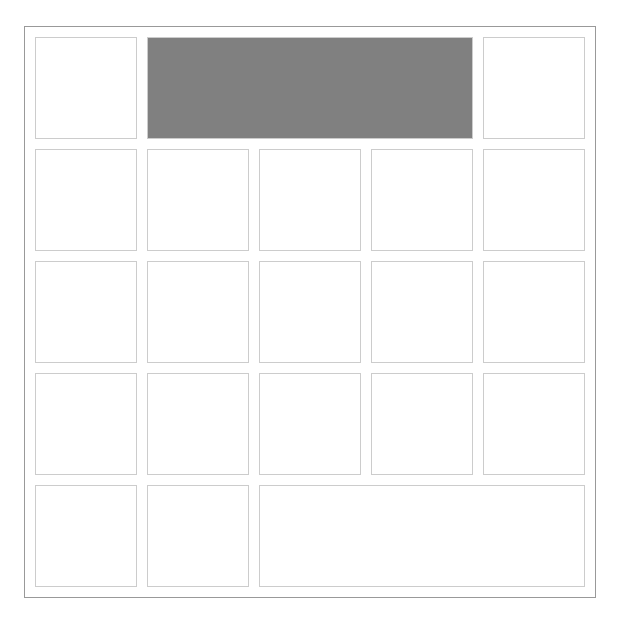
截图:
代码:
<!DOCTYPE html PUBLIC "-//W3C//DTD XHTML 1.0 Transitional//EN" "http://www.w3.org/TR/xhtml1/DTD/xhtml1-transitional.dtd">

<html xmlns="http://www.w3.org/1999/xhtml">

<head>

  	<meta http-equiv="Content-Type" content="text/html; charset=utf-8" />

 	<title>Document</title>

	<style>

	*{ margin:0;padding:0;}

	#box{ position: absolute;top:200px;left:200px; width:560px;height:560px;border:1px solid #999;padding:10px 0 0 10px; }

	#box div{ position: relative; float:left;width:100px;height: 100px; margin:0 10px 10px 0;border:1px solid #ccc;overflow: hidden;}

	#box div.big-box{ width:324px;}

	#box .mark{ position: absolute;left:-200px;top:-200px;width:100%;height:100%;background-color: #000; opacity: 0.5; border:none; }

	</style>

	<script src="jquery-1.8.3.min.js"></script>

	<script>

		$(function(){

			var $oBox = $('#box');

			var $aDivs = $oBox.children();

			var $aMarks = $('.mark');

			$aMarks.on('mouseenter',function(event){

				event.stopPropagation();

				return false;

			});

			$aDivs.on('mouseenter mouseleave',function( event ){

				var $this = $(this),

					$mark = $this.find('.mark'),

					w = $this.width(),

					h = $this.height(),

					offset = $this.offset(),

					scaleX = w > h ? (h / w) : 1,

		        	scaleY = h > w ? (w / h) : 1,

		        	x = (event.pageX - offset.left - (w / 2)) * scaleX,

		        	y = (event.pageY - offset.top - (h / 2)) * scaleY,

		        	direction = Math.round((((Math.atan2(y, x) * (180 / Math.PI)) + 180) / 90) + 3) % 4,

		        	type = event.type;

		        if( direction == 0 ){

					if( type == "mouseenter" ){

						$mark.css({

							'top'  : -h,

							'left' : 0

						});

						$mark.animate({

							'top' : 0

						},300);

					}else{

						$mark.animate({

							'top' : -h

						},300);

					}

				}else if( direction == 1 ){

					if( type == "mouseenter" ){

						$mark.css({

							'top'  : 0,

							'left' : w

						});

						$mark.animate({

							'left' : 0

						},300);

					}else{

						$mark.animate({

							'left' : w

						},300);

					}

				}else if( direction == 2 ){

					if( type == "mouseenter" ){

						$mark.css({

							'top'  : h,

							'left' : 0

						});

						$mark.animate({

							'top' : 0

						},300);

					}else{

						$mark.animate({

							'top' : h

						},300);

					}

				}else if( direction == 3 ){

					if( type == "mouseenter" ){

						$mark.css({

							'top'  : 0,

							'left' : -w

						});

						$mark.animate({

							'left' : 0

						},300);

					}else{

						$mark.animate({

							'left' : -w

						},300);

					}

				}else{

					$mark.css({

						'top'  : 0,

						'left' : 0

					});

				}

			});

		});

	</script>

</head>

<body>

	<div id="box">

		<div >

			<a href="#" class="mark"></a>

		</div>

		<div class="big-box">

			<a href="#" class="mark"></a>

		</div>

		<div>

			<a href="#" class="mark"></a>

		</div>

		<div>

			<a href="#" class="mark"></a>

		</div>

		<div>

			<a href="#" class="mark"></a>

		</div>

		<div>

			<a href="#" class="mark"></a>

		</div>

		<div>

			<a href="#" class="mark"></a>

		</div>

		<div>

			<a href="#" class="mark"></a>

		</div>

		<div>

			<a href="#" class="mark"></a>

		</div>

		<div>

			<a href="#" class="mark"></a>

		</div>

		<div>

			<a href="#" class="mark"></a>

		</div>

		<div>

			<a href="#" class="mark"></a>

		</div>

		<div>

			<a href="#" class="mark"></a>

		</div>

		<div>

			<a href="#" class="mark"></a>

		</div>

		<div>

			<a href="#" class="mark"></a>

		</div>

		<div>

			<a href="#" class="mark"></a>

		</div>

		<div>

			<a href="#" class="mark"></a>

		</div>

		<div>

			<a href="#" class="mark"></a>

		</div>

		<div>

			<a href="#" class="mark"></a>

		</div>

		<div>

			<a href="#" class="mark"></a>

		</div>

		<div class="big-box">

			<a href="#" class="mark"></a>

		</div>

	</div>

</body>

</html>
后记:
其实核心的代码都是用贤心博客里的代码,讲解的也比较清楚。
1.要知道父级容器有正方形和长方形所以要算一个比例关系,求出x,y的值;
2.Math.atan2(y, x) 返回从 x 轴到点 (x,y) 之间的角度 其实返回的是弧度然后在* 180 / Math.PI 转成角度;
3.至于+ 180) / 90) + 3) % 4 +180 是为了角度的反转,除90是平均分成四份 +3其实为了%4求出0,1,2,3;
大概的逻辑是这样,可以也有个人理解不对的方法,欢迎指出;
判断鼠标进入容器的方向小Demo的更多相关文章
- 2015.10.11(js判断鼠标进入容器的方向)
判断鼠标进入容器的方向 1.前几天在万圣节专题项目中用到了鼠标坐标page事件,随着鼠标背景图片移动形成有层次感的效果,但page事件在IE低版本不支持,所以还要做兼容.在研究page事件同时无意中想 ...
- JS判断鼠标移入元素的方向
最终效果 这里的关键主要是判断鼠标是从哪个方向进入和离开的 $("li").on("mouseenter mouseleave",function(e) { v ...
- jQuery插件,判断鼠标的移入移出方向
今天用jQuery封装了一个简单的插件,判断鼠标的移入移出方向,以后的项目中可能还会遇到这样一个简单的效果,就记录下来吧! 先看结构和样式: <!DOCTYPE html> <htm ...
- JS判断鼠标进入容器方向的方法和分析window.open新窗口被拦截的问题
1.鼠标进入容器方向的判定 判断鼠标从哪个方向进入元素容器是一个经常碰到的问题,如何来判断呢?首先想到的是:获取鼠标的位置,然后经过一大堆的if..else逻辑来确定.这样的做法比较繁琐,下面介绍两种 ...
- 关于js判断鼠标移入元素的方向--解释
一开始我是这么想的,将待移入的元素分割四块,用mousemove获取第一次鼠标落入的区域来判断鼠标是从哪个方向进去的. 所以只要写个算法来判断鼠标的值落入该元素的区域就可以得出鼠标移入的方向,如下图: ...
- 关于js判断鼠标移入元素的方向——上下左右
一开始我是这么想的,将待移入的元素分割四块,用mousemove获取第一次鼠标落入的区域来判断鼠标是从哪个方向进去的. 所以只要写个算法来判断鼠标的值落入该元素的区域就可以得出鼠标移入的方向,如下图: ...
- JS判断鼠标从什么方向进入一个容器
偶然将想到的一个如何判断鼠标从哪个方向进入一个容器的问题.首先想到的是给容器的四个边添加几个块,然后看鼠标进入的时候哪个块先监听到鼠标事件.不过这样麻烦太多了.google了一下找到了一个不错的解决方 ...
- js判断鼠标进入以及离开容器的方向
(注:以下代码涉及到jQuery,建议前端大牛绕路~~~) 1.遇到的问题 如图当鼠标右箭头位置上下移动的时候 下面的城市列表容器不能隐藏. 2.方法: 网上搜了些前端大牛们的解决办法 ...
- js中判断鼠标滚轮方向的方法
前 言 LiuDaP 最近无聊,在做自己的个人站,其中用到了一个关于鼠标滚轮方向判断的方法,今天闲来无聊,就给大家介绍一下吧!!!! 在介绍鼠标事件案例前,让我们先稍微了解一下js中的event ...
随机推荐
- jQuery使用(一):jQuery对象与选择器
一.简单的一些介绍 1.jQuery是由普通的是由一些系列操作DOM节点的函数和一些其他的工具方法组成的js库. 2.为什么要使用jQuery库? jQuery面向用户良好的设计在使用过程中彻底解放了 ...
- 【leetcode-100】 简单 树相关题目
100. 相同的树 (1过,熟练) 给定两个二叉树,编写一个函数来检验它们是否相同. 如果两个树在结构上相同,并且节点具有相同的值,则认为它们是相同的. 示例 1: 输入: 1 1 / \ / \ 2 ...
- HDU 1097(m次幂的个位数 规律)
题意是求 n^m 结果的最后一位数. 可以用快速幂取模的方法做,当然本题还有更简单的方法: 所有数字( 0 - 9 )的 m 次幂的个位数不会受进位的影响,只收到乘数的影响,所以在结果中一旦出现之前出 ...
- freemarker迭代list、map等常规操作,将数据放到模板中
转自:https://blog.csdn.net/wickedvalley/article/details/65937189 一.controller开始准备模型.数据1.po类 package co ...
- Vuex笔记
Vuex 是一个专为 Vue.js 应用程序开发的状态管理模式 Vuex - 状态管理器,可以管理你的数据状态(类似于 React的 Redux) 一个 Vuex 应用的核心是 store(仓库,一个 ...
- html中src与href的区别
概述 src和href之间存在区别,能混淆使用.src用于替换当前元素,href用于在当前文档和引用资源之间确立联系. src src是source的缩写,指向外部资源的位置,指向的内容将会嵌入到文档 ...
- asp.net写入读取xml的方法
添加命名空间 using System.Xml; 我自己的代码(添加其中的节点) XmlDocument xmlDoc = new XmlDocument();xmlDoc.Load(Server.M ...
- PHP操作实现一个多功能购物网站
PHP操作实现一个多功能购物网站 一.需要实现的页面: Index.aspx:浏览商品页面,显示商品列表,用户可以点击“加入购物车“. ViewCart.aspx:查看购物车页面,显示已购买的商品信息 ...
- Kaldi的nnet2 Component
FixedAffineComponent:类 LDA-like 的非相关转换,由标准的 weight matrix plus bias 组成(即Wx+b),通过标准的 stochastic gradi ...
- python中的Process
from multiprocessing import Process import time import os # # def acb(n): # print(n) # # # if __name ...