
Entity Framework 6 Recipes 2nd Edition(10-10)译 - > 为TPH继承的插入、更新、删除操作映射到存储过程
10-10. 为TPH继承的插入、更新、删除操作映射到存储过程
问题
TPH继承模型,想把它的插入、修改、删除操作映射到存储过程
Solution
假设数据库有一个描述不同种类的产品表(Product )(见Figure 10-13). 而且为这个表的每种产品创建了创建了派生模型,这个模型如Figure 10-14.

Figure 10-13. 一个含有鉴别列(ProductType)的产品表, 表的每行按该列的值划分不同的产品
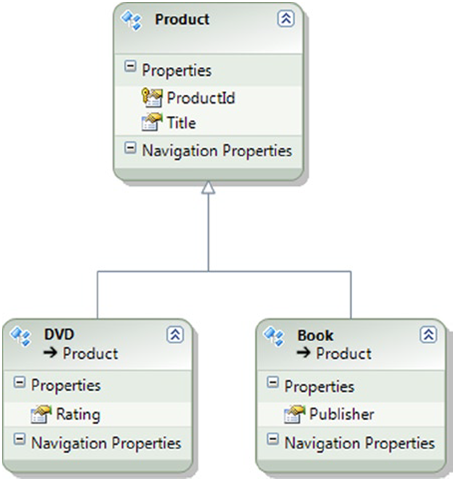
Figure 10-14. TPH继承形式的模型
接下来把这个模型的插入、更新、删除操作映射到存储过程:
1. 在数据库里,创建 Listing 10-26 所示的存储过程. 这些存储过程为Book 和 DVD 实体处理插入、更新、删除操作。
Listing 10-26. The Stored Procedure We Map to the Insert, Update, and Delete Actions for the Model
create procedure [chapter10].[InsertBook](@Title varchar(50), @Publisher varchar(50))
as
begin
insert into Chapter10.Product (Title, Publisher, ProductType) values(@Title,@Publisher, 'Book')
select SCOPE_IDENTITY() as ProductId
end
go
create procedure [chapter10].[UpdateBook](@Title varchar(50), @Publisher varchar(50), @ProductId int)
as
begin
update Chapter10.Product set Title = @Title, Publisher = @Publisher where ProductId = @ProductId
end
go
create procedure [chapter10].[DeleteBook](@ProductId int)
as
begin
delete from Chapter10.Product where ProductId = @ProductId
end
go
create procedure [chapter10].[InsertDVD](@Title varchar(50), @Rating varchar(50))
as
begin
insert into Chapter10.Product (Title, Rating, ProductType) values(@Title, @Rating, 'DVD')
select SCOPE_IDENTITY() as ProductId
end
go
create procedure [chapter10].[DeleteDVD](@ProductId int)
as
begin
delete from Chapter10.Product where ProductId = @ProductId
end
go
create procedure [chapter10].[UpdateDVD](@Title varchar(50), @Rating varchar(50), @ProductId int)
as
begin
update Chapter10.Product set Title = @Title, Rating = @Rating where ProductId = @ProductId
end
2.右击模型的设计视图,选择“从数据库更新模型. 选择新建的存储过程, 单击“完成”,完成更新.
3.右击 Book 实体,选择“存储过程映射”.映射 InsertBook,UpdateBook, 和DeleteBook 存储过程到相应的操作。为插入操作绑定ProductId列 (见 Figure 10-15).
Figure 10-15. 映射存在过程到Book实体的插入、更新、删除操作. 特别注意要把插入操作绑定结果列绑定到ProductId.
4. 右击 DVD 实体,选择“存储过程映射”, 映射 InsertBook,UpdateBook, 和DeleteBook 存储过程到相应的操作。为插入操作绑定ProductId列(见 Figure 10-16).
它是如何工作的?
我们为Book和DVD实体的插入、更新、删除操作创建了存储过程,并且引入到模型. 引入后,我们把它们分别映射到相应的实体的相应操作上,需要注意的是两个实体的结果列绑定都需要绑定ProductId属性,这样就可以确保存储过程返回的产品自动创建的ProductId列的值映射到实体的ProductId属性上。
TPH继承可以通过执行插入的存储过程,把ProductType值插入到表中, EF能根据ProductType值,正确地实体化出派生实体.
接下来的Listing 10-27 代码演示了插入、更新、删除和查询.
Listing 10-27. Exercising the Insert, Update, and Delete Actions
class Program
{
static void Main(string[] args)
{
using (var context = new EFRecipesEntities1010())
{
var book1 = new Book
{
Title = "A Day in the Life",
Publisher = "Colorful Press"
};
var book2 = new Book
{
Title = "Spring in October",
Publisher = "AnimalCover Press"
};
var dvd1 = new DVD { Title = "Saving Sergeant Pepper", Rating = "G" };
var dvd2 = new DVD { Title = "Around The Block", Rating = "PG-13" };
context.Products.Add(book1);
context.Products.Add(book2);
context.Products.Add(dvd1);
context.Products.Add(dvd2);
context.SaveChanges();
// update a book and delete a dvd
book1.Title = "A Day in the Life of Sergeant Pepper";
context.Products.Remove(dvd2);
context.SaveChanges();
}
using (var context = new EFRecipesEntities1010())
{
Console.WriteLine("All Products");
Console.WriteLine("============");
foreach (var product in context.Products)
{
if (product is Book)
Console.WriteLine("'{0}' published by {1}",
product.Title, ((Book)product).Publisher);
else if (product is DVD)
Console.WriteLine("'{0}' is rated {1}",
product.Title, ((DVD)product).Rating);
}
}
Console.WriteLine("\npress any key to exit...");
Console.ReadKey();
}
}
输出结果如下面的 Listing 10-27所示:
All Products
============
'Spring in October' published by AnimalCover Press
'A Day in the Life of Sergeant Pepper' published by Colorful Press
'Saving Sergeant Pepper' is rated G
Entity Framework 6 Recipes 2nd Edition(10-10)译 - > 为TPH继承的插入、更新、删除操作映射到存储过程的更多相关文章
- Entity Framework 6 Recipes 2nd Edition 译 -> 目录 -持续更新
因为看了<Entity Framework 6 Recipes 2nd Edition>这本书前面8章的翻译,感谢china_fucan. 从第九章开始,我是边看边译的,没有通读,加之英语 ...
- Entity Framework 6 Recipes 2nd Edition(9-1)译->用Web Api更新单独分离的实体
第九章 在N层结构的应用程序中使用EF 不是所有的应用都能完全地写入到一个单个的过程中(就是驻留在一个单一的物理层中),实际上,在当今不断发展的网络世界,大量的应用程序的结构包含经典的表现层,应用程, ...
- Entity Framework 6 Recipes 2nd Edition(9-3)译->找出Web API中发生了什么变化
9-3. 找出Web API中发生了什么变化 问题 想通过基于REST的Web API服务对数据库进行插入,删除和修改对象图,而不必为每个实体类编写单独的更新方法. 此外, 用EF6的Code Fri ...
- Entity Framework 6 Recipes 2nd Edition(9-4)译->Web API 的客户端实现修改跟踪
9-4. Web API 的客户端实现修改跟踪 问题 我们想通过客户端更新实体类,调用基于REST的Web API 服务实现把一个对象图的插入.删除和修改等数据库操作.此外, 我们想通过EF6的Cod ...
- Entity Framework 6 Recipes 2nd Edition(13-4)译 -> 有效地创建一个搜索查询
问题 你想用LINQ写一个搜索查询,能被转换成更有效率的SQL.另外,你想用EF的CodeFirst方式实现. 解决方案 假设你有如下Figure 13-6所示的模型 Figure 13-6. A s ...
- Entity Framework 6 Recipes 2nd Edition(13-2)译 -> 用实体键获取一个单独的实体
问题 不管你用DBFirst,ModelFirst或是CodeFirst的方式,你想用实体键获取一个单独的实体.在本例中,我们用CodeFirst的方式. 解决方案 假设你有一个模型表示一个Paint ...
- Entity Framework 6 Recipes 2nd Edition(13-3)译 -> 为一个只读的访问获取实体
问题 你想有效地获取只是用来显示不会更新的操作的实体.另外,你想用CodeFirst的方式来实现 解决方案 一个非常常见行为,尤其是网站,就是只是让用户浏览数据.大多数情况下,用户不会更新数据.在这种 ...
- Entity Framework 6 Recipes 2nd Edition(13-5)译 -> 使POCO的修改追踪更高
问题 你正在使用POCO,你想提高修改跟踪的性能,同时使内存消耗更少.另外,你想通过EF的CodeFirst方式来实现. 解决方案 假设你有一个关于Account(帐户)和相关的Payments(支付 ...
- Entity Framework 6 Recipes 2nd Edition(13-9)译 -> 避免Include
问题 你想不用Include()方法,立即加载一下相关的集合,并想通过EF的CodeFirst方式实现. 解决方案 假设你有一个如Figure 13-14所示的模型: Figure 13-14. A ...
- Entity Framework 6 Recipes 2nd Edition(目录索引)
Chapter01. Getting Started with Entity Framework / 实体框架入门 1-1. A Brief Tour of the Entity Framework ...
随机推荐
- ASP.NET Core的路由[4]:来认识一下实现路由的RouterMiddleware中间件
虽然ASP.NET Core应用的路由是通过RouterMiddleware这个中间件来完成的,但是具体的路由解析功能都落在指定的Router对象上,不过我们依然有必要以代码实现的角度来介绍一下这个中 ...
- JavaScript之职责链模式
一.概述 职责链模式(Chain of responsibility),就是使多个对象都有机会处理请求,从而避免请求的发送者和接受者之间的耦合关系.将这个对象连成一条链,并沿着这条链传递该请求,直到有 ...
- 算法与数据结构(八) AOV网的关键路径
上篇博客我们介绍了AOV网的拓扑序列,请参考<数据结构(七) AOV网的拓扑排序(Swift面向对象版)>.拓扑序列中包括项目的每个结点,沿着拓扑序列将项目进行下去是肯定可以将项目完成的, ...
- MAVEN学习-第一个Maven项目的构建
MAVEN安装成功之后就可以进行项目的构建和管理了: 为什么要用maven进行项目的构建和管理? 对于初学者来说一个最直接的也是最容易里的优点在于JAR包的管理,相对于以前开发一个项目的时候我们需要用 ...
- Java开发中的23种设计模式详解
[放弃了原文访问者模式的Demo,自己写了一个新使用场景的Demo,加上了自己的理解] [源码地址:https://github.com/leon66666/DesignPattern] 一.设计模式 ...
- 似懂非懂的localStorage和sessionStorage
一.区别 相信很多人都见过这两个关于HTML5的新名词!HTML5种的web storage包含两种存储方式:localStorage和sessionStorage,这两种方式存储的数据不会自动发给服 ...
- mysql 大表拆分成csv导出
最近公司有一个几千万行的大表需要按照城市的id字段拆分成不同的csv文件. 写了一个自动化的shell脚本 在/home/hdh 下面 linux-xud0:/home/hdh # lltotal 1 ...
- BZOJ 3626: [LNOI2014]LCA [树链剖分 离线|主席树]
3626: [LNOI2014]LCA Time Limit: 10 Sec Memory Limit: 128 MBSubmit: 2050 Solved: 817[Submit][Status ...
- Object是什么
Object是什么 .Net程序员们每天都在和Object在打交道如果你问一个.Net程序员什么是Object,他可能会信誓旦旦的告诉你"Object还不简单吗,就是所有类型的基类" ...
- 重学hadoop技术
最近因为做了些和hadoop相关的项目(虽然主要是运维),但是这段经历让我对hadoop的实际运用有了更加深入的理解. 相比以前自学hadoop,因为没有实战场景以及良好的大数据学习氛围,现在回顾下的 ...