
lettuce webdriver 自动化测试---玩转BDD
行为驱动开发(BDD),依然高大上的矗立在远方,很少被人问津,一方面是BDD的思想不太容易理解,别一方面BDD的资料并不多。中文的资料就更少了。
之前增写过一篇《python BDD 框架之lettuce》 来介绍BDD ,本文将在此基础上通过lettuce 和webdriver来实现自动化测试,感兴趣的测试同学跟我一起装X吧!
下面向读者介绍如何通过lettuce 和 webdriver 结合来编写自动化脚本。
环境配置:
------------------------------------------
前提:有python载发环境,并且安装了pip ,强烈建议在linux下操作。
第一步,安装lettuce
root@machine:~$ [sudo] pip install lettuce
第二步,安装lettuce_webdriver
https://pypi.python.org/pypi/lettuce_webdriver
root@machine:~$ [sudo] pip install lettuce_webdriver
第三步,安装nose
nose继承自unittest,属于第三方的python单元测试框架,且更容易使用,lettuce_webdriver包的运行依赖于nose模块
https://pypi.python.org/pypi/nose/
root@machine:~$ [sudo] pip install nose
---------------------------------
下面以为百度搜索为例,好吧!谁让这个例子能简单明了的讲解问题呢。所以,我们再次以百度搜索为例。
一般的百度搜索自动化脚本是这样的:
# coding = utf-8

from selenium import webdriver

browser = webdriver.Firefox()

browser.get("http://www.baidu.com")

browser.find_element_by_id("kw1").send_keys("selenium")

browser.find_element_by_id("su1").click()

browser.quit()
下面看看BDD是怎么玩的:
创建目录结构如下:
.../test/features/baidu.feature
/step_definitions/setps.py
/support/terrain.py
先来回顾一下我们去写百度搜索脚本的过程:
功能:访问百度

   场景:搜索selenium

     我去访问百度的“http://www.badiu.com”

     通过id 为“kw1”找到输入框并输入“selenium”关键字

     点击 id为“su1” 按钮

     然后,我在搜索结果上找到了“seleniumhq.com”的网址

     最后,我关闭了浏览器
OK,确定了我们要做事情的过程,下面将其转换成BDD 的描述文件。
baidu.feature
Feature: Go to baidu

Scenario: search selenium

  Given I go to "http://www.baidu.com/"

     When I fill in field with id "kw1" with "selenium"

     And  I click id "su1" with baidu once

     Then I should see "seleniumhq.org" within 2 second

     Then I close browser
setps.py
from lettuce import *

from lettuce_webdriver.util import assert_false

from lettuce_webdriver.util import AssertContextManager

def input_frame(browser, attribute):

    xpath = "//input[@id='%s']" % attribute

    elems = browser.find_elements_by_xpath(xpath)

    return elems[0] if elems else False

def click_button(browser,attribute):

    xpath = "//input[@id='%s']" % attribute

    elems = browser.find_elements_by_xpath(xpath)

    return elems[0] if elems else False

#定位输入框输入关键字

@step('I fill in field with id "(.*?)" with "(.*?)"')

def baidu_text(step,field_name,value):

    with AssertContextManager(step):

        text_field = input_frame(world.browser, field_name)

        text_field.clear()

        text_field.send_keys(value)

#点击“百度一下”按钮

@step('I click id "(.*?)" with baidu once')

def baidu_click(step,field_name):

    with AssertContextManager(step):

        click_field = click_button(world.browser,field_name)

        click_field.click()

#关闭浏览器

@step('I close browser')

def close_browser(step):

    world.browser.quit()
注意:@step (‘xxx’)读取了baidu.feature 里有关键字,用正则表达式匹配的。 这是BDD的核心点。理解了这一点,就知道BDD是怎么玩的了。
terrain.py
from lettuce import before, world

from selenium import webdriver

import lettuce_webdriver.webdriver

@before.all

def setup_browser():

    world.browser = webdriver.Friefox()
terrain文件配置浏览器驱动,可以作用于所有测试用例。
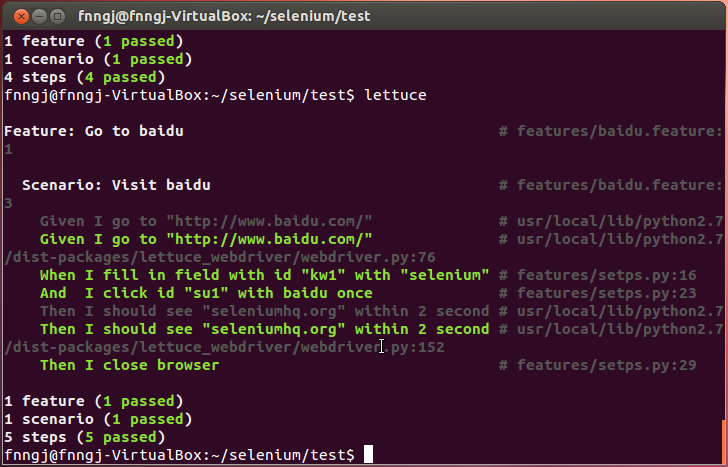
在.../test/目录下输入lettuce命令,运行结果如下图
对于当前测试用例来说,添加新的测试场景也非常简单,我们只用修改baidu.feature即可:
Feature: Go to baidu

Scenario: search selenium

  Given I go to "http://www.baidu.com/"

     When I fill in field with id "kw1" with "selenium"

     And  I click id "su1" with baidu once

     Then I should see "seleniumhq.org" within 2 second

Scenario: search lettuce_webdriver

  Given I go to "http://www.baidu.com/"

     When I fill in field with id "kw1" with "lettuce_webdriver"

     And  I click id "su1" with baidu once

     Then I should see "pypi.python.org" within 2 second

     Then I close browser
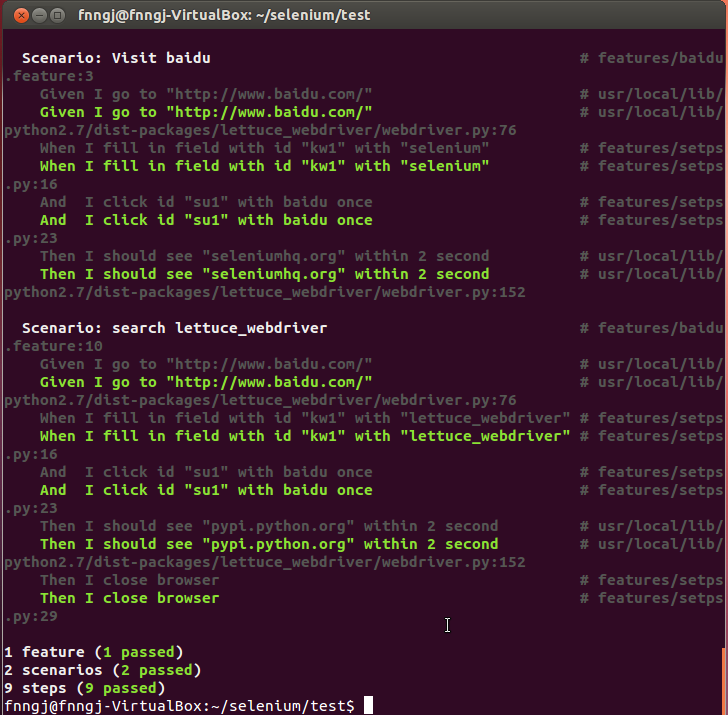
运行结果如下:
通过lettuce 来编写自动化脚本将是一件非常有趣的事儿。
lettuce webdriver 自动化测试---玩转BDD的更多相关文章
- Selenium 2.0 WebDriver 自动化测试 使用教程 实例教程 API快速参考
Selenium 2.0 WebDriver 自动化测试 使用教程 实例教程 API快速参考 //System.setProperty("webdriver.firefox.bin" ...
- 转来的——python webdriver自动化测试初步印象——转来的
python webdriver自动化测试初步印象 以下示例演示启动firefox,浏览google.com,搜索Cheese,等待搜索结果,然后打印出搜索结果页的标题 from selenium i ...
- AutoIt实现Webdriver自动化测试文件上传
在运用WebDriver进行自动化测试时,由于WebDriver自身的限制,对于上传文件时Windows弹出的文件选择窗口无法控制,通过在网上查找资料锁定使用AutoIt来控制文件上传窗口. Auto ...
- Python WebDriver自动化测试
转载来自: http://www.cnblogs.com/fnng/p/3160606.html Webdriver Selenium 是 ThroughtWorks 一个强大的基于浏览器的开源自动化 ...
- selenium webdriver自动化测试
selenium家族介绍 Selenium IDE:Selenium IDE是嵌入到Firefox浏览器中的一个插件,实现简单的浏览器操作的录制与回放功能. Selenium ...
- 关于Webdriver自动化测试时,页面数据与数据库id不一致的处理方式,需要使用鼠标事件
有时候Web页面需要通过onmouseout事件去动态的获取数据库的数据,在使用Webdriver进行自动化测试的时候,对于页面显示的数据,其在数据库可能会存在一个id或者code,但是id或者cod ...
- WebDriver自动化测试工具(1)---环境搭建
Webdriver是一个前端自动化测试工具,可以模拟用户点击链接,填写表单,点击按钮等操作,下面介绍其使用 一.下载WebdriverC#类库以及对应浏览器驱动 http://www.selenium ...
- python webdriver 自动化测试练习 1-- 在线调查
__author__ = 'Mickey0s' # coding:utf8 from selenium import webdriver from selenium.webdriver.common. ...
- Selenium Webdriver 自动化测试开发常见问题(C#版)
转一篇文章,有修改,出处http://www.7dtest.com/site/blog-2880-203.html 1:Selenium中对浏览器的操作 首先生成一个Web对象 IWebDriver ...
随机推荐
- android: PendingIntent的使用
PendingIntent的Flags的类型: * Flags的类型: FLAG_ONE_SHOT:得到的pi只能使用一次,第二次使用该pi时报错 FLAG_NO_CREATE: 当pi不存在时,不创 ...
- const成员函数
尽管函数名和参数列表都相同,void foo( ) const成员函数是可以与void foo( )并存的,可以形成重载! 我们假设调用语句为obj.foo(),如果obj为non-const对象,则 ...
- ORACLE 监听日志文件太大停止写监听日志引起数据库连接不上问题
生产库监听日志文件太大(达到4G多),发现oracle停止写监听日志,检查参数log_file,log_directory,log_status 均正常,数据库运行也正常. 经确认确实为监听日志过大引 ...
- 【CUDA学习】共享存储器
下面简单介绍一些cuda中的共享存储器和全局存储器 共享存储器,shared memory,可以被同一块中的所有线程访问的可读写存储器,生存期是块的生命期. Tesla的每个SM拥有16KB共享存储器 ...
- 可扩展验证框架 - A2DFramework验证框架使用介绍
SUMMARY 用途 DEMO演示 NuGet相关的资料 VS工具端的设置 用途 数据验证的作用很重要,目前.NET提供的内建验证机制是采用DataAnnotation方式来实现属性的验证,并且也提供 ...
- python字符串格式化方法 format函数的使用
python从2.6开始支持format,新的更加容易读懂的字符串格式化方法, 从原来的% 模式变成新的可读性更强的 花括号声明{}.用于渲染前的参数引用声明, 花括号里可以用数字代表引用参数的序 ...
- android实现自动升级并安装打开
http://blog.csdn.net/wa991830558/article/details/41014673 这是一个比较简单的程序,但网上还是有很多人问起这个问题,并且回答的人,也没有完全回答 ...
- .net_ckeditor+ckfinder的图片上传配置
CKEditor和CKFinder的最新版可以到官方网站(http://cksource.com)上下载获得. 把以上两个资源放到网站的根目录: /CKEditor 和 /CKFinder (不区分大 ...
- Openwrt安装软件的方法
转自:http://blog.csdn.net/jk110333/article/details/8753825 web软件: Naken Web Openwrt安装软件 简介 Openwrt ...
- 三层架构与MVC & 设计模式的较量
刚刚学习了三层架构,并且正在实际应用中,但随着学习的深入,又了解到了一个叫MVC的东西,(早在设计模式中就听到过MVC,仅仅是简单查了一下什么意思.)如今正好把这三个东西放在一起聊聊. 三层 是一个分 ...