
将MFC Grid control封装为DLL的做法及其在DLL中的使用方法
MFCGrid control是一款非常优秀的网格控件,支持非常丰富的界面元素,如下图:
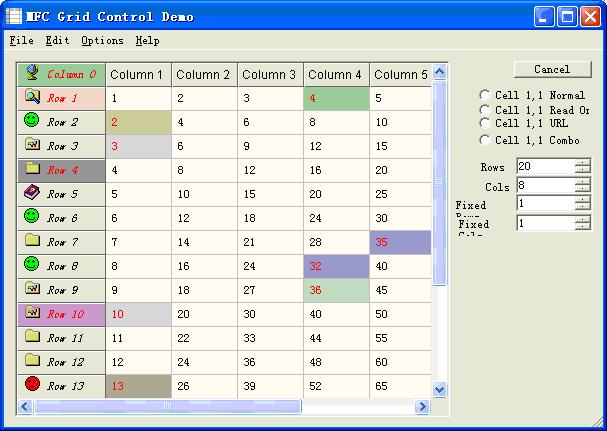
因而在数据库程序及报表程序应用较为广泛,其源码可以在下面下载到:
MFC Gridcontrol的作者并没有将其封装为DLL,因为在程序的多个模块复用这个控件比较麻烦(需要在多个工程中加入其源码),因此最好将其封装为一个DLL。今天有同事反映在DLL的对话框中无法使用封装好的MFC Grid control,于是上网查了下资料,晚上摸索了一下,解决了这个问题。
MFC Grid control的作者在设计该控件并没考虑到在DLL中使用该控件,因此在其控件类CGridCtrl类的构造函数注册窗口类时指定该窗口类的窗口过程所属的应用实例句柄皆为主程序的程序句柄(一般为exe程序),因此在DLL中无法显示。因此要解决该问题,就必须将注册窗口类函数改写,将应用实例句柄传给控件类。具体注册函数为:
- BOOL CGridCtrl::RegisterWindowClass(HINSTANCE hInstance)
- {
- WNDCLASS wndcls;
- HINSTANCE hInst = hInstance ? hInstance : AfxGetInstanceHandle();
- //HINSTANCE hInst = AfxGetResourceHandle();
- if (!(::GetClassInfo(hInst, GRIDCTRL_CLASSNAME, &wndcls)))
- {
- // otherwise we need to register a new class
- wndcls.style = CS_DBLCLKS | CS_HREDRAW | CS_VREDRAW;
- wndcls.lpfnWndProc = ::DefWindowProc;
- wndcls.cbClsExtra = wndcls.cbWndExtra = 0;
- wndcls.hInstance = hInst;
- wndcls.hIcon = NULL;
- #ifndef _WIN32_WCE_NO_CURSOR
- wndcls.hCursor = AfxGetApp()->LoadStandardCursor(IDC_ARROW);
- #else
- wndcls.hCursor = 0;
- #endif
- wndcls.hbrBackground = (HBRUSH) (COLOR_3DFACE + 1);
- wndcls.lpszMenuName = NULL;
- wndcls.lpszClassName = GRIDCTRL_CLASSNAME;
- if (!AfxRegisterClass(&wndcls))
- {
- AfxThrowResourceException();
- return FALSE;
- }
- }
- return TRUE;
- }
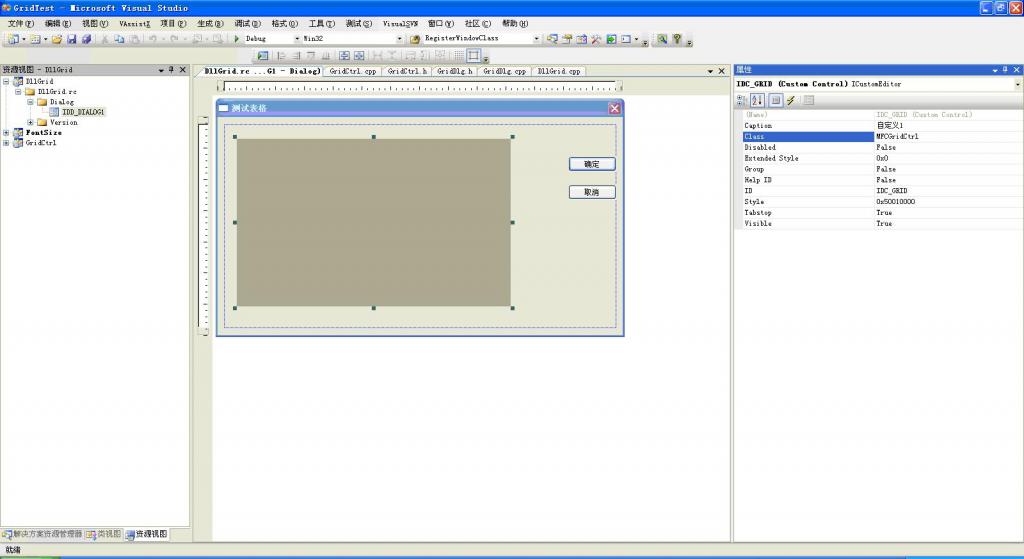
下面介绍如何在DLL工程中使用CGridCtrl类。新建一个MFC 常规DLL,接着新建一个对话框资源,拖一个Custom Control进对话框,Class填:MFCGridCtrl,ID取为IDC_GRID,
如下图:
在对话框类中添加成员变量:
- CGridCtrl m_Grid;
在对话框的实现代码中添加控件绑定以及注册窗口代码:
- void CGridDlg::DoDataExchange(CDataExchange* pDX)
- {
- CDialog::DoDataExchange(pDX);
- DDX_Control(pDX, IDC_GRID, m_Grid);
- }
- extern CDllGridApp theApp;
- CGridDlg::CGridDlg(CWnd* pParent /*=NULL*/)
- : CDialog(CGridDlg::IDD, pParent)
- {
- // 最好在构造函数注册,其它地方不保证成功,传入是DLL的模块句柄
- m_Grid.RegisterWindowClass(theApp.m_hInstance);
- }
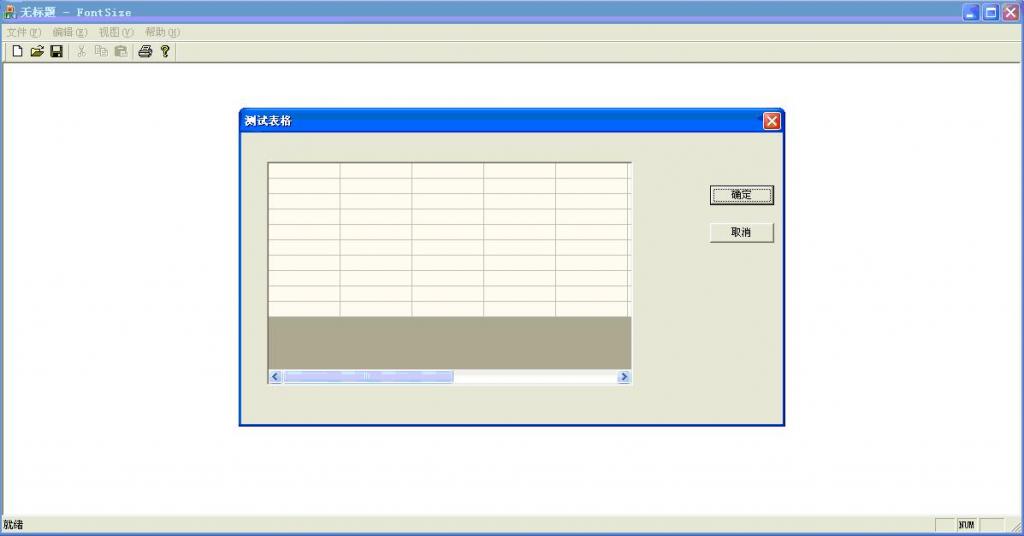
效果图如下,其中弹出对话框的操作在DLL实现:
相关源码下载:
MFC Gridcontrol封装为DLL的源码
将MFC Grid control封装为DLL的做法及其在DLL中的使用方法的更多相关文章
- MFC Grid control 2.27
原文链接地址:http://www.codeproject.com/Articles/8/MFC-Grid-control MFCGridCtrl是个强大的类,用于数据的表格显示. 1.类特征 Cel ...
- MFC 使用MFC EditBrowse Control控件选择文件或者文件夹
从工具箱中拖拽一个MFC EditBrowse Control到窗体中, 通过设置“Browse Mode”属性指定“文件浏览”还是“文件夹浏览” 可以通过添加对象的方式将其与一个CString se ...
- mfc中Button、Edit Control和MFC EditBrowse Control的用法
[前(fei)言(hua)] 写LL(1)分析器被CString转string卡了一个多小时也是醉了. 趁着还算清醒写下这次用到的控件的使用方法好了. 这次实验的mfc用到了四个控件:Edit Con ...
- OCX控件在IE中无法侦测到键盘消息( MFC ActiveX Control in IE Doesn't Detect Keystrokes)
症状描述: Accelerator keys, such as ARROW keys, are first received by the message pump of the ActiveX co ...
- Oracle Grid control 11g及Active DataGuard 11g安装部署
Oracle Grid control 11g及Active DataGuard 11g安装部署(一) 原贴 http://blog.csdn.net/lichangzai/article/detai ...
- grid control 11.1.0.1 安装指南
grid control 11.1.0.1 安装指南 废话少说,进入正题 系统版本号 [root@gridcontrol ~]# lsb_release -a LSB Version: :bas ...
- 转 11g Grid Control: Overview of the EMCTL Options Available for Managing the Agent
1.概念: The Enterprise Manager DBConsole consists of the following components: - A Standalone OC4J Man ...
- 10.2.0.1.1 grid control的启动和关闭
一.Stopping Grid Control and All Its Components 1.停止OMS服务 [oracle@ocm2 oms10g]$ cd /u01/app/oracle/Or ...
- Access Grid Control Properties 访问网格控件属性
In this lesson, you will learn how to access the properties of a list form's Grid Control in WinForm ...
随机推荐
- Android 开发之Matrix图片处理类的使用
在Android中,对图片的处理需要使用到Matrix类,Matrix是一个3 x 3的矩阵,他对图片的处理分为四个基本类型: 1.Translate————平移变换 2.Scale————缩放变换 ...
- Mad Lib程序
单选框 复选框 按钮 标签 文本框的应用 #coding=utf-8 __author__ = 'minmin' from Tkinter import * class Application ...
- 阿里云ECS每天一件事D5:安装php5.4.34
原本是想把php和nginx合在一起来说的,不过考虑后,还是分开来做吧,已熟悉的更透彻一些. 1.准备类库 yum install autoconf automake libtool re2c fle ...
- 转: javascript模块加载框架seajs详解
javascript模块加载框架seajs详解 SeaJS是一个遵循commonJS规范的javascript模块加载框架,可以实现javascript的模块化开发和模块化加载(模块可按需加载或全部加 ...
- Windows 7各版本的主要功能区别是什么 有何不同
Windows 7包含6个版本,分别为Windows 7 Starter(初级版).Windows 7 Home Basic(家庭普通版).Windows 7 Home Premium(家庭高级版). ...
- VC++中的类的内存分布(上)(通过强制转换,观察地址,以及地址里的值来判断)
0.序 目前正在学习C++中,对于C++的类及其类的实现原理也挺感兴趣.于是打算通过观察类在内存中的分布更好地理解类的实现.因为其实类的分布是由编译器决定的,而本次试验使用的编译器为VS2015 RC ...
- file_get_contents 超时设置
<?php $ctx = stream_context_create( array( 'http' => array( 'timeout' => 1 //设置一个超时时间,单位为秒 ...
- XML DOM 节点
来自:w3cschool菜鸟教程 在 DOM 中,XML 文档中的每个成分都是一个节点. DOM 节点 根据 DOM,XML 文档中的每个成分都是一个节点. DOM 是这样规定的: 整个文档是一个文档 ...
- 一、Cocos2dx在visualStudio或者vc++中环境搭建(入门篇)
本文由qinning199原创,转载请注明:http://www.cocos2dx.net/?p=106 0.概述 Cocos2dx-win32的项目能够被向导生成 向导支持vs2008,vs2010 ...
- 《Linux内核设计与实现》内存管理札记
1.页 芯作为物理页存储器管理的基本单元,MMU(内存管理单元)中的页表,从虚拟内存的角度来看,页就是最小单位. 内核用struct page结构来标识系统中的每个物理页.它的定义例如以下: flag ...