
Jquery二级简单折叠菜单
写在前面:
1、前端新手
2、欢迎交流
3、
源代码百度云页面示例链接: http://pan.baidu.com/s/1nt0yjd3
链接失效请留言
效果图:
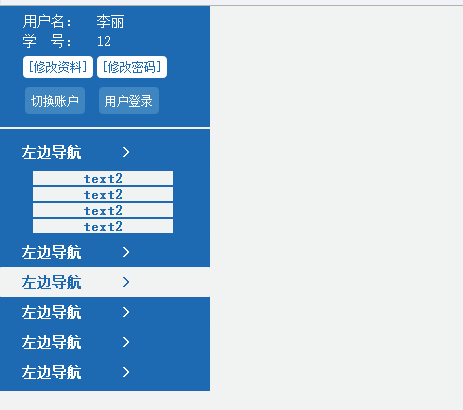
代码部分:jquery部分:
<script>

$(function(){

    $("#1,#2").toggle(

      function(){

          var ss=$(this).attr("id");

          $(this).children().parent().next().slideDown(1000);

          },

      function(){

          $(this).children().parent().next().hide(500);

          });

});

  </script>
HTML部分:
<!DOCTYPE html PUBLIC "-//W3C//DTD XHTML 1.0 Transitional//EN" "http://www.w3.org/TR/xhtml1/DTD/xhtml1-transitional.dtd">
<html xmlns="http://www.w3.org/1999/xhtml">
<head>
<meta http-equiv="Content-Type" content="text/html; charset=utf-8" />
<title></title>
<style>
html{
padding:0px;margin:0px;}
body{
padding:0px;margin:0px;background-color:#f1f2f2;}
a{
text-decoration:none;}
a:hover{
text-decoration:none;
} #left{
float:left;width:210.4px; background-color:#1d6ab2;}
#main{
float:left;width:84.4%;position:absolute;left:210.4px;}
#left table{
margin-left:20px;margin-right:auto;margin-top:4px; text-align:left;}
#left table td{
color:#FFF;font-size:14px;font-family:宋体; font-weight:400;}
#left table td a{
color:#1d6ab2;font-size:12px;font-family:宋体; font-weight:400; background-color:#fff;
border-radius:4px;padding:5px;}
#left table td a:hover{
background-color:#1d6ab2;color:#FFF;
}
#left table td button{
background:#3f85c0;color:#fff;border:0px;padding:6px;border-radius:4px;font-size:12px;
}
#left table td button:hover{
background:#2e2d80;
}
#menu{
width:100%; margin-left:auto; margin-right:auto;margin-bottom:4px;}
#menu1,#menu2{
width:144px;display:none;margin-left:auto; margin-right:auto;clear:left;margin-bottom:3px;margin-top:3px;}
#menu button{
width:100%;height:30px;border:0px;margin:0px 0px 0px 0px; background-color:#1D6ab2;color:#FFF;
font-size:14px;font-family:宋体; font-weight:600;border-radius:1px;
}
#menu button:hover{
background-color:#f1f2f2;color:#1D6ab2;
}
#menu1 a,#menu2 a{
font-size:14px;font-family:宋体; font-weight:600;padding:0px 50px 0px 50px;
background-color:#f1f2f2;color:#1D6ab2; text-align:center;}
#menu1 a:hover,#menu2 a:hover{
background-color:#AAD5E8;color:#1D6ab2;
} </style>
<script src="js/jquery.min.js"></script> </head> <body>
<div id="left" >
<table>
<tr><td>用户名:</td><td>李丽</td></tr>
<tr><td>学 号:</td><td>12</td></tr>
<tr height="30px"><td ><a href="#">[修改资料]</a></td>
<td><a href="#">[修改密码]</a></td></tr>
<tr ><td><button type="button">切换账户</button></td>
<td><button type="button">用户登录</button></td></tr>
</table>
<hr style="border:1px solid #f1f2f2;height:0px;"> <div id="menu" >
<button type="button" id="1" >左边导航 <span style="float:right;margin-right:74px;">></span></button>
<div id="menu1">
<a href="#">text2</a><br>
<a href="#">text2</a><br>
<a href="#">text2</a><br>
<a href="#">text2</a><br>
</div>
<button type="button" id="2">左边导航 <span style="float:right;margin-right:74px;">></span></button>
<div id="menu2">
<a href="#">text2</a><br>
<a href="#">text2</a><br>
<a href="#">text2</a><br>
<a href="#">text2</a><br>
</div>
<button type="button" >左边导航 <span style="float:right;margin-right:74px;">></span></button>
<button type="button" >左边导航 <span style="float:right;margin-right:74px;">></span></button>
<button type="button" >左边导航 <span style="float:right;margin-right:74px;">></span></button>
<button type="button" >左边导航 <span style="float:right;margin-right:74px;">></span></button>
</div> </div>
</body>
</html>
Jquery二级简单折叠菜单的更多相关文章
- JQuery案例:折叠菜单
折叠菜单(jquery) <html> <head> <meta charset="UTF-8"> <title>accordion ...
- 一个基于jQuery的简单树形菜单
在工作中的项目使用的是一个前端基于 jQuery easyui 的一个系统,其中左侧的主菜单使用的是 easyui 中的 tree 组件,不是太熟悉,不过感觉不是太好用. 比如 easyui 中的 t ...
- jquery一个简单的菜单小插件
刚学会封装插件,先来封装一个小的菜单插件 html部分 <ul class="zong"> <li class="yiji"> < ...
- 用JQuery实现简单的菜单隐藏于切换
<锋利的JQuery>第一个demo<!DOCTYPE html> <html> <head> <meta charset="UTF-8 ...
- jQuery二级下拉菜单
在线演示 本地下载
- 第一百八十九节,jQueryUI,折叠菜单 UI
jQueryUI,折叠菜单 UI 学习要点: 1.使用 accordion 2.修改 accordion 样式 3.accordion()方法的属性 4.accordion()方法的事件 5.acco ...
- jquery垂直展开折叠手风琴二级菜单
摘要:jquery实现垂直展开二级菜单 最近新开发一个简单项目,用到左侧两级的菜单.找找了手头的文件,竟然没有现成的代码,算了,去网上找找整理下吧. 注:jquery-1.8.3.min.js需要下载 ...
- cocos2dx-lua使用UIListView制作二级折叠菜单
折叠菜单,用过jquery accordion的同学都知道是啥玩艺儿~,图片效果就是介样: cocos2dx不带有此控件,因此我们动手来实现一个. 原理很简单,展开的时候往listview里inser ...
- 原生Js_实现简单的下拉折叠菜单(添加弹出动画效果)
用javascript实现简单的下拉折叠菜单效果 实现步骤 (a)获得各操作的dom对象: (b)在所有菜单按钮对象上添加单击事件: (c)设置所有菜单按钮样式为空,并将当前按钮的样式设置为“acti ...
随机推荐
- c# 高斯模糊
using System; using System.Collections.Generic; using System.Text; using System.Drawing; using Syste ...
- 对于IE6及以下版本的处
判断IE6 CSS 通过判断浏览器类型而加载不同的css样式 所有的IE都起作用: <!--[if IE]> <link rel="stylesheet" typ ...
- MHA自动切换流程
MHA的全名叫做mysql-master-ha,配置后可以在10-30秒内完成master自动切换,切换过程如下: 1. 检测master的状态,方法是一秒一次“ SELECT 1 As Value” ...
- C#中大List的内存分配
之前在开发中只用到List的时候几乎就是拿过来就用,从来没有考虑过List的内存分配问题,试想一个有10万元素的List的在构造和添加元素时内存是如何变化的呢?在MSDN上关于List的Capacit ...
- C++程序设计实践指导1.8求指定范围内的所有素数改写要求实现
改写要求1:以指针为数据结构动态开辟存储空间 #include <cstdlib> #include <iostream> using namespace std; class ...
- MySQL忘记了密码登录不进去,用命令符修改新的密码重新登录的方法
MySQL忘记了密码登录不进去,用命令符修改新的密码重新登录的方法: 1.备份my.ini 2.在my.ini字段里 [mysqld] #socket=mysql skip-grant-tables ...
- 2015.4.16-SQL-内连接与外连接
1.内连接 如图: 关键字 inner join 2.外连接 分为左外连接 和右外连接,即如果是左外连接,即使左面没有值,也会显示为null, 右外连接也如此 关键字 left join ; righ ...
- mySql-数据库之存储过程学习总结
之前在工作中总是听别人提到存储过程,觉得是个很高深的东西,利用工作之余,看了下相关的知识,现将学习知识总结如下,希望可以为刚学习的人提供些许帮助. 开发环境:Navicat For Mysql. My ...
- 【Lucene4.8教程之一】使用Lucene4.8进行索引及搜索的基本操作
在Lucene对文本进行处理的过程中,可以大致分为三大部分: 1.索引文件:提取文档内容并分析,生成索引 2.搜索内容:搜索索引内容,根据搜索关键字得出搜索结果 3.分析内容:对搜索词汇进行分析,生成 ...
- Android 使用BroadcastReceiver的几种方法
发送自定义广播 全局广播 发送标准广播 1.定义广播接收器.(在发送广播前,需要先定义一个广播接收器,不然发了也是白发) public class MyBroadcastReceiver extend ...