
《DSP using MATLAB》示例Example4.14
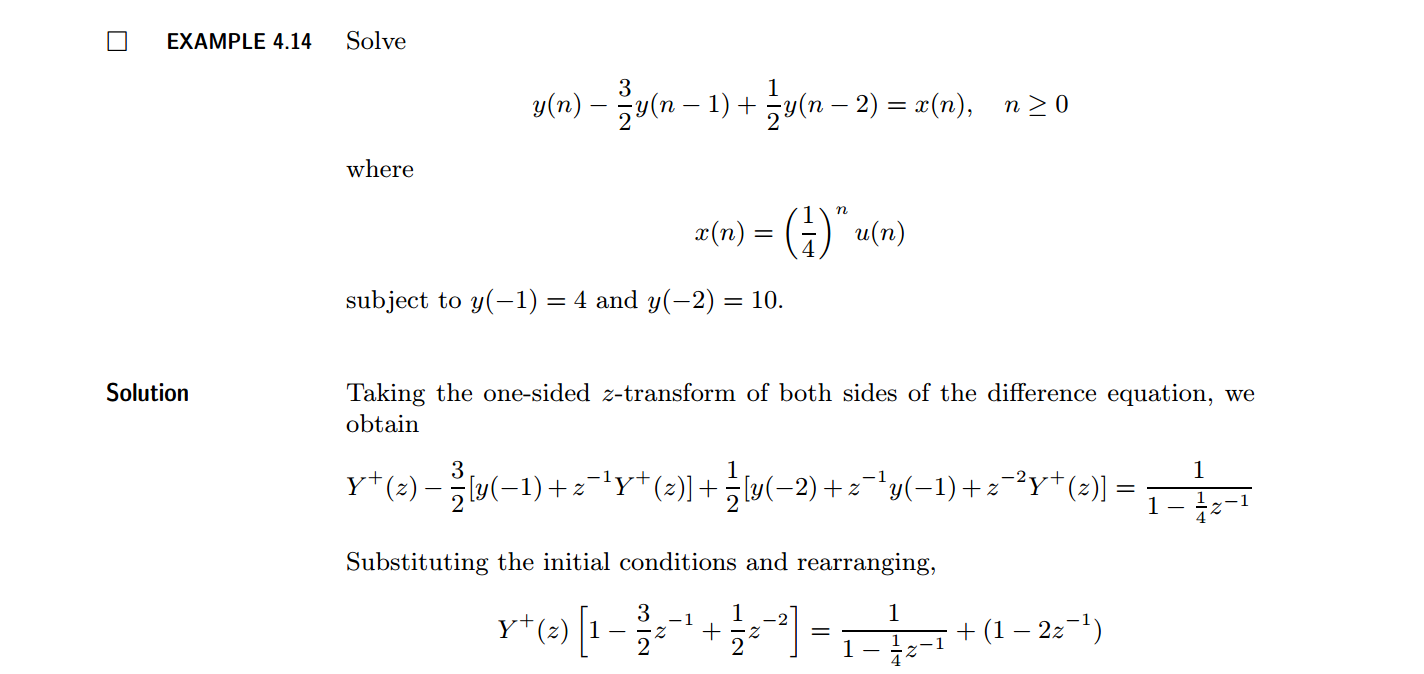
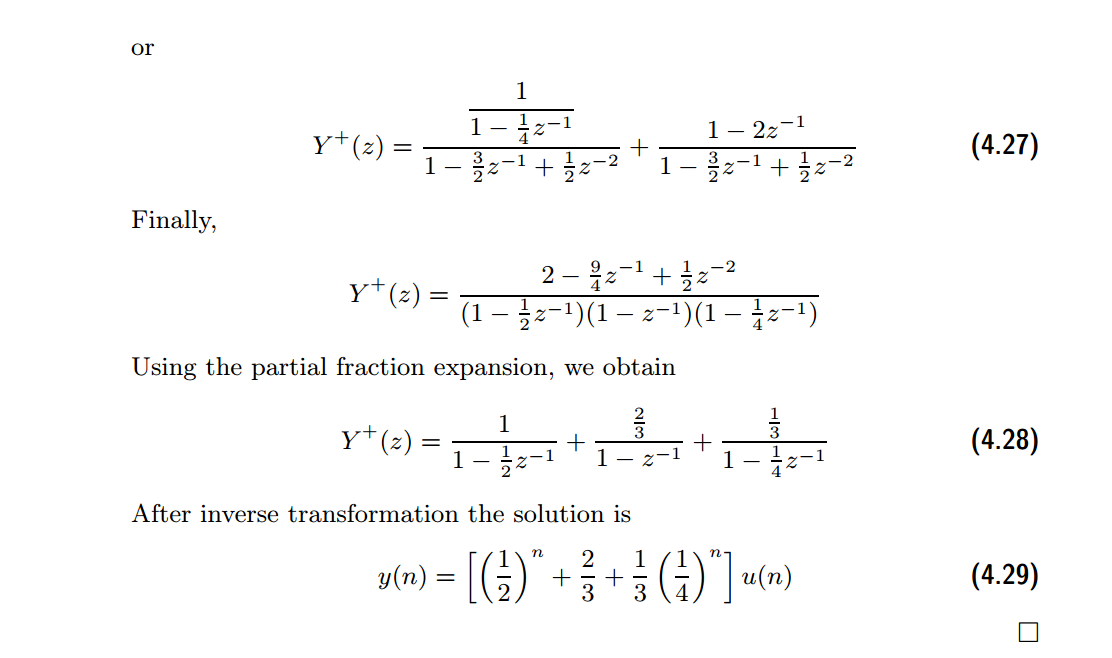
代码:
b = [1]; a = [1, -1.5, 0.5];               %

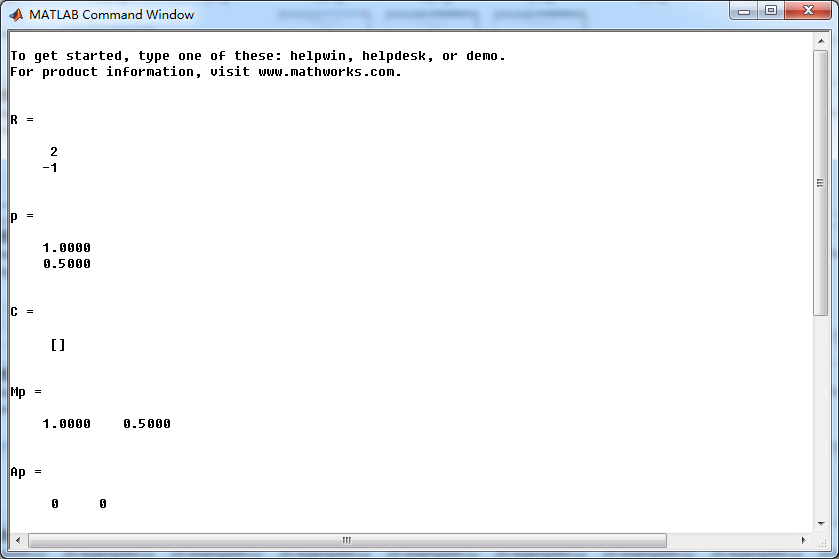
[R, p, C] = residuez(b,a)

Mp = (abs(p))'

Ap = (angle(p))'/pi

% check

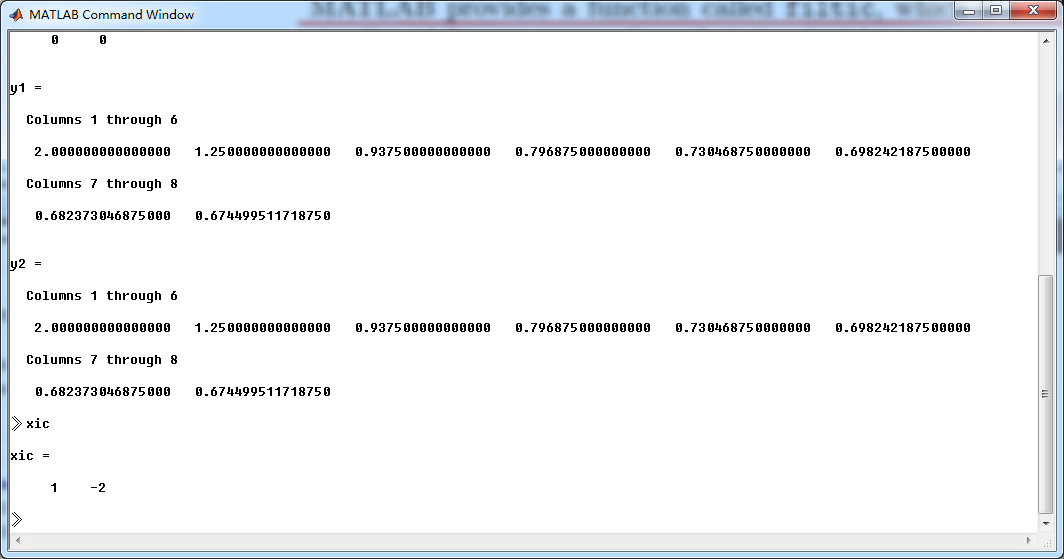
n = [0:7]; x = (1/4).^n; xic = [1, -2];

format long;

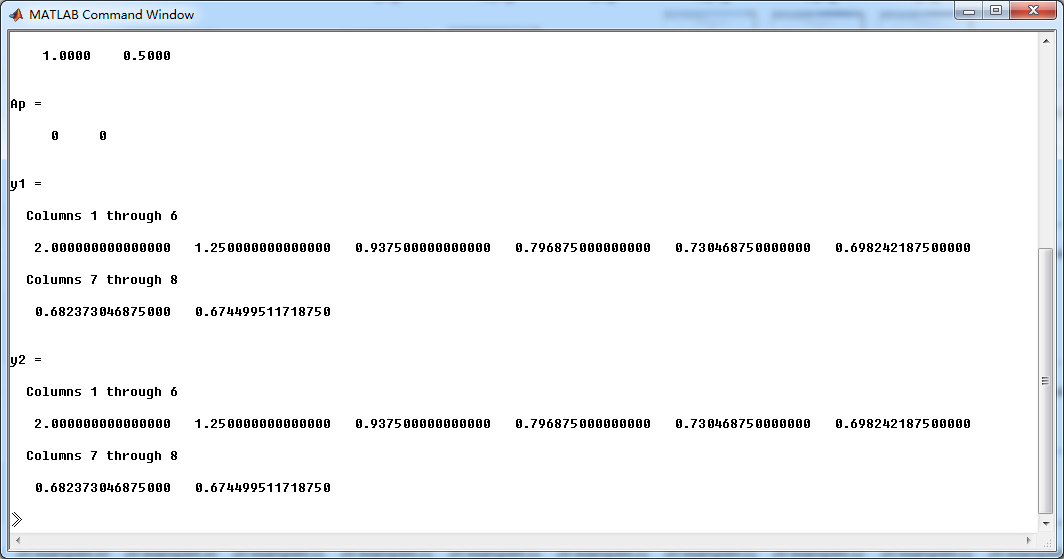
y1 = filter(b,a,x,xic)

y2 = (1/3)*(1/4).^n + (1/2).^n + (2/3)*ones(1,8)

Y = [4, 10]; xic = filtic(b,a,Y);

%% ----------------------------------------------

%%   START a    determine H(z) and sketch

%% ----------------------------------------------

figure('NumberTitle', 'off', 'Name', 'Example4.14 H(z) its pole-zero plot')

set(gcf,'Color','white');

zplane(b,a);

title('pole-zero plot'); grid on;

%% ----------------------------------------------

%%    END

%% ----------------------------------------------

%% --------------------------------------------------------------

%%    START    b   |H|   <H

%%    1st form of freqz

%% --------------------------------------------------------------

[H,w] = freqz(b,a,500);                 % 1st form of freqz

magH  = abs(H);  angH  = angle(H);  realH  = real(H);  imagH  = imag(H);

%% ================================================

%%              START H's  mag ang real imag

%% ================================================

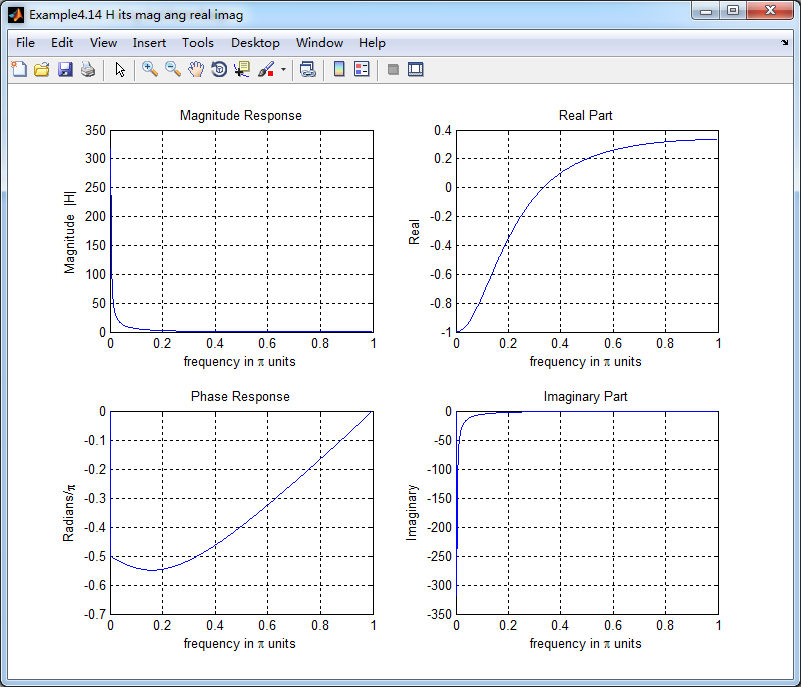
figure('NumberTitle', 'off', 'Name', 'Example4.14 H its mag ang real imag');

set(gcf,'Color','white');

subplot(2,2,1); plot(w/pi,magH); grid on;  %axis([0,1,0,1.5]);

title('Magnitude Response');

xlabel('frequency in \pi units'); ylabel('Magnitude  |H|');

subplot(2,2,3); plot(w/pi, angH/pi); grid on; % axis([-1,1,-1,1]);

title('Phase Response');

xlabel('frequency in \pi units'); ylabel('Radians/\pi');

subplot('2,2,2'); plot(w/pi, realH); grid on;

title('Real Part');

xlabel('frequency in \pi units'); ylabel('Real');

subplot('2,2,4'); plot(w/pi, imagH); grid on;

title('Imaginary Part');

xlabel('frequency in \pi units'); ylabel('Imaginary');

%% ==================================================

%%             END H's  mag ang real imag

%% ==================================================

%% ---------------------------------------------------------------

%%    END    b   |H|   <H

%% ---------------------------------------------------------------

%% --------------------------------------------------------------

%%    START    b   |H|   <H

%%    3rd form of freqz

%% --------------------------------------------------------------

w = [0:1:500]*pi/500;     H = freqz(b,a,w);

%[H,w] = freqz(b,a,200,'whole');                 % 3rd form of freqz

magH  = abs(H);  angH  = angle(H);  realH  = real(H);  imagH  = imag(H);

%% ================================================

%%              START H's  mag ang real imag

%% ================================================

figure('NumberTitle', 'off', 'Name', 'Example4.14  using 3rd form freqz ');

set(gcf,'Color','white');

subplot(2,2,1); plot(w/pi,magH); grid on;  %axis([0,1,0,1.5]);

title('Magnitude Response');

xlabel('frequency in \pi units'); ylabel('Magnitude  |H|');

subplot(2,2,3); plot(w/pi, angH/pi); grid on; % axis([-1,1,-1,1]);

title('Phase Response');

xlabel('frequency in \pi units'); ylabel('Radians/\pi');

subplot('2,2,2'); plot(w/pi, realH); grid on;

title('Real Part');

xlabel('frequency in \pi units'); ylabel('Real');

subplot('2,2,4'); plot(w/pi, imagH); grid on;

title('Imaginary Part');

xlabel('frequency in \pi units'); ylabel('Imaginary');

%% ==================================================

%%             END H's  mag ang real imag

%% ==================================================

%% ---------------------------------------------------------------

%%    END    b   |H|   <H

%% ---------------------------------------------------------------
结果:

《DSP using MATLAB》示例Example4.14的更多相关文章
- DSP using MATLAB 示例Example3.21
代码: % Discrete-time Signal x1(n) % Ts = 0.0002; n = -25:1:25; nTs = n*Ts; Fs = 1/Ts; x = exp(-1000*a ...
- DSP using MATLAB 示例 Example3.19
代码: % Analog Signal Dt = 0.00005; t = -0.005:Dt:0.005; xa = exp(-1000*abs(t)); % Discrete-time Signa ...
- DSP using MATLAB示例Example3.18
代码: % Analog Signal Dt = 0.00005; t = -0.005:Dt:0.005; xa = exp(-1000*abs(t)); % Continuous-time Fou ...
- DSP using MATLAB 示例Example3.23
代码: % Discrete-time Signal x1(n) : Ts = 0.0002 Ts = 0.0002; n = -25:1:25; nTs = n*Ts; x1 = exp(-1000 ...
- DSP using MATLAB 示例Example3.22
代码: % Discrete-time Signal x2(n) Ts = 0.001; n = -5:1:5; nTs = n*Ts; Fs = 1/Ts; x = exp(-1000*abs(nT ...
- DSP using MATLAB 示例Example3.17
- DSP using MATLAB示例Example3.16
代码: b = [0.0181, 0.0543, 0.0543, 0.0181]; % filter coefficient array b a = [1.0000, -1.7600, 1.1829, ...
- DSP using MATLAB 示例 Example3.15
上代码: subplot(1,1,1); b = 1; a = [1, -0.8]; n = [0:100]; x = cos(0.05*pi*n); y = filter(b,a,x); figur ...
- DSP using MATLAB 示例 Example3.13
上代码: w = [0:1:500]*pi/500; % freqency between 0 and +pi, [0,pi] axis divided into 501 points. H = ex ...
随机推荐
- UVA 156 Ananagrams ---map
题目链接 题意:输入一些单词,找出所有满足如下条件的单词:该单词不能通过字母重排,得到输入文本中的另外一个单词.在判断是否满足条件时,字母不分大小写,但在输出时应保留输入中的大小写,按字典序进行排列( ...
- JS倒计时,不会重复执行
直接上代码,亲自测试了的,没问题咯 <html> <head> <title>点击获取验证码按钮后按钮变灰,倒计时一段时间后又可重复点击</title> ...
- VS工程目标文件名设置
默认的输出文件名是$(ProjectName) 可以在项目属性-配置属性-常规-目标文件名中设置 例如我想在Debug版本的输出文件加一个后缀d,那么我可以这样设置:$(ProjectName)d
- Server.Transfer方式(或称HttpContext方式)传值实例
public class QueryPage : System.Web.UI.Page { protected System.Web.UI.WebControls.TextBox txtStaDate ...
- iOS 全局禁止横屏,但UIWebView 全屏播放视频,横屏,解决办法(任意页面横竖屏或禁止)
iOS 全局禁止横屏,但UIWebView 全屏播放视频,横屏,解决办法 时间 2015-07-14 20:59:00 博客园-原创精华区 原文 http://www.cnblogs.com/fe ...
- 用线框模式绘制多边形 glPolygonMode
glPolygonMode(GL_FRONT_AND_BACK, GL_LINE); glBegin(GL_TRIANGLES);//开始以g_ViewMode模式绘制 glColor3ub(182. ...
- python eval和literal_eval
eval是python中一个相当智能的函数,把参数当成表达式,进行最大限度的解析, 比如: a = "[[1,2], [3,4], [5,6], [7,8], [9,0]]" b ...
- 模拟赛1101d1
完美的序列(sequence)Time Limit:1000ms Memory Limit:64MB题目描述LYK 认为一个完美的序列要满足这样的条件:对于任意两个位置上的数都不相同.然而并不是所有的 ...
- DB2 上copy表结构及数据
现已有一行数据,要复制为多行,每行只有两个字段值不同,db2 没有sql server的top关键字,本只想复制几次,然后update逐条数据,发现不行. 然后想到不如临时创建一张表B,插入此行数据, ...
- 三、jQuery--Ajax基础--Ajax全接触--Ajax在JS中的应用
Ajax的全称:Asynchronous JavaScript And XML(异步的 JavaScript 和 XML). Ajax不是某种编程语言,是一种在无需重新加载整个网页的情况下能够更新部分 ...