前面介绍过基本的配置,后来我又从网上查找了很多资料,经过不断的摸索,下面做了一个总结,希望能对大家提供些许帮助(Mac版本是sierra)
一.mac系统会自带git,而我们要做的是自己安装git
使用命令
git --version 可以查看系统自带的git版本
which git 可以查看git的所在地址
brew install git 来安装git
brew info git 可以查看brew中的git信息
现在我们要明确下自带git和我们安装的git所在的地址
自带的git安装在 /usr/local/bin/git
brew 安装的地址是 /usr/local/Cellar/git/2.10.2 类似的
我们进入到 /usr/local/bin目录下
list git* 会列出含有git的文件名字
创建一个文件夹 back,然后将自带git移入到文件中
mv git* ./back/
接下来配置路径(更改 bash_profile)
sudo vim ~/.bash_profile
加入以下内容
export GIT=/usr/local/Cellar/git/2.1.3
export PATH=$GIT/bin:$PATH
然后刷新环境变量
source ~/.bash_profile
此时就大功告成了
二.安装php7.0
1>使用 brew doctor 可以检查你的brew运行情况
2>添加brew的PHP扩展库:(mac os 比较歧视PHP,不包含PHP的包,那么我们就要绑定其他人的git仓库,用法是$ brew tap <gihhub_user/repo>)
brew update
brew tap homebrew/dupes
brew tap homebrew/php
(有些地方使用brew tap josegonzalez/homebrew-php或者brew tap josegonzalez/php,我去josegonzalez的仓库看了下都是fork的homebrew的仓库,所以我认为有上面两个仓库够用了,就不写osegonzalez的了)
可以使用brew options php70命令来查看安装php的选项,请注意:如果你希望以mac下的apache作为web server,编译时要加 --with-apache;如果你的web server 是 nginx这类,就需要加上 --with-fpm。这里我用下面的选项安装
brew install php70 --with-apxs2 --with-apache --with-gmp --with-imap --with-tidy --with-debug
下面提个坑,--with-apache这个要带上,否则macos sierra系统在安装php7的时候不会产生相应的libphp7.so模块
然后将下载的apache卸载,方法是
brew list //查看都安装了哪些
brew uninstall //卸载相应的模块
brew cleanup -s //清除缓存和老旧版本文件
brew link php70 //开启PHP70进程
php -v //测试是否成功
当你安装完之后,输入
brew info php70
打出来的信息我放在了文章末尾,这些话很重要,请仔细阅读
3>修改apache配置文件
打开配置文件
sudo vim /etc/apache2/httpd.conf
先将下面两句注释掉
#LoadModule php5_module libexec/apache2/libphp5.so
#Include /private/etc/apache2/other/*.conf 这行
然后增加下面三项
LoadModule php7_module /usr/local/Cellar/php70/7.0.0rc.4/libexec/apache2/libphp7.so
<FilesMatch .php$>
SetHandler application/x-httpd-php
</FilesMatch>
<IfModule php7_module>
AddType application/x-httpd-php .php
AddType application/x-httpd-php-source .phps
<IfModule dir_module>
DirectoryIndex index.html index.php
</IfModule>
</IfModule>
4>由于Mac自带了php,因此需要添加系统环境变量PATH来替代自带PHP版本(如果你使用ngix,那马你还有考虑关于fpm的配置)
进入配置文件
sudo vim ~/.bash_profile
将以下内容加入到路径中,注意/usr/local/bin在/usr/local/sbin之前
export PATH="$(brew --prefix homebrew/php/php70)/bin:$PATH"
export PATH="/usr/local/bin:/usr/local/sbin:$PATH"
然后更新系统资源使之生效
source ~/.bash_profile
注意:如果你用的是zsh,那么你加入的配置文件是 ~/.zshrc
5>测试apache是否支持php70
输入 php -v 查看你当前的php版本
在apache默认目录(/Library/WebServer/Documents)下新建info.php,内容如下
<?php
phpinfo();
?>
重启apache服务
apache sudo apachectl restart
在浏览器输入localhost/info.php 当画面出现的一刻,简直是热泪盈眶
三.安装mysql
1>安装mysql
brew install mysql
2>查看mysql安装信息
brew info mysql
我们可以看到下面的一段话
#######brew info mysql命令后的提示#######
We've installed your MySQL database without a root password. To secure it run:
mysql_secure_installation
To connect run:
mysql -uroot
To have launchd start mysql now and restart at login:
brew services start mysql
Or, if you don't want/need a background service you can just run:
mysql.server start
#######brew info mysql命令后的提示#######
那么我们就按照提示操作,输入以下命令
mysql_secure_installation
接下来就是按照提示操作,设置密码
然后决定是否要开机运行mysql,如果需要的话就运行
brew services start mysql
不需要的话就在使用的时候运行
mysql.server start
3>连接mysql
没有密码
mysql -uroot
如果你有密码
mysql -uroot -p
运行一个命令试试
show databes;
结果出来如下,
mysql> show databases;
+--------------------+
| Database |
+--------------------+
| information_schema |
| mysql |
| performance_schema |
| sys |
+--------------------+
4 rows in set (0.01 sec)
进入mysql命令之后退出的方法
exit
4>图形工具使用的是navicat(破解版)
四.安装redis
1>使用brew安装redis
brew install redis
2>查看安装信息
brew info redis
可以看到以下信息
##########brew info redis显示信息#########
To have launchd start redis now and restart at login:
brew services start redis
Or, if you don't want/need a background service you can just run:
redis-server /usr/local/etc/redis.conf
##########brew info redis显示信息#########
如果你想要开机自启动那么
brew services start redis
如果你想使用的时候再启动
redis-server /usr/local/etc/redis.conf
3>启动redis,出现以下画面证明安装成功了
4>在终端打开新的窗口使用客户端功能
command+n组合按键打开一个新的窗口
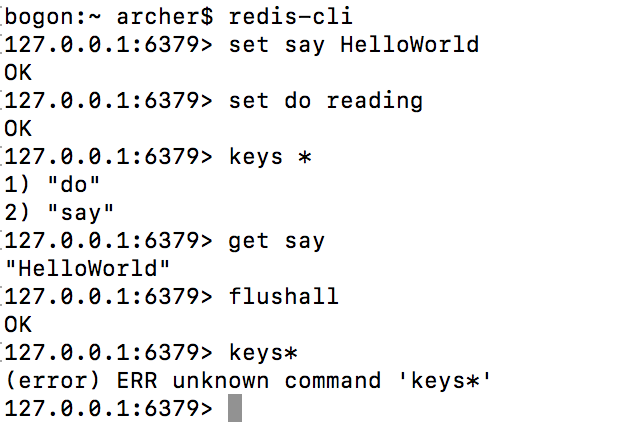
使用redis-cli命令启动redis客户端
redis-cli
使用举例
如果想终止redis
redis-cli shutdown
备注:我使用的是laravel框架,不用自己去考虑php7的redis扩展问题
附录
########brew info php70 命令后的信息###########
==> Caveats
To enable PHP in Apache add the following to httpd.conf and restart Apache:
LoadModule php7_module /usr/local/opt/php70/libexec/apache2/libphp7.so
<FilesMatch .php$>
SetHandler application/x-httpd-php
</FilesMatch>
Finally, check DirectoryIndex includes index.php
DirectoryIndex index.php index.html
The php.ini file can be found in:
/usr/local/etc/php/7.0/php.ini
✩✩✩✩ Extensions ✩✩✩✩
If you are having issues with custom extension compiling, ensure that
you are using the brew version, by placing /usr/local/bin before /usr/sbin in your PATH:
PATH="/usr/local/bin:$PATH"
PHP70 Extensions will always be compiled against this PHP. Please install them
using --without-homebrew-php to enable compiling against system PHP.
✩✩✩✩ PHP CLI ✩✩✩✩
If you wish to swap the PHP you use on the command line, you should add the following to ~/.bashrc,
~/.zshrc, ~/.profile or your shell's equivalent configuration file:
export PATH="$(brew --prefix homebrew/php/php70)/bin:$PATH"
GMP has moved to its own formula, please install it by running: brew install php70-gmp
✩✩✩✩ FPM ✩✩✩✩
To launch php-fpm on startup:
mkdir -p ~/Library/LaunchAgents
cp /usr/local/opt/php70/homebrew.mxcl.php70.plist ~/Library/LaunchAgents/
launchctl load -w ~/Library/LaunchAgents/homebrew.mxcl.php70.plist
The control script is located at /usr/local/opt/php70/sbin/php70-fpm
OS X 10.8 and newer come with php-fpm pre-installed, to ensure you are using the brew version you need to make sure /usr/local/sbin is before /usr/sbin in your PATH:
PATH="/usr/local/sbin:$PATH"
You may also need to edit the plist to use the correct "UserName".
Please note that the plist was called 'homebrew-php.josegonzalez.php70.plist' in old versions
of this formula.
With the release of macOS Sierra the Apache module is now not built by default. If you want to build it on your system
you have to install php with the --with-apache option. See brew options php70 for more details.
To have launchd start josegonzalez/php/php70 now and restart at login:
brew services start josegonzalez/php/php70
########brew info php70 命令后的信息###########
- mac攻略(4) -- 使用brew配置php7开发环境(mac+php+apache+mysql+redis)
[http://www.cnblogs.com/redirect/p/6131751.html] 网上有很多文章都是错误的,因为是copy别人的,作者没有自己亲测,不仅不能给新手提供帮助,还会产生严重 ...
- Mac OS安装Go语言及配置VSCode开发环境:一个工具(gopls)解千愁
前言 截止到目前为止,Go语言已经更新到1.14.1,网上的很多教程均已经过时,我在此汇总并整理一下相关的教程,提供一个适合当下的Mac OS教程. 教程中使用了Go在1.11之后推出的依赖包管理工具 ...
- 第五章 MyEclipse配置hadoop开发环境
1.首先要下载相应的hadoop版本的插件,我这里就给2个例子: hadoop-1.2.1插件:http://download.csdn.net/download/hanyongan300/62381 ...
- IIS 7完全攻略之日志记录配置(摘自网络)
IIS 7完全攻略之日志记录配置 作者:泉之源 [IT168 专稿]除了 Windows 提供的日志记录功能外,IIS 7.0 还可以提供其他日志记录功能.例如,可以选择日志文件格式并指定要记录的请求 ...
- MAC 下用 brew 搭建 PHP 开发环境
Mac下用brew搭建PHP(LNMP/LAMP)开发环境 Mac下搭建lamp开发环境很容易,有xampp和mamp现成的集成环境.但是集成环境对于经常需要自定义一些配置的开发者来说会非常麻烦,而且 ...
- Windows服务器安装配置PHP7.0环境图文教程
摘自http://www.111cn.net/phper/linux-php/109865.htm Windows服务器安装配置PHP7.0环境图文教程 www.111cn.net 更新:2016-0 ...
- Windows2016的 IIS中配置PHP7运行环境
Windows2016的 IIS中配置PHP7运行环境 在Windows 的IIS(8.0)中搭建PHP运行环境: 一:安装IIS服务器 .进入控制面板>>程序和功能>>打开或 ...
- Mac配置Java开发环境
笔者从Window上转到Mac上做开发,一切配置都要重新开始,开发环境配置介绍如下: 1. 下载JDK 从下面链接选择合适版本的安装包进行下载...笔者下载的是jdk-9.0.1 链接:http:// ...
- Mac上通过docker配置PHP开发环境
这篇文章介绍的内容是关于Mac上通过docker配置PHP开发环境,有着一定的参考价值,现在分享给大家,有需要的朋友可以参考一下 更多PHP相关知识请关注我的专栏PHPzhuanlan.zhihu. ...
随机推荐
- 64位虚拟机安装64位ubuntu出现问题
virtualbox 出现this kernel requires an an x86-64 cpu 错误 如题,但是主机是win8 64位,使用virtualbox安装ubuntu-12.04.3- ...
- C++静态成员和静态成员函数
一:静态数据成员: 类体中的数据成员的声明前加上static关键字,该数据成员就成为了该类的静态数据成员.和其他数据成员一样,静态数据成员也遵守public/protected/private访问规则 ...
- 运行在VMware上的Linux虚拟机如何使用NAT模式连接物理机的外部网络
在VMware Workstation中,默认有3个虚拟交换机,分别是VMnet0(使用桥接网络).VMnet1(仅主机网络)和VMnet8(NAT网络). 首先说一下为什么要用NAT模式,如果你的物 ...
- zju(6)中断控制实验
1.实验目的 1.学习和掌握Linux下中断驱动的写法: 二.实验内容 1.编写EduKit-IV实验箱Linux操作系统下按键key的驱动: 2.编写EduKit-IV实验箱Linux操作系统下按键 ...
- jQuery库中的变量$和其它类库的变量$冲突解决方案
jQuery.noConflict();//把变量$给其它插件 /* 由于把jQuery插件中的变量$给了其它插件使用 那么在调用jQuery插件的时候只能使用jQuery 但是这样很不方便 1.其实 ...
- ubuntu下neural-style-master的demo
1.Installing Torch 参考官网:http://torch.ch/docs/getting-started.html git clone https://github.com/torch ...
- JavaScript入门篇 第三天(认识DOM)
认识DOM 文档对象模型DOM(Document Object Model)定义访问和处理HTML文档的标准方法.DOM 将HTML文档呈现为带有元素.属性和文本的树结构(节点树). 先来看看下面代码 ...
- Linux 安装pip
参考:为Linux 系统安装pip pip: "A tool for installing and managing Python packages.",也就是说pip是pytho ...
- Box2D淌坑日记: 如何正确的设置角度
对刚体角度设置的唯一函数是 SetTransform 然而,这个函数不会对传入的角度作任何处理,因此,如果你试图设置一个角度,并应用一个revoluteJoint时,可能会出现问题. 我在实践中碰到的 ...
- css中width的计算方式,以及width:100%的参考系
PS:测试浏览器均为chrome. 首先说下负margin的影响. 正常html页面在显示时,默认是根据文档流的形式显示的.文档流横向显示时,会有一个元素横向排列的基准线,并且以最高元素的vertic ...