
mysql安装方法
MySQL是一个关系型数据库管理系统,由瑞典MySQL AB 公司开发,目前属于 Oracle 旗下公司。MySQL 最流行的关系型数据库管理系统,在 WEB 应用方面MySQL是最好的 RDBMS (Relational Database Management System,关系数据库管理系统) 应用软件之一。
一、Window版本
1、下载
 MySQL Community Server 5.7.16

 http://dev.mysql.com/downloads/mysql/
2、解压
如果想要让MySQL安装在指定目录,那么就将解压后的文件夹移动到指定目录,如:C:\mysql-5.7.16-winx64
3、初始化
MySQL解压后的 bin 目录下有一大堆的可执行文件,执行如下命令初始化数据:
 cd c:\mysql-5.7.16-winx64\bin

 mysqld --initialize-insecure
4、启动MySQL服务
执行命令从而启动MySQL服务
 # 进入可执行文件目录

 cd c:\mysql-5.7.16-winx64\bin

 # 启动MySQL服务

 mysqld
5、启动MySQL客户端并连接MySQL服务
由于初始化时使用的【mysqld --initialize-insecure】命令,其默认未给root账户设置密码
 # 进入可执行文件目录

 cd c:\mysql-5.7.16-winx64\bin

 # 连接MySQL服务器

 mysql -u root -p

 # 提示请输入密码,直接回车
输入回车,见下图表示安装成功:
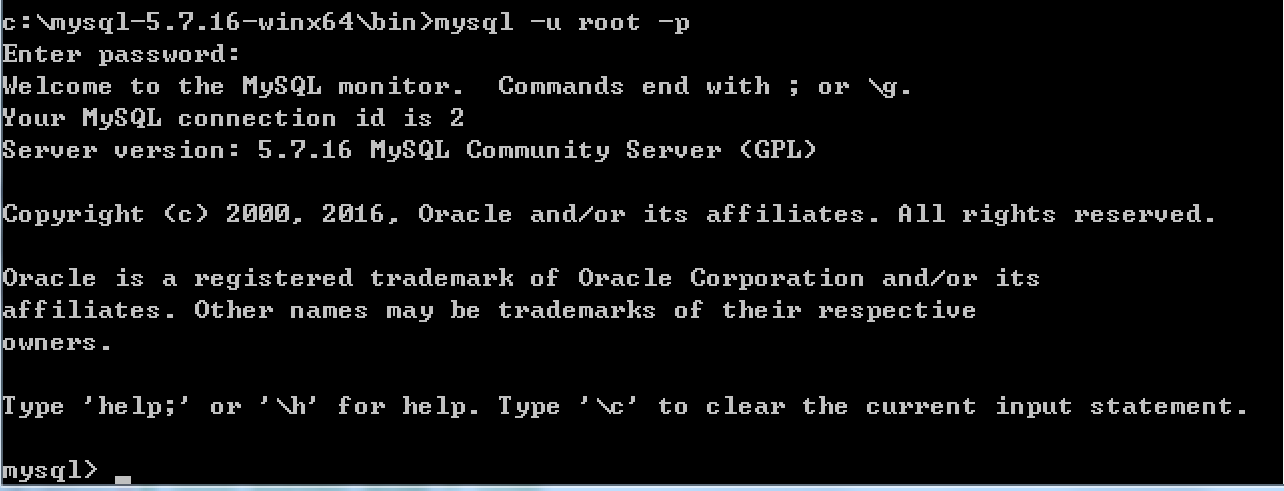
到此为止,MySQL服务端已经安装成功并且客户端已经可以连接上,以后再操作MySQL时,只需要重复上述4、5步骤即可。但是,在4、5步骤中重复的进入可执行文件目录比较繁琐,如想日后操作简便,可以做如下操作。
a. 添加环境变量
将MySQL可执行文件添加到环境变量中,从而执行执行命令即可
【右键计算机】--》【属性】--》【高级系统设置】--》【高级】--》【环境变量】--》【在第二个内容框中找到 变量名为Path 的一行,双击】 --> 【将MySQL的bin目录路径追加到变值值中,用 ; 分割】

如:

C:\Program Files (x86)\Parallels\Parallels Tools\Applications;%SystemRoot%\system32;%SystemRoot%;%SystemRoot%\System32\Wbem;%SYSTEMROOT%\System32\WindowsPowerShell\v1.0\;C:\Python27;C:\Python35;C:\mysql-5.7.16-winx64\bin
如此一来,以后再启动服务并连接时,仅需:
 # 启动MySQL服务,在终端输入

 mysqld

 # 连接MySQL服务,在终端输入:

 mysql -u root -p
b. 将MySQL服务制作成windows服务
上一步解决了一些问题,但不够彻底,因为在执行【mysqd】启动MySQL服务器时,当前终端会被hang住,那么做一下设置即可解决此问题:
 # 制作MySQL的Windows服务,在终端执行此命令:

 "c:\mysql-5.7.16-winx64\bin\mysqld" --install

 # 移除MySQL的Windows服务,在终端执行此命令:

 "c:\mysql-5.7.16-winx64\bin\mysqld" --remove
注册成服务之后,以后再启动和关闭MySQL服务时,仅需执行如下命令:
 # 启动MySQL服务

 net start mysql

 # 关闭MySQL服务

 net stop mysql
二、Linux版本
1、采用二进制包安装mysql
二进制软件包名称
mysql-5.5.49-linux2.6-x8.6_64.tar.gz
添加用户和组
groupadd mysql

useradd -s /sbin/nologin -g mysql -M mysql

tail -1 /etc/passwd

id mysql
开始安装MySQL
 [root@template ]# mkdir -p /home/oldboy/tools

 [root@template ]# cd /home/oldboy/tools

 [root@template tools]# wget http://dev.mysql.com/get/Downloads/MySQL-5.5/mysql-5.5.49-linux2.6-x86_64.tar.gz

 [root@template tools]# tar xf mysql-5.5.49-linux2.6-x86_64.tar.gz

 [root@template tools]# mkdir -p /application/

 [root@template tools]# mv mysql-5.5.49-linux2.6-x86_64 /application/mysql-5.5.49

 [root@template tools]# ln -s /application/mysql-5.5.49/ /application/mysql

 [root@template tools]# ls -l /application/mysql

 lrwxrwxrwx 1 root root 26 10月 27 10:28 /application/mysql -> /application/mysql-5.5.49/

 [root@template tools]# cd /application/mysql/

 [root@template mysql]# ls -l support-files/*.cnf

 -rw-r--r-- 1 7161 wheel  4691 3月   1 2016 support-files/my-huge.cnf

 -rw-r--r-- 1 7161 wheel 19759 3月   1 2016 support-files/my-innodb-heavy-4G.cnf

 -rw-r--r-- 1 7161 wheel  4665 3月   1 2016 support-files/my-large.cnf

 -rw-r--r-- 1 7161 wheel  4676 3月   1 2016 support-files/my-medium.cnf

 -rw-r--r-- 1 7161 wheel  2840 3月   1 2016 support-files/my-small.cnf

 #复制my.cnf 配置文件

 [root@template mysql]# /bin/cp support-files/my-small.cnf /etc/my.cnf

 [root@template mysql]# mkdir -p /application/mysql/data

 [root@template mysql]# chown -R mysql.mysql /application/mysql/
初始化数据库
 [root@template mysql]# /application/mysql/scripts/mysql_install_db --basedir=/application/mysql --datadir=/application/mysql/data --user=mysql

 Installing MySQL system tables...

 161027 10:30:22 [Note] /application/mysql/bin/mysqld (mysqld 5.5.49) starting as process 1958 ...

 OK

 Filling help tables...

 161027 10:30:23 [Note] /application/mysql/bin/mysqld (mysqld 5.5.49) starting as process 1965 ...

 OK

 To start mysqld at boot time you have to copy

 support-files/mysql.server to the right place for your system

 PLEASE REMEMBER TO SET A PASSWORD FOR THE MySQL root USER !

 To do so, start the server, then issue the following commands:

 /application/mysql/bin/mysqladmin -u root password 'new-password'

 /application/mysql/bin/mysqladmin -u root -h template.com password 'new-password'

 Alternatively you can run:

 /application/mysql/bin/mysql_secure_installation

 which will also give you the option of removing the test

 databases and anonymous user created by default.  This is

 strongly recommended for production servers.

 See the manual for more instructions.

 You can start the MySQL daemon with:

 cd /application/mysql ; /application/mysql/bin/mysqld_safe &

 You can test the MySQL daemon with mysql-test-run.pl

 cd /application/mysql/mysql-test ; perl mysql-test-run.pl

 Please report any problems at http://bugs.mysql.com/
添加数据库文件
 [root@template mysql]# cp support-files/mysql.server  /etc/init.d/mysqld

 [root@template mysql]# chmod +x /etc/init.d/mysqld

 [root@template mysql]# ll /etc/init.d/mysqld

 -rwxr-xr-x 1 root root 10880 Oct 27 10:31 /etc/init.d/mysqld
二进制默认路径为/usr/local/mysql 启动脚本里面的路径要更改
[root@template mysql]# sed -i 's#/usr/local/mysql#/application/mysql#g' /application/mysql/bin/mysqld_safe /etc/init.d/mysqld
启动mysql数据库
 [root@template mysql]# /etc/init.d/mysqld start

 Starting MySQL.. SUCCESS!
检查mysql数据库是否启动
 [root@template mysql]# netstat -lntup|grep mysql

 tcp        0      0 0.0.0.0:3306                0.0.0.0:*                   LISTEN      2224/mysqld
设置mysql 开机自启动
 [root@template mysql]# chkconfig --add mysqld

 [root@template mysql]# chkconfig mysqld on

 [root@template mysql]# chkconfig --list mysqld

 mysqld          0:off   1:off   2:on    3:on    4:on    5:on    6:off
配置开机自启动
 echo "#mysql start by huzhihua at 2016-10-27" >>/etc/rc.local

 echo "/etc/init.d/mysqld start" >>/etc/rc.local

 [root@template mysql]# tail -2 /etc/rc.local

 #mysql start by huzhihua at 2016-10-27

 /etc/init.d/mysqld start
配置mysql命令的全局使用路径
 [root@template mysql]# echo 'export PATH=/application/mysql/bin:$PATH' >>/etc/profile

 [root@template mysql]# tail -1 /etc/profile

 export PATH=/application/mysql/bin:$PATH

 [root@template mysql]# source /etc/profile

 [root@template mysql]# echo $PATH

 /application/mysql/bin:/usr/local/sbin:/usr/local/bin:/sbin:/bin:/usr/sbin:/usr/bin:/root/bin
登录mysql
别外三种登录方法:
 mysql -uroot -p,

 mysql -uroot

 mysql -uroot -p 'oldboy123'

 [root@template mysql]# mysql

 Welcome to the MySQL monitor.  Commands end with ; or \g.

 Your MySQL connection id is 1

 Server version: 5.5.49 MySQL Community Server (GPL)

 Copyright (c) 2000, 2016, Oracle and/or its affiliates. All rights reserved.

 Oracle is a registered trademark of Oracle Corporation and/or its

 affiliates. Other names may be trademarks of their respective

 owners.

 Type 'help;' or '\h' for help. Type '\c' to clear the current input statement.

 mysql> exit   #退出
请退出mysql,再设置密码
mysqladmin -u root password ''
2、采用yum的方式安装mysql
安装:
|
1
|
yum install mysql-server |
服务端启动
|
1
|
mysql.server start |
mysql安装方法的更多相关文章
- Mysql安装方法介绍
MySQL的yum安装方法 centos7默认不再使用mysql而是用mariadb来代替mysql [root@yxh6 ~]# yum install mysql-server 已加载插件:fas ...
- Linux的MySQL安装方法
第一种: APT方式安装 在ubuntu系统的apt软件仓库中,默认存在MySQL数据库 在用户模式下使用命令: apt/apt-get install mysql-server mysql-cli ...
- MySQL 安装方法
所有平台的Mysql下载地址为: MySQL 下载. 挑选你需要的 MySQL Community Server 版本及对应的平台. Linux/UNIX上安装Mysql Linux平台上推荐使用RP ...
- MySql安装方法和配置、解决中文乱码
MySql Server安装步骤 1安装MySql Server 2 安装MySqlServer管理工具 解压中文语言包,将文件复制到安装目录下覆盖 文件覆盖后,打开软件设置语言为中文(CN) 3 M ...
- 模拟生成环境的MySQL安装方法-通用二进制方式安装
模拟生成环境的MySQL安装方法-通用二进制方式安装 作者:尹正杰 版权声明:原创作品,谢绝转载!否则将追究法律责任. 一.并发响应用户请求的网络IO模型 1>.单进程 特点:一个进程响应一个请 ...
- linux系统下yum 安装mysql的方法
菜鸟一个,记录下yum 安装mysql的方法,给需要的朋友也做个参考吧. 弄了个新vps,想安装最新版的mysql,网上查了相关资料,记录如下: 1.安装查看有没有安装过: yum ...
- mysql 安装失败解决方法
在安装mysql的过程中,出现的最麻烦的问题和解决方法 安装后,启动不成功,就卡了,程序就没有响应. 如何解决: 找到mysql安装目录下的 #Path to the database root da ...
- MySQL的热备percona-xtrabackup、innobackupex的安装方法
http://blog.csdn.net/dbanote/article/details/13295727 http://blog.csdn.net/yangzhawen/article/detail ...
- 【Vegas原创】Mysql绿色版安装方法
所谓的绿色版,就是没有installer的MySQL,完全需要靠人工来操作,好处是,重装系统后,只要再做一次本次配置,即可使用. 具体操作方法: 1,设置系统环境变量, 在Path中添加 D:\mys ...
随机推荐
- ubuntu 安装配置jdk+eclipse+android sdk
共5步: 1.安装jdk 2.安装eclipse 3.安装android-sdk 4.安装adb 5.在eclipse中安装ADT 1.安装jdk 之前已经安装好了. 用下面的命令安装,只需一些时间, ...
- 如何更改nginx网站根目录 以及解析php
nginx默认网站根目录为/usr/local/nginx/html,如果想要将它改成/data/www 需配置 vim /usr/local/nginx/conf/nginx.conf 将其中的字段 ...
- JavaScript实现简单的双向绑定
很多的前端框架都支持数据双向绑定了,最近正好在看双向绑定的实现,就用Javascript写了几个简单的例子. 几个例子中尝试使用了下面的方式实现双向绑定: 发布/订阅模式 属性劫持 脏数据检测 发布/ ...
- 解决android中Layout文件下的xml文件配好后,R类中不能自动生成相应代码
不能更新的原因: 1.在xml文件中代码错误或者格式错误 2.eclipse 编译器是老版本 3.布局文件的文件名有大写字母 4.含有相同文件名.格式的xml文件 解决方法: 1.找到出错的xml文件 ...
- CPU和GPU性能对比
计算20000次10000点的fft,分别使用CPU和GPU,得 the running time of cpu is : 2.3696s the running time of gpu is : 0 ...
- AC日记——单词倒排 1.7 28
28:单词倒排 总时间限制: 1000ms 内存限制: 65536kB 描述 编写程序,读入一行英文(只包含字母和空格,单词间以单个空格分隔),将所有单词的顺序倒排并输出,依然以单个空格分隔. 输 ...
- 转:HTML网页中插入视频各种方法
现在如果要在页面中使用video标签,需要考虑三种情况,支持Ogg Theora或者VP8(如果这玩意儿没出事的话)的(Opera.Mozilla.Chrome),支持H.264的(Safari.IE ...
- 怎样使用VMware Workstation(虚拟机)
怎样使用VMware Workstation(虚拟机) 听语音 浏览:66981 | 更新:2010-12-06 16:26 | 标签:vmware 1 2 3 4 5 6 7 分步阅读 一键约师傅 ...
- ACCP7.0-S2-复习自测-15测试分析
3.下列关于java中集合接口的说法不正确的是(). A: B: C: D: 正确答案是 D 4. (选择一项) A: B: C: D: 正确答案是 D 5. (选择一项) A: B: C: D: ...
- rownum和sum一起使用经验
因为sum的使用需要group by的,所以,对于sum出来的东西想要排序,使用rownum的话,不能直接放在SQL里面的. 可以这样. select rownum,R.* ( select sum( ...