
Linux YUM 配置源
Linux Yum 简介
YUM是交互式的以rpm为基础的软件包管理工具。YUM可以根据仓库的元数据信息,去自动的实现系统更新,包括依赖性分析,过期软件包处理。我们也可以利用yum来进行软件安装,删除旧包。也可以通过其他命令或服务来查询已经安装或可以安装的包。
YUM仓库源的配置
当我们想要使用yum 安装、更新包的时候我们要先配置yum 仓库。就是软件的源头。我们向安装包的时候,必须有可提供给我们下载包的仓库,否则我们是没有办法安装和更新包的。
配置YUM仓库源,有几种方式,一种是网络仓库源,就是一些公司开放到网络的仓库,另一种就是我们本地的仓库,例如网盘,或者其他。
配置本地仓库源
#YUM仓库源配置文件的地址

[root@node1 ~]# cd /etc/yum.repos.d/

#手动添加仓库源

[root@node1 yum.repos.d]# mkdir -p /mnt/cdrom

#/dev/sr0为我们光盘的设备,将它挂载到/mnt/cdrom目录下:

[root@node1 yum.repos.d]# mount /dev/sr0 /mnt/cdrom

#编辑配置仓库,enable表示仓库是否使用,gpgcheck表示是否校验包,这里因为是自己的光盘。所以就不做gpgcheck

# baseurl指向我们仓库的地址,因为仓库源在本地所以使用/mnt/cdrom

# 本地仓库源使用file://协议

# name是自己起的名字,方便区分

[root@node1 yum.repos.d]# vi local.repo

[local]

name=local

baseurl=file:///mnt/cdrom

enable=1

gpgcheck=0
配置公网源
配置aliyun地址
centos镜像-centos下载地址-centos安装教程-阿里巴巴开源镜像站 (aliyun.com)
######此处地址由aliyun官方提供
2. 下载新的 CentOS-Base.repo 到 /etc/yum.repos.d/

centos8(centos8官方源已下线,建议切换centos-vault源)

wget -O /etc/yum.repos.d/CentOS-Base.repo https://mirrors.aliyun.com/repo/Centos-vault-8.5.2111.repo

或者

curl -o /etc/yum.repos.d/CentOS-Base.repo https://mirrors.aliyun.com/repo/Centos-vault-8.5.2111.repo

centos6(centos6官方源已下线,建议切换centos-vault源)

wget -O /etc/yum.repos.d/CentOS-Base.repo https://mirrors.aliyun.com/repo/Centos-vault-6.10.repo

或者

curl -o /etc/yum.repos.d/CentOS-Base.repo https://mirrors.aliyun.com/repo/Centos-vault-6.10.repo

CentOS 7

wget -O /etc/yum.repos.d/CentOS-Base.repo https://mirrors.aliyun.com/repo/Centos-7.repo

或者

curl -o /etc/yum.repos.d/CentOS-Base.repo https://mirrors.aliyun.com/repo/Centos-7.repo
#确定自己的操作系统类型

[root@node1 yum.repos.d]# cat /etc/*release

.......

CentOS Linux release 7.9.2009 (Core)

CentOS Linux release 7.9.2009 (Core)

#按照aliyun配置指导,选择适合自己系统的源,我这里是Centos7所以选择Centos-7.repo

[root@node1 yum.repos.d]# cd /etc/yum.repos.d/

[root@node1 yum.repos.d]# wget -O /etc/yum.repos.d/CentOS-Base.repo https://mirrors.aliyun.com/repo/Centos-7.repo

[root@node1 yum.repos.d]# yum clean all

[root@node1 yum.repos.d]# yum makecache
配置163源
使用说明

首先备份/etc/yum.repos.d/CentOS-Base.repo

mv /etc/yum.repos.d/CentOS-Base.repo /etc/yum.repos.d/CentOS-Base.repo.backup

下载对应版本repo文件, 放入/etc/yum.repos.d/(操作前请做好相应备份)

CentOS7    #右键复制网络连接

CentOS6

CentOS5

运行以下命令生成缓存

yum clean all

yum makecache
#地址为自己选择的右键复制网络连接
[root@node1 yum.repos.d]# wget -O 163.repo https://mirrors.163.com/.help/CentOS7-Base-163.repo^C

[root@node1 yum.repos.d]# yum clean all

[root@node1 yum.repos.d]# yum makecache
配置mysql源
有的时候由于配置的yum仓库源里的包不是最新的安装包。我们需要自己配置想要的软件的源, 例如配置mysql或nginx源.
需要先下载以下rpm。安装后会自动配置mysql的源。
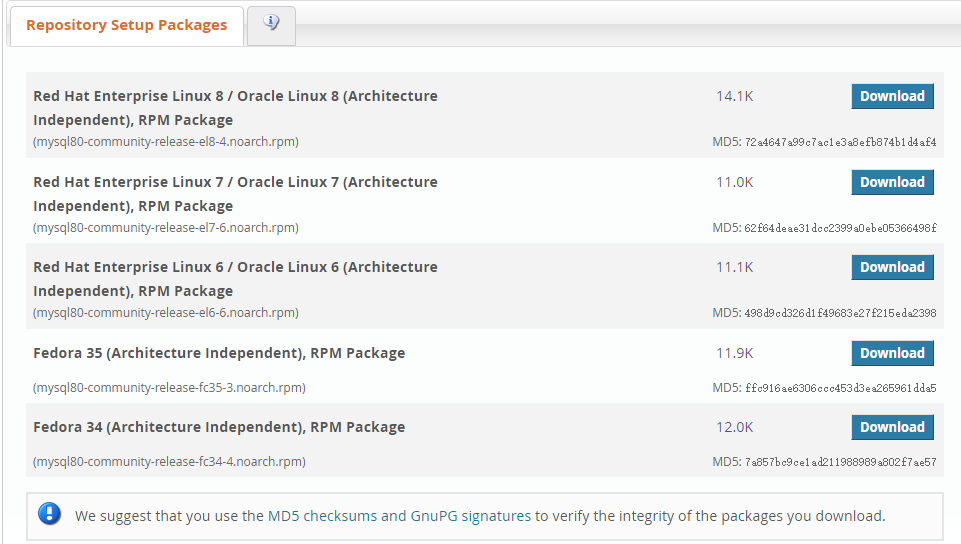
下载该rpm文件上次的服务器上后,安装该rpm文件
[root@node1 ~]# yum install mysql80-community-release-el7-6.noarch.rpm

Loaded plugins: fastestmirror

Examining mysql80-community-release-el7-6.noarch.rpm: mysql80-community-release-el7-6.noarch

Marking mysql80-community-release-el7-6.noarch.rpm to be installed

Resolving Dependencies

--> Running transaction check

---> Package mysql80-community-release.noarch 0:el7-6 will be installed

--> Finished Dependency Resolution

Dependencies Resolved

================================================================================================================================================================================================================

 Package                                                 Arch                                 Version                               Repository                                                             Size

================================================================================================================================================================================================================

Installing:

 mysql80-community-release                               noarch                               el7-6                                 /mysql80-community-release-el7-6.noarch                                10 k

Transaction Summary

================================================================================================================================================================================================================

Install  1 Package

Total size: 10 k

Installed size: 10 k

Is this ok [y/d/N]: y

Downloading packages:

Running transaction check

Running transaction test

Transaction test succeeded

Running transaction

  Installing : mysql80-community-release-el7-6.noarch                                                                                                                                                       1/1

  Verifying  : mysql80-community-release-el7-6.noarch                                                                                                                                                       1/1

Installed:

  mysql80-community-release.noarch 0:el7-6

Complete!
查看mysql80-community-release rpm的安装文件,这样mysql仓库源就配置好了。我们可以根据需要自己enable或disable不同版本的源。
[root@node1 ~]# rpm -ql mysql80-community-release

/etc/RPM-GPG-KEY-mysql

/etc/RPM-GPG-KEY-mysql-2022

/etc/yum.repos.d/mysql-community-debuginfo.repo

/etc/yum.repos.d/mysql-community-source.repo

/etc/yum.repos.d/mysql-community.repo

[root@node1 ~]# cd /etc/yum.repos.d/

[root@node1 yum.repos.d]# cat mysql-community.repo

# Enable to use MySQL 5.7

[mysql57-community]

name=MySQL 5.7 Community Server

baseurl=http://repo.mysql.com/yum/mysql-5.7-community/el/7/$basearch

enabled=0

gpgcheck=1

gpgkey=file:///etc/pki/rpm-gpg/RPM-GPG-KEY-mysql-2022

       file:///etc/pki/rpm-gpg/RPM-GPG-KEY-mysql

[mysql80-community]

name=MySQL 8.0 Community Server

baseurl=http://repo.mysql.com/yum/mysql-8.0-community/el/7/$basearch

enabled=1

gpgcheck=1

gpgkey=file:///etc/pki/rpm-gpg/RPM-GPG-KEY-mysql-2022

       file:///etc/pki/rpm-gpg/RPM-GPG-KEY-mysql
安装最新版本mysql-community
yum repolist all | grep mysql

yum-config-manager --disable mysql57-community

yum-config-manager --enable mysql80-community

yum repolist enabled | grep mysql

yum install mysql-community-server
Linux YUM 配置源的更多相关文章
- Linux Yum仓库源配置
Yum概念:Yum软件仓库的作用是为了进一步简化RPM管理软件的难度以及自动分析所需软件包及其依赖关系的技术 Yum配置仓库源放置位置:/etc/yum.repo.d/ :配置文件需以 .repo 结 ...
- linux yum 本地源配置
1.查看硬盘情况 lsblk sr0就是光驱了 2.执行挂载命令 查看光驱cd /devls 执行命令 mount /dev/sr0 /mnt 将光驱挂载到 /mnt 目录 这样光驱就挂载好了 2. ...
- linux yum配置本地iso镜像
1.本地源配置:cdiso.repo 将iso镜像文件中所有内容复制到/public/software/cdrom 中,节点将本地yum指向此处. [root@node19 ~]# vim /etc/ ...
- linux yum配置
yum源模版 vi /etc/yum.repos.d/xxx.repo [rhel-server]name=serverbaseurl=file:///media/disk/Serverenabled ...
- linux yum配置代理
yum里面可以单独设置代理就是yum源的参数加proxy=“http://ip:PORT”即在/etc/yum.conf中加入下面几句.proxy=http://210.45.72.XX:808pro ...
- RedHat Linux RHEL6配置本地YUM源
YUM是Yellow dog Updater Modified的简称,起初是由yellow dog这一发行版的开发者Terra Soft研发,用python写成,那时还叫做yup(yellow dog ...
- RedHat Enterprise Linux下配置yum源(尝试过的可行方案)
转自:http://bbs.51cto.com/thread-861410-1.html 一.在linux 6.1中本地yum源配置:首先编辑yum源配置文件我们可以再这个目录中新创建一个配置文件,v ...
- Linux下配置yum源为阿里云或网易的详解
一.yum源概述 yum需要一个yum库,也就是yum源.默认情况下,CentOS就有一个yum源.在/etc/yum.repos.d/目录下有一些默认的配置文件(可以将这些文件移到/opt下,或者直 ...
- Linux yum源配置
Linux yum源配置 本文介绍Red Hat下yum源配置方法,Redhat使用yum网络源需要购买服务,但是本地yum源不会收费. CentOS用户自带yum源,并且yum不收费. 准备工具: ...
随机推荐
- Windbg调试工具命令详解
.cls -------------------------------清屏 ~ ----------------------------------查看当前程序的所有线程 ~0s --------- ...
- 记一次 PHP 省市县三级联动 数据库取值
/** * Notes:省市县三级联动 * Created by depressiom * Date: 2022年4月14日 */ public function getCityData(){ //获 ...
- [题解] 序列(sequence)
题目大意 给定一个长度为 \(N\) 的非负整数序列 \(A_1,A_2, \ldots ,A_N\),和一个正整数 \(M\).序列 \(A\) 满足 \(\forall 1 \le i \ ...
- 1.6 为什么要学Linux,它比Windows好在哪里?
早在 20 世纪 70 年代,UNIX 系统是开源而且免费的,但是在 1979 年时,AT&T 公司宣布了对 UNIX 系统的商业化计划,随之开源软件业转变成了版权式软件产业,源代码被当作商业 ...
- 实战 target 选择器,解放生产力!
大家好,我是半夏,一个刚刚开始写文的沙雕程序员.如果喜欢我的文章,可以关注 点赞 加我微信:frontendpicker,一起学习交流前端,成为更优秀的工程师-关注公众号:搞前端的半夏,了解更多前端知 ...
- RabbitMQ 3.9( 基础 )
1.认识MQ 1.1.什么是MQ? MQ全称:message queue 即 消息队列 这个队列遵循的原则:FIFO 即 先进先出 队列里面存的就是message 1.2.为什么要用MQ? 1.2.1 ...
- 面试简历书写、Flask框架介绍与快速使用、Flask演示登录页面、用户信息页面案例
今日内容概要 面试简历编写 Flask框架介绍与安装 内容详细 1.面试简历编写 # 千万不要几个小时把简历凑出来 几天到一周 # 有没有面试机会,取决于简历写得怎么样 简历写好是第一步 # 投简历的 ...
- leetcode 643. Maximum Average Subarray I 子数组最大平均数 I
一.题目大意 https://leetcode.cn/problems/maximum-average-subarray-i/ 给你一个由 n 个元素组成的整数数组 nums 和一个整数 k . 请你 ...
- 将MySQL查询结果导出到Excel
总结将mysql的查询结果导出到文件的方法 总结 使用命令 select user, host, password from mysql.user into outfile '/tmp/user.xl ...
- 好客租房1-React基础目标
学习目标 能够说出React是什么 掌握react的特点 掌握react的基本使用 能够使用react脚手架 学习目录 react概述 react基本使用 react脚手架