
读取本地xml或json等本地文件报错Failed to load file:///D:/xml/test.xml: Cross origin requests are only supported for protocol schemes: http, data, chrome, chrome-extension, https.

问题如上图;
原因及解析:
在浏览器打开本地的html文件, 上面proxy中的url获取的就是一个本地文件, 协议是file://,如果是在服务器启动的话,则使用的是http或者https协议。
出于安全性考虑, Chrome默认禁止了这种用法,file协议和http/https协议不同,会被Chrome认为是跨域访问,所以会报被CORS(Cross-Origin Resource Sharing,跨域资源共享)的安全策略阻止。
原文链接:https://blog.csdn.net/oscar999/article/details/124114343
可以解决的方式是:
将Html文件挂在IIS上以网站方式去访问
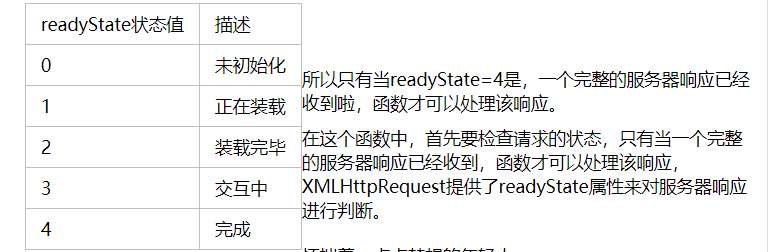
读取本地xml文件参数,获取要得到的图片名,判断图片是否存在
  var xmlObj = false;

        function DownloadPng() {

            //判断是否是IE浏览器

            if (window.ActiveXObject) {

                xmlObj = new ActiveXObject("Microsoft.XMLHTTP");

            }

            else if (window.XMLHttpRequest) {

                xmlObj = new XMLHttpRequest();

            }

            xmlObj.open('GET', 'PngInfo.xml', true);

            //使用异步方式所以要在XMLHttpRequest对象的状态改变时做相应的处理

            xmlObj.onreadystatechange = function () {

                //判断XMLHttpRequest的状态,如果是4 ,继续处理

                if (xmlObj.readyState == 4) {

                    //需要判断返回状态时否是200

                    if (xmlObj.status == 200) {

                        DoXml();

                    }

                }

            }

            //发送请求,因为是GET,所以send的内容是null

            xmlObj.send(null);

            function DoXml() {

                var xmlDoc = xmlObj.responseXML;

                var imageName = xmlDoc.getElementsByTagName("location")[0].childNodes[0].nodeValue;

                console.log(imageName);

                var location = "file/" + imageName + ".png";

                xmlObj.open("Get", location , true);

                xmlObj.send();

                if (xmlObj.status == 404) {

                    console("图片不存在");

                } else {

                    console("图片存在");

                }

            }
访问的html 后缀待参数,读取参数作为文件名
例如 http://10.0.xx.xxx:8090/download.html?imagename=sssxx01
        var ImageName = "";

        urlinfo = window.location.href; //获取当前页面的

        len = urlinfo.length;//获取url的长度

        offset = urlinfo.indexOf("?");//设置参数字符串开始的位置

        if (offset == -1) {

            ImageName = "不存在";

        }

        else {

            newsidinfo = urlinfo.substr(offset, len)//取出参数字符串 这里会获得类似“id=1”这样的字符串

            newsids = newsidinfo.split("=");//对获得的参数字符串按照“=”进行分割 newsid=newsids[1];

            ImageName = newsids[1];

        }
读取本地xml或json等本地文件报错Failed to load file:///D:/xml/test.xml: Cross origin requests are only supported for protocol schemes: http, data, chrome, chrome-extension, https.的更多相关文章
- jquery读取本地文件,Windows上报错。XMLHttpRequest cannot load xxx. Cross origin requests are only supported for protocol schemes: http, data, chrome, chrome-extension, https, chrome-extension-resource.k.cors.a.c
问题: 测试报告,使用本地的json.txt文件,结果文件读取失败,报错如下: XMLHttpRequest cannot load xxx. Cross origin requests are on ...
- 【chrome错误】Cross origin requests are only supported for protocol schemes: http, data,chrome-extension, https, chrome-extension-reso
使用ajax请求本地文件,chrome会报跨域错误. XMLHttpRequest cannot loadfile:///C:/Users/Li/Desktop/images/alist.json.C ...
- nodejs报错 XMLHttpRequest cannot load localhost:3000/test_date/. Cross origin requests are only supported for protocol schemes: http, data, chrome, chrome-extension, https.
z在请求本地的时候 如果ajax的URL 前面没有http的话 就会报错 jq.js:2 XMLHttpRequest cannot load localhost:3000/test_date/. ...
- 【Google Chrome】 Cross origin requests are only supported for protocol schemes: http, data, chrome, chrome-extension, https, chrome-extension-resource问题解决
问题??打开Google Chrome浏览器报错如下: 结论 浏览器出于安全性考虑,默认对跨域访问禁止 解决方法 给浏览器添加启动参数 --allow-file-access-from-files ...
- XMLHttpRequest cannot load file:///E:/userdialog.html?_=1465888805734. Cross origin requests are only supported for protocol schemes: http, data, chrome, chrome-extension, https, chrome-extension-reso
做前端写静态页面时,采用的是jq easyui框架 在ie与webkit总是加载的时候总是在loading... 而firefox却是正常加载的,总以为是代码写错了, 经过再三的检查以及百度查找,确认 ...
- 如何解决XMLHttpRequest cannot load file:~~~~~~~~~~~. Cross origin requests are only supported for protocol schemes: http, data, chrome, chrome-extension, https, chrome-extension-res
原因:Chrome不支持本地Ajax请求. 解决: 右击Chrome浏览器快捷方式,选择“属性”,在“目标”中加上"--allow-file-access-from-files", ...
- Cross origin requests are only supported for protocol schemes: http, data, chrome, chrome-extension, https.
转自:https://www.zhihu.com/question/20948649?sort=created 我最近也遇到这个问题了,用传统的快捷方式加参数并没有用,不知道是不是和chrome版本有 ...
- 本地数据访问时出现跨域问题Cross origin requests are only supported for protocol schemes: ……
从桌面找到Chrome图标,右键属性,快捷方式,起始位置(安装路径) 注:在cmd中访问Program Files文件的方法 %ProgramFiles%=C:\Program Files %Prog ...
- Ajax本地跨域问题 Cross origin requests are only supported for HTTP
问题:打开本地html文件时,报错如下 Cross origin requests are only supported for protocol schemes: http, data,chrome ...
- 云笔记项目- 上传文件报错"java.lang.IllegalStateException: File has been moved - cannot be read again"
在做文件上传时,当写入上传的文件到文件时,会报错“java.lang.IllegalStateException: File has been moved - cannot be read again ...
随机推荐
- nginx 更改配置client_max_body_size nginx.conf 修改默认限制上传附件大小
Nginx 上传大文件超时解决办法 情况如下:用nginx作代理服务器,上传大文件时(测试上传50m的文件),提示上传超时或文件过大. 原因是nginx对上传文件大小有限制,而且默认是1M.另外,若上 ...
- oracle收缩表和表空间
oracle shrink space收缩表 segment shrink分为两个阶段: 1).数据重组(compact):通过一系列insert.delete操作,将数据尽量排列在段的前面.在这个过 ...
- maven上传jar包或pom文件到远程仓库
一. 步骤 有时候,项目中打好的jar包或pom文件需要上传到远程仓库,步骤总结如下: 安装好maven,网上有很多教程,默认已安装 工程中的settings.xml增加相应的server账号密码: ...
- 代码随想录训练营day 3|59.螺旋矩阵II 加 数组总结篇
59.螺旋矩阵II 题目链接:59.螺旋矩阵II 题目描述:给定一个正整数 n,生成一个包含 1 到 n^2 所有元素,且元素按顺时针顺序螺旋排列的正方形矩阵. 示例: 输入: 3 输出: [ [ 1 ...
- 安全测试-WEB安全渗透测试基础知识(一)
1.1. Web技术演化 1.1.1. 静态页面 在互联网最初开始的时候,Web网站的主要内容是静态的,由文字和图片组成,制作和表现形式也是以表格为主.当时的用户行为也非常简单,仅仅是浏览网页. ...
- xmind某一天突然打不开了
某一天发现xmind双击后,应用未启动 感谢博主:https://www.cnblogs.com/helloLuoLuo/p/11926530.html 将安装目录下的两个ini文件 将文件中将App ...
- kubernetes service服务发现两种方式
service服务发现ClusterIP方式 1.暴露deployment服务 kubectl expose deployment nginx4 --port=8000 --target-port=8 ...
- CentOS7安裝 Nginx + php7 + php-fpm
原文 : https://ivanagyro.medium.com/於centos7安裝-nginx-php7-php-fpm-laravel5-6-df8631681acf安装nginx 1/ 用y ...
- web基础(3):CSS样式
chapter4 CSS样式 html是网页的内容和结构:CSS是网页的样式.内容和样式相分离,便于修改样式. CSS cascading style sheets 层叠样式表.一个内容上面可以添加多 ...
- PCB走线宽度与电流、温度的关系
测试PCB的线长为24cm 其他: