
读取本地xml或json等本地文件报错Failed to load file:///D:/xml/test.xml: Cross origin requests are only supported for protocol schemes: http, data, chrome, chrome-extension, https.

问题如上图;
原因及解析:
在浏览器打开本地的html文件, 上面proxy中的url获取的就是一个本地文件, 协议是file://,如果是在服务器启动的话,则使用的是http或者https协议。
出于安全性考虑, Chrome默认禁止了这种用法,file协议和http/https协议不同,会被Chrome认为是跨域访问,所以会报被CORS(Cross-Origin Resource Sharing,跨域资源共享)的安全策略阻止。
原文链接:https://blog.csdn.net/oscar999/article/details/124114343
可以解决的方式是:
将Html文件挂在IIS上以网站方式去访问
读取本地xml文件参数,获取要得到的图片名,判断图片是否存在
  var xmlObj = false;

        function DownloadPng() {

            //判断是否是IE浏览器

            if (window.ActiveXObject) {

                xmlObj = new ActiveXObject("Microsoft.XMLHTTP");

            }

            else if (window.XMLHttpRequest) {

                xmlObj = new XMLHttpRequest();

            }

            xmlObj.open('GET', 'PngInfo.xml', true);

            //使用异步方式所以要在XMLHttpRequest对象的状态改变时做相应的处理

            xmlObj.onreadystatechange = function () {

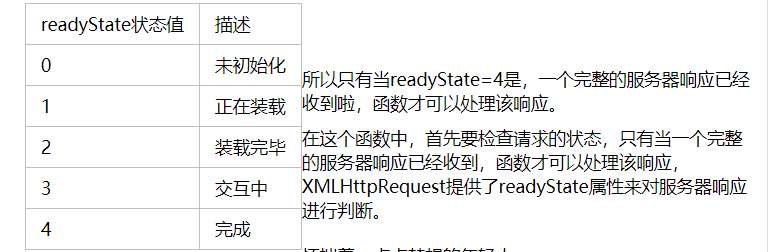
                //判断XMLHttpRequest的状态,如果是4 ,继续处理

                if (xmlObj.readyState == 4) {

                    //需要判断返回状态时否是200

                    if (xmlObj.status == 200) {

                        DoXml();

                    }

                }

            }

            //发送请求,因为是GET,所以send的内容是null

            xmlObj.send(null);

            function DoXml() {

                var xmlDoc = xmlObj.responseXML;

                var imageName = xmlDoc.getElementsByTagName("location")[0].childNodes[0].nodeValue;

                console.log(imageName);

                var location = "file/" + imageName + ".png";

                xmlObj.open("Get", location , true);

                xmlObj.send();

                if (xmlObj.status == 404) {

                    console("图片不存在");

                } else {

                    console("图片存在");

                }

            }
访问的html 后缀待参数,读取参数作为文件名
例如 http://10.0.xx.xxx:8090/download.html?imagename=sssxx01
        var ImageName = "";

        urlinfo = window.location.href; //获取当前页面的

        len = urlinfo.length;//获取url的长度

        offset = urlinfo.indexOf("?");//设置参数字符串开始的位置

        if (offset == -1) {

            ImageName = "不存在";

        }

        else {

            newsidinfo = urlinfo.substr(offset, len)//取出参数字符串 这里会获得类似“id=1”这样的字符串

            newsids = newsidinfo.split("=");//对获得的参数字符串按照“=”进行分割 newsid=newsids[1];

            ImageName = newsids[1];

        }
读取本地xml或json等本地文件报错Failed to load file:///D:/xml/test.xml: Cross origin requests are only supported for protocol schemes: http, data, chrome, chrome-extension, https.的更多相关文章
- jquery读取本地文件,Windows上报错。XMLHttpRequest cannot load xxx. Cross origin requests are only supported for protocol schemes: http, data, chrome, chrome-extension, https, chrome-extension-resource.k.cors.a.c
问题: 测试报告,使用本地的json.txt文件,结果文件读取失败,报错如下: XMLHttpRequest cannot load xxx. Cross origin requests are on ...
- 【chrome错误】Cross origin requests are only supported for protocol schemes: http, data,chrome-extension, https, chrome-extension-reso
使用ajax请求本地文件,chrome会报跨域错误. XMLHttpRequest cannot loadfile:///C:/Users/Li/Desktop/images/alist.json.C ...
- nodejs报错 XMLHttpRequest cannot load localhost:3000/test_date/. Cross origin requests are only supported for protocol schemes: http, data, chrome, chrome-extension, https.
z在请求本地的时候 如果ajax的URL 前面没有http的话 就会报错 jq.js:2 XMLHttpRequest cannot load localhost:3000/test_date/. ...
- 【Google Chrome】 Cross origin requests are only supported for protocol schemes: http, data, chrome, chrome-extension, https, chrome-extension-resource问题解决
问题??打开Google Chrome浏览器报错如下: 结论 浏览器出于安全性考虑,默认对跨域访问禁止 解决方法 给浏览器添加启动参数 --allow-file-access-from-files ...
- XMLHttpRequest cannot load file:///E:/userdialog.html?_=1465888805734. Cross origin requests are only supported for protocol schemes: http, data, chrome, chrome-extension, https, chrome-extension-reso
做前端写静态页面时,采用的是jq easyui框架 在ie与webkit总是加载的时候总是在loading... 而firefox却是正常加载的,总以为是代码写错了, 经过再三的检查以及百度查找,确认 ...
- 如何解决XMLHttpRequest cannot load file:~~~~~~~~~~~. Cross origin requests are only supported for protocol schemes: http, data, chrome, chrome-extension, https, chrome-extension-res
原因:Chrome不支持本地Ajax请求. 解决: 右击Chrome浏览器快捷方式,选择“属性”,在“目标”中加上"--allow-file-access-from-files", ...
- Cross origin requests are only supported for protocol schemes: http, data, chrome, chrome-extension, https.
转自:https://www.zhihu.com/question/20948649?sort=created 我最近也遇到这个问题了,用传统的快捷方式加参数并没有用,不知道是不是和chrome版本有 ...
- 本地数据访问时出现跨域问题Cross origin requests are only supported for protocol schemes: ……
从桌面找到Chrome图标,右键属性,快捷方式,起始位置(安装路径) 注:在cmd中访问Program Files文件的方法 %ProgramFiles%=C:\Program Files %Prog ...
- Ajax本地跨域问题 Cross origin requests are only supported for HTTP
问题:打开本地html文件时,报错如下 Cross origin requests are only supported for protocol schemes: http, data,chrome ...
- 云笔记项目- 上传文件报错"java.lang.IllegalStateException: File has been moved - cannot be read again"
在做文件上传时,当写入上传的文件到文件时,会报错“java.lang.IllegalStateException: File has been moved - cannot be read again ...
随机推荐
- c++的double转string(转)
原文地址:https://www.cnblogs.com/finallyliuyu/p/1810071.html c++中double转换成string型(浮点数的格式化)(转) 在日常编程中-- ...
- Java异常之Error和Exception
异常Exception 实际工作中,遇到的情况不可能是非常完美的.比如:你写的某个模块,用户输入不一定符合你的要求.你的程序要打开某个文件,这个文件可能不存在或者文件格式不对,你要读取数据库的数据,数 ...
- 1839:【05NOIP提高组】谁拿了最多奖学金
1839:[05NOIP提高组]谁拿了最多奖学金 时间限制: 1000 ms 内存限制: 65536 KB提交数: 9569 通过数: 4431 [题目描述] 某校的惯例是在每 ...
- 使用open打开子页面时,父页面关闭子页面操作
<button onclick="open1()">kaiqi</button> <button onclick="close1()&quo ...
- cdn全栈加速nginx二层代理实现
1 nginx.conf中添加配置如下: server { listen 5050; location / { proxy_pass http://代理IP:3333; proxy_set_heade ...
- python_类 对象 属性
1, 类 (class) 类的概念表示某种对象的集合,用于表示某一种相同对象的模板.例如:人作为一个类 由这个"人"类定义出来的内容就是这个类定义出来的对象,类还拥有属性和功能,属 ...
- Angular响应式表单验证输入(跨字段验证、异步API验证)
一.跨字段验证 1.新增验证器 import { AbstractControl, ValidationErrors, ValidatorFn } from '@angular/forms'; exp ...
- 阻止google浏览器自动更新
修改 "C:\Windows\System32\drivers\etc\host 文件,在最后增加 127.0.0.1 update.googleapis.com 保存后 win+r 快捷键 ...
- Jemeter 压测 Elasticsearch
Jemeter 版本 apache-jmeter-5.5 Elasticsearch 版本 7.17.6 自行官网下载 Elasticsearch压测报告 Elasticsearch 服务器当前情况: ...
- 在前端js worker里使用dom并且加载jquery
四个工具: nodejs + npm npm安装的jsdom npm安装的jquery npm安装的browserify 网址: browserify: https://browserify.org/ ...