
spring boot+vue前后端项目的分离(我的第一个前后端分离项目)
文章目录
1、前端vue的搭建
建立项目的过程略
开启一个建立好的vue项目用npm run dev
关闭一个vue项目可在终端操作:ctrl+c
需要注意的几点
1、在建立项目的时候、可以选择路由选项。后续就不需要再次安装路由。
2、安装axiosnpm install --save axios vue-axios
前端项目结构样式
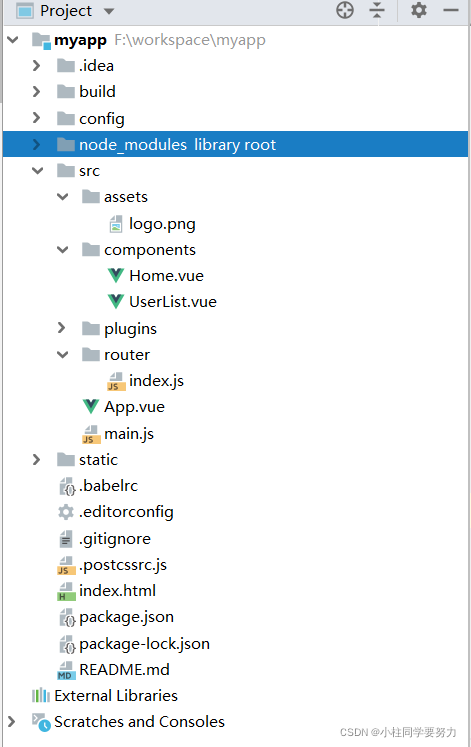
main.js、这个是整个项目的入口、要使用的在这里引入
// The Vue build version to load with the `import` command

// (runtime-only or standalone) has been set in webpack.base.conf with an alias.

import Vue from 'vue'

import './plugins/axios'

import App from './App'

import router from './router'

Vue.config.productionTip = false

/* eslint-disable no-new */

new Vue({

  el: '#app',

  router,

  components: { App },

  template: '<App/>'

})
Vue.js
在这里可以定义跳转到其他页面的连接
<template>

  <div id="app">

    <router-link to="/user">book</router-link>

    <router-view/>

  </div>

</template>

<script>

export default {

  name: 'App'

}

</script>

<style>

#app {

  font-family: 'Avenir', Helvetica, Arial, sans-serif;

  -webkit-font-smoothing: antialiased;

  -moz-osx-font-smoothing: grayscale;

  text-align: center;

  color: #2c3e50;

  margin-top: 60px;

}

</style>
配置的路由
在这里配置各个页面跳转的路由
import Vue from 'vue'

import Router from 'vue-router'

import UserList from '../components/UserList'

import Home from '../components/Home'

Vue.use(Router)

export default new Router({

  routes: [

  {

    path:'/user',

    component:UserList

    },

    {

      path:'/',

      component:Home

    }

  ]

})
组件1、
<template>

    <div>

      这里是首页

    </div>

</template>

<script>

    export default {

        name: "Home"

    }

</script>

<style scoped>

</style>
组件2
(每个组件之间都可以和后台数据交互通过axios)
提示: const _this =this变量的设置,否则会和回调函数搞混
这里和后台进行连接是通过url。这里的url是访问某一个接口的url,就相当于和某个方法进行打通
<template>

    <div>

      <table class="_table">

        <tr class="_tr">

          <td>姓名</td>

          <td>年龄</td>

          <td>邮箱</td>

        </tr>

        <tr v-for="item in books ">

          <td>{{item.bookAuthor}}</td>

          <td>{{item.bookName}}</td>

          <td>{{item.price}}</td>

        </tr>

      </table>

    </div>

</template>

<script>

    export default {

        name: "UserList",

      data(){

          return{

            books:[

              {

                bookName:'java',

                bookAuthor:'小黑',

                price:'33'

              }

            ]

          }

      },

      created() {

          const _this =this

          axios.get('http://localhost:8181/book/findAll').then(function(resp){

         _this.books=resp.data

          })

      }

    }

</script>

<style scoped>

table,td{

  border: 1px solid silver;

}

</style>
2、后端项目的构建
首先构建项目
目录结构这个样子
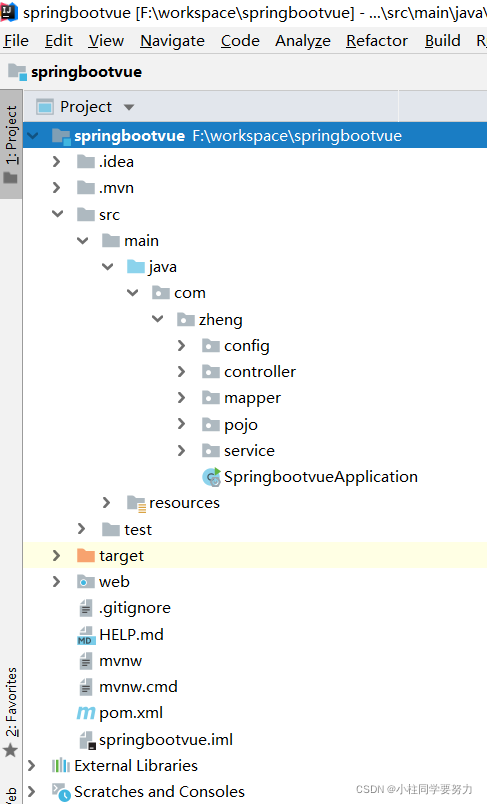
pom文件中引入的jar包
我目前只用到mysql,shiro用来做后续的权限安全验证
<dependencies>

		<dependency>

			<groupId>org.springframework.boot</groupId>

			<artifactId>spring-boot-starter</artifactId>

		</dependency>

		<dependency>

			<groupId>org.springframework.boot</groupId>

			<artifactId>spring-boot-starter-test</artifactId>

			<scope>test</scope>

		</dependency>

        <!--整合shiro

           subject:用户

           security manager:管理所有的用户

           realm:连接数据库

       -->

        <dependency>

            <groupId>org.apache.shiro</groupId>

            <artifactId>shiro-spring</artifactId>

            <version>1.4.1</version>

        </dependency>

        <dependency>

            <groupId>com.github.theborakompanioni</groupId>

            <artifactId>thymeleaf-extras-shiro</artifactId>

            <version>2.0.0</version>

        </dependency>

		<!--整合mybatis-->

		<!-- https://mvnrepository.com/artifact/org.mybatis.spring.boot/mybatis-spring-boot-starter -->

		<dependency>

			<groupId>org.mybatis.spring.boot</groupId>

			<artifactId>mybatis-spring-boot-starter</artifactId>

			<version>2.1.0</version>

		</dependency>

		<dependency>

			<groupId>org.springframework.boot</groupId>

			<artifactId>spring-boot-starter-web</artifactId>

		</dependency>

		<!--   JDBC-->

		<dependency>

			<groupId>org.springframework.boot</groupId>

			<artifactId>spring-boot-starter-jdbc</artifactId>

		</dependency>

		<!--  Mysql-->

		<dependency>

			<groupId>mysql</groupId>

			<artifactId>mysql-connector-java</artifactId>

			<scope>runtime</scope>

		</dependency>

		<dependency>

			<groupId>com.alibaba</groupId>

			<artifactId>druid</artifactId>

			<version>1.1.6</version>

		</dependency>

	</dependencies>
yml文件用来配置连接数据库和端口的设置
spring:

  datasource:

    username: root

    password: root

    url: jdbc:mysql://localhost:3306/ssmbuild?allowMultiQueries=true&characterEncoding=UTF-8&characterSetResults=UTF-8&zeroDateTimeBehavior=convertToNull&useSSL=false

    driver-class-name: com.mysql.cj.jdbc.Driver

    type: com.alibaba.druid.pool.DruidDataSource

    #spring boot 默认是不注入这些属性的,需要自己绑定

    #druid 数据源专有配置

    initiaSize: 5

    minIdle: 5

    maxActive: 20

    maxWait: 60000

    timeBetweenEvictionRunsmMillis: 60000

    minEvictableIdleTimeMillis: 300000

    validationQuery: SELECT 1 FROM DUAL

    testWhileIdle: true

    testOnBorrow: false

    testOnReturn: false

    poolPreparedStatements: true

    filters: stat,wall,log4j

    maxPoolPrepareStatementPerConnectionSize: 20

    useGlobalDataSourceStat: true

    connectionProperties: druid.stat.mergeSql=true;druid.stat.slowSqlMillis=500

server:

  port: 8181
application.property进行一些整合
spring.aop.auto=true

#整合mybatis

mybatis.type-aliases-package=com.zheng.pojo

mybatis.mapper-locations=classpath:mybatis/mapper/*.xml
controller层(这里返回给前端的数据用json)
这里使用RestController返回的就是return的内容
- 知识点:@RestController注解相当于@ResponseBody + @Controller合在一起的作用。
如果需要返回JSON,XML或自定义mediaType内容到页面,则需要在对应的方法上加上@ResponseBody注解。
package com.zheng.controller;

import com.zheng.pojo.Books;

import com.zheng.service.BookService;

import org.springframework.beans.factory.annotation.Autowired;

import org.springframework.web.bind.annotation.GetMapping;

import org.springframework.web.bind.annotation.RequestMapping;

import org.springframework.web.bind.annotation.RestController;

import java.util.List;

@RestController

@RequestMapping("/book")

public class BooksController {

    @Autowired

    BookService bookService;

    //查询所有的书籍信息

    @GetMapping("/findAll")

    public List<Books> findAll() {

        return bookService.queryBookList();

    }

}
service层
package com.zheng.service;

import com.zheng.pojo.Books;

import java.util.List;

public interface BookService {

    /**

     * 查询图书

     */

    public List<Books> queryBookList();

}
imp层
package com.zheng.service.serviceImpl;

import com.zheng.mapper.BooksMapper;

import com.zheng.pojo.Books;

import com.zheng.service.BookService;

import org.springframework.beans.factory.annotation.Autowired;

import org.springframework.stereotype.Service;

import java.util.List;

@Service

public class BookServiceImpl implements BookService {

    @Autowired

    BooksMapper booksMapper;

   //查询书籍

    @Override

    public List<Books> queryBookList() {

        return booksMapper.queryBookList() ;

    }

}
dao层
package com.zheng.mapper;

import com.zheng.pojo.Books;

import org.apache.ibatis.annotations.Mapper;

import org.springframework.stereotype.Repository;

import java.util.List;

@Mapper    //这个注解表示这个是mybatis的mapeper

@Repository

public interface BooksMapper {

    /**

     * 查询图书

     */

   public List<Books> queryBookList();

}
mapper
、这个位置

<?xml version="1.0" encoding="UTF8"?>

<!DOCTYPE mapper

        PUBLIC "-//mybatis.org//DTD Config 3.0//EN"

        "http://mybatis.org/dtd/mybatis-3-mapper.dtd">

<mapper namespace="com.zheng.mapper.BooksMapper">

    <select id="queryBookList" resultType="com.zheng.pojo.Books">

        select * from bookss

    </select>

</mapper>
实体类
可以使用Lombok、我不喜欢使用
package com.zheng.pojo;

public class Books {

    private String bookId;

    private String bookName;

    private String bookAuthor;

    private Double price;

    private String address;

    private String impression;

    private String introduce;

    public Books(String bookId, String bookName, String bookAuthor, Double price, String address, String impression, String introduce) {

        this.bookId = bookId;

        this.bookName = bookName;

        this.bookAuthor = bookAuthor;

        this.price = price;

        this.address = address;

        this.impression = impression;

        this.introduce = introduce;

    }

    public Double getPrice() {

        return price;

    }

    public void setPrice(Double price) {

        this.price = price;

    }

    public Books() { }

    public String getBookId() {

        return bookId;

    }

    public void setBookId(String bookId) {

        this.bookId = bookId;

    }

    public String getBookName() {

        return bookName;

    }

    public void setBookName(String bookName) {

        this.bookName = bookName;

    }

    public String getBookAuthor() {

        return bookAuthor;

    }

    public void setBookAuthor(String bookAuthor) {

        this.bookAuthor = bookAuthor;

    }

    public String getAddress() {

        return address;

    }

    public void setAddress(String address) {

        this.address = address;

    }

    public String getImpression() {

        return impression;

    }

    public void setImpression(String impression) {

        this.impression = impression;

    }

    public String getIntroduce() {

        return introduce;

    }

    public void setIntroduce(String introduce) {

        this.introduce = introduce;

    }

}
额外写一个类、解决跨域问题
package com.zheng.config;

import org.springframework.context.annotation.Configuration;

import org.springframework.web.servlet.config.annotation.CorsRegistry;

import org.springframework.web.servlet.config.annotation.WebMvcConfigurer;

@Configuration

public class CrosConfig implements WebMvcConfigurer {

    public void addCorsMappings(CorsRegistry registry){

        registry.addMapping("/**")

                .allowedOriginPatterns("*")

                .allowedMethods("GET","HEAD","POST","PUT","DELETE","OPTIONS")

                .allowCredentials(true)

                .maxAge(3600)

                .allowedHeaders("*");

    }

}
遇到的问题:
在测试从数据库取数据的时候,那个测试类出了问题。根本原因是spring boot的启动类没有放在根目录。
3、测试
第一步、1、开启后端服务

第二步、开启前端服务

看页面效果
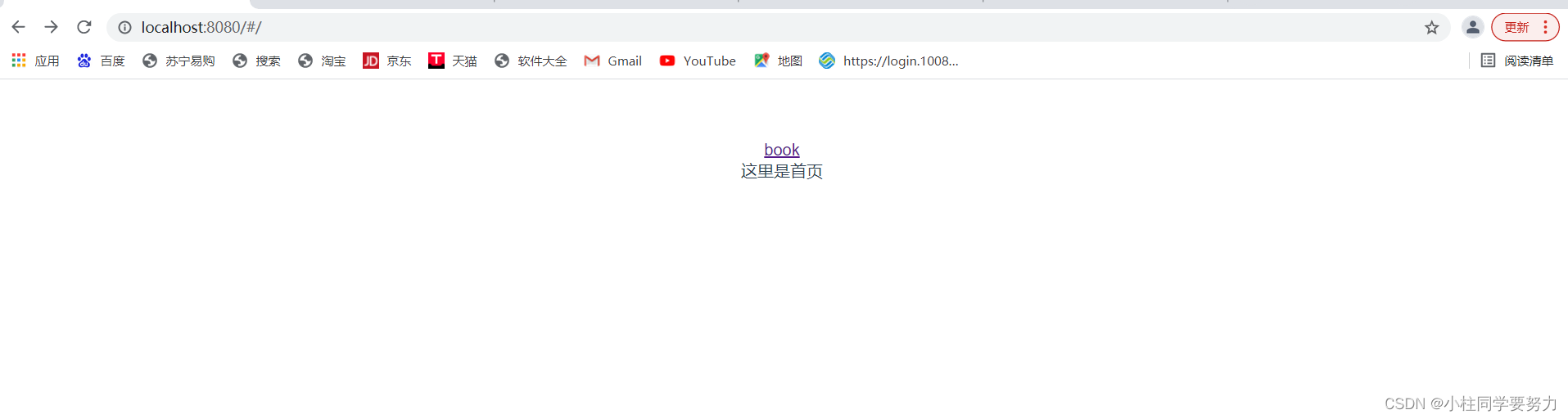
点击book
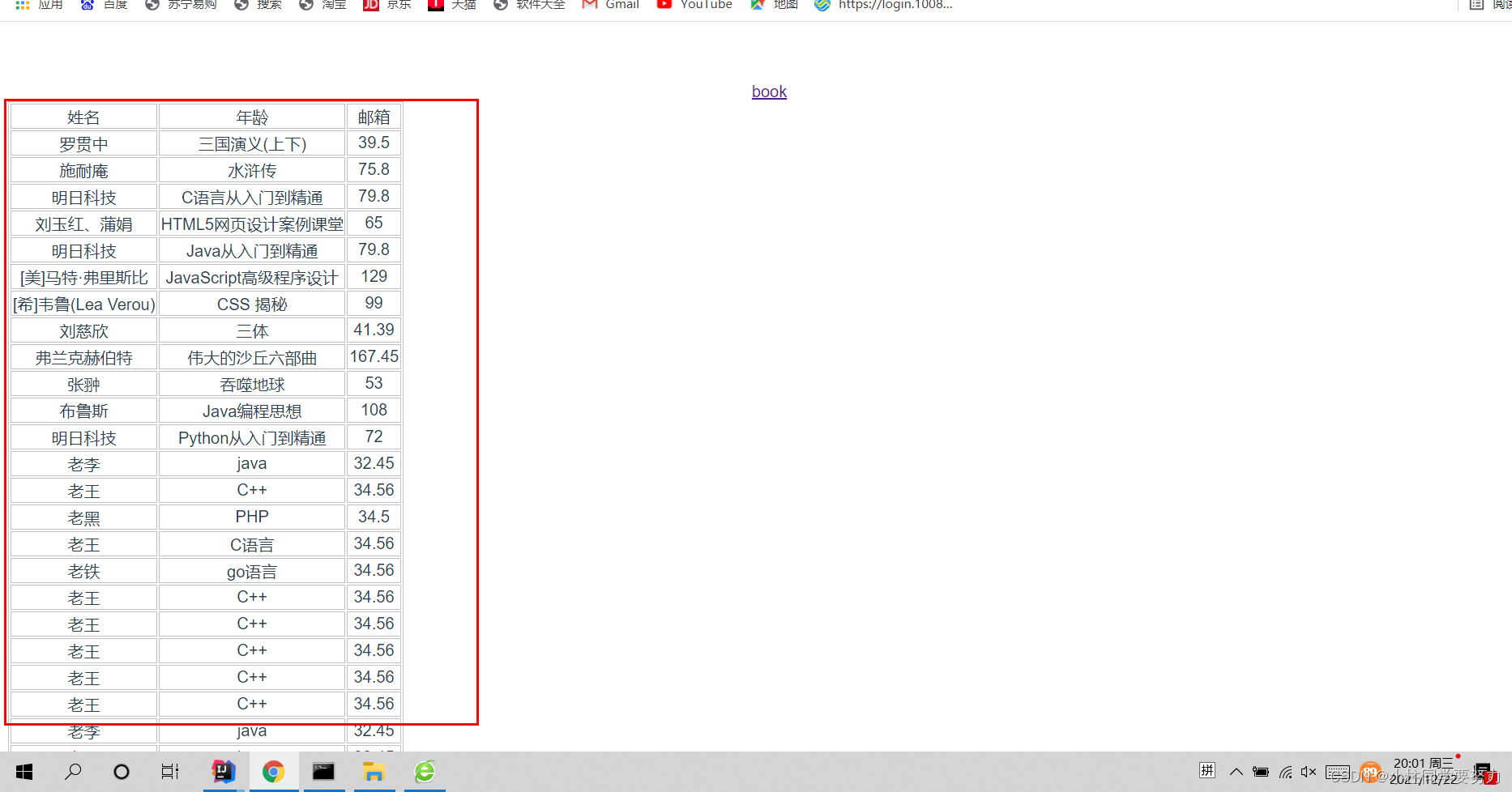
这个是从后端请求来的数据。没做样式、简单打通、可以使用elementui让页面更加美观。
spring boot+vue前后端项目的分离(我的第一个前后端分离项目)的更多相关文章
- 喜大普奔,两个开源的 Spring Boot + Vue 前后端分离项目可以在线体验了
折腾了一周的域名备案昨天终于搞定了. 松哥第一时间想到赶紧把微人事和 V 部落部署上去,我知道很多小伙伴已经等不及了. 1. 也曾经上过线 其实这两个项目当时刚做好的时候,我就把它们部署到服务器上了, ...
- 两个开源的 Spring Boot + Vue 前后端分离项目
折腾了一周的域名备案昨天终于搞定了. 松哥第一时间想到赶紧把微人事和 V 部落部署上去,我知道很多小伙伴已经等不及了. 1. 也曾经上过线 其实这两个项目当时刚做好的时候,我就把它们部署到服务器上了, ...
- 一个实际的案例介绍Spring Boot + Vue 前后端分离
介绍 最近在工作中做个新项目,后端选用Spring Boot,前端选用Vue技术.众所周知现在开发都是前后端分离,本文就将介绍一种前后端分离方式. 常规的开发方式 采用Spring Boot 开发项目 ...
- 前后端分离,我怎么就选择了 Spring Boot + Vue 技术栈?
前两天又有小伙伴私信松哥,问题还是职业规划,Java 技术栈路线这种,实际上对于这一类问题我经常不太敢回答,每个人的情况都不太一样,而小伙伴也很少详细介绍自己的情况,大都是一两句话就把问题抛出来了,啥 ...
- spring boot + vue + element-ui全栈开发入门——开篇
最近经常看到很多java程序员朋友还在使用Spring 3.x,Spring MVC(struts),JSP.jQuery等这样传统技术.其实,我并不认为这些传统技术不好,而我想表达的是,技术的新旧程 ...
- 部署spring boot + Vue遇到的坑(权限、刷新404、跨域、内存)
部署spring boot + Vue遇到的坑(权限.刷新404.跨域.内存) 项目背景是采用前后端分离,前端使用vue,后端使用springboot. 工具 工欲善其事必先利其器,我们先找一个操作L ...
- 给大家整理了几个开源免费的 Spring Boot + Vue 学习资料
最近抽空在整理前面的文章案例啥的,顺便把手上的几个 Spring Boot + Vue 的学习资料推荐给各位小伙伴.这些案例有知识点的讲解,也有项目实战,正在做这一块的小伙伴们可以收藏下. 案例学习 ...
- Spring Boot + Vue 跨域请求问题
使用Spring Boot + Vue 做前后端分离项目搭建,实现登录时,出现跨域请求 Access to XMLHttpRequest at 'http://localhost/open/login ...
- spring boot + vue + element-ui全栈开发入门
今天想弄弄element-ui 然后就在网上找了个例子 感觉还是可以用的 第一步是完成了 果断 拿过来 放到我这里这 下面直接是连接 点进去 就可以用啊 本想着不用vue 直接导入连接 ...
- spring boot + vue + element-ui全栈开发入门——基于Electron桌面应用开发
前言 Electron是由Github开发,用HTML,CSS和JavaScript来构建跨平台桌面应用程序的一个开源库. Electron通过将Chromium和Node.js合并到同一个运行时环 ...
随机推荐
- HTML5 基础学习
HTML 基础学习 参考资料 视频课程:https://www.bilibili.com/video/BV14J4114768 W3C文档:https://webplatform.github.io/ ...
- 程序员的专属浪漫——用3D Engine 5分钟实现烟花绽放效果
谁说程序员不懂浪漫? 作为程序员,用自己的代码本事手搓一个技术感十足的惊喜,我觉得,这是不亚于车马慢时代手写信的古典主义浪漫. 那么,应该怎样创作出具有自我身份属性的浪漫惊喜呢? 玩法很多,今天给大家 ...
- Vue3 发生错误:setup function returned a promise
当你组件中有 Promise 对象时,即 Axios.Ajax 这类的请求,然后把数据渲染到模板中就会报如下图的错误: 在这个异步组件外包裹一个 <Suspense> 组件.比如 App. ...
- 我就获取个时间,机器就down了
本文主要讲解linux 时间管理系统中的一个问题 背景:linux 时间管理,包含clocksource,clockevent,timer,tick,timekeeper等等概念 , 这些概念有机地组 ...
- LOJ6671 EntropyIncreaser 与 Minecraft (生成函数)
题面 EntropyIncreaser 是组合计数大师. EntropyIncreaser 很喜欢玩麦块.当然,EntropyIncreaser 拥有非同常人的超能力,他玩的是MOD版的 n 维麦块, ...
- Spring(四)-声明式事务
Spring-04 声明式事务 1.事务的定义 事务就是由一组逻辑上紧密关联的多个工作单元(数据库操作)而合并成一个整体,这些操作要么都执行,要么都不执行. 2.事务的特性:ACID 1)原子性A : ...
- 利用userfaultfd + setxattr堆占位
利用userfaultfd + setxattr堆占位 很久之前便看到过这个技术的名字,但是由于自己的摆烂,一直没有管.今天终于找到时间好好看一下这个技术的利用方式.利用userfaultfd + s ...
- PLSQL 与 PLPGSQL
KingbaseES 为了更好地适应用户的oracle 应用,实现了对 plsql 的支持,用户可以根据需要使用 plsql 或 plpgsql. 以下简要介绍下二者的差异 一.格式差异 1.plpg ...
- 【读书笔记】C#高级编程 第十一章 LINQ
(一)LINQ概述 语言集成查询(Language Integrated Query,LINQ)在C#编程语言中继承了查询语法,可以用相同的语法访问不同的数据源. 1.LINQ查询 var query ...
- 引擎之旅 前传:C++代码规范
自己以前写代码时,一个项目一个风格.单人开发的工作使得我并没有注意到代码规范性和可读性的问题.每当项目结束后,看到自己杂乱无章的代码,完全没有二次开发和重构的欲望. 写代码就应该像写诗一样优雅. by ...