
ViewBinding 与 Kotlin 委托双剑合璧
请点赞关注,你的支持对我意义重大。
Hi,我是小彭。本文已收录到 GitHub · Android-NoteBook 中。这里有 Android 进阶成长知识体系,有志同道合的朋友,关注公众号 [彭旭锐] 带你建立核心竞争力。
前言
大家好,我是小彭。
过去两年,我们在掘金平台上发表过一些文章,小彭也收到了大家的意见和鼓励。最近,我会陆续搬运到公众号上。
ViewBinding 是 Android Gradle Plugin 3.6 中新增的特性,用于更加轻量地实现视图绑定(即视图与变量的绑定),可以理解为轻量版本的 DataBinding。 在这篇文章里,我将总结 ViewBinding 使用方法 & 原理,示例程序 AndroidFamilyDemo · KotlinDelegate 有用请记得给 Star ,给小彭一点创作的动力。
前置知识:
- Kotlin | 委托机制 & 原理 & 应用
- Kotlin | 扩展函数(终于知道为什么 with 用 this,let 用 it)
- Java | 关于泛型能问的都在这里了(含Kotlin)
- Android | Fragment 核心原理 & 面试题 (AndroidX 版本)
学习路线图
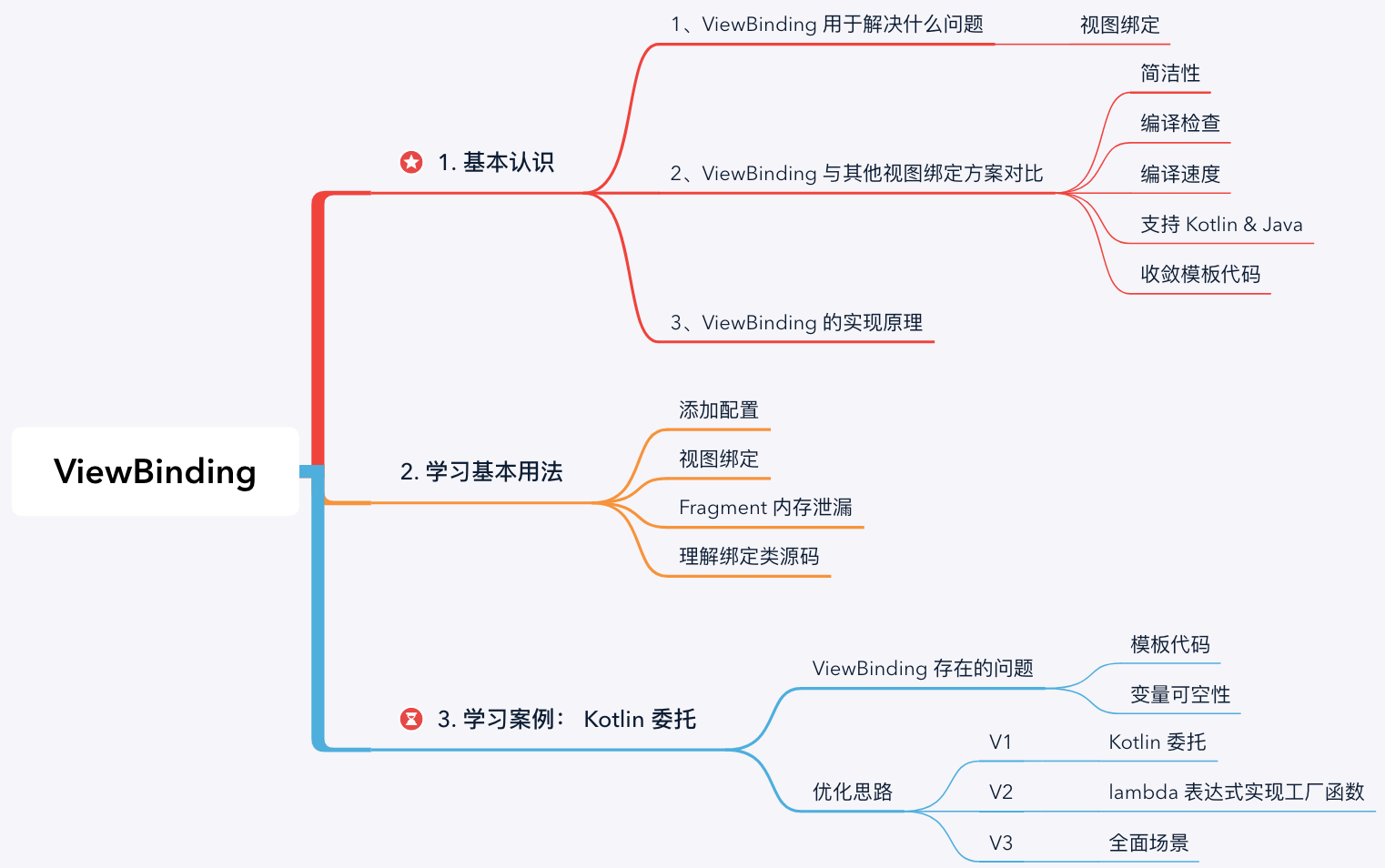
1. 认识 ViewBinding
1.1 ViewBinding 用于解决什么问题?
ViewBinding 是 Android Gradle Plugin 3.6 中新增的特性,用于更加轻量地实现视图绑定(即视图与变量的绑定),可以理解为轻量版本的 DataBinding。
1.2 ViewBinding 与其他视图绑定方案对比
在 ViewBinding 之前,业界已经有过几种视图绑定方案了,想必你也用过。那么,ViewBinding 作为后起之秀就一定比前者香吗?我从多个维度对比它们的区别:
| 角度 | findViewById | ButterKnife | Kotlin Synthetics | DataBinding | ViewBinding | |
|---|---|---|---|---|---|---|
| 简洁性 | ||||||
| 编译期检查 | ||||||
| 编译速度 | ||||||
| 支持 Kotlin & Java | ||||||
| 收敛模板代码 |
- 1、简洁性: findViewById 和 ButterKnife 需要在代码中声明很多变量,其他几种方案代码简洁读较好;
- 2、编译检查: 编译期间主要有两个方面的检查:类型检查 + 只能访问当前布局中的 id。findViewById、ButterKnife 和 Kotlin Synthetics 在这方面表现较差;
- 3、编译速度: findViewById 的编译速度是最快的,而 ButterKnife 和 DataBinding 中存在注解处理,编译速度略逊色于 Kotlin Synthetics 和 ViewBinding;
- 4、支持 Kotlin & Java: Kotlin Synthetics 只支持 Kotlin 语言;
- 5、收敛模板代码: 基本上每种方案都带有一定量的模板代码,只有 Kotlin Synthetics 的模板代码是较少的。
可以看到,并没有一种绝对优势的方法,但越往后整体的效果是有提升的。另外,是什么呢?
1.3 ViewBinding 的实现原理
AGP 插件会为每个 XML 布局文件创建一个绑定类文件 xxxBinding ,绑定类中会持有布局文件中所有带 android:id 属性的 View 引用。例如,有布局文件为 fragment_test.xml ,则插件会生成绑定类 FragmentTestBinding.java 。
那么,所有 XML 布局文件都生成 Java 类,会不会导致包体积瞬间增大?不会的, 未使用的类会在混淆时被压缩。
2. ViewBinding 的基本用法
这一节我们来介绍 ViewBinding 的使用方法,内容不多。
提示: ViewBinding 要求在 Android Gradle Plugin 版本在至少在 3.6 以上。
2.1 添加配置
视图绑定功能按模块级别启用,启用的模块需要在模块级 build.gralde 中添加配置。例如:
build.gradle
android {

    ...

    viewBinding {

        enabled = true

    }

}
对于不需要生成绑定类的布局文件,可以在根节点声明 tools:viewBindingIgnore="true" 。例如:
<LinearLayout

    ...

    tools:viewBindingIgnore="true" >

    ...

</LinearLayout>
2.2 视图绑定
绑定类中提供了 3 个视图绑定 API:
// 绑定到视图 view 上

fun <T> bind(view : View) : T

// 使用 inflater 解析布局,再绑定到 View 上

fun <T> inflate(inflater : LayoutInflater) : T

// 使用 inflater 解析布局,再绑定到 View 上

fun <T> inflate(inflater : LayoutInflater, parent : ViewGroup?, attachToParent : Boolean) : T
- 1、在 Activity 中使用
MainActivity.kt
class TestActivity: AppCompatActivity(R.layout.activity_test) {

    private lateinit var binding: ActivityTestBinding

    override fun onCreate(savedInstanceState: Bundle?) {

        super.onCreate(savedInstanceState)

        binding = ActivityTestBinding.inflate(layoutInflater)

        setContentView(binding.root)

        binding.tvDisplay.text = "Hello World."

    }

}
- 2、在 Fragment 中使用
TestFragment.kt
class TestFragment : Fragment(R.layout.fragment_test) {

    private var _binding: FragmentTestBinding? = null

    private val binding get() = _binding!!

    override fun onViewCreated(root: View, savedInstanceState: Bundle?) {

        _binding = FragmentTestBinding.bind(root)

        binding.tvDisplay.text = "Hello World."

    }

    override fun onDestroyView() {

        super.onDestroyView()

        // 置空

        _binding = null

    }

}
2.3 避免内存泄露
这里有一个隐藏的内存泄露问题,你需要理解清楚(严格来说这并不是 ViewBinding 的问题,即使你采用其它视图绑定方案也要考虑这个问题)。
问题:为什么 Fragment#onDestroyView() 里需要置空绑定类对象,而 Activity 里不需要?
答:Activity 实例和 Activity 视图的生命周期是同步的,而 Fragment 实例和 Fragment 视图的生命周期并不是完全同步的,因此需要在 Fragment 视图销毁时,手动回收绑定类对象,否则造成内存泄露。例如:detach Fragment,或者 remove Fragment 并且事务进入返回栈,此时 Fragment 视图销毁但 Fragment 实例存在。关于 Fragment 生命周期和事务在我之前的一篇文章里讨论过:Android | Fragment 核心原理 & 面试题 (AndroidX 版本)
总之,在视图销毁但是控制类对象实例还存活的时机,你就需要手动回收绑定类对象,否则造成内存泄露。
2.4 ViewBinding 绑定类源码
反编译如下:
ActivityTestBinding.java
public final class ActivityTestBinding implements ViewBinding {

    private final ConstraintLayout rootView;

    public final TextView tvDisplay;

    private ActivityTestBinding (ConstraintLayout paramConstraintLayout1, TextView paramTextView)

        this.rootView = paramConstraintLayout1;

        this.tvDisplay = paramTextView;

    }

    public static ActivityTestBinding bind(View paramView) {

        TextView localTextView = (TextView)paramView.findViewById(2131165363);

        if (localTextView != null) {

            return new ActivityMainBinding((ConstraintLayout)paramView, localTextView);

        }else {

          paramView = "tvDisplay";

        }

        throw new NullPointerException("Missing required view with ID: ".concat(paramView));

    }

    public static ActivityMainBinding inflate(LayoutInflater paramLayoutInflater) {

        return inflate(paramLayoutInflater, null, false);

    }

    public static ActivityMainBinding inflate(LayoutInflater paramLayoutInflater, ViewGroup paramViewGroup, boolean paramBoolean) {

        paramLayoutInflater = paramLayoutInflater.inflate(2131361821, paramViewGroup, false);

        if (paramBoolean) {

            paramViewGroup.addView(paramLayoutInflater);

        }

        return bind(paramLayoutInflater);

    }

    public ConstraintLayout getRoot() {

        return this.rootView;

    }

}
3. ViewBinding 与 Kotlin 委托双剑合璧
到这里,ViewBinding 的使用教程已经说完了。但是回过头看,有没有发现一些局限性呢?
- 1、创建和回收 ViewBinding 对象需要重复编写样板代码,特别是在 Fragment 中使用的案例;
- 2、binding 属性是可空的,也是可变的,使用起来不方便。
那么,有没有可优化的方案呢?我们想起了 Kotlin 属性委托,关于 Kotlin 委托机制在我之前的一篇文章里讨论过:Kotlin | 委托机制 & 原理。如果你还不太了解 Kotlin 委托,下面的内容对你会有些难度。下面,我将带你一步步封装 ViewBinding 属性委托工具。首先,我们梳理一下我们要委托的内容与需求,以及相应的解决办法:
| 需求 | 解决办法 |
|---|---|
| 需要委托 ViewBinding#bind() 的调用 | 反射 |
| 需要委托 binding = null 的调用 | 监听 Fragment 视图生命周期 |
| 期望 binding 属性声明为非空不可变变量 | ReadOnlyProperty<F, V> |
3.1 ViewBinding + Kotlin 委托 1.0
我们现在较复杂的 Fragment 中尝试使用 Kotlin 委托优化:
FragmentViewBindingPropertyV1.kt
private const val TAG = "ViewBindingProperty"

public inline fun <reified V : ViewBinding> viewBindingV1() = viewBindingV1(V::class.java)

public inline fun <reified T : ViewBinding> viewBindingV1(clazz: Class<T>): FragmentViewBindingPropertyV1<Fragment, T> {

    val bindMethod = clazz.getMethod("bind", View::class.java)

    return FragmentViewBindingPropertyV1 {

        bindMethod(null, it.requireView()) as T

    }

}

/**

 * @param viewBinder 创建绑定类对象

 */

class FragmentViewBindingPropertyV1<in F : Fragment, out V : ViewBinding>(

    private val viewBinder: (F) -> V

) : ReadOnlyProperty<F, V> {

    private var viewBinding: V? = null

    @MainThread

    override fun getValue(thisRef: F, property: KProperty<*>): V {

        // 已经绑定,直接返回

        viewBinding?.let { return it }

        // Use viewLifecycleOwner.lifecycle other than lifecycle

        val lifecycle = thisRef.viewLifecycleOwner.lifecycle

        val viewBinding = viewBinder(thisRef)

        if (lifecycle.currentState == Lifecycle.State.DESTROYED) {

            Log.w(

                TAG, "Access to viewBinding after Lifecycle is destroyed or hasn't created yet. " +

                        "The instance of viewBinding will be not cached."

            )

            // We can access to ViewBinding after Fragment.onDestroyView(), but don't save it to prevent memory leak

        } else {

            lifecycle.addObserver(ClearOnDestroyLifecycleObserver())

            this.viewBinding = viewBinding

        }

        return viewBinding

    }

    @MainThread

    fun clear() {

        viewBinding = null

    }

    private inner class ClearOnDestroyLifecycleObserver : LifecycleObserver {

        private val mainHandler = Handler(Looper.getMainLooper())

        @MainThread

        @OnLifecycleEvent(Lifecycle.Event.ON_DESTROY)

        fun onDestroy(owner: LifecycleOwner) {

            owner.lifecycle.removeObserver(this)

            mainHandler.post { clear() }

        }

    }

}
使用示例:
class TestFragment : Fragment(R.layout.fragment_test) {

    private val binding : FragmentTestBinding by viewBindingV1()

    override fun onViewCreated(root: View, savedInstanceState: Bundle?) {

        binding.tvDisplay.text = "Hello World."

    }

}
干净清爽!前面提出的三个需求也都实现了,现在我为你解答细节:
- 问题 1、为什么可以使用 V::class.java,不是泛型擦除了吗? 利用了 Kotlin 内敛函数 + 实化类型参数,编译后函数体整体被复制到调用处,V::class.java 其实是 FragmentTestBinding::class.java。具体分析见:Java | 关于泛型能问的都在这里了(含Kotlin)
- 问题 2、ReadOnlyProperty<F, V> 是什么? ReadOnlyProperty 是不可变属性代理,通过 getValue(...) 方法实现委托行为。第一个类型参数 F 是属性所有者,第二个参数 V 是属性类型,因为我们在 Fragment 中定义属性,属性类型为 ViewBinding,所谓定义类型参数为 <in F : Fragment, out V : ViewBinding>;
- 问题 3、解释下 getValue(...) 方法? 直接看注释:
FragmentViewBindingPropertyV1.kt
@MainThread

override fun getValue(thisRef: F, property: KProperty<*>): V {

    // 1、viewBinding 不为空说明已经绑定,直接返回

    viewBinding?.let { return it }

    // 2、Fragment 视图的生命周期

    val lifecycle = thisRef.viewLifecycleOwner.lifecycle

    // 3、实例化绑定类对象

    val viewBinding = viewBinder(thisRef)

    if (lifecycle.currentState == Lifecycle.State.DESTROYED) {

        // 4.1 如果视图生命周期为 DESTROYED,说明视图被销毁,此时不缓存绑定类对象(避免内存泄漏)

    } else {

        // 4.2 定义视图生命周期监听者

        lifecycle.addObserver(ClearOnDestroyLifecycleObserver())

        // 4.3 缓存绑定类对象

        this.viewBinding = viewBinding

    }

    return viewBinding

}
- 问题 4、为什么 onDestroy() 要采用 Handler#post(Message) 完成? 因为 Fragment#viewLifecycleOwner 通知生命周期事件 ON_DESTROY 的时机在 Fragment#onDestroyView 之前。如果不使用 post 的方式,那么业务方要是在 onDestroyView 中访问了 binding,则会二次执行 getValue() 这是不必要的。
3.2 ViewBinding + Kotlin 委托 2.0
V1.0 版本使用了反射,真的一定要反射吗?反射调用 bind 函数的目的就是获得一个 ViewBinding 绑定类对象,或许我们可以试试把创建对象的行为交给外部去定义,类似这样用一个 lambda 表达式实现工厂函数:
FragmentViewBindingPropertyV2.kt
inline fun <F : Fragment, V : ViewBinding> viewBindingV2(

    crossinline viewBinder: (View) -> V,

    // 类似于创建工厂

    crossinline viewProvider: (F) -> View = Fragment::requireView

) = FragmentViewBindingPropertyV2 { fragment: F ->

    viewBinder(viewProvider(fragment))

}

class FragmentViewBindingPropertyV2<in F : Fragment, out V : ViewBinding>(

    private val viewBinder: (F) -> V

) : ReadOnlyProperty<F, V> {

    // 以下源码相同 ...

}
使用示例:
class TestFragment : Fragment(R.layout.fragment_test) {

    private val binding by viewBindingV2(FragmentTestBinding::bind)

    override fun onViewCreated(root: View, savedInstanceState: Bundle?) {

        binding.tvDisplay.text = "Hello World."

    }

}
干净清爽!不使用反射也可以实现,现在我为你解答细节:
- 问题 5、(View) -> V 是什么? Kotlin 高阶函数,可以把 lambda 表达式直接作为参数传递,其中 View 是函数参数,而 T 是函数返回值。lambda 表达式本质上是 「可以作为值传递的代码块」。在老版本 Java 中,传递代码块需要使用匿名内部类实现,而使用 lambda 表达式甚至连函数声明都不需要,可以直接传递代码块作为函数值;
- 问题 6、Fragment::requireView 是什么? 把函数 requireView() 作为参数传递。Fragment#requireView() 会返回 Fragment 的根节点,但要注意在 onCreateView() 之前调用 requireView() 会抛出异常;
- 问题 7、FragmentTestBinding::bind 是什么? 把函数 bind() 作为参数传递,bind 函数的参数为 View,返回值为 ViewBinding,与函数声明 (View) -> V 匹配。
3.3 ViewBinding + Kotlin 委托最终版
V2.0 版本已经完成了针对 Fragment 的属性代理,但是实际场景中只会在 Fragment 中使用 ViewBinding 吗?显然并不是,我们还有其他一些场景:
- Activity
- Fragment
- DialogFragment
- ViewGroup
- RecyclerView.ViewHolder
所以,我们有必要将委托工具适当封装得更通用些,完整代码和演示工程你可以直接下载查看: AndroidFamilyDemo · KotlinDelegate
ViewBindingProperty.kt
// -------------------------------------------------------

// ViewBindingProperty for Activity

// -------------------------------------------------------

@JvmName("viewBindingActivity")

inline fun <V : ViewBinding> ComponentActivity.viewBinding(

    crossinline viewBinder: (View) -> V,

    crossinline viewProvider: (ComponentActivity) -> View = ::findRootView

): ViewBindingProperty<ComponentActivity, V> = ActivityViewBindingProperty { activity: ComponentActivity ->

    viewBinder(viewProvider(activity))

}

@JvmName("viewBindingActivity")

inline fun <V : ViewBinding> ComponentActivity.viewBinding(

    crossinline viewBinder: (View) -> V,

    @IdRes viewBindingRootId: Int

): ViewBindingProperty<ComponentActivity, V> = ActivityViewBindingProperty { activity: ComponentActivity ->

    viewBinder(activity.requireViewByIdCompat(viewBindingRootId))

}

// -------------------------------------------------------

// ViewBindingProperty for Fragment / DialogFragment

// -------------------------------------------------------

@Suppress("UNCHECKED_CAST")

@JvmName("viewBindingFragment")

inline fun <F : Fragment, V : ViewBinding> Fragment.viewBinding(

    crossinline viewBinder: (View) -> V,

    crossinline viewProvider: (F) -> View = Fragment::requireView

): ViewBindingProperty<F, V> = when (this) {

    is DialogFragment -> DialogFragmentViewBindingProperty { fragment: F ->

        viewBinder(viewProvider(fragment))

    } as ViewBindingProperty<F, V>

    else -> FragmentViewBindingProperty { fragment: F ->

        viewBinder(viewProvider(fragment))

    }

}

@Suppress("UNCHECKED_CAST")

@JvmName("viewBindingFragment")

inline fun <F : Fragment, V : ViewBinding> Fragment.viewBinding(

    crossinline viewBinder: (View) -> V,

    @IdRes viewBindingRootId: Int

): ViewBindingProperty<F, V> = when (this) {

    is DialogFragment -> viewBinding(viewBinder) { fragment: DialogFragment ->

        fragment.getRootView(viewBindingRootId)

    } as ViewBindingProperty<F, V>

    else -> viewBinding(viewBinder) { fragment: F ->

        fragment.requireView().requireViewByIdCompat(viewBindingRootId)

    }

}

// -------------------------------------------------------

// ViewBindingProperty for ViewGroup

// -------------------------------------------------------

@JvmName("viewBindingViewGroup")

inline fun <V : ViewBinding> ViewGroup.viewBinding(

    crossinline viewBinder: (View) -> V,

    crossinline viewProvider: (ViewGroup) -> View = { this }

): ViewBindingProperty<ViewGroup, V> = LazyViewBindingProperty { viewGroup: ViewGroup ->

    viewBinder(viewProvider(viewGroup))

}

@JvmName("viewBindingViewGroup")

inline fun <V : ViewBinding> ViewGroup.viewBinding(

    crossinline viewBinder: (View) -> V,

    @IdRes viewBindingRootId: Int

): ViewBindingProperty<ViewGroup, V> = LazyViewBindingProperty { viewGroup: ViewGroup ->

    viewBinder(viewGroup.requireViewByIdCompat(viewBindingRootId))

}

// -------------------------------------------------------

// ViewBindingProperty for RecyclerView#ViewHolder

// -------------------------------------------------------

@JvmName("viewBindingViewHolder")

inline fun <V : ViewBinding> RecyclerView.ViewHolder.viewBinding(

    crossinline viewBinder: (View) -> V,

    crossinline viewProvider: (RecyclerView.ViewHolder) -> View = RecyclerView.ViewHolder::itemView

): ViewBindingProperty<RecyclerView.ViewHolder, V> = LazyViewBindingProperty { holder: RecyclerView.ViewHolder ->

    viewBinder(viewProvider(holder))

}

@JvmName("viewBindingViewHolder")

inline fun <V : ViewBinding> RecyclerView.ViewHolder.viewBinding(

    crossinline viewBinder: (View) -> V,

    @IdRes viewBindingRootId: Int

): ViewBindingProperty<RecyclerView.ViewHolder, V> = LazyViewBindingProperty { holder: RecyclerView.ViewHolder ->

    viewBinder(holder.itemView.requireViewByIdCompat(viewBindingRootId))

}

// -------------------------------------------------------

// ViewBindingProperty

// -------------------------------------------------------

private const val TAG = "ViewBindingProperty"

interface ViewBindingProperty<in R : Any, out V : ViewBinding> : ReadOnlyProperty<R, V> {

    @MainThread

    fun clear()

}

class LazyViewBindingProperty<in R : Any, out V : ViewBinding>(

    private val viewBinder: (R) -> V

) : ViewBindingProperty<R, V> {

    private var viewBinding: V? = null

    @Suppress("UNCHECKED_CAST")

    @MainThread

    override fun getValue(thisRef: R, property: KProperty<*>): V {

        // Already bound

        viewBinding?.let { return it }

        return viewBinder(thisRef).also {

            this.viewBinding = it

        }

    }

    @MainThread

    override fun clear() {

        viewBinding = null

    }

}

abstract class LifecycleViewBindingProperty<in R : Any, out V : ViewBinding>(

    private val viewBinder: (R) -> V

) : ViewBindingProperty<R, V> {

    private var viewBinding: V? = null

    protected abstract fun getLifecycleOwner(thisRef: R): LifecycleOwner

    @MainThread

    override fun getValue(thisRef: R, property: KProperty<*>): V {

        // Already bound

        viewBinding?.let { return it }

        val lifecycle = getLifecycleOwner(thisRef).lifecycle

        val viewBinding = viewBinder(thisRef)

        if (lifecycle.currentState == Lifecycle.State.DESTROYED) {

            Log.w(

                TAG, "Access to viewBinding after Lifecycle is destroyed or hasn't created yet. " +

                        "The instance of viewBinding will be not cached."

            )

            // We can access to ViewBinding after Fragment.onDestroyView(), but don't save it to prevent memory leak

        } else {

            lifecycle.addObserver(ClearOnDestroyLifecycleObserver(this))

            this.viewBinding = viewBinding

        }

        return viewBinding

    }

    @MainThread

    override fun clear() {

        viewBinding = null

    }

    private class ClearOnDestroyLifecycleObserver(

        private val property: LifecycleViewBindingProperty<*, *>

    ) : LifecycleObserver {

        private companion object {

            private val mainHandler = Handler(Looper.getMainLooper())

        }

        @MainThread

        @OnLifecycleEvent(Lifecycle.Event.ON_DESTROY)

        fun onDestroy(owner: LifecycleOwner) {

            mainHandler.post { property.clear() }

        }

    }

}

class FragmentViewBindingProperty<in F : Fragment, out V : ViewBinding>(

    viewBinder: (F) -> V

) : LifecycleViewBindingProperty<F, V>(viewBinder) {

    override fun getLifecycleOwner(thisRef: F): LifecycleOwner {

        try {

            return thisRef.viewLifecycleOwner

        } catch (ignored: IllegalStateException) {

            error("Fragment doesn't have view associated with it or the view has been destroyed")

        }

    }

}

class DialogFragmentViewBindingProperty<in F : DialogFragment, out V : ViewBinding>(

    viewBinder: (F) -> V

) : LifecycleViewBindingProperty<F, V>(viewBinder) {

    override fun getLifecycleOwner(thisRef: F): LifecycleOwner {

        return if (thisRef.showsDialog) {

            thisRef

        } else {

            try {

                thisRef.viewLifecycleOwner

            } catch (ignored: IllegalStateException) {

                error("Fragment doesn't have view associated with it or the view has been destroyed")

            }

        }

    }

}

// -------------------------------------------------------

// Utils

// -------------------------------------------------------

@RestrictTo(RestrictTo.Scope.LIBRARY)

class ActivityViewBindingProperty<in A : ComponentActivity, out V : ViewBinding>(

    viewBinder: (A) -> V

) : LifecycleViewBindingProperty<A, V>(viewBinder) {

    override fun getLifecycleOwner(thisRef: A): LifecycleOwner {

        return thisRef

    }

}

fun <V : View> View.requireViewByIdCompat(@IdRes id: Int): V {

    return ViewCompat.requireViewById(this, id)

}

fun <V : View> Activity.requireViewByIdCompat(@IdRes id: Int): V {

    return ActivityCompat.requireViewById(this, id)

}

/**

 * Utility to find root view for ViewBinding in Activity

 */

fun findRootView(activity: Activity): View {

    val contentView = activity.findViewById<ViewGroup>(android.R.id.content)

    checkNotNull(contentView) { "Activity has no content view" }

    return when (contentView.childCount) {

        1 -> contentView.getChildAt(0)

        0 -> error("Content view has no children. Provide root view explicitly")

        else -> error("More than one child view found in Activity content view")

    }

}

fun DialogFragment.getRootView(viewBindingRootId: Int): View {

    val dialog = checkNotNull(dialog) {

        "DialogFragment doesn't have dialog. Use viewBinding delegate after onCreateDialog"

    }

    val window = checkNotNull(dialog.window) { "Fragment's Dialog has no window" }

    return with(window.decorView) {

        if (viewBindingRootId != 0) requireViewByIdCompat(

            viewBindingRootId

        ) else this

    }

}
4. 总结
ViewBinding 是一个轻量级的视图绑定方案,Android Gradle 插件会为每个 XML 布局文件创建一个绑定类。在 Fragment 中使用 ViewBinding 需要注意在 Fragment#onDestroyView() 里置空绑定类对象避免内存泄漏。但这会带来很多重复编写样板代码,使用属性委托可以收敛模板代码,保证调用方代码干净清爽。
| 角度 | findViewById | ButterKnife | Kotlin Synthetics | DataBinding | ViewBinding | ViewBindingProperty |
|---|---|---|---|---|---|---|
| 简洁性 | ||||||
| 编译期检查 | ||||||
| 编译速度 | ||||||
| 支持 Kotlin & Java | ||||||
| 收敛模板代码 |
参考资料
- View Binding 视图绑定 —— 官方文档
- View Binding 与 Kotlin 委托属性的巧妙结合,告别垃圾代码! —— Kirill Rozov 著,依然范特稀西 译
- 谁才是 ButterKnife 的终结者? —— fundroid 著
- 深入研究 ViewBinding 在 include, merge, adapter, fragment, activity 中使用 —— Flywith24 著
ViewBinding 与 Kotlin 委托双剑合璧的更多相关文章
- MarkDown、Vim双剑合璧
作为一名软件攻城狮(是的,我从来都以攻城狮自居! 我坚信如今的每一天,都在朝攻城狮迈进.虽然被菜鸟的肉身皮囊裹着,我依然还是怀着攻城狮的内心! 我非常讨厌别人喊我程序猿.虽然这是不争的事实!).... ...
- Spring Cloud & Alibaba 实战 | 第十二篇: 微服务整合Sentinel的流控、熔断降级,赋能拥有降级功能的Feign新技能熔断,实现熔断降级双剑合璧(JMeter模拟测试)
目录 一. Sentinel概念 1. 什么是Sentinel? 2. Sentinel功能特性 3. Sentinel VS Hystrix 二. Docker部署Sentinel Dashboar ...
- kotlin 委托
委托模式是软件设计模式中的一项基本技巧.在委托模式中,有两个对象参与处理同一个请求,接受请求的对象将请求委托给另一个对象来处理. Kotlin 直接支持委托模式,更加优雅,简洁.Kotlin 通过关键 ...
- [转帖]双剑合璧:CPU+GPU异构计算完全解析
引用自:http://tech.sina.com.cn/mobile/n/2011-06-20/18371792199.shtml 这篇文章写的深入浅出,把异构计算的思想和行业趋势描述的非常清楚,难得 ...
- kotlin委托属性
fun main(arg: Array<String>) { val myClass1 = myClass1() myClass1.name="mycalsss1" v ...
- Kotlin 委托(2)变量委托是什么、自定义变量委托
1.委托是什么? 1.1 官网示例 在每个变量委托的实现的背后,Kotlin 编译器都会生成辅助对象并委托给它. 假设委托如下, class C { var prop: Type by MyDeleg ...
- Kotlin 委托(1)类委托、变量委托注意事项
1.官方文档 英文: https://kotlinlang.org/docs/reference/delegation.html https://kotlinlang.org/docs/referen ...
- kotlin 委托类的初始化函数
import java.beans.AppletInitializer import kotlin.reflect.KProperty fun main(arg: Array<String> ...
- ASP.NET Core和Angular 2双剑合璧
(此文章同时发表在本人微信公众号"dotNET每日精华文章",欢迎右边二维码来关注.) 题记:两个还没有正式发布的东西一起用,是什么效果? 效果当然会很好了(我猜的),那么如何在A ...
随机推荐
- Obsidian基础教程
Obsidian基础教程 相关链接 2021年新教程 - Obsidian中文教程 - Obsidian Publish 软通达 基础设置篇 1. 开启实时预览 开启实时预览模式,所见即所得 打开设置 ...
- 基于thinkphp6 layui的优秀极速后台开发框架推荐
很多时候我们在做项目开发的时候,苦于没有好一点的轮子,自己动手开发的话,太耗费时间了,如果采用VUE的话,学习成本跟调试也比较麻烦, 而且有时候选用的东西甲方也不太容易接受,现在给大家介绍一款优秀的极 ...
- Java TIF、JPG、PNG等图片转换
代码如下: public static void main(String[] args) { try { BufferedImage bufferegImage = ImageIO.read(new ...
- NC15979 小q的数列
NC15979 小q的数列 题目 题目描述 小q最近迷上了各种好玩的数列,这天,他发现了一个有趣的数列,其递推公式如下: \[f[i] = \left\{ \begin{array}{l} 0 ,&a ...
- Spring XmlBeanFactory 容器的基本实现
容器的基本用法 熟悉 Spring 的朋友应该都很了解下段代码: public void testBeanFactory() { BeanFactory bf = new XmlBeanFactory ...
- 如何搭建android源代码repo仓库
如何搭建android源代码repo仓库 目录 如何搭建android源代码repo仓库 1 repo是如何管理仓库的? 1.1 repo如何工作的? 1.2 搭建repo服务需要做哪些事情? 2 部 ...
- 【python笔记】Qt+云函数 实现简单的登录框制作
[python笔记]Qt+云函数 实现简单的登录框制作 备注:前置条件:QtDesigner.pycharm.PyQt5.配置好的云函数(百度的叫函数计算CFC,用来充当一个简陋的服务器,主要是免费) ...
- Spring 核心概念
Spring 核心概念 引言 本文主要介绍 Spring 源码中使用到的一些核心类 1. BeanDefinition BeanDefinition表示Bean定义,BeanDefinition 中存 ...
- Linux教我们丢掉键盘
前言 本篇博客并非博主编写,而是跟着黑马教程整理的. 因为Linux都是一些操作命令,也不想深入研究,所以就用此博客记录一下平时的基本知识,方便日后查找. 一.常用命令 命令 对应英文 作用 ls l ...
- springboot creating bean with name 'sqlSessionFactory'
pom.xml文件配置 <build> <plugins> <plugin> <groupId>org.springframework.boot< ...