
# 8 快速入门 dubbo
8 快速入门 dubbo
注册中心 Zookeeper
- 官方推荐使用 zookeeper 注册中心;
- 注册中心负责服务地址的注册与查找,相当于目录服务;
- 服务提供者和消费者只在启动时与注册中心交互,注册中不转发请求,压力较小;
- Zookeeper 是 apache hadoop 的子项目,是一个树形的目录服务,支持变更推送,适合作为
dubbo 的服务注册中心,工业强度较高,可用于生产环境;
入门 demo 的架构

注意
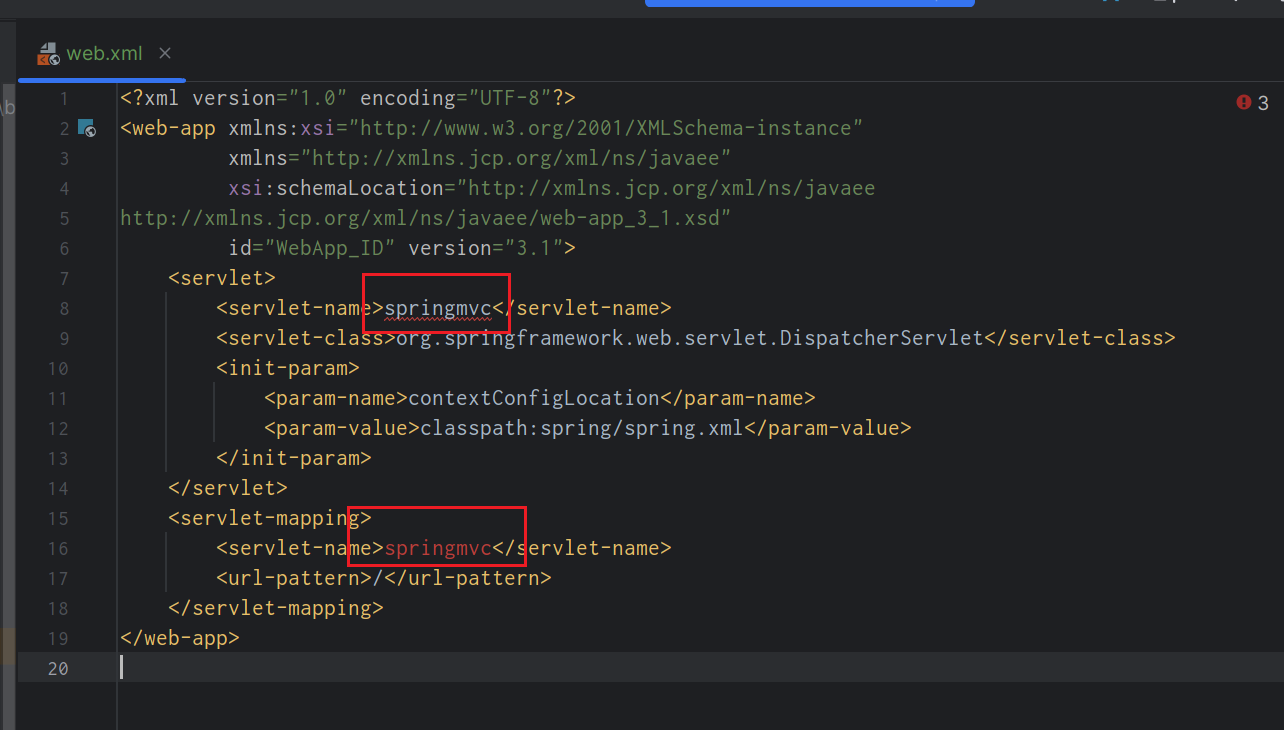
如果在粘贴这些web.xml 或者pom.xml里面build里面的标签发送这样的报错提示,注意哦 这可能不是错误,不会影响到我们项目的运行。
服务提供者
1、一个空的maven项目
2、提供一个服务接口即可
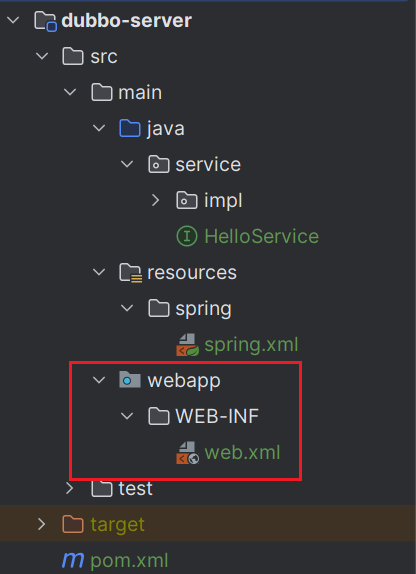
项目目录结构
图中红框的需要我们创建
提供方的pom.xml
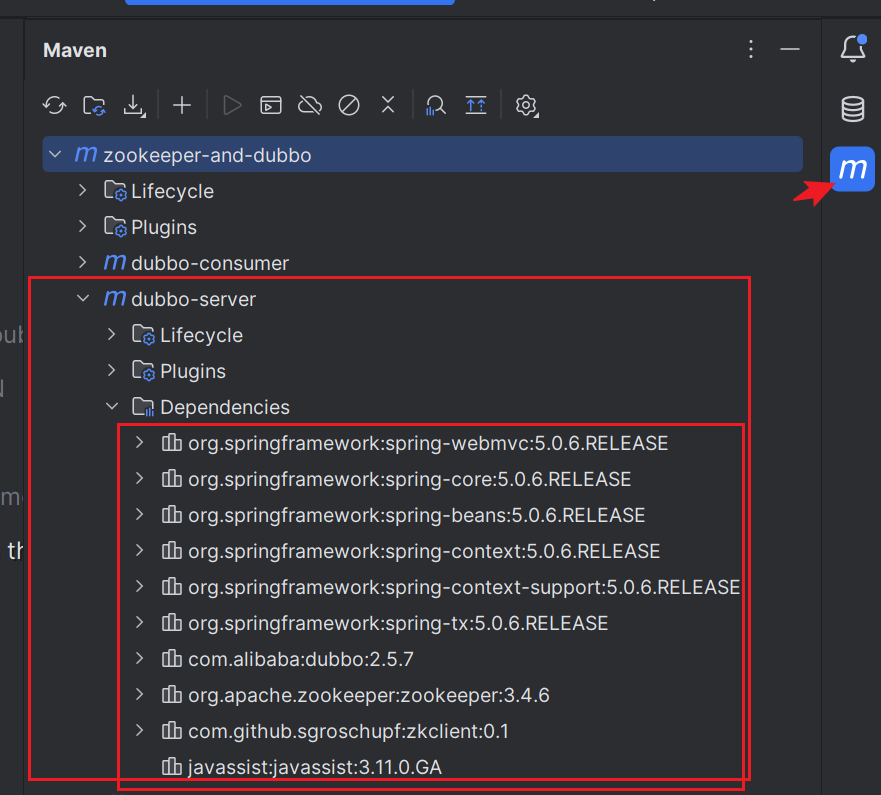
各种依赖请严格按照下面的版本
- 记得要更新pom文件哦!
- 当dependencies中出现依赖的版本信息 说明依赖引入成功了
    <properties>

        <maven.compiler.source>8</maven.compiler.source>

        <maven.compiler.target>8</maven.compiler.target>

        <project.build.sourceEncoding>UTF-8</project.build.sourceEncoding>

        <spring.version>5.0.6.RELEASE</spring.version>

    </properties>

    <packaging>war</packaging>

    <dependencies>

        <dependency>

            <groupId>org.springframework</groupId>

            <artifactId>spring-webmvc</artifactId>

            <version>${spring.version}</version>

        </dependency>

        <dependency>

            <groupId>org.springframework</groupId>

            <artifactId>spring-core</artifactId>

            <version>${spring.version}</version>

        </dependency>

        <dependency>

            <groupId>org.springframework</groupId>

            <artifactId>spring-beans</artifactId>

            <version>${spring.version}</version>

        </dependency>

        <dependency>

            <groupId>org.springframework</groupId>

            <artifactId>spring-context</artifactId>

            <version>${spring.version}</version>

        </dependency>

        <dependency>

            <groupId>org.springframework</groupId>

            <artifactId>spring-context-support</artifactId>

            <version>${spring.version}</version>

        </dependency>

        <dependency>

            <groupId>org.springframework</groupId>

            <artifactId>spring-tx</artifactId>

            <version>${spring.version}</version>

        </dependency>

        <!--dubbo -->

        <dependency>

            <groupId>com.alibaba</groupId>

            <artifactId>dubbo</artifactId>

            <version>2.5.7</version>

        </dependency>

        <dependency>

            <groupId>org.apache.zookeeper</groupId>

            <artifactId>zookeeper</artifactId>

            <version>3.4.6</version>

        </dependency>

        <dependency>

            <groupId>com.github.sgroschupf</groupId>

            <artifactId>zkclient</artifactId>

            <version>0.1</version>

        </dependency>

        <dependency>

            <groupId>javassist</groupId>

            <artifactId>javassist</artifactId>

            <version>3.11.0.GA</version>

        </dependency>

    </dependencies>

    <build>

        <plugins>

            <plugin>

                <groupId>org.apache.tomcat.maven</groupId>

                <artifactId>tomcat7-maven-plugin</artifactId>

                <configuration>

                    <port>8001</port>

                    <path>/</path>

                </configuration>

                <executions>

                    <execution>

                        <!-- 打包完成后,运行服务 -->

                        <phase>package</phase>

                        <goals>

                            <goal>run</goal>

                        </goals>

                    </execution>

                </executions>

            </plugin>

        </plugins>

    </build>
提供方接口
public interface HelloService {

    String sayHello(String name);

}
暴露的提供方实现
@Service 这个注解不是spring的哦
@com.alibaba.dubbo.config.annotation.Service

public class HelloServiceImpl implements HelloService {

    @Override

    public String sayHello(String name) {

        return "Hello," + name + "!!!";

    }

}
服务提供方的配置文件spring.xml
<?xml version="1.0" encoding="UTF-8"?>

<beans xmlns="http://www.springframework.org/schema/beans"

       xmlns:xsi="http://www.w3.org/2001/XMLSchema-instance"

       xmlns:dubbo="http://code.alibabatech.com/schema/dubbo"

       xsi:schemaLocation="

        http://www.springframework.org/schema/beans

        http://www.springframework.org/schema/beans/spring-beans.xsd

        http://code.alibabatech.com/schema/dubbo

        http://code.alibabatech.com/schema/dubbo/dubbo.xsd">

    <!--1.服务提供方在zookeeper中的“别名”-->

    <dubbo:application name="dubbo-server"/>

    <!--2.注册中心的地址-->

    <dubbo:registry address="zookeeper://192.168.77.132:2181"/>

    <!-- 让监控 去注册中心 自动找服务 -->

    <dubbo:monitor protocol="registry"/>

    <!--3.扫描类(将什么包下的类作为服务提供类)-->

    <dubbo:annotation package="service.impl"/>

</beans>
提供方的web.xml
<?xml version="1.0" encoding="UTF-8"?>

<web-app xmlns:xsi="http://www.w3.org/2001/XMLSchema-instance"

         xmlns="http://xmlns.jcp.org/xml/ns/javaee"

         xsi:schemaLocation="http://xmlns.jcp.org/xml/ns/javaee

http://xmlns.jcp.org/xml/ns/javaee/web-app_3_1.xsd"

         id="WebApp_ID" version="3.1">

<!--使用上下文监听器-初始化项目环境-->

    <listener>

        <listener-class>org.springframework.web.context.ContextLoaderListener</listener-class>

    </listener>

    <context-param>

        <param-name>contextConfigLocation</param-name>

        <param-value>classpath:spring/spring.xml</param-value>

    </context-param>

</web-app>
服务消费方
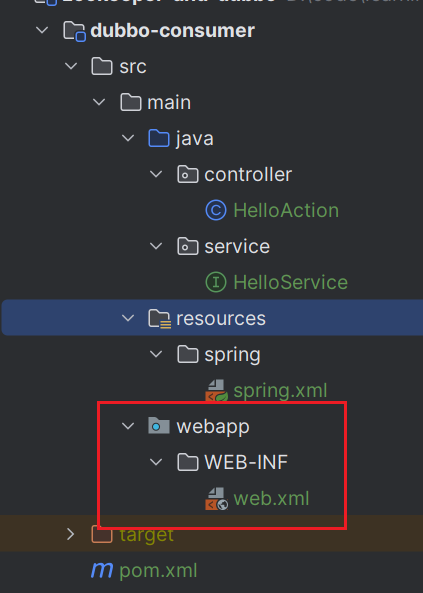
项目目录结构
消费方的pom.xml
与服务方一致,只需要修改tomcat的端口为8002
消费方的Controller
因为我们是通过浏览器去访问的,所以要创建controller层,提供对外访问的接口
@RestController

public class HelloAction {

    @com.alibaba.dubbo.config.annotation.Reference

    private HelloService hs;

    @RequestMapping("hello/{name}")

    @ResponseBody

    public String hello(@PathVariable String name) {

        return hs.sayHello(name);

    }

}
消费方的接口
注意:
- controller中要依赖HelloService,所以我们创建一个接口;
- 这里是消费方,不需要实现,因为实现会让服务方为我们搞定!跟8001服务提供方的线程远程通信
public interface HelloService {

    String sayHello(String name);

}
消费方的springmvc.xml
<?xml version="1.0" encoding="UTF-8"?>

<beans xmlns="http://www.springframework.org/schema/beans"

       xmlns:xsi="http://www.w3.org/2001/XMLSchema-instance"

       xmlns:dubbo="http://code.alibabatech.com/schema/dubbo"

       xsi:schemaLocation="

http://www.springframework.org/schema/beans

http://www.springframework.org/schema/beans/spring-beans.xsd

http://code.alibabatech.com/schema/dubbo

http://code.alibabatech.com/schema/dubbo/dubbo.xsd">

    <!--Dubbo的应用名称,通常使用项目名 -->

    <dubbo:application name="dubbo-consumer"/>

    <!--配置Dubbo的注册中心地址 -->

    <dubbo:registry address="zookeeper://192.168.77.132:2181"/>

    <!-- 让监控 去注册中心 自动找服务 -->

    <dubbo:monitor protocol="registry"/>

    <!--配置Dubbo扫描类,将这个类作为服务进行发布 -->

    <dubbo:annotation package="controller"/>

</beans>
消费方的web.xml
<?xml version="1.0" encoding="UTF-8"?>

<web-app xmlns:xsi="http://www.w3.org/2001/XMLSchema-instance"

         xmlns="http://xmlns.jcp.org/xml/ns/javaee"

         xsi:schemaLocation="http://xmlns.jcp.org/xml/ns/javaee

http://xmlns.jcp.org/xml/ns/javaee/web-app_3_1.xsd"

         id="WebApp_ID" version="3.1">

    <servlet>

        <servlet-name>springmvc</servlet-name>

        <servlet-class>org.springframework.web.servlet.DispatcherServlet</servlet-class>

        <init-param>

            <param-name>contextConfigLocation</param-name>

            <param-value>classpath:spring/spring.xml</param-value>

        </init-param>

    </servlet>

    <servlet-mapping>

        <servlet-name>springmvc</servlet-name>

        <url-pattern>/</url-pattern>

    </servlet-mapping>

</web-app>
启动测试
还是跟是实现zookeeper实现分布式锁一样启动哦
- 我们在这里配置了打包之后直接运行
- 所以我们执行打包命令即可,如果出错,先执行clean在执行package
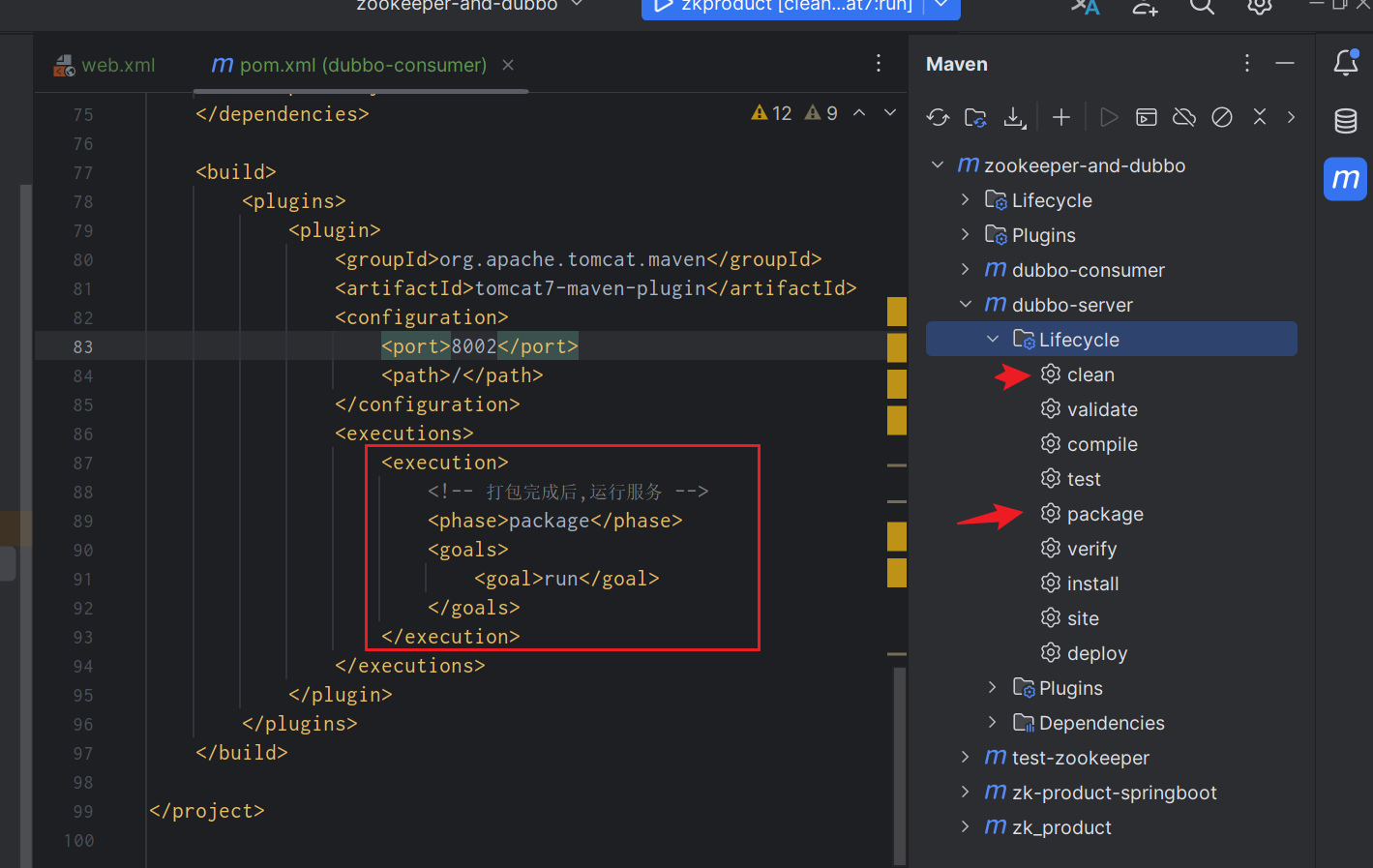
如果执行出错,或者访问失败可以去查找以下问题
- @service注解是否是dubbo的
- linux服务器的防火墙是否关闭
- zookeeper的注册地址是否有误 linux查看本机ip 【ip address】
- 如果想看到自己的服务,可以先搭建dubbo的可视化工具,文章地址
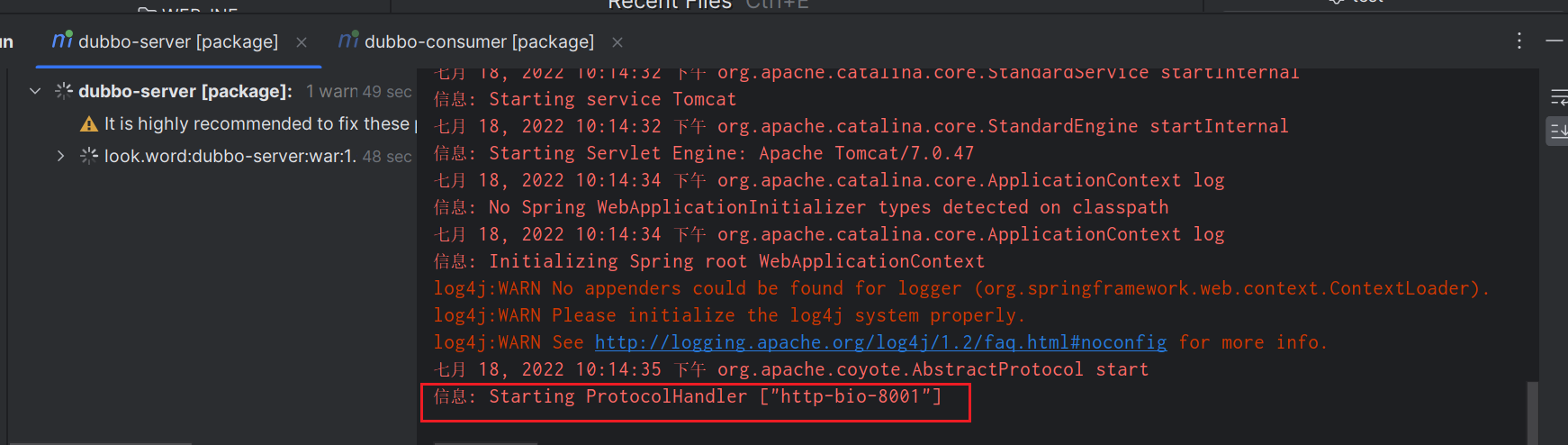
当出现端口地址 且上面没有报错信息时,说明启动成功
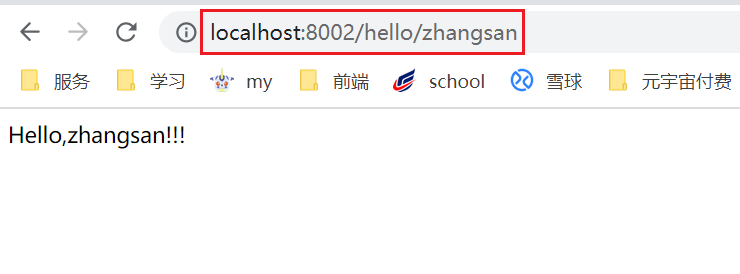
可以看到我们的请求成功了
# 8 快速入门 dubbo的更多相关文章
- Spring Boot 2.0 的快速入门(图文教程)
摘要: 原创出处 https://www.bysocket.com 「公众号:泥瓦匠BYSocket 」欢迎关注和转载,保留摘要,谢谢! Spring Boot 2.0 的快速入门(图文教程) 大家都 ...
- Web Api 入门实战 (快速入门+工具使用+不依赖IIS)
平台之大势何人能挡? 带着你的Net飞奔吧!:http://www.cnblogs.com/dunitian/p/4822808.html 屁话我也就不多说了,什么简介的也省了,直接简单概括+demo ...
- SignalR快速入门 ~ 仿QQ即时聊天,消息推送,单聊,群聊,多群公聊(基础=》提升)
SignalR快速入门 ~ 仿QQ即时聊天,消息推送,单聊,群聊,多群公聊(基础=>提升,5个Demo贯彻全篇,感兴趣的玩才是真的学) 官方demo:http://www.asp.net/si ...
- 前端开发小白必学技能—非关系数据库又像关系数据库的MongoDB快速入门命令(2)
今天给大家道个歉,没有及时更新MongoDB快速入门的下篇,最近有点小忙,在此向博友们致歉.下面我将简单地说一下mongdb的一些基本命令以及我们日常开发过程中的一些问题.mongodb可以为我们提供 ...
- 【第三篇】ASP.NET MVC快速入门之安全策略(MVC5+EF6)
目录 [第一篇]ASP.NET MVC快速入门之数据库操作(MVC5+EF6) [第二篇]ASP.NET MVC快速入门之数据注解(MVC5+EF6) [第三篇]ASP.NET MVC快速入门之安全策 ...
- 【番外篇】ASP.NET MVC快速入门之免费jQuery控件库(MVC5+EF6)
目录 [第一篇]ASP.NET MVC快速入门之数据库操作(MVC5+EF6) [第二篇]ASP.NET MVC快速入门之数据注解(MVC5+EF6) [第三篇]ASP.NET MVC快速入门之安全策 ...
- Mybatis框架 的快速入门
MyBatis 简介 什么是 MyBatis? MyBatis 是支持普通 SQL 查询,存储过程和高级映射的优秀持久层框架.MyBatis 消除 了几乎所有的 JDBC 代码和参数的手工设置以及结果 ...
- grunt快速入门
快速入门 Grunt和 Grunt 插件是通过 npm 安装并管理的,npm是 Node.js 的包管理器. Grunt 0.4.x 必须配合Node.js >= 0.8.0版本使用.:奇数版本 ...
- 【第一篇】ASP.NET MVC快速入门之数据库操作(MVC5+EF6)
目录 [第一篇]ASP.NET MVC快速入门之数据库操作(MVC5+EF6) [第二篇]ASP.NET MVC快速入门之数据注解(MVC5+EF6) [第三篇]ASP.NET MVC快速入门之安全策 ...
随机推荐
- openstack命令创建云主机实例
@ 目录 前言 上传centos镜像 创建实例 创建外网卡 修改安全组规则 创建云主机实例 前言 简单创建云主机实例只需要上传一个测试镜像.创建一张外网卡.创建一个实例类型.修改安全组规则即可 注:这 ...
- PyScript:让Python在HTML中运行
大家好,我是DD,已经是封闭在家的第51天了! 最近一直在更新Java新特性和IDEA Tips两个专栏,其他方向内容的动态关注少了.昨天天晚上刷推的时候,瞄到了这个神奇的东西,觉得挺cool的,拿出 ...
- Java学习笔记-基础语法Ⅱ
成员变量:类中方法外的变量 局部变量:方法中的变量 注意,成员变量有默认初始值,而局部变量需要赋初始值 Java中虽然没有明确规定类必须首字母大写,但为了规范最好大写(因为自己刚刚写的时候就没看清写错 ...
- 思科,华为l2tp组网,家庭宽带,公司内网数据分离
拓扑 简介 办公网使用专线接入,拥有固定IP地址,网络出口使用防火墙做NAT,下联交换机接入服务器,办公电脑等,旁挂思科路由器做L2TP LNS 家庭宽带使用ADSL线路,华为路由器做拨号设备与DHC ...
- 4.0 vue绑定dom属性和函数的方法
<!DOCTYPE html> <html> <head> <meta charset="UTF-8"> <title> ...
- Endeavour OS 安装流程中的一些小问题的对应的解决方案
安装窗口显示"系统未连接到互联网",但实际上已经连接了 Endeavour OS 检测系统是否连接上互联网的方式就是 ping 一个目标站点,这个站点默认写入在 /etc/cala ...
- singlelinklist
C++实现单链表 阅读先知 链表是一种动态数据结构,他的特点是用一组任意的存储单元(可以是连续的,也可以是不连续的)存放数据元素. 链表中每一个元素成为"结点",每一个结点都是由数 ...
- docker安装RabbitMQ及安装延迟插件
我这个安装攻略首先得保证服务器上安装过docker了 如果没安装docker请先去安装docker 1.首先说一下什么是MQ MQ(message queue)字面意思上来说消息队列,FIFO先入先出 ...
- 前端3JS1
内容概要 溢出属性 定位属性 z-index JavaScript简介 变量与注释 数据类型 内容详情 溢出属性 # 文本内容超出了标签的最大范围 overflow: hidden; 接隐藏文本内容 ...
- 4. Docker自定义镜像
下面制作镜像: 此时,验证一下: 以上验证都是成功的,到此就可以把刚才建立并经过刚才运行并验证的镜像包通过各种方式传递给其他人来部署使用了,并且环境肯定是可你统一的.