
标准输入输出() & 打印流 &配置文件
    public static void main(String[] args) {

        //System 类 的 public final static InputStream in = null;

        // System.in 编译类型   InputStream

        // System.in 运行类型   BufferedInputStream

        // 表示的是标准输入 键盘

        System.out.println(System.in.getClass());

        //老韩解读

        //1. System.out public final static PrintStream out = null;

        //2. 编译类型 PrintStream

        //3. 运行类型 PrintStream

        //4. 表示标准输出 显示器

        System.out.println(System.out.getClass());

        System.out.println("hello, 韩顺平教育~");

        Scanner scanner = new Scanner(System.in);

        System.out.println("输入内容");

        String next = scanner.next();

        System.out.println("next=" + next);

    }
字节打印流(本质还是输出流)


    public static void main(String[] args) throws IOException {

        PrintStream out = System.out;

        //在默认情况下,PrintStream 输出数据的位置是 标准输出,即显示器

        /*

             public void print(String s) {

                if (s == null) {

                    s = "null";

                }

                write(s);

            }

         */

        out.print("john, hello");

        //因为print底层使用的是write , 所以我们可以直接调用write进行打印/输出

        out.write("韩顺平,你好".getBytes());

        out.close();

        //我们可以去修改打印流输出的位置/设备

        //1. 输出修改成到 "e:\\f1.txt"

        //2. "hello, 韩顺平教育~" 就会输出到 e:\f1.txt

        //3. public static void setOut(PrintStream out) {

        //        checkIO();

        //        setOut0(out); // native 方法,修改了out

        //   }

        System.setOut(new PrintStream("e:\\f1.txt"));

        System.out.println("hello, 韩顺平教育~");

    }
字符打印流
    public static void main(String[] args) throws IOException {

        //PrintWriter printWriter = new PrintWriter(System.out);

        PrintWriter printWriter = new PrintWriter(new FileWriter("e:\\f2.txt"));

        printWriter.print("hi, 北京你好~~~~");

        printWriter.close();//flush + 关闭流, 才会将数据写入到文件..

    }
配置文件,Properties类 格式: ip=225.225.225.225 name=tom
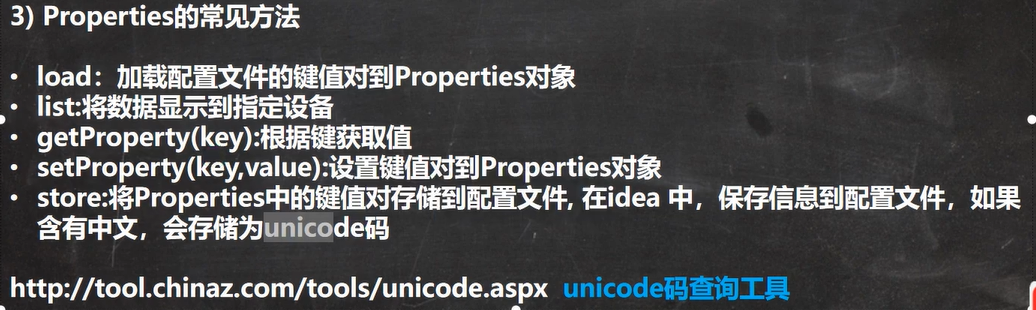
读取
    public static void main(String[] args) throws IOException {

        //使用Properties 类来读取mysql.properties 文件

        //1. 创建Properties 对象

        Properties properties = new Properties();

        //2. 加载指定配置文件

        properties.load(new FileReader("src\\mysql.properties"));

        //3. 把k-v显示控制台

        properties.list(System.out);

        //4. 根据key 获取对应的值

        String user = properties.getProperty("user");

        String pwd = properties.getProperty("pwd");

        System.out.println("用户名=" + user);

        System.out.println("密码是=" + pwd);

    }
写入&修改
    public static void main(String[] args) throws IOException {

        //使用Properties 类来创建 配置文件, 修改配置文件内容

        Properties properties = new Properties();

        //创建

        //1.如果该文件没有key 就是创建

        //2.如果该文件有key ,就是修改

        /*

            Properties 父类是 Hashtable , 底层就是Hashtable 核心方法

            public synchronized V put(K key, V value) {

                // Make sure the value is not null

                if (value == null) {

                    throw new NullPointerException();

                }

                // Makes sure the key is not already in the hashtable.

                Entry<?,?> tab[] = table;

                int hash = key.hashCode();

                int index = (hash & 0x7FFFFFFF) % tab.length;

                @SuppressWarnings("unchecked")

                Entry<K,V> entry = (Entry<K,V>)tab[index];

                for(; entry != null ; entry = entry.next) {

                    if ((entry.hash == hash) && entry.key.equals(key)) {

                        V old = entry.value;

                        entry.value = value;//如果key 存在,就替换

                        return old;

                    }

                }

                addEntry(hash, key, value, index);//如果是新k, 就addEntry

                return null;

            }

         */

        properties.setProperty("charset", "utf8");

        properties.setProperty("user", "汤姆");//注意保存时,是中文的 unicode码值

        properties.setProperty("pwd", "888888");

        //将k-v 存储文件中即可

        properties.store(new FileOutputStream("src\\mysql2.properties"), null);

        System.out.println("保存配置文件成功~");

    }
标准输入输出() & 打印流 &配置文件的更多相关文章
- 标准输入输出 stdio 流缓冲
**From : http://www.pixelbeat.org/programming/stdio_buffering/** 我发现找出标准流用的是什么缓冲是一件困难的事. 例如下面这个使用uni ...
- 标准输入输出 stdio 流缓冲 buffering in standard streams
From : http://www.pixelbeat.org/programming/stdio_buffering/ 译者:李秋豪 我发现找出标准流用的是什么缓冲是一件困难的事. 例如下面这个使用 ...
- Day 19:Properties配置文件类、打印流(printStream) 、 编码与解码
Properties(配置文件类): 主要用于生产配置文件与读取配置文件的信息. Properties要注意的细节: 1. 如果配置文件的信息一旦使用了中文,那么在使用store方法生成配置文件的时 ...
- Java IO流之打印流与标准流
一.打印流 1.1打印流特点与构造方法 1)PrintStream和PrintWriter类都提供了一系列重载的print和println方法来输出各种类型的数据. 2)PrintStream和Pri ...
- Java:IO流其他类(字节数组流、字符数组流、数据流、打印流、Properities、对象流、管道流、随机访问、序列流、字符串读写流)
一.字节数组流: 类 ByteArrayInputStream:在构造函数的时候,需要接受数据源,而且数据源是一个字节数组. 包含一个内部缓冲区,该缓冲区包含从流中读取的字节.内部计数器跟踪 read ...
- Java API —— IO流(数据操作流 & 内存操作流 & 打印流 & 标准输入输出流 & 随机访问流 & 合并流 & 序列化流 & Properties & NIO)
1.操作基本数据类型的流 1) 操作基本数据类型 · DataInputStream:数据输入流允许应用程序以与机器无关方式从底层输入流中读取基本 Java 数据类型.应用程序可以使用数据输出 ...
- IO流总结---- 字节流 ,字符流, 序列化 ,数据操作流,打印流 , Properties 集合
笔记内容: 什么是流 字节流 字符流 序列化 数据操作流(操作基本数据类型的流)DataInputStream 打印流 Properties 集合 什么是流: 流是个抽象的概念,是对输入输出设备的抽象 ...
- stdio - 标准输入输出库函数
SYNOPSIS 总览 #include <stdio.h> FILE *stdin; FILE *stdout; FILE *stderr; DESCRIPTION 描述 标注 I/O ...
- Java自学第10期——File类与IO流(输入输出流、处理流、转换流、缓冲流、Properties集合、打印流)
1.IO简介 IO(输入输出)通过java.io包下的类和接口来支持,包下包括输入.输出两种IO流,每种输入输出流又可分为字符流和字节流两大类. 2.File类 File类是io包下与平台无关的文件和 ...
随机推荐
- Java常见的垃圾收集器有哪些?
守拙者_6a98关注 2020.04.11 22:06:31字数 2,135阅读 394 实际上,垃圾收集器( GC , Garbage Collector )是和具体 JVM 实现紧密相关的,不同厂 ...
- Eureka和zookeeper都可以提供服务注册与发现的功能,请说说两个的区别?
Zookeeper保证了CP(C:一致性,P:分区容错性),Eureka保证了AP(A:高可用) (1)当向注册中心查询服务列表时,我们可以容忍注册中心返回的是几分钟以前的信息,但不能容忍直接down ...
- Dubbo 集群容错有几种方案?
集群容错方案 说明 Failover Cluster 失败自动切换,自动重试其它服务器(默认) Failfast Cluster 快速失败,立即报错,只发起一次调用 Failsafe Cluster ...
- C++11最常用的新特性如下
1.auto关键字:编译器可以根据初始值自动推导出类型.但是不能用于函数传参.定义数组以及非静态成员变量. 2.nullptr关键字:是一种特殊类型的字面值,它可以被转换成任意其它类型的指针:而NUL ...
- 学习GlusterFS(六)
一.GlusterFS概述 分布式文件系统由来 在介绍之前我们先来看下文件系统及典型的NFS文件系统. 计算机通过文件系统管理,存储数据的.而现在数据信息时代中人们可获取数据成指数倍的增长,单纯通过增 ...
- 理解OIDC协议和认证机制
当互联网应用越来越多,每个应用程序都实现了自己的身份存储.认证和授权,用户需要在应用上反复的注册与登录,体验糟糕,用户身份信息无法在多个应用间共享与同步.当使用企业应用时,企业提供了一系列应用,尽管是 ...
- C/C++头文件以及避免头文件包含造成的重定义方法
C 头文件 头文件是扩展名为 .h 的文件,包含了 C 函数声明和宏定义,被多个源文件中引用共享.有两种类型的头文件:程序员编写的头文件和编译器自带的头文件. 在程序中要使用头文件,需要使用 C 预处 ...
- 面试BAT,你凭什么说你掌握了CSS
介绍 项目已经开源:https://github.com/nanhupatar... 欢迎PR 推荐 关注我们的公众号 display: none; 与 visibility: hidden; 的区别 ...
- Spark入门之idea编写Scala脚本
一.安装Scala插件 1.File->Settings 2.Plugins->Msrketplace->搜索Scala并安装 (或者自己下载合适的scala版本,教程:自己给ide ...
- java中接口到底是干什么的,怎么用,深入剖析
6.总结性深一层次综合剖析接口概念[新手可忽略不影响继续学习] 通过以上的学习, 我们知道,所有定义在接口中的常量都默认为public.static和final.所有定义在接口中的方法默认为publi ...