
The Ultimate Guide to Dynamics 365 Pricing and Licensing
Microsoft Dynamics 365 integrates powerful ERP and CRM capabilities in the cloud to provide business applications for today’s users. In modernizing their lineup of applications, they have evolved the licensing model and pricing of their entire Dynamics 365 offerings.
Dynamics 365 offers purpose-built business applications that manage specific business processes, and work seamlessly together in a single cloud-based product offering. Understanding what your business needs are and how they fit within Dynamics 365 is the key to getting the most value out of your business.
The business applications include:
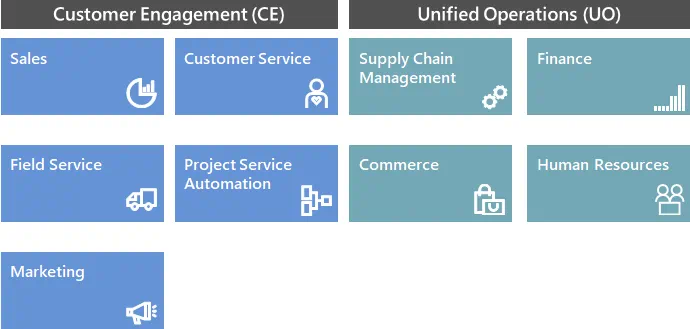
Dynamics 365 Customer Engagement (CE)
Dynamics 365 for Sales (Formerly Dynamics CRM Online)
Enable your salespeople to build strong relationships with their customers, take actions based on insights, and close sales faster. Use Dynamics 365 for Sales to:
- Keep track of your accounts and contacts
- Nurture your sales from lead to order
- Create sales collateral
It also lets you create marketing lists and campaigns, and follow service cases associated with specific accounts or opportunities.
Dynamics 365 for Customer Service (Formerly Dynamics CRM Online)
Build great customer relationships by focusing on optimum customer satisfaction with the Customer Service apps. Customer Service provides many features and tools that organizations can use to manage the services they provide to customers.
Dynamics 365 for Field Service
Helps your team deliver onsite service to customer locations. The application combines workflow automation, scheduling algorithms, and mobility to set mobile workers up for success when they’re onsite with customers fixing issues.
Dynamics 365 for Project Service Automation (PSA)
Helps your organization efficiently track, manage, and deliver project-based services, from the initial sale all the way to invoicing.
Dynamics 365 for Marketing
A marketing-automation application that helps turn prospects into business relationships. The app is: easy to use, works seamlessly with Dynamics 365 for Sales, and has built-in business intelligence.
Dynamics 365 Unified Operations (UO)
Dynamics 365 for Supply Chain Management (SCM) (Formerly Dynamics AX)
Formerly part of the Dynamics 365 Finance and Operations application. Finance enables medium and enterprise organizations to monitor the performance of global financial operations in real-time, predict future outcomes, and make data-driven decisions to drive growth.
Dynamics 365 for Finance (Formerly Dynamics AX)
Formerly part of the Dynamics 365 Finance and Operations application. Finance enables medium and enterprise organizations to monitor the performance of global financial operations in real-time, predict future outcomes, and make data-driven decisions to drive growth.
Dynamics 365 for Commerce (Formerly Retail)
Dynamics 365 Commerce is designed to help retailers manage their operations, deliver a connected employee experience, and offer exceptional shopping experiences. The Commerce application simplifies the process of unifying customer shopping experience through an end-to-end commerce platform that brings together eCommerce, in-store, back office, and call center along with enabling easier integration to emerging channels through an API driven headless commerce engine.
Dynamics 365 for Human Resources (Formerly Talent)
Dynamics 365 Human Resources enables customers to optimize compensation, benefits, leave and absence, compliance, performance feedback, standardized training, and self-service programs.
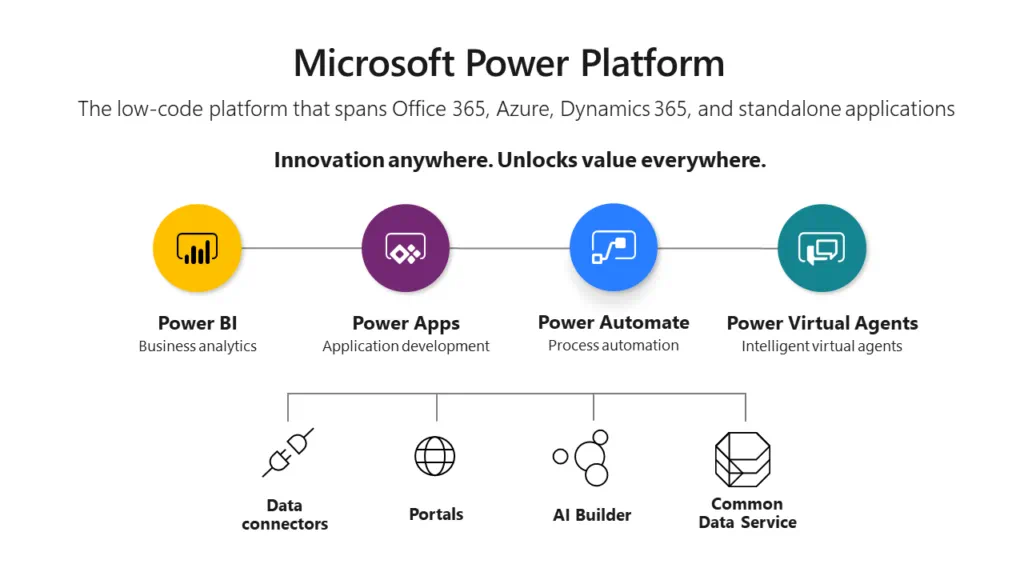
Power Platform
Power Apps
Power Apps is a suite of apps, services, connectors, and a data platform that provides a rapid application development environment to build custom apps for your business needs. Using Power Apps, you can quickly build custom business apps that connect to your business data, stored either in the underlying data platform (Common Data Service) or in various online and on-premises data sources (SharePoint, Excel, Office 365, Dynamics 365, SQL Server, and so on).
Microsoft Automate (Formerly Flow)
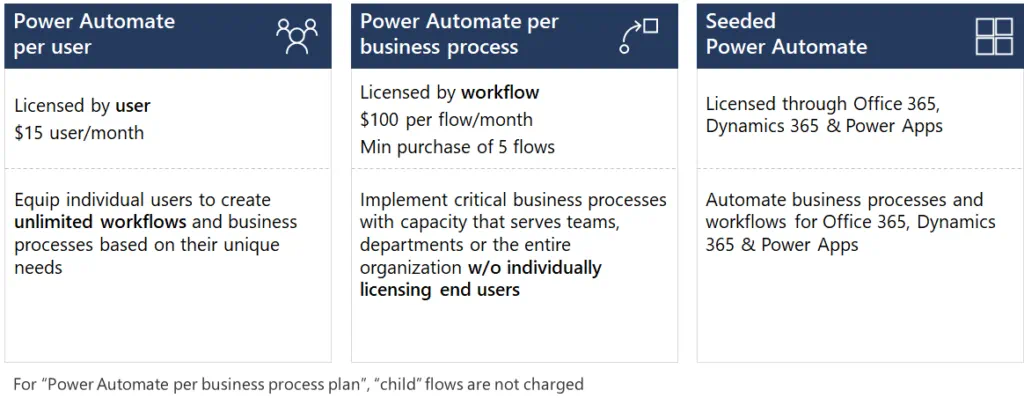
Power Automate allows enterprises to implement automated workflows and business processes and achieve operational efficiencies.
Power BI
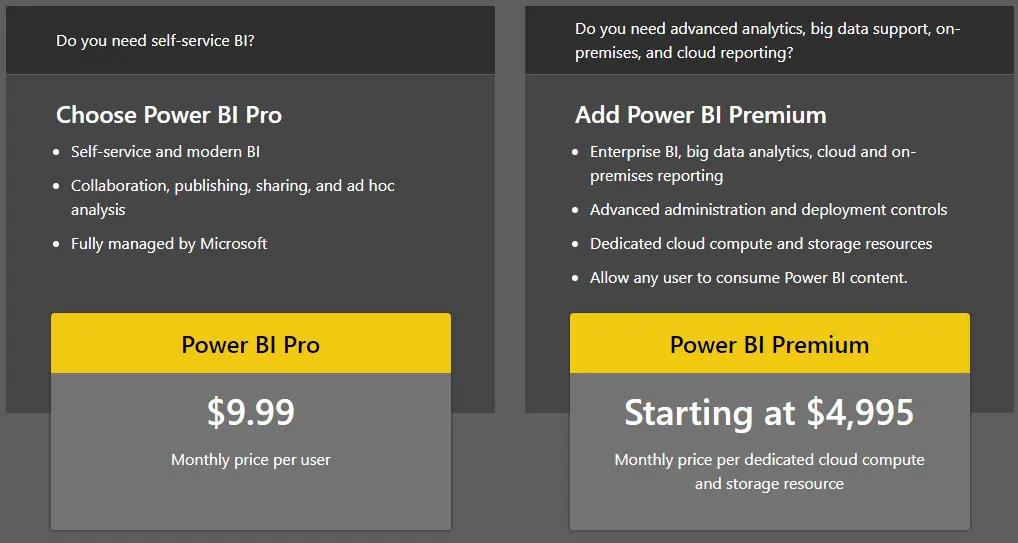
A collection of software services, apps, and connectors that work together to turn your unrelated sources of data into coherent, visually immersive, and interactive insights. Your data may be in an Excel spreadsheet or in a collection of cloud-based and on-premises hybrid data warehouses. Power BI lets you easily connect to your data sources, visualize, and discover what’s important, so you can share with anyone.
Power Virtual Agent
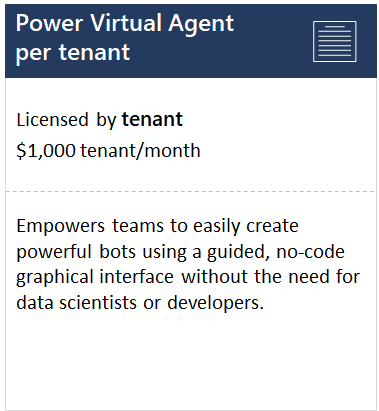
Power Virtual Agents empowers teams to easily create powerful bots using a guided, no-code graphical interface without the need for data scientists or developers. It easily integrates bots with hundreds of apps and services using pre-built connectors and allows the ability to create custom workflows with Power Automate, enabling bots to take action on behalf of customers. It allows users to monitor and continuously improve bot performance using AI- and data-driven insights available in an easy-to-read dashboard.
Dynamics 365 License Types: Determining the Appropriate Access for Users
Users can access Dynamics 365 if a subscription license is purchased for them or the device they’re using. The type of license to purchase depends on the level of access they need. Subscription Licenses (SL) come in 3 major types: User SL, Device SL, and Organization SL.
User Subscription License
The most commonly purchased license is a “Name User” license. This requires each user to have their own login. Those with User SL may access the service through multiple devices. The User SL is classified into three sub-types of licenses:
Full User
These are the users whose work requires use of feature-rich business application functionality. Examples of full users are salespeople, customer service representatives, finance employees, controllers, and supply chain managers. These users have also been referred to in the past as Professional Users or Power Users. These Full Users are licensed with a Dynamics 365 Application subscription.
Team Member
This enables users to read Dynamics 365 data generated from Dynamics 365 Unified Operations and Dynamics 365 Customer Engagement Applications. At least one full Dynamics 365 user must be assigned to the tenant to administer and configure the individual Team Members applications.
Team Member licenses are designed to work across most major Dynamics 365 applications. They have the rights to the following:
| Customer Engagement | Unified Operations |
| Create, view, update, and delete contacts, activities, tasks, and notes.Record time and expense for Dynamics 365 for Project Service Automation, and apply for projects.Update personal employee information.User reporting and dashboards.Participate as an end-consumer of Dynamics 365 services, such as responding to surveys.A Team Members application module may not be customized with more than 15 custom entities available to the Dynamics 365 Team license. Customization is only allowed if it does not result in a change to core purpose of the specified scenario. | To record any type of time.To record any type of expense.Manage personal employee information.Manage direct employee and candidate activities for hiring, onboarding, and human resources.Create requisitions.Create or edit the items related to the following capabilities: quality control and departmental budgets.Approval of time, expense, and invoices.Team Members application module may not be customized with more than 15 custom entities available to the Dynamics 365 Team license. This only applies to entities that sit on Common Data Service Platform (Talent – Attract). Customization is only allowed if it does not result in a change to core purpose of the specified scenario. |
Dynamics 365 Unified Operations – Activity
This is only available for Unified Operations applications, and is intended for users who require more capabilities than the Team Members license, but do not require the use rights of a Full User. Dynamics 365 Unified Operations – Activity use rights include all Dynamics 365 Team Members user rights as well as the right to:
- Approve all activity related transactions.
- Create or edit the items related to warehousing, receiving, shipping, orders, vendor maintenance, and all budgets.
- Operate a Point-of-Sale (POS) device, store manager device, shop floor device, or warehouse device.
Device Subscription License
With Device SL, any number of users can access a licensed device with individual logins without the need for separate User SLs. Customer Engagement device licenses are full devices that include the same rights as the equivalent user license, while the Operations device licenses are a limited with a subset of Unified Operations capabilities.
Tenant-Based Subscription License
With Tenant-Based SL, customers only need to purchase one license for the entire tenant. There’s no need to license each user as usage is shared among all users accessing the application.
Dynamics 365 Pricing
Dynamics 365 offers great value by providing users the ability to subscribe to only the applications they will use. Users can mix and match between both Customer Engagement applications and Unified Operations applications.
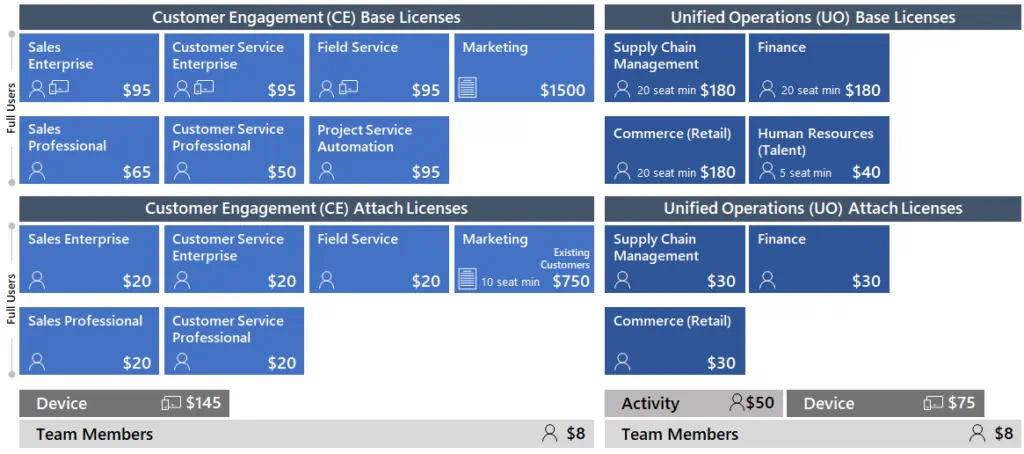
Customers first purchase a Base license for each Dynamics 365 user within their organization. Then, they may add one or more Attach licenses to each Base license. For example, if a customer has an individual user that requires both Sales and Customer Service Enterprise application functionality, they may purchase the Sales Enterprise Base license for $95 and then add the Customer Service Enterprise Attach license for $20. Their total Per User Per Month (PUPM) rate for this user is $115.
If the customer would like to purchase both a Base and an Attach license for a user, they must purchase the higher priced of the two licenses as the Base license. For example, if the customer would like to purchase a Retail license and a Customer Service license for a user, they must purchase the Retail license as the Base license ($180) and the Customer Service license as the Attach license ($20) for that user, for a total of $200 PUPM.
Dynamics 365 for Marketing is a tenant-based subscription license. If purchased as a standalone, $1,500 per month will allow you to assign Marketing licenses to any number of users in your tenant. Customers with at least 10 users (Sales, Customer Service, Field Service, Project Service Automation, Supply Chain Management, Finance, Retail) can purchase this for $750 per month.
Dynamics 365 for Project Service Automation and Dynamics 365 for Talent can only be purchased as a standalone Base license and cannot be used to attach any additional applications.
Prices below are Per User Per Month (PUPM), except for Marketing which is Per Tenant Per Month:
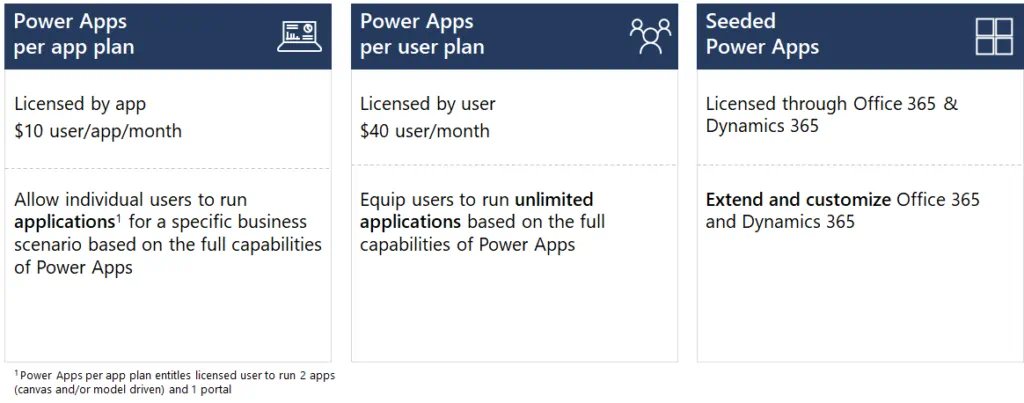
PowerApps Pricing
Microsoft Flow Pricing
Power Virtual Agent Pricing
The Power Virtual Agents application is licensed per tenant. The administrator will need to assign user licenses through the admin portal to Power Virtual Agent users who need access to the Power Virtual Agents application. Power Virtual Agents will be charged according to the unit of “sessions”. By default, 2,000 sessions are included with the license. Additional capacity add-on can be purchased for 1,000 chat sessions per add-on.
Power BI Pricing
Dynamics 365 Pricing and Licensing – Providing Organizations Flexibility and Value
Dynamics 365 pricing and licensing enables businesses to leverage the power of Microsoft business management technology according to their needs and budgets. Dynamics 365 offers the end-to-end functionality that simplifies business processes and maximizes a cost-effective IT investment.
The Ultimate Guide to Dynamics 365 Pricing and Licensing的更多相关文章
- Introduction to Microsoft Dynamics 365 licensing
Microsoft Dynamics 365 will be released on November 1. In preparation for that, Scott Guthrie hosted ...
- 下载Dynamics 365 Customer Engagement 工具
微软动态CRM专家罗勇 ,回复312或者20190311可方便获取本文,同时可以在第一间得到我发布的最新博文信息,follow me!我的网站是 www.luoyong.me . 从Dynamics ...
- 介绍Dynamics 365 Performance Center
关注本人微信和易信公众号: 微软动态CRM专家罗勇 ,回复257或者20170517可方便获取本文,同时可以在第一间得到我发布的最新的博文信息,follow me!我的网站是 www.luoyong. ...
- Dynamics 365 for Team Members Description
Dynamics 365 for Team Members, Business edition The Dynamics 365 for Team Members, Business edition ...
- 为实施了IFD的Dynamics 365更换自签名的SSL证书以符合Chrome的要求
关注本人微信和易信公众号: 微软动态CRM专家罗勇 ,回复259或者20170704可方便获取本文,同时可以在第一间得到我发布的最新的博文信息,follow me!我的网站是 www.luoyong. ...
- 升级本地部署的CRM到Dynamics 365及部分新特性介绍。
关注本人微信和易信公众号: 微软动态CRM专家罗勇 ,回复241或者20161226可方便获取本文,同时可以在第一间得到我发布的最新的博文信息,follow me!我的网站是 www.luoyong. ...
- Ultimate Guide to WhatsApp for Business 2019
By Iaroslav Kudritskiy (Source: https://rocketbots.io/blog/the-ultimate-guide-to-whatsapp-business-a ...
- 为Dynamics 365 USD设置打开调试面板的自定义快捷键
我是微软Dynamics 365 & Power Platform方面的工程师罗勇,也是2015年7月到2018年6月连续三年Dynamics CRM/Business Solutions方面 ...
- 为Dynamics 365启用部署级的跟踪以及跟踪文件的定期删除
关注本人微信和易信公众号: 微软动态CRM专家罗勇 ,回复260或者20170712可方便获取本文,同时可以在第一间得到我发布的最新的博文信息,follow me!我的网站是 www.luoyong. ...
- 为Dynamics 365写一个简单程序实现解决方案一键迁移
关注本人微信和易信公众号: 微软动态CRM专家罗勇 ,回复258或者20170627可方便获取本文,同时可以在第一间得到我发布的最新的博文信息,follow me!我的网站是 www.luoyong. ...
随机推荐
- win10系统下mysql安装
1.官网下载压缩包 2.添加环境变量到PATH 3.在bin的同级目录下,新增my.ini,内容如下(严重注意,是斜杠,千万别写成反斜杠!!!): [mysqld] basedir = D://sof ...
- uniapp 图片文件流
uni.request({ url: '*****', //仅为示例,并非真实接口地址. method: 'GET', responseType: 'arraybuffer', data: {}, h ...
- 渲染杂谈:early-z、z-culling、hi-z、z-perpass到底是什么?
之前一直被这几个和深度缓存(z-buffer)相关的概念搞得神魂颠倒.今天在翻阅<Real-Time Rendering>时碰巧碰巧看到了这部分的讲解.硬着头皮看了看,姑且算是讲几个概念分 ...
- SDCC 学习
单个led.c文件 #include <stdbool.h> __sfr __at(0xb0) P3; __sfr __at(0x88) TCON; __sfr __at(0x89) TM ...
- JDK、JRE、JVM和i++
JRE:运行环境(包含JVM和JAVA核心类库) JDK:JAVA开发工具包(包含JRE和开发工具)----开发工具:指编译工具javac和运行工具java JVM:虚拟机,保证了跨平台 ++i:先运 ...
- File、Files、Path、Paths
一.Path.Paths 和 File.Files // Paths 工具类,用于获取 Path 实例 Path path = Paths.get("files/Data.txt" ...
- ue项目--浏览器出现卡顿及崩溃的原因查找与解决方案
一些内存泄露的情况进行了排查 全局变量 定时器 使用未销毁的全局事件和第三方库 v-if和v-show不合理使用,v-if和v-for不合理使用 使用watch
- 记录 windows RabbitMq 安装教程
安装地址:https://www.rabbitmq.com/ RabbitMq 官网下载如下两个exe文件,otp_win64_22.0.exe 文件是rabbitmq的运行环境,必须安装!!! 傻子 ...
- 1、PyTorch基本操作
一.简介 简单介绍PyTorch框架,基本使用和安装方法.Torch是什么?一个火炬!其实跟Tensorflow中Tensor是一个意思,就是说,有一批数据,无论是图像数据还是文本数据或数值数据,都需 ...
- async await和promise的区别,和使用方法
async和promise都是异步方法,区别是async生成的结果是promise对象,async是promise的终结版. await只能在async中使用,await是阻塞的意思,就是暂停,你一起 ...