
快速新建并配置一个eslint+prettier+husky+commitlint+vue3+vite+ts+pnpm的项目
前置准备
- 一台电脑
- vscode
- pnpm
- vscode插件:
ESLintv2.2.6及以上 - vscode插件:
Prettier - Code formatterv9.5.0及以上 - vscode插件:
Vue Language Features (Volar)v0.39.4及以上
一:新建vue3项目
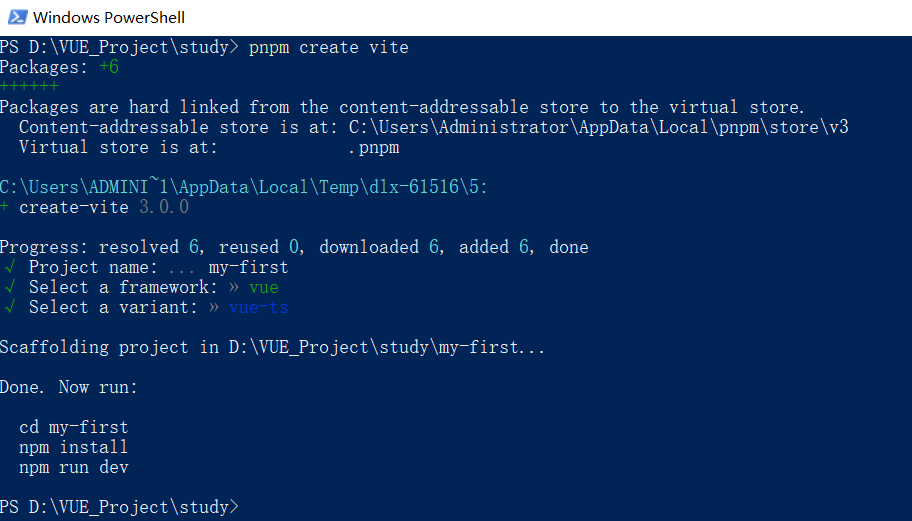
运行如下命令:
pnpm create vite
模板选择vue、vue-ts
二:配置依赖包
修改项目根目录的package.json的scripts和devDependencies如下
  "scripts": {

    "dev": "vite",

    "build": "vue-tsc --noEmit && vite build",

    "preview": "vite preview",

    "lint:eslint": "eslint --fix --ext .js,.ts,.vue,.tsx ./src",

    "preinstall": "npx only-allow pnpm",

    "postinstall": "husky install"

  },
  "devDependencies": {

    "@vitejs/plugin-vue": "^2.3.3",

    "typescript": "^4.5.4",

    "vite": "^2.9.9",

    "vue-tsc": "^0.34.7",

    "@commitlint/cli": "^17.0.3",

    "@commitlint/config-conventional": "^17.0.3",

    "@typescript-eslint/eslint-plugin": "^5.30.5",

    "@typescript-eslint/parser": "^5.30.5",

    "eslint": "^8.19.0",

    "eslint-config-prettier": "^8.5.0",

    "eslint-define-config": "^1.5.1",

    "eslint-plugin-prettier": "^4.2.1",

    "eslint-plugin-vue": "^9.2.0",

    "husky": "^8.0.1",

    "prettier": "^2.7.1",

    "vite-plugin-eslint": "^1.6.1",

    "vue-eslint-parser": "^9.0.3"

  },
如果有 "type": "module" 记得删掉
新增属性
  "lint-staged": {

    "*.{js,jsx,vue,ts,tsx}": [

      "pnpm run lint:eslint"

    ]

  }
完整配置如下
{

  "name": "my-first",

  "private": true,

  "version": "0.0.0",

  "scripts": {

    "dev": "vite",

    "build": "vue-tsc --noEmit && vite build",

    "preview": "vite preview",

    "lint:eslint": "eslint --fix --ext .js,.ts,.vue,.tsx ./src",

    "preinstall": "npx only-allow pnpm",

    "postinstall": "husky install"

  },

  "dependencies": {

    "vue": "^3.2.37"

  },

  "devDependencies": {

    "@vitejs/plugin-vue": "^3.0.0",

    "typescript": "^4.6.4",

    "vite": "^3.0.0",

    "vue-tsc": "^0.38.4",

    "@commitlint/cli": "^17.0.3",

    "@commitlint/config-conventional": "^17.0.3",

    "@typescript-eslint/eslint-plugin": "^5.30.5",

    "@typescript-eslint/parser": "^5.30.5",

    "eslint": "^8.19.0",

    "eslint-config-prettier": "^8.5.0",

    "eslint-define-config": "^1.5.1",

    "eslint-plugin-prettier": "^4.2.1",

    "eslint-plugin-vue": "^9.2.0",

    "husky": "^8.0.1",

    "prettier": "^2.7.1",

    "vite-plugin-eslint": "^1.6.1",

    "vue-eslint-parser": "^9.0.3"

  },

  "lint-staged": {

    "*.{js,jsx,vue,ts,tsx}": [

      "pnpm run lint:eslint"

    ]

  }

}
三:新建配置文件
.eslintignore :设置eslint不检查的文件
*.md

.vscode

.idea

dist

node_modules
.eslintrc.js :eslint的配置
module.exports = {

  root: true,

  env: {

    browser: true,

    node: true,

    es6: true

  },

  parser: 'vue-eslint-parser',

  parserOptions: {

    parser: '@typescript-eslint/parser',

    ecmaVersion: 'latest',

    sourceType: 'module',

    jsxPragma: 'React',

    ecmaFeatures: {

      jsx: true

    }

  },

  extends: [

    'plugin:vue/vue3-recommended',

    'plugin:@typescript-eslint/recommended',

    'prettier',

    'plugin:prettier/recommended' // 一定要放在最后。因为 extends 中后引入的规则会覆盖前面的规则。

  ],

  rules: {

    // @typescript-eslint

    '@typescript-eslint/explicit-function-return-type': 'off', // 需要函数和类方法的显式返回类型

    '@typescript-eslint/no-explicit-any': 'off', // 禁止使用该 any 类型

    '@typescript-eslint/no-var-requires': 'off', // 不允许使用 require 语句,除了在 import 语句中

    '@typescript-eslint/no-empty-function': 'off', // 禁止空函数

    '@typescript-eslint/no-use-before-define': 'off', // 在定义之前禁止使用变量

    '@typescript-eslint/ban-ts-comment': 'off', // 禁止 @ts-<directive> 使用评论或在指令后要求描述

    '@typescript-eslint/ban-types': 'off', // 禁止使用特定类型

    '@typescript-eslint/no-non-null-assertion': 'off', // '!'不允许使用后缀运算符的非空断言

    '@typescript-eslint/explicit-module-boundary-types': 'off', // 需要导出函数和类的公共类方法的显式返回和参数类型

    '@typescript-eslint/no-unused-vars': [

      'error',

      {

        argsIgnorePattern: '^_',

        varsIgnorePattern: '^_'

      }

    ], // 禁止未使用的变量

    // vue

    'vue/custom-event-name-casing': 'off', // 为自定义事件名称强制使用特定大小写

    'vue/attributes-order': 'off', // 强制执行属性顺序

    'vue/one-component-per-file': 'off', // 强制每个组件都应该在自己的文件中

    'vue/html-closing-bracket-newline': 'off', // 在标签的右括号之前要求或禁止换行

    'vue/multiline-html-element-content-newline': 'off', // 在多行元素的内容之前和之后需要换行符

    'vue/singleline-html-element-content-newline': 'off', // 在单行元素的内容之前和之后需要换行符

    'vue/attribute-hyphenation': 'off', // 对模板中的自定义组件强制执行属性命名样式

    'vue/require-default-prop': 'off', // 需要 props 的默认值

    'vue/html-indent': ['error', 2], // 在<template>中强制一致缩进

    'vue/html-self-closing': 'off', // 执行自闭合的风格

    'vue/max-attributes-per-line': 'off', // 强制每行属性的最大数量

    'vue/multi-word-component-names': 'off', // 是否开启组件命名规则校验(强制多个单词以驼峰或'-'链接的命名规则)

    // ESLint

    'no-use-before-define': 'off', // 禁止在变量定义之前使用它们

    'space-before-function-paren': 'off' // 强制在 function的左括号之前使用一致的空格

  }

};
.prettierignore :设置prettier不进行格式化的文件
/node_modules/**

/dist*

/public/*
commitlint.config.js :commitlint的配置
module.exports = { extends: ['@commitlint/config-conventional'] };
prettier.config.js:prettier的配置
module.exports = {

  printWidth: 100, // 最大行长规则通常设置为 100 或 120

  tabWidth: 2, // 指定每个标签缩进级别的空格数。

  useTabs: false, // 使用制表符而不是空格缩进行。

  semi: true, // true(默认): 在每条语句的末尾添加一个分号。false:仅在可能导致 ASI 失败的行的开头添加分号。

  vueIndentScriptAndStyle: true, // Vue 文件脚本和样式标签缩进

  singleQuote: true, // 使用单引号而不是双引号

  quoteProps: 'as-needed', // 引用对象中的属性时,仅在需要时在对象属性周围添加引号。

  bracketSpacing: true, // 在对象文字中的括号之间打印空格。

  trailingComma: 'none', // "none":没有尾随逗号。"es5": 在 ES5 中有效的尾随逗号(对象、数组等),TypeScript 中的类型参数中没有尾随逗号。"all"- 尽可能使用尾随逗号。

  bracketSameLine: false, // 将>多行 HTML(HTML、JSX、Vue、Angular)元素放在最后一行的末尾,而不是单独放在下一行(不适用于自闭合元素)。

  jsxSingleQuote: false, // 在 JSX 中使用单引号而不是双引号。

  arrowParens: 'always', // 在唯一的箭头函数参数周围始终包含括号。

  insertPragma: false, // 插入编译指示

  requirePragma: false, // 需要编译指示

  proseWrap: 'never', // 如果散文超过打印宽度,则换行

  htmlWhitespaceSensitivity: 'strict', // 所有标签周围的空格(或缺少空格)被认为是重要的。

  endOfLine: 'lf', // 确保在文本文件中仅使用 ( \n)换行,常见于 Linux 和 macOS 以及 git repos 内部。

  rangeStart: 0 // 格式化文件时,回到包含所选语句的第一行的开头。

};
以上五个配置文件创建完成之后执行命令
pnpm dlx husky-init
将在项目根目录下创建文件夹.husky
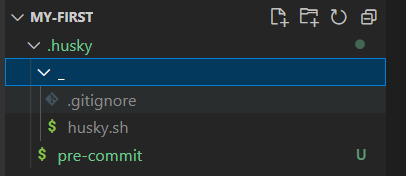
在.husky文件夹里面新建文件commit-msg和common.sh
commit-msg
#!/bin/sh

. "$(dirname "$0")/_/husky.sh"

npx --no -- commitlint --edit $1
common.sh
#!/bin/sh

command_exists () {

  command -v "$1" >/dev/null 2>&1

}

# Workaround for Windows 10, Git Bash and Yarn

if command_exists winpty && test -t 1; then

  exec < /dev/tty

fi
修改文件 pre-commit
#!/bin/sh

. "$(dirname "$0")/_/husky.sh"

npx lint-staged

npx lint-staged
在.vscode文件夹下新增文件settings.json
{

  "editor.codeActionsOnSave": {

    "source.fixAll.eslint": true,

    "eslint.autoFixOnSave": true

  },

  "files.eol": "\n"

}
编辑.gitignore
# Logs

logs

*.log

npm-debug.log*

yarn-debug.log*

yarn-error.log*

pnpm-debug.log*

lerna-debug.log*

node_modules

dist

dist-ssr

*.local

# Editor directories and files

.idea

.DS_Store

*.suo

*.ntvs*

*.njsproj

*.sln

*.sw?
四:引入配置
修改文件vite.config.ts
import { defineConfig } from 'vite';

import vue from '@vitejs/plugin-vue';

import eslintPlugin from 'vite-plugin-eslint';

// https://vitejs.dev/config/

export default defineConfig({

  plugins: [

    vue(),

    eslintPlugin({

      cache: false,

      include: ['src/**/*.vue', 'src/**/*.ts', 'src/**/*.tsx'] // 检查的文件

    })

  ]

});
五:安装依赖
pnpm i
六:测试并运行项目
首先先测试保存能否自动修正格式和引号分号换行等错误
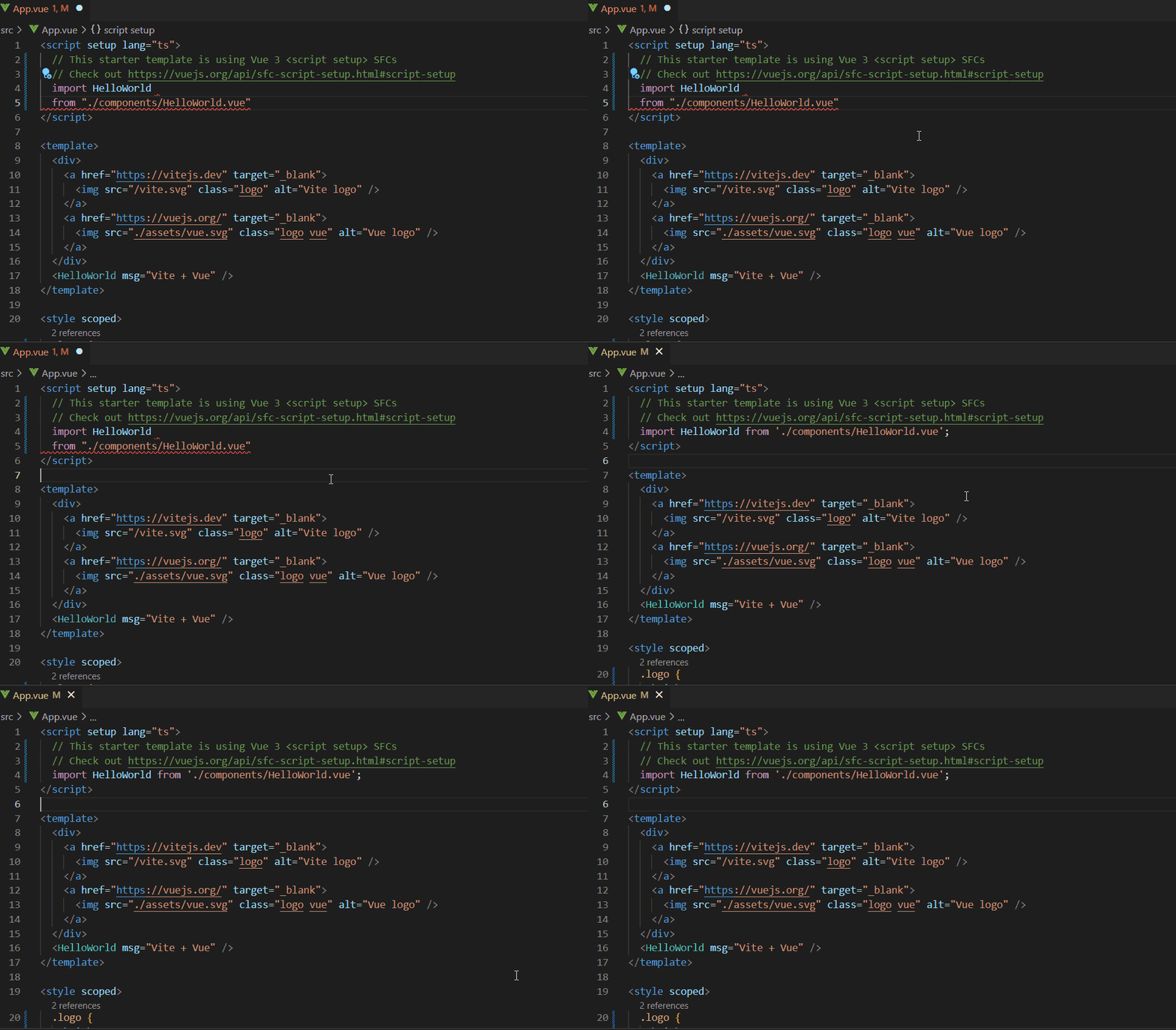
ok!没问题!
接下来测试不规范提交能否成功
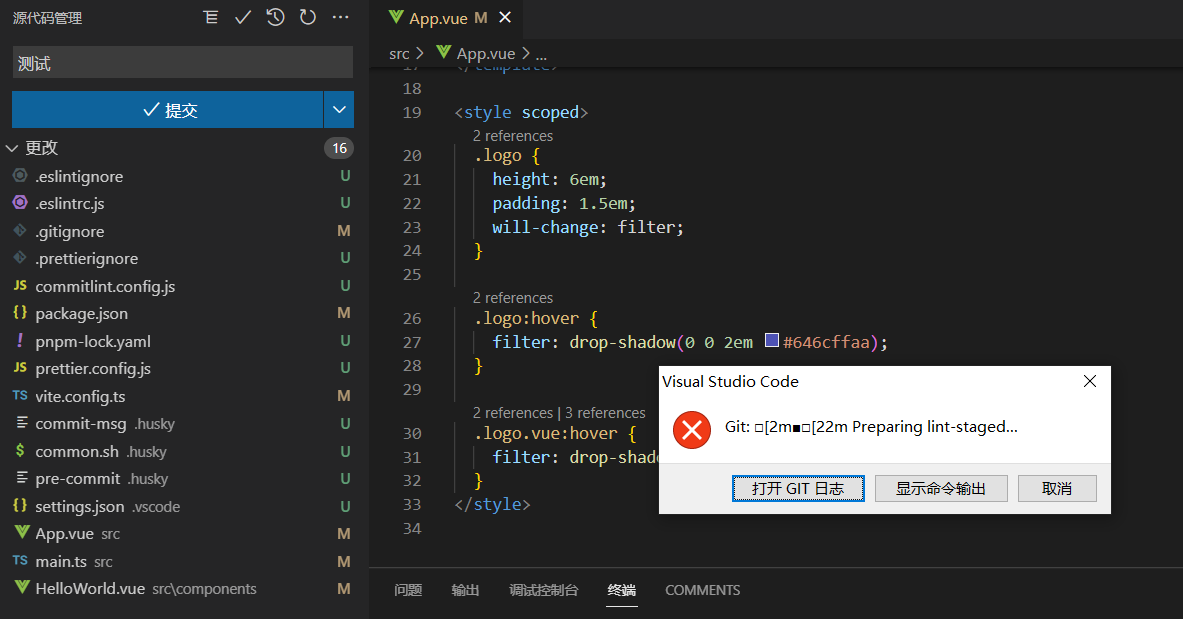
以下是项目目录
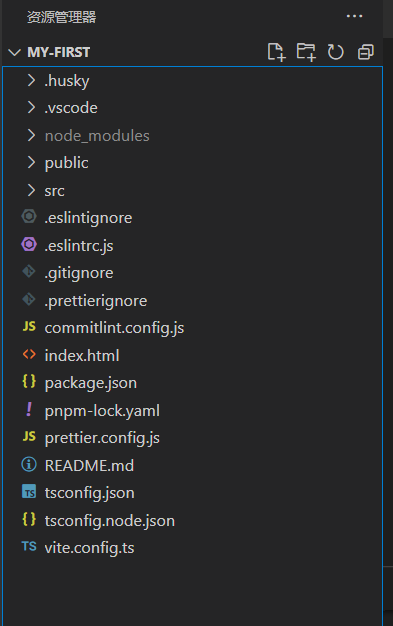
至此,eslint+prettier+husky+commitlint配置完成
快速新建并配置一个eslint+prettier+husky+commitlint+vue3+vite+ts+pnpm的项目的更多相关文章
- eslint+prettier+husky+lint-staged 统一前端代码规范
eslint+prettier+husky+lint-staged 统一前端代码规范 遵循编码规范和使用语法检测,可以很好的提高代码的可读性,可维护性,并有效的减少一些编码错误. 1.终极目标 团队中 ...
- 创建TypeScript代码模板(NVS+Yarn+ESLint+Prettier+Husky)
创建TypeScript代码模板(NVS+Yarn+ESLint+Prettier+Husky) Cui, Richard Chikun 本文笔者将带你在Github代码仓库创建TypeScript代 ...
- ESLint + Prettier + husky + lint-staged 规范统一前端代码风格
写在前面: ESLint: Find and fix problems in your JavaScript code. Prettier: Prettier is an opinionated co ...
- eclips 配置一个tomcat,启动多个不同端口的web项目
前提: 记录这个文章是因为在网上查资料,很多都是,用eclips.配置多个tomcat,就像下面图这样配置两个tomcat 去启动不同的web: 运动多个web 项目,设置不同的端口,需要多个tomc ...
- React-native ESLint & Prettier & Pre-commit Hook配置
目录 前言 一 eslint 1.1. 局部安装eslint 1.2 初始化配置文件 1.3 安装步骤 1.3.1 ESLint 风格 选Use a popular style guide 1.3.2 ...
- vscode 中 eslint prettier 和 eslint -loader 配置关系
前置 本文将探究 vscode prettier 插件 和 eslint 插件在 vscode 中的配置以及这两者对应的在项目中的配置文件的关系,最后提及 vscode eslint 插件配置与 es ...
- 03.ElementUI源码学习:代码风格检查和格式化配置(ESlint & Prettier)
书接上文.在团队协作中,为避免低级Bug.以及团队协作时不同代码风格对彼此造成的困扰与影响,会预先制定编码规范.使用 Lint工具和代码风格检测工具,则可以辅助编码规范执行,格式化代码,使样式与规则保 ...
- 配置一个高效快速的Git环境
username and email editor difftool and mergetool alias 可以直接修改~/.gitconfig文件,也可以用命令配置一个可以实际使用的高效的Git环 ...
- 【万字长文】从零配置一个vue组件库
简介 本文会从零开始配置一个monorepo类型的组件库,包括规范化配置.打包配置.组件库文档配置及开发一些提升效率的脚本等,monorepo 不熟悉的话这里一句话介绍一下,就是在一个git仓库里包含 ...
随机推荐
- 6┃音视频直播系统之 WebRTC 核心驱动SDP规范协商
一.什么是SDP SDP(Session Description Protocal)其实就是当数据过来时候,告诉数据自己这里支持的解码方式.传输协议等等,这样数据才能根据正确的方式进行解码使用 SDP ...
- 『忘了再学』Shell基础 — 13、环境变量(一)
目录 1.用户自定义的环境变量 (1)环境变量设置 (2)查询自定义环境变量 (3)删除自定义环境变量 2.系统自带的环境变量--PATH环境变量 (1)PATH环境变量 (2)PATH环境变量的作用 ...
- 11┃音视频直播系统之 WebRTC 进行文本聊天并实时传输文件
一.RTCDataChannel WebRTC 不但可以让你进行音视频通话,而且还可以用它传输普通的二进制数据,比如说可以利用它实现文本聊天.文件的传输等 WebRTC 的数据通道(RTCDataCh ...
- 跨域问题及其解决方法(JSONP&CORS)
一.什么是跨域 当a.qq.com域名下的页⾯或脚本试图去请求b.qq.com域名下的资源时,就是典型的跨域行为.跨域的定义从受限范围可以分为两种,⼴义跨域和狭义跨域. (一)广义跨域 ⼴义跨域通常包 ...
- HDFS 细粒度锁优化,FusionInsight MRS有妙招
摘要:华为云FusionInsight MRS通过FGL对HDFS NameNode锁机制进行优化,有效提升了NameNode的读写吞吐量,从而能够支持更多数据,更多业务请求访问,从而更好的支撑政企客 ...
- Vue 基础篇---computed 和 watch
最近在看前端 Vue方面的基础知识,虽然前段时间也做了一些vue方面的小项目,但总觉得对vue掌握的不够 所以对vue基础知识需要注意的地方重新撸一遍,可能比较零碎,看到那块就写哪块吧 1.vue中的 ...
- SCI论文写作注意事项
1. 先写结论:(划定范围,以防添加无效的内容) 并非一开始就把整个结论都写出来,而是把
- VTK 截图
vtk的vtkRenderWindowInteractor中的Initialize函数初始化了可交互的窗口,但是实际工程中,往往需要把窗口拿出来在别的页面上显示,如存为png图片等等.本文主要介绍如何 ...
- BUUCTF-九连环
九连环 这题还是稍微有点难度的 使用16进制打开发现压缩包,用binwalk分离看看 分离得到的压缩包同样16进制看看 可以发现多个压缩包,这种情况应该是伪加密的方式,但是直接使用修复压缩包的方式没法 ...
- 3. Caller 服务调用 - dapr
前言 上一篇我们讲了使用HttpClient的方式调用,那么如果我们现在需要更换为通过dapr实现服务调用,我们需要做哪些事情呢? Caller.Dapr 入门 如果我们的项目原本使用的是Caller ...