
@ConfigurationProperties(prefix = "server-options") 抛出 SpringBoot Configuration Annotation Processor not configured 错误
说明
spring-boot-configuration-processor 包的作用是自动生成 META-INF/spring-configuration-metadata.json 文件,而这个 json 文件可以为我们在配置 application.yml 文件时提供智能提示、自动补全、注释、跳转到 java 代码(ctrl+鼠标左键)的功能。
这样一来,在开发过程中就会避免写错配置项的问题,也可以增加编码流畅感
完美集成步骤
在 pom.xml 的 dependencies 节点中加入
spring-boot-configuration-processor包的 maven 依赖<dependency>
<groupId>org.springframework.boot</groupId>
<artifactId>spring-boot-configuration-processor</artifactId>
<optional>true</optional>
<version>2.5.2</version>
</dependency>
检查有没有在 pom.xml 中配置
build/plugins/[artifactId=maven-compiler-plugin]/configuration/annotationProcessorPaths
如果没有配置,可以跳到第 3 点了
如果配置了,那么一定要在annotationProcessorPaths加入spring-boot-configuration-processor包的path节点,如下:<path>
<groupId>org.springframework.boot</groupId>
<artifactId>spring-boot-configuration-processor</artifactId>
<version>2.5.2</version>
</path>
注意
version和dependencies节点中的一致,可以在properties节点中声明该包的版本号,然后在以上两个地方引用声明的变量编写自己的 XXProperty,如下:
package com.example.springboottests;

import lombok.Getter;

import lombok.Setter;

import org.springframework.boot.context.properties.ConfigurationProperties;

import org.springframework.boot.context.properties.NestedConfigurationProperty;

import org.springframework.stereotype.Component;

@Getter

@Setter

@Component

@ConfigurationProperties(prefix = "server-options")

public class ServerProperty {

    /**

     * 名称

     */

    private String name;

    /**

     * 其他配置

     */

    @NestedConfigurationProperty

    private ServerOtherProperty api;

    @Getter

    @Setter

    public static class ServerOtherProperty {

        /**

         * 标题

         */

        private String title;

    }

}
完毕,现在可以去
resources/application.yml查看效果了
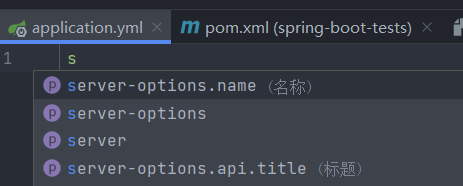
必读的注意事项
- 每次修改
ServerProperty中的内容时,必须要 rebuild 项目,因为他是通过编译帮助我们自动生成META-INF/spring-configuration-metadata.json文件,所以如果不 rebuild,json 文件内容就不会变。 - 如果不生效,可以自己看下是不是修改了 pom.xml 但没有点击右上角的刷新按钮,或者删除
target目录再 build 试试
@ConfigurationProperties(prefix = "server-options") 抛出 SpringBoot Configuration Annotation Processor not configured 错误的更多相关文章
- idea中的springboot+gradle项目报错springboot configuration annotation processor not found in classpath
idea中的springboot项目,打开某个类run.halo.app.config.properties.HaloProperties.java,报错(使用gradle编译): springboo ...
- SpringBoot中使用@ConfigurationProperties提示:Configuration Annotation Processor not found in classpath
问题 Springboot1.5以上版本,在使用 @ConfigurationProperties注解的时候会提示Spring Boot Configuration Annotation Proces ...
- 解决spring boot1.5以上版本@ConfigurationProperties提示“Spring Boot Configuration Annotation Processor not.."
Springboot1.5以上版本,在使用 @ConfigurationProperties注解的时候会提示“Spring Boot Configuration Annotation Processo ...
- PHP 的异常处理、错误的抛出及回调函数等面向对象的错误处理方法
PHP 的异常处理.错误的抛出及回调函数等面向对象的错误处理方法: http://www.jb51.net/article/32498.htm http://www.cnblogs.com/hongf ...
- 论如何优雅的抛出SpringBoot注解的异常
平时我们在写代码的时候肯定要进行很多参数验证,最开始的时候我们一般都是这样处理的 如下图 看起来好像也没什么,但是 如果参数多了呢?你就会看到这样的校验 OMG!!! 有没有感觉稍微有点视觉 ...
- CocoaPods 抛出[!] Unable to satisfy the following requirements: 错误
今天使用CocoaPods管理ReactiveCocoa,抛出以下错误 [!] Unable to satisfy the following requirements: - `ReactiveCoc ...
- 使用@ConfigurationProperties注解 提示 “Spring Boot Configuration Annotation Processor not found in classpath ”
解决方案: 在 pom.xml 添加依赖 <dependency> <groupId>org.springframework.boot</groupId> < ...
- spring boot configuration annotation processor not found in classpath
<dependency> <groupId> org.springframework.boot </groupId> <artifactId> spri ...
- 解决Spring Boot Configuration Annotation Processor not found in classpath
问题截图: 解决方式: 在pom.xml文件中添加这些依赖 <dependency> <groupId>org.springframework.boot</groupId ...
随机推荐
- servlet中的HttpServletResponse对象
当有多个客户端浏览器去请求Tomcat时,Tomcat会为每一个客户端浏览器创建一对独立的HttpServletRequest与HttpServletResponse对象 HttpServletRes ...
- 5-Pandas数据分组的函数应用(df.apply()、df.agg()和df.transform()、df.applymap())
将自己定义的或其他库的函数应用于Pandas对象,有以下3种方法: apply():逐行或逐列应用该函数 agg()和transform():聚合和转换 applymap():逐元素应用函数 一 ...
- 完美解决 scipy.misc.imread 报错 TypeError: Image data cannot be converted to float
File "/home/harrison/anaconda3/lib/python3.7/site-packages/matplotlib/image.py", line 634, ...
- can总线第二讲
一 CAN总线拓扑结构CAN是一种分布式的控制总线,总线上的每一个节点一般来说都比较简单,使用MCU控制器处理CAN总线数据,完成特定的功能:通过CAN总线将各节点连接只需较少的线缆(两根线:CAN_ ...
- 第 4 章 ROS运行管理
第 4 章 ROS运行管理 ROS是多进程(节点)的分布式框架,一个完整的ROS系统实现: 可能包含多台主机:每台主机上又有多个工作空间(workspace):每个的工作空间中又包含多个功能包(pac ...
- 小程序 wx.getSystemInfoSync 获取 windowHeight 问题
windowHeight 概念 可使用窗口高度,即:屏幕高度(screenHeight) - 导航(tabbar)高度 存在问题 安卓设备下获取 windowHeight 不能准确得到对应的高度,总是 ...
- canvas系列教程03-柱状图项目1
弄了一堆线方块和函数,感觉挺玄乎,然并卵.我们直接写个项目看看. canvas一个比较拽的应用就是图表和游戏,我们从浅入深,先玩图表,图表我们今天说一个最简单柱状图. 柱状图很多人用百度的echars ...
- 什么是3D建模?
一.3D建模是什么 将所见所想用立体三维的方式通过计算机技术表现出来,这就是3D建模,比如你看到了一个可爱呆萌的卡通人物又或是华丽酷炫的变形金刚,总之就是你认为美好的立体实物 你想将它用计算机技术完美 ...
- Leetcode541/151之String与char数组与StringBuffer
String与char数组与StringBuffer 通常情况下遇到删除字符或者反转字符串时需要将String转为char数组或者StringBuffer String与char数组 char [] ...
- 利用Docker快速部署Mysql
写在前面 我又来更新了~~~,今天内容较少,主要是利用Docker快速部署Mysql和初始化数据 利用Docker下载Mysql 简洁明了,在命令提示符中输入 docker pull mysql:8. ...