
Vue_(组件通讯)父组件向子组件传值
Vue组件 传送门

父组件向子组件传值:父组件通过属性向下传值的方式和子组件通信;
使用步骤:
1、定义组件:现有自定义组件com-a、com-b,com-a是com-b的父组件
2、准备获取数据:com-b要获取父组件data中的name属性
3、在<com-b :name=“name”></com-b> 使用v-bind 绑定name属性,红色部分为属性名称,可以随意写
4、在子组件定义部分里添加选项,值是个字符串数组 props:[‘name’],将上边红色的属性名称写在这里
5、之后就可定义在子组件中使用name属性了
Learn:
一、父组件向子组件传值
二、Props选项高级选项配置
目录结构

一、父组件向子组件传值
需要在父组件中用v-bind绑定name属性
<template id="father-template">

        <div>

            <h1>father component</h1>

            myData : <span>{{name}}</span><br />

            <input type="text" v-model="name"/>

            <hr />

            <child-component :name="name"></child-component>

        </div>

    </template>
在Vue中components属性中通过props选项给子组件绑定name标签
        new Vue({

            data : {

            },

            components : {

                "father-component" : {

                    data(){

                        return {

                            name : 'Gary'

                        }

                    },

                    template :  "#father-template",

                    components : {

                        "child-component" : {

                            template : "#child-template",

                            props:['name']

                        }

                    }

                }

            }

        }).$mount("#GaryId");
在子组件中就可以直接通过{{props}}将值传递过去
    <template id="child-template">

        <div>

            <h2>child component</h2>

            fatherData : <span>{{name}}</span>

        </div>

    </template>

<!DOCTYPE html>

<html>

    <head>

        <meta charset="UTF-8">

        <title>Gary</title>

    </head>

    <body>

        <div id="GaryId">

            <father-component></father-component>

        </div>

    </body>

<template id="father-template">

        <div>

            <h1>father component</h1>

            myData : <span>{{name}}</span><br />

            <input type="text" v-model="name"/>

            <hr />

            <child-component :name="name"></child-component>

        </div>

    </template>

    <template id="child-template">

        <div>

            <h2>child component</h2>

            fatherData : <span>{{name}}</span>

        </div>

    </template>

    <script type="text/javascript" src="../js/vue.js" ></script>

    <script type="text/javascript">

        new Vue({

            data : {

            },

            components : {

                "father-component" : {

                    data(){

                        return {

                            name : 'Gary'

                        }

                    },

                    template :  "#father-template",

                    components : {

                        "child-component" : {

                            template : "#child-template",

                            props:['name']

                        }

                    }

                }

            }

        }).$mount("#GaryId");

    </script>

</html>
Gary_fatherAndChild.html
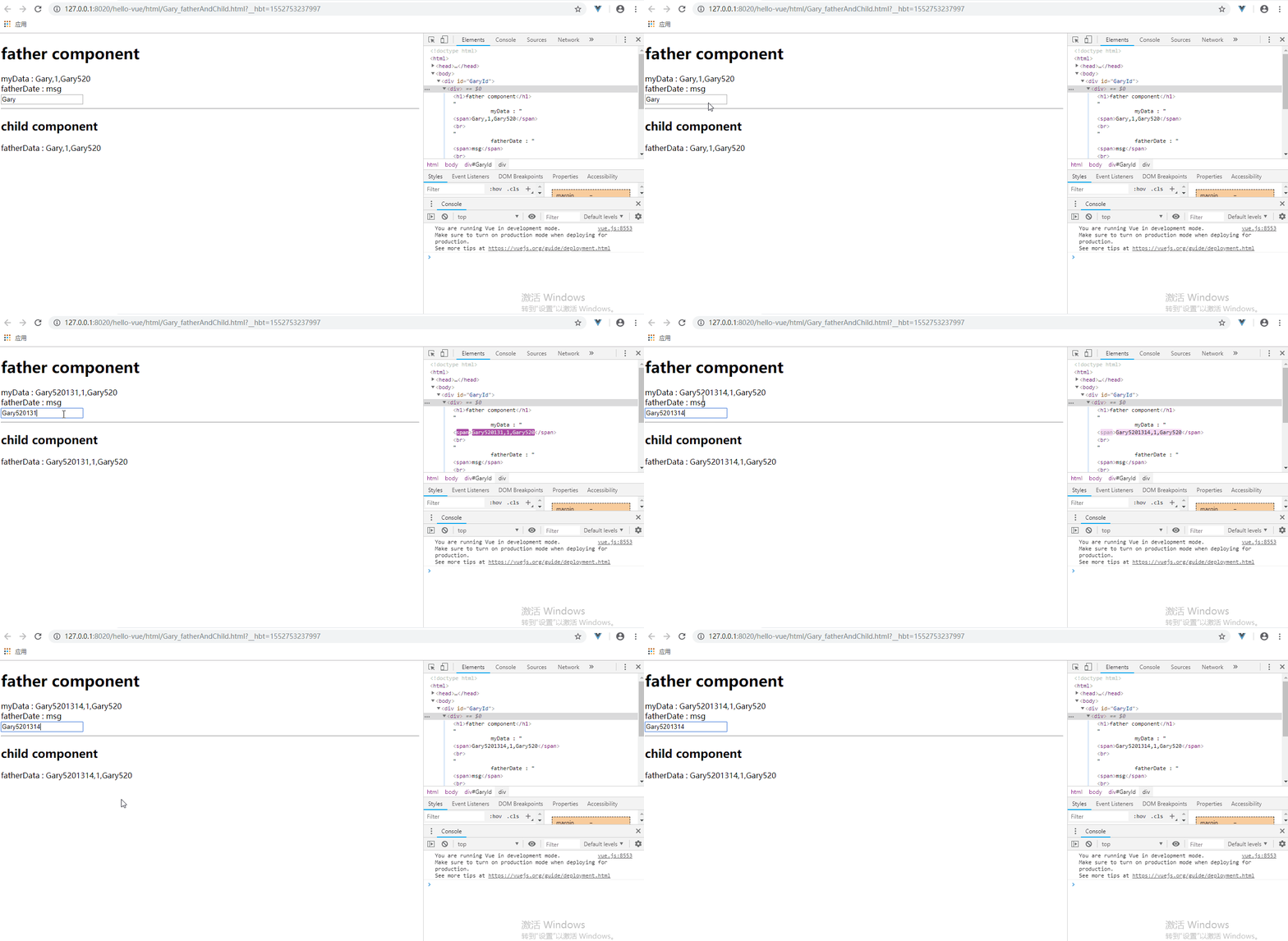
在father组件的<child-component>组件中使用多个v-bind属性可实现多组数值传递
<template id="father-template">

        <div>

            <h1>father component</h1>

            myData : <span>{{name}},{{id}},{{user.username}}</span><br />

            fatherDate : <span>msg</span><br />

            <input type="text" v-model="name"/>

            <hr />

            <child-component :name="name" :id="id" :user="user"></child-component>

        </div>

    </template>
Vue中给子组件添加user对象,以及给对象初始值msg:'helloVue'并在父组件中通过<father-component :msg="msg"></father-component>中直接使用
        new Vue({

            data : {

                 msg:'helloVue'

            },

            components : {

                "father-component" : {

                    data(){

                        return {

                            id:1,

                            name : 'Gary',

                            user:{

                                username:'Gary520',

                                password:'5201314'

                            }

                        }

                    },

                    props:['msg'],

                    template :  "#father-template",

                    components : {

                        "child-component" : {

                            template : "#child-template",

                            props:['name','id','user']

                        }

                    }

                }

            }

        }).$mount("#GaryId");
同理在父组件中调用数据
    <template id="child-template">

        <div>

            <h2>child component</h2>

            fatherData : <span>{{name}},{{id}},{{user.username}}</span>

        </div>

    </template>
<!DOCTYPE html>

<html>

    <head>

        <meta charset="UTF-8">

        <title>Gary</title>

    </head>

    <body>

        <div id="GaryId">

            <father-component :msg="msg"></father-component>

        </div>

    </body>

<template id="father-template">

        <div>

            <h1>father component</h1>

            myData : <span>{{name}},{{id}},{{user.username}}</span><br />

            fatherDate : <span>msg</span><br />

            <input type="text" v-model="name"/>

            <hr />

            <child-component :name="name" :id="id" :user="user"></child-component>

        </div>

    </template>

    <template id="child-template">

        <div>

            <h2>child component</h2>

            fatherData : <span>{{name}},{{id}},{{user.username}}</span>

        </div>

    </template>

    <script type="text/javascript" src="../js/vue.js" ></script>

    <script type="text/javascript">

        new Vue({

            data : {

                 msg:'helloVue'

            },

            components : {

                "father-component" : {

                    data(){

                        return {

                            id:1,

                            name : 'Gary',

                            user:{

                                username:'Gary520',

                                password:'5201314'

                            }

                        }

                    },

                    props:['msg'],

                    template :  "#father-template",

                    components : {

                        "child-component" : {

                            template : "#child-template",

                            props:['name','id','user']

                        }

                    }

                }

            }

        }).$mount("#GaryId");

    </script>

</html>
Gary_fatherAndChild.html
二、Props选项高级选项配置 传送门
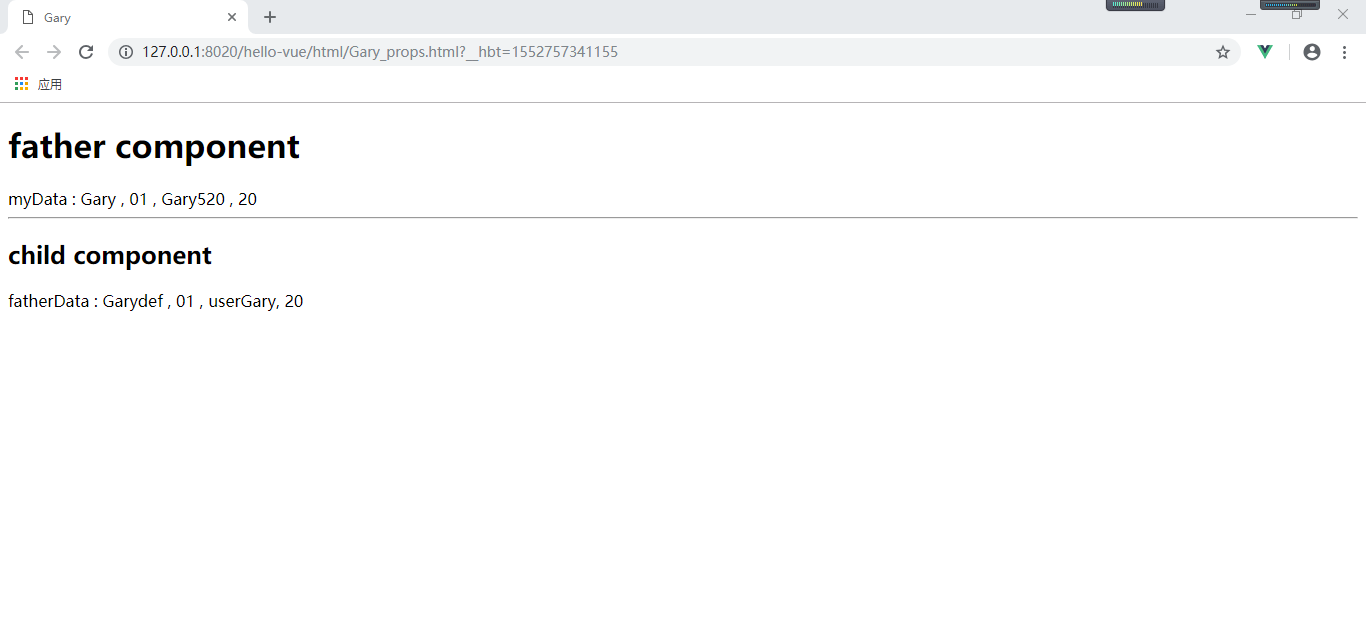
使用Props还可以实现许多功能,如设置默认值、数据校验、设置返回值
new Vue({

            data : {

            },

            components : {

                "father-component" : {

                    data(){

                        return {

                            id : '01',

                            name : 'Gary',

                            user : {

                                username : 'Gary520',

                                password : '5201314'

                            },

                            age : 20

                        }

                    },

                    props : ['msg'],

                    template :  "#father-template",

                    components : {

                        "child-component" : {

                            template : "#child-template",

                            //props : ['username', 'id', 'user']

                            props : {

                                name : {

                                    type : String,

                                    //必须得传值可使用required : true,

                                    default : "Garydef"

                                },

                                id : [Number, String],

                                user : {

                                    type : Object,

                                    default : function(){

                                        return {username : 'userGary', password : 'pw123'};

                                    }

                                },

                                age : {

                                    type : Number,

                                    validator : function(value){

                                        return value >= 0;

                                    }

                                }

                            }

                        }

                    }

                }

            }

        }).$mount("#GaryId");
<!DOCTYPE html>

<html>

    <head>

        <meta charset="UTF-8">

        <title>Gary</title>

    </head>

    <body>

        <div id="GaryId">

                <father-component></father-component>

        </div>

    </body>

<template id="father-template">

            <div>

            <h1>father component</h1>

            myData :

            <span>

                {{name}} ,

                {{id}} ,

                {{user.username}} ,

                {{age}}

            </span><br /><hr />

            <child-component  :id="id" :age="age"></child-component>

        </div>

    </template>

    <template id="child-template">

        <div>

            <h2>child component</h2>

            fatherData :

            <span>

                {{name}} ,

                {{id}} ,

                {{user.username}},

                {{age}}

            </span>

        </div>

    </template>

    <script type="text/javascript" src="../js/vue.js" ></script>

    <script type="text/javascript">

            new Vue({

            data : {

            },

            components : {

                "father-component" : {

                    data(){

                        return {

                            id : '01',

                            name : 'Gary',

                            user : {

                                username : 'Gary520',

                                password : '5201314'

                            },

                            age : 20

                        }

                    },

                    props : ['msg'],

                    template :  "#father-template",

                    components : {

                        "child-component" : {

                            template : "#child-template",

                            //props : ['username', 'id', 'user']

                            props : {

                                name : {

                                    type : String,

                                    //必须得传值可使用required : true,

                                    default : "Garydef"

                                },

                                id : [Number, String],

                                user : {

                                    type : Object,

                                    default : function(){

                                        return {username : 'userGary', password : 'pw123'};

                                    }

                                },

                                age : {

                                    type : Number,

                                    validator : function(value){

                                        return value >= 0;

                                    }

                                }

                            }

                        }

                    }

                }

            }

        }).$mount("#GaryId");

    </script>

</html>
Gary_props.html
Vue_(组件通讯)父组件向子组件传值的更多相关文章
- vue 父组件主动获取子组件的数据和方法 子组件主动获取父组件的数据和方法
Header.vue <template> <div> <h2>我是头部组件</h2> <button @click="getParen ...
- Vue 父组件循环使用refs调用子组件方法出现undefined的问题
Vue 父组件循环使用refs调用子组件方法出现undefined的问题 1. 背景 最近前端项目遇到一个问题,我在父组件中使用了两个相同的子组件child,分别设置ref为add和update.其中 ...
- Vue把父组件的方法传递给子组件调用(评论列表例子)
Vue把父组件的方法传递给子组件调用(评论列表例子) 效果展示: 相关Html: <!DOCTYPE html> <html lang="en"> < ...
- vue父组件异步传递prop到子组件echarts画图问题踩坑总结
效果图: 大致思路:考虑到5张图都是折线图,所以准备用一个子组件承接echarts画图,然后父组件通过prop传递不同数据来展示不同的图 踩坑问题: 1.引入line子组件,画了5个元素,但是只显示一 ...
- Vue父组件向子组件传递方法(自定义方法)并且子组件向父组件传递数据
<!DOCTYPE html> <html lang="en"> <head> <meta charset="UTF-8&quo ...
- 九、React中的组件、父子组件、React props父组件给子组件传值、子组件给父组件传值、父组件中通过refs获取子组件属性和方法
一.概述 React中的组件: 解决html 标签构建应用的不足. 使用组件的好处:把公共的功能单独抽离成一个文件作为一个组件,哪里里使用哪里引入. [父子组件]:组件的相互调用中,我们把调用者称为父 ...
- 【VUE】7.组件通信(二)子组件修改父组件
1. 前提&知识点 1./components/Father.vue 是父组件, Son.vue 是子组件 2.子组件修改父组件 emit 2. 组件通信 1. 首先对子组件绑定一个事件 ch ...
- vue3常见问题及解决方案(四)父组件切换行,然后子组件切换tab,子组件内的数据不刷新
问题描述 父组件切换行,然后子组件切换tab,子组件内的数据不刷新. 例如父组件为订单,子组件为订单相关商品和相关客户,商品和客户使用tab选项卡组织. 当tab显示商品页时,切换订单,商品页内容跟着 ...
- 【Vue项目笔记】—— 父子组件之间传递参数和子组件执行父组件中的方法
父组件(MyBlog.vue) <template> <!-- Delete Modal --> <!-- 注意:这里的@deleteBlog中的deleteBlog要和 ...
- Vue父子组件数据双向绑定,子组件可修改props
第一种,子组件通过监听父组件数据,子组件改变数据之后通知给父组件 原文链接:https://blog.csdn.net/m0_37728716/article/details/81776929 父组件 ...
随机推荐
- centos7安装配置zabbix监控
CentOs7安装部署Zabbix3.4 1.关闭selinux和firewall systemctl stop firewalld setenforce 1.1检测selinux是否关闭 [ro ...
- node jade || ejs引擎模板
1.jade:破坏式2.ejs:保留式 -------------------------------------------------------------------------------- ...
- vue项目 时间戳转 格式
项目用了 element UI的日期插件,修改时 时间回显不了,打印出来是换行了,因此要转换 changeTime(value){ let date = new Date(value); let y ...
- docker容器生态技术链
图片来源:https://blog.51cto.com/liuleis/2067116 说明:学习Docker容器技术,先纵向了解大致内容架构,再横向逐一分解涉及的各项技术内容,对容器所涉及的技术体系 ...
- dart 函数练习
import 'dart:convert'; import 'dart:html'; void main() { _getIPAddress() { final url = 'https://http ...
- act_window 属性
窗口Action(ir.actions.act_window ) 最常用的action类型,用于将model的数据展示出来 字段列表: 1.res_model -- 需要在view里显示数据的mode ...
- Delphi 使用Query组件的SQL查询
樊伟胜
- 十四,K8s集群网络flannel及canal策略
目录 k8s网络CNI之flannel k8s网络通信模型 常见CNI插件(Container,Network,Interface) 插件通信一般的解决方案 网络插件的应用 Flannel插件 fla ...
- Toast的基本用法 吐司打印
//Toast.makeText(上下文,内容,显示时间);Toast toast =Toast.makeText(this,"位置="+position+"内容=&qu ...
- 批量删除Zen Cart 无图片商品
<?php /** * * @ 批量删除Zen Cart 无图片商品 * @ 使用方法: 将本文件上传到网站根目录下运行 http://你的域名/zcdelpro.php * @ $status ...