
Vue_(组件通讯)父组件向子组件传值
Vue组件 传送门

父组件向子组件传值:父组件通过属性向下传值的方式和子组件通信;
使用步骤:
1、定义组件:现有自定义组件com-a、com-b,com-a是com-b的父组件
2、准备获取数据:com-b要获取父组件data中的name属性
3、在<com-b :name=“name”></com-b> 使用v-bind 绑定name属性,红色部分为属性名称,可以随意写
4、在子组件定义部分里添加选项,值是个字符串数组 props:[‘name’],将上边红色的属性名称写在这里
5、之后就可定义在子组件中使用name属性了
Learn:
一、父组件向子组件传值
二、Props选项高级选项配置
目录结构

一、父组件向子组件传值
需要在父组件中用v-bind绑定name属性
<template id="father-template">

        <div>

            <h1>father component</h1>

            myData : <span>{{name}}</span><br />

            <input type="text" v-model="name"/>

            <hr />

            <child-component :name="name"></child-component>

        </div>

    </template>
在Vue中components属性中通过props选项给子组件绑定name标签
        new Vue({

            data : {

            },

            components : {

                "father-component" : {

                    data(){

                        return {

                            name : 'Gary'

                        }

                    },

                    template :  "#father-template",

                    components : {

                        "child-component" : {

                            template : "#child-template",

                            props:['name']

                        }

                    }

                }

            }

        }).$mount("#GaryId");
在子组件中就可以直接通过{{props}}将值传递过去
    <template id="child-template">

        <div>

            <h2>child component</h2>

            fatherData : <span>{{name}}</span>

        </div>

    </template>

<!DOCTYPE html>

<html>

    <head>

        <meta charset="UTF-8">

        <title>Gary</title>

    </head>

    <body>

        <div id="GaryId">

            <father-component></father-component>

        </div>

    </body>

<template id="father-template">

        <div>

            <h1>father component</h1>

            myData : <span>{{name}}</span><br />

            <input type="text" v-model="name"/>

            <hr />

            <child-component :name="name"></child-component>

        </div>

    </template>

    <template id="child-template">

        <div>

            <h2>child component</h2>

            fatherData : <span>{{name}}</span>

        </div>

    </template>

    <script type="text/javascript" src="../js/vue.js" ></script>

    <script type="text/javascript">

        new Vue({

            data : {

            },

            components : {

                "father-component" : {

                    data(){

                        return {

                            name : 'Gary'

                        }

                    },

                    template :  "#father-template",

                    components : {

                        "child-component" : {

                            template : "#child-template",

                            props:['name']

                        }

                    }

                }

            }

        }).$mount("#GaryId");

    </script>

</html>
Gary_fatherAndChild.html
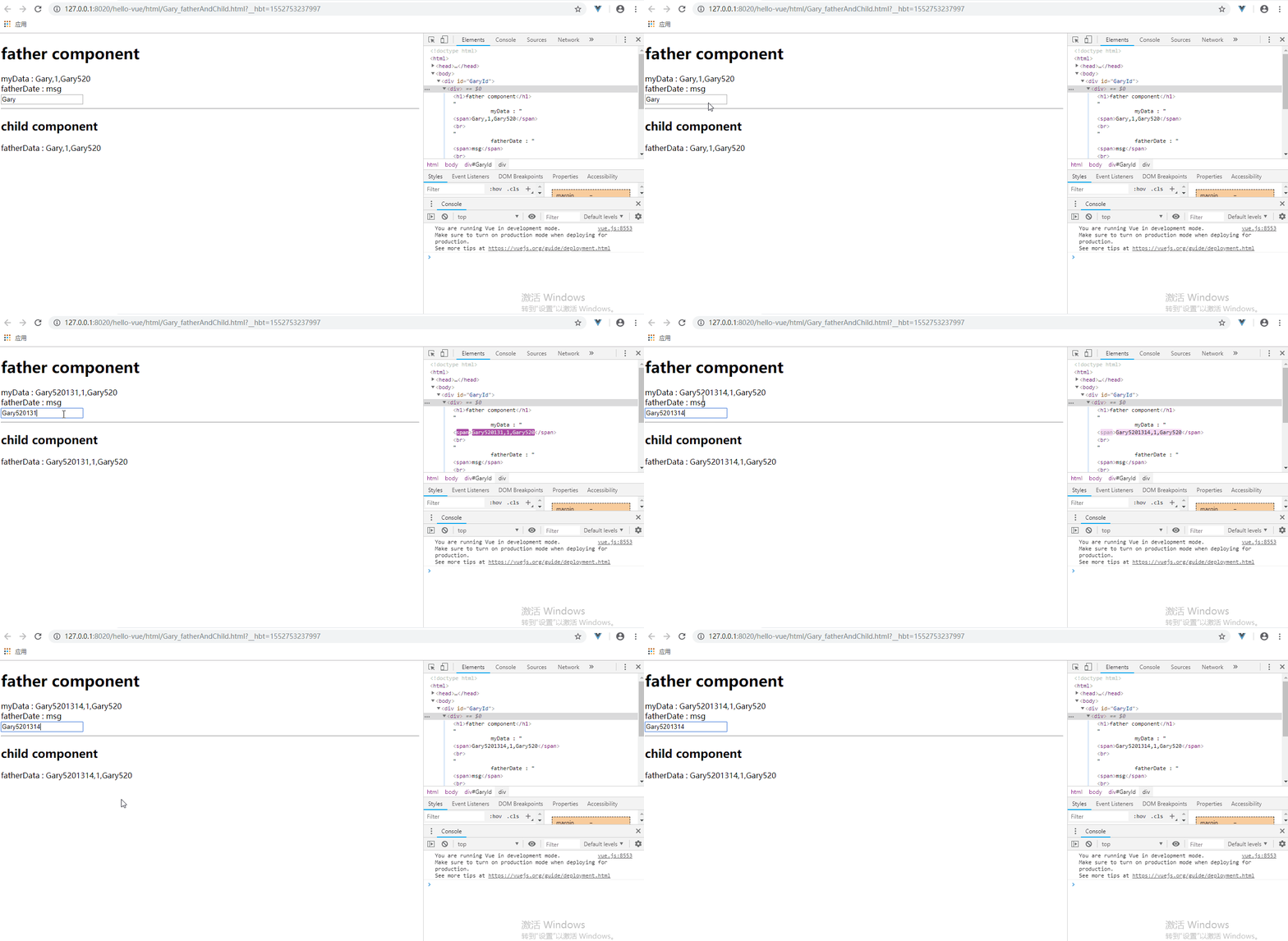
在father组件的<child-component>组件中使用多个v-bind属性可实现多组数值传递
<template id="father-template">

        <div>

            <h1>father component</h1>

            myData : <span>{{name}},{{id}},{{user.username}}</span><br />

            fatherDate : <span>msg</span><br />

            <input type="text" v-model="name"/>

            <hr />

            <child-component :name="name" :id="id" :user="user"></child-component>

        </div>

    </template>
Vue中给子组件添加user对象,以及给对象初始值msg:'helloVue'并在父组件中通过<father-component :msg="msg"></father-component>中直接使用
        new Vue({

            data : {

                 msg:'helloVue'

            },

            components : {

                "father-component" : {

                    data(){

                        return {

                            id:1,

                            name : 'Gary',

                            user:{

                                username:'Gary520',

                                password:'5201314'

                            }

                        }

                    },

                    props:['msg'],

                    template :  "#father-template",

                    components : {

                        "child-component" : {

                            template : "#child-template",

                            props:['name','id','user']

                        }

                    }

                }

            }

        }).$mount("#GaryId");
同理在父组件中调用数据
    <template id="child-template">

        <div>

            <h2>child component</h2>

            fatherData : <span>{{name}},{{id}},{{user.username}}</span>

        </div>

    </template>
<!DOCTYPE html>

<html>

    <head>

        <meta charset="UTF-8">

        <title>Gary</title>

    </head>

    <body>

        <div id="GaryId">

            <father-component :msg="msg"></father-component>

        </div>

    </body>

<template id="father-template">

        <div>

            <h1>father component</h1>

            myData : <span>{{name}},{{id}},{{user.username}}</span><br />

            fatherDate : <span>msg</span><br />

            <input type="text" v-model="name"/>

            <hr />

            <child-component :name="name" :id="id" :user="user"></child-component>

        </div>

    </template>

    <template id="child-template">

        <div>

            <h2>child component</h2>

            fatherData : <span>{{name}},{{id}},{{user.username}}</span>

        </div>

    </template>

    <script type="text/javascript" src="../js/vue.js" ></script>

    <script type="text/javascript">

        new Vue({

            data : {

                 msg:'helloVue'

            },

            components : {

                "father-component" : {

                    data(){

                        return {

                            id:1,

                            name : 'Gary',

                            user:{

                                username:'Gary520',

                                password:'5201314'

                            }

                        }

                    },

                    props:['msg'],

                    template :  "#father-template",

                    components : {

                        "child-component" : {

                            template : "#child-template",

                            props:['name','id','user']

                        }

                    }

                }

            }

        }).$mount("#GaryId");

    </script>

</html>
Gary_fatherAndChild.html
二、Props选项高级选项配置 传送门
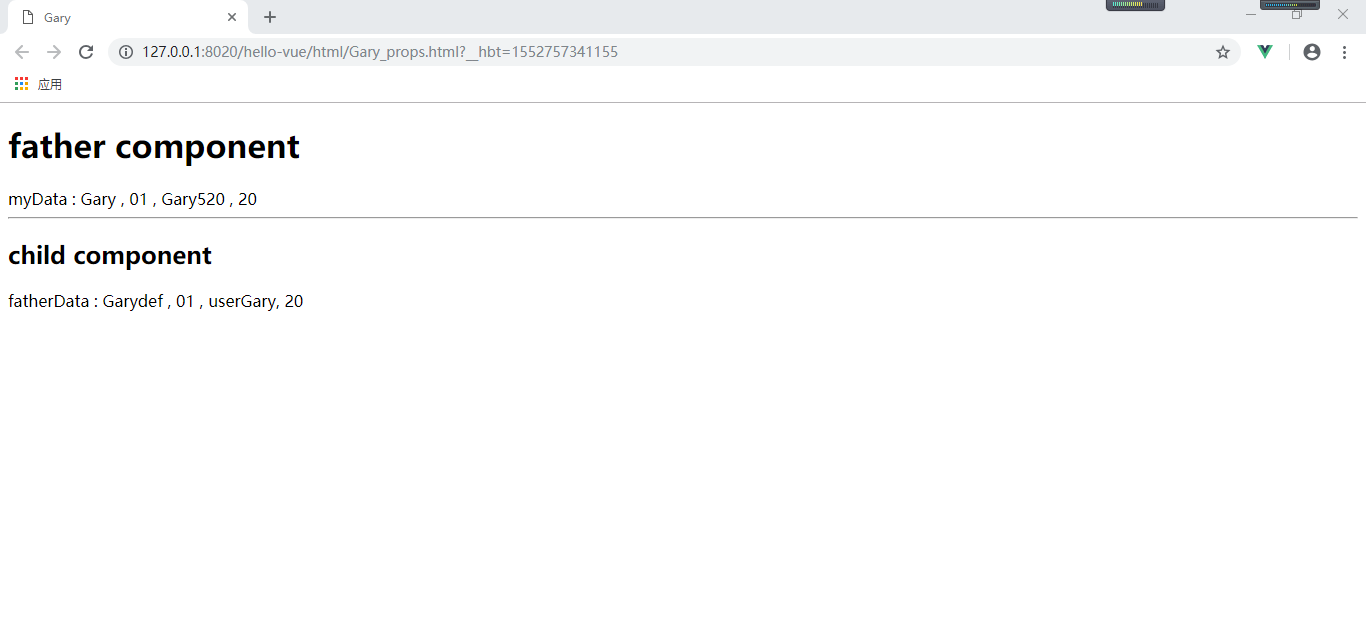
使用Props还可以实现许多功能,如设置默认值、数据校验、设置返回值
new Vue({

            data : {

            },

            components : {

                "father-component" : {

                    data(){

                        return {

                            id : '01',

                            name : 'Gary',

                            user : {

                                username : 'Gary520',

                                password : '5201314'

                            },

                            age : 20

                        }

                    },

                    props : ['msg'],

                    template :  "#father-template",

                    components : {

                        "child-component" : {

                            template : "#child-template",

                            //props : ['username', 'id', 'user']

                            props : {

                                name : {

                                    type : String,

                                    //必须得传值可使用required : true,

                                    default : "Garydef"

                                },

                                id : [Number, String],

                                user : {

                                    type : Object,

                                    default : function(){

                                        return {username : 'userGary', password : 'pw123'};

                                    }

                                },

                                age : {

                                    type : Number,

                                    validator : function(value){

                                        return value >= 0;

                                    }

                                }

                            }

                        }

                    }

                }

            }

        }).$mount("#GaryId");
<!DOCTYPE html>

<html>

    <head>

        <meta charset="UTF-8">

        <title>Gary</title>

    </head>

    <body>

        <div id="GaryId">

                <father-component></father-component>

        </div>

    </body>

<template id="father-template">

            <div>

            <h1>father component</h1>

            myData :

            <span>

                {{name}} ,

                {{id}} ,

                {{user.username}} ,

                {{age}}

            </span><br /><hr />

            <child-component  :id="id" :age="age"></child-component>

        </div>

    </template>

    <template id="child-template">

        <div>

            <h2>child component</h2>

            fatherData :

            <span>

                {{name}} ,

                {{id}} ,

                {{user.username}},

                {{age}}

            </span>

        </div>

    </template>

    <script type="text/javascript" src="../js/vue.js" ></script>

    <script type="text/javascript">

            new Vue({

            data : {

            },

            components : {

                "father-component" : {

                    data(){

                        return {

                            id : '01',

                            name : 'Gary',

                            user : {

                                username : 'Gary520',

                                password : '5201314'

                            },

                            age : 20

                        }

                    },

                    props : ['msg'],

                    template :  "#father-template",

                    components : {

                        "child-component" : {

                            template : "#child-template",

                            //props : ['username', 'id', 'user']

                            props : {

                                name : {

                                    type : String,

                                    //必须得传值可使用required : true,

                                    default : "Garydef"

                                },

                                id : [Number, String],

                                user : {

                                    type : Object,

                                    default : function(){

                                        return {username : 'userGary', password : 'pw123'};

                                    }

                                },

                                age : {

                                    type : Number,

                                    validator : function(value){

                                        return value >= 0;

                                    }

                                }

                            }

                        }

                    }

                }

            }

        }).$mount("#GaryId");

    </script>

</html>
Gary_props.html
Vue_(组件通讯)父组件向子组件传值的更多相关文章
- vue 父组件主动获取子组件的数据和方法 子组件主动获取父组件的数据和方法
Header.vue <template> <div> <h2>我是头部组件</h2> <button @click="getParen ...
- Vue 父组件循环使用refs调用子组件方法出现undefined的问题
Vue 父组件循环使用refs调用子组件方法出现undefined的问题 1. 背景 最近前端项目遇到一个问题,我在父组件中使用了两个相同的子组件child,分别设置ref为add和update.其中 ...
- Vue把父组件的方法传递给子组件调用(评论列表例子)
Vue把父组件的方法传递给子组件调用(评论列表例子) 效果展示: 相关Html: <!DOCTYPE html> <html lang="en"> < ...
- vue父组件异步传递prop到子组件echarts画图问题踩坑总结
效果图: 大致思路:考虑到5张图都是折线图,所以准备用一个子组件承接echarts画图,然后父组件通过prop传递不同数据来展示不同的图 踩坑问题: 1.引入line子组件,画了5个元素,但是只显示一 ...
- Vue父组件向子组件传递方法(自定义方法)并且子组件向父组件传递数据
<!DOCTYPE html> <html lang="en"> <head> <meta charset="UTF-8&quo ...
- 九、React中的组件、父子组件、React props父组件给子组件传值、子组件给父组件传值、父组件中通过refs获取子组件属性和方法
一.概述 React中的组件: 解决html 标签构建应用的不足. 使用组件的好处:把公共的功能单独抽离成一个文件作为一个组件,哪里里使用哪里引入. [父子组件]:组件的相互调用中,我们把调用者称为父 ...
- 【VUE】7.组件通信(二)子组件修改父组件
1. 前提&知识点 1./components/Father.vue 是父组件, Son.vue 是子组件 2.子组件修改父组件 emit 2. 组件通信 1. 首先对子组件绑定一个事件 ch ...
- vue3常见问题及解决方案(四)父组件切换行,然后子组件切换tab,子组件内的数据不刷新
问题描述 父组件切换行,然后子组件切换tab,子组件内的数据不刷新. 例如父组件为订单,子组件为订单相关商品和相关客户,商品和客户使用tab选项卡组织. 当tab显示商品页时,切换订单,商品页内容跟着 ...
- 【Vue项目笔记】—— 父子组件之间传递参数和子组件执行父组件中的方法
父组件(MyBlog.vue) <template> <!-- Delete Modal --> <!-- 注意:这里的@deleteBlog中的deleteBlog要和 ...
- Vue父子组件数据双向绑定,子组件可修改props
第一种,子组件通过监听父组件数据,子组件改变数据之后通知给父组件 原文链接:https://blog.csdn.net/m0_37728716/article/details/81776929 父组件 ...
随机推荐
- Stacey矩阵简介
1. Stacey 矩阵包含哪几个区域? 1区:Simple 第一个区域,需求明确,技术(解决方案)也确定,这类项目就是简单的项目(Simple):比如注册一个新公司,需求很明确,手续也很清楚,就那么 ...
- Func<>委托、扩展方法、yield、linq ForEach综合运用
1.先定义一个Model类 public class P1 { public string name { get; set; } public int age ...
- 豆瓣网post 爬取带验证码
# -*- coding: utf- -*- import scrapy import requests from ..bao.jiema import get_number fromdata = { ...
- mqtt协议实现 java服务端推送功能(一)安装
最近有个新需求,需要通过java服务端把信息推送到mqtt服务器上,安卓和ios端从mqtt服务器上获取信息实现推送. 1. 本地需要安装Mosquitto服务器 http://mosquitto. ...
- 7.Hibernate查询
一:Hibernate可以使用的查询语言 1.NativeSQL:本地语言(数据库自己的SQL语句) 2.HQL:hibernate自带的查询语句,可以使用HQL语言,转换成具体的方言 3.EJBQL ...
- Web开发的分层结构与MVC模式
1.分层结构 所谓分层结构.把不同的功能代码封装成类,把相同功能的类封装在一个个的包中,也叫层.功能归类如下: 实体类: 封装数据,是数据的载体,在层与层之间进行传递,数据也就传递了.比如说要传递学生 ...
- arm交叉编译sudo-1.8.6p7
1.交叉编译 # tar -xvf sudo-1.8.6p7.tar.gz # cd sudo-1.8.6p7/ # mkdir build # ./configure --prefix=/home/ ...
- 【C/C++】内存对齐规则和实战
内存对齐规则和实战 这篇文章是我的平时的一个笔记修改后来的.这里主要介绍一下内存对齐的规则,以及提供一些实战一下.几篇我觉得比较好的详细的介绍内存对齐的作用什么的博文会在文末附上. 规则 在开始实战前 ...
- 序列化 json pickle shelve configparser
一 什么是 序列化 在我们存储数据或者 网络传输数据的时候,需要对我们的 对象进行处理,把对象处理成方便我们存储和传输的 数据格式,这个过程叫序列化,不同的序列化,结果也不相同,但是目的是一样的,都是 ...
- Linux基础命令01
绝对路径:从“/”根目录下开始 常用的一些命令选项 ls ls :使用方式 ls {空格}选项 {空格}参数 (全写为list)(等同于dir) 列出当前目录下所有的文件,包括隐藏文件 ls -a ...