
利用UICollectionView实现列表和宫格视图的切换
很多时候我们需要列表和宫格视图的来回切换,就像苹果的天气应用一样,我之前见过一个用tableview和collectionview来实现这种效果的,我本人不太喜欢这个,那么有没有更好的方法呢?答案是:有
初识UICollectionView
UICollectionView是一个比UITableView更灵活强大的控件。其他怎么使用这个控件这里不讲述,这里只说列表和宫格的切换。我们查看UICollectionView的API,可以发现有这么一个方法:
open func setCollectionViewLayout(_ layout: UICollectionViewLayout, animated: Bool) // transition from one layout to another
他的解释是转换一个布局到另一个布局。这不就是我们想要的嘛,我们实现两个布局,通过该方法,来回切换布局就行了。
接下来我们通过代码来实现
我们创建一个工程,命名为ListAndGrid,我们直接在默认创建的ViewController中先写这么几个属性
var collectionView: UICollectionView!

var datas: [String] {

        var d = [String]()

        for i in ... {

            d.append("\(i)")

        }

        return d

    }
let listLayout = UICollectionViewFlowLayout() // 列表布局
let gridLayout = UICollectionViewFlowLayout() // 宫格布局
接下来我们在viewDidLoad方法中对这几个属性进行初始设置
代码如下
override func viewDidLoad() {

        super.viewDidLoad()

        listLayout.itemSize = CGSize(width: UIScreen.main.bounds.size.width, height: )

        gridLayout.itemSize = CGSize(width: (UIScreen.main.bounds.size.width - ) / 3.0, height: )

        gridLayout.minimumLineSpacing =

        gridLayout.minimumInteritemSpacing =

        collectionView = UICollectionView(frame: self.view.bounds, collectionViewLayout: listLayout)

        collectionView.dataSource = self

        collectionView.delegate = self

        collectionView.register(UINib.init(nibName: "LabelCell", bundle: nil), forCellWithReuseIdentifier: "LabelCell")

        collectionView.backgroundColor = UIColor.white

        view.addSubview(collectionView)

        // Do any additional setup after loading the view, typically from a nib.

 }
然后实现UICollectionView相应的代理方法
func collectionView(_ collectionView: UICollectionView, numberOfItemsInSection section: Int) -> Int {

        return datas.count

}

func collectionView(_ collectionView: UICollectionView, cellForItemAt indexPath: IndexPath) -> UICollectionViewCell {

       let cell = collectionView.dequeueReusableCell(withReuseIdentifier: "LabelCell", for: indexPath) as! LabelCell

       cell.label.text = datas[indexPath.row]

       return cell

}
至此我们已经实现所有基本代码,接下来我们需要触发setCollectionViewLayout这个方法,我这里是在导航控制器上添加了一个item,这里给出触发事件的代码
@IBAction func clickItem(_ sender: UIBarButtonItem) {

        if collectionView.collectionViewLayout == listLayout {

            collectionView.setCollectionViewLayout(gridLayout, animated: true)

        } else {

           collectionView.setCollectionViewLayout(listLayout, animated: true)

        }

}
运行程序,效果如下图
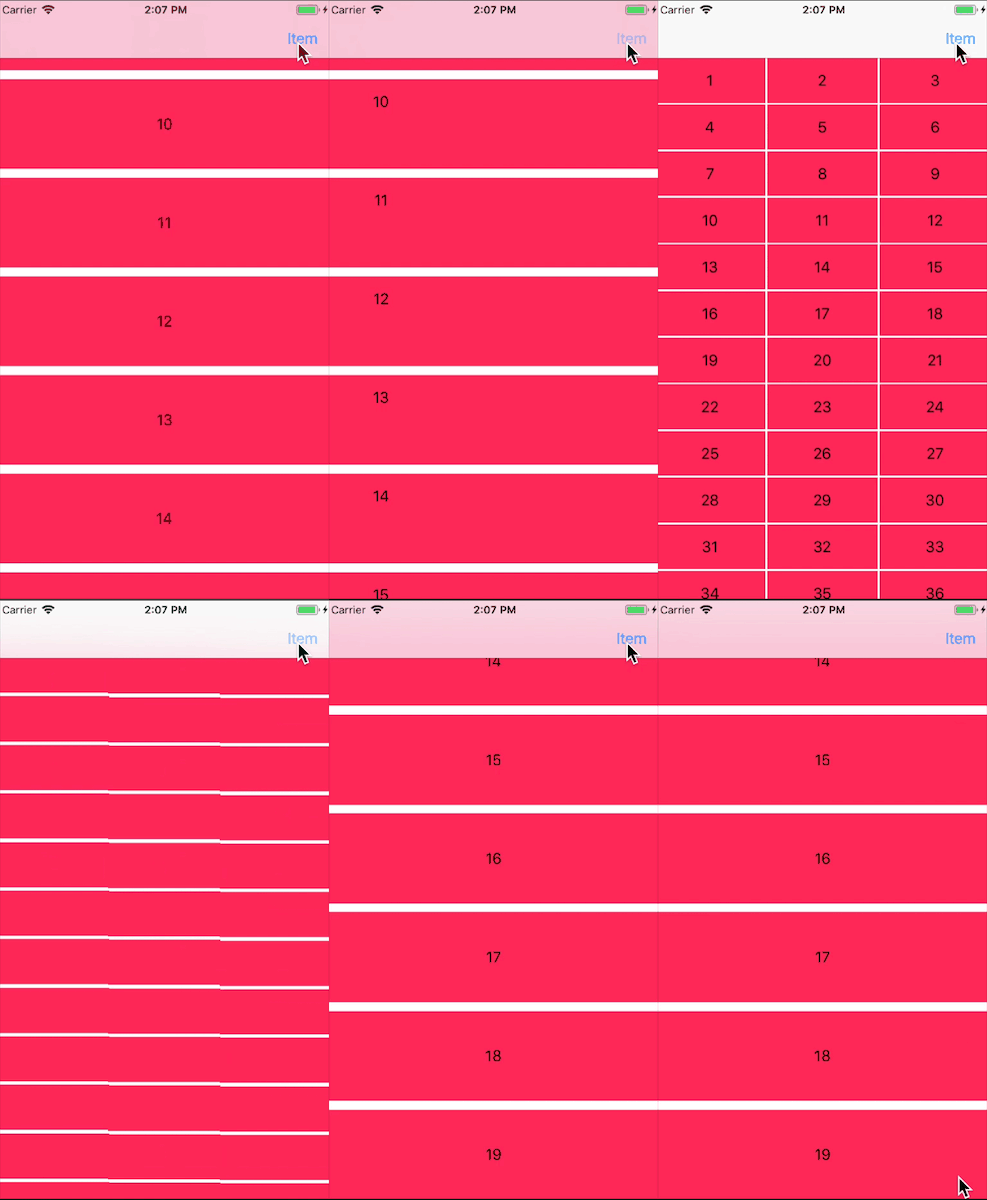
切换之后改变cell样式
这是cell样式一样的情况,如果我们要在不用的布局中用不同的cell样式该怎么办呢?
我们首先要在viewDidLoad中添加另一个cell的注册代码,以便复用
collectionView.register(UINib.init(nibName: "LabelCell2", bundle: nil), forCellWithReuseIdentifier: "LabelCell2")
然后func collectionView(_ collectionView: UICollectionView, cellForItemAt indexPath: IndexPath) -> UICollectionViewCell代理中也需要做一些改变,我们需要区分是哪种布局,改为下面这样
func collectionView(_ collectionView: UICollectionView, cellForItemAt indexPath: IndexPath) -> UICollectionViewCell {

        if collectionView.collectionViewLayout == listLayout {

            let cell = collectionView.dequeueReusableCell(withReuseIdentifier: "LabelCell", for: indexPath) as! LabelCell

            cell.label.text = datas[indexPath.row]

            return cell

        } else {

            let cell = collectionView.dequeueReusableCell(withReuseIdentifier: "LabelCell2", for: indexPath) as! LabelCell2

            cell.label.text = datas[indexPath.row]

            return cell

        }

}
最后关键的地方来了,我们如果用之前的切换布局方法会发现根本达不到目的,我们查看API发现有一个类似的方法是:func setCollectionViewLayout(_ layout: UICollectionViewLayout, animated: Bool, completion: ((Bool) -> Swift.Void)? = nil),这个方法比之前那个多一个完成之后的回调,我们可以利用回调来重新加载一下数据就可以了,这次触发时间里的代码如下:
@IBAction func clickItem(_ sender: UIBarButtonItem) {

        if collectionView.collectionViewLayout == listLayout {

            collectionView.setCollectionViewLayout(gridLayout, animated: true, completion: { (com) in

                    if com {

                        self.collectionView.reloadData()

                    }

            })

        } else {

            collectionView.setCollectionViewLayout(listLayout, animated: true, completion: { (com) in

                    if com {

                        self.collectionView.reloadData()

                    }

            })

        }

}
我们是在布局切换完之后又重新刷了一下数据。
运行程序,效果如下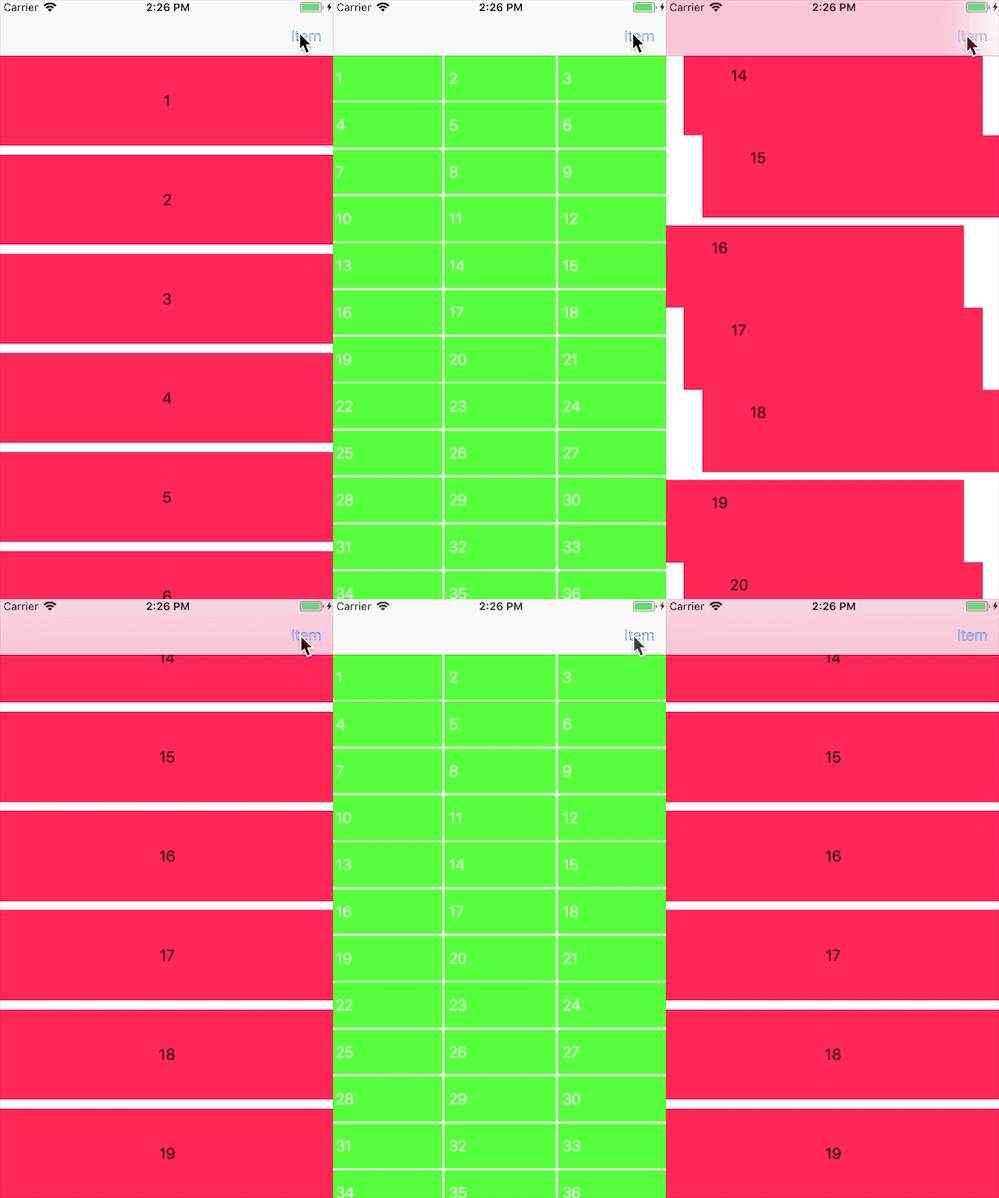
至此,基本的内容已经讲解完,通过这些我们可以完成更复杂的内容
本工程代码请点击下载
利用UICollectionView实现列表和宫格视图的切换的更多相关文章
- SharePoint开发 - Excel数据导入到SharePoint自定义列表(数据视图方式)
博客地址 http://blog.csdn.net/foxdave 本篇讲解一个有些新颖的SharePoint实例应用,给甲方做过项目的都有过体会,数据太多了,客户有Excel,要求实现批量导入. 效 ...
- python利用or在列表解析中调用多个函数.py
python利用or在列表解析中调用多个函数.py """ python利用or在列表解析中调用多个函数.py 2016年3月15日 05:08:42 codegay & ...
- [改善Java代码]子列表只是原列表的一个视图
List接口提供了subList方法,其作用是返回一个列表的子列表.这与String类的subString有点类似.但是他们的功能是否相同?看代码: import java.util.ArrayLis ...
- 利用UICollectionView实现瀑布流
利用UICollectionView实现瀑布流通过自定义布局来实现. - 自定义类继承UICollectionViewLayout: 必须重写的方法有: //决定每个item的位置: - (nulla ...
- Jenkins 利用Dashboard View插件管理任务视图
利用Dashboard View插件管理任务视图 by:授客 QQ:1033553122 步骤 1. 安装Dashboard View插件 说明: 如果无法在线安装,可以选择本地上传方式安装 附 ...
- iOS - UICollectionView 瀑布流 添加表头视图的坑
UICollectionView 瀑布流 添加表头视图的坑 首先是,需求加了个头视图在顶部,在collectionView中的头视图跟TableView的不一样,TableView的表头只要设置tab ...
- python3之利用字典和列表实现城市多级菜单
利用字典和列表实现城市多级菜单 #coding:utf-8 #利用字典和列表实现城市多级菜单 addrIndex = {":"福建"} addrDict = {" ...
- C利用可变参数列表统计一组数的平均值,利用函数形式参数栈原理实现指针运算
//描述:利用可变参数列表统计一组数的平均值 #include <stdarg.h> #include <stdio.h> float average(int num, ... ...
- 【逆向工具】IDA使用5-( string、图形化与视图的切换、图形化显示反汇编地址、自动注释、标签使用)
分析petya病毒时新学会的技巧. IDA技巧1 : string 提取文件中的字符串内容,如果看到一些文件字符串可以定位到关键的函数中. view -> open subview -> ...
随机推荐
- zookeeper部署和运行
环境准备: 操作系统,此处使用windows系统 Java运行环境,JDK1.6以上 下载对应操作系统zookeeper安装包zookeeper-x.x.x.tar.gz,下载地址:http://zo ...
- Mysql Nested-Loop Join Algorithms
MySQL在多表之间执行join时,利用一种nested-loop algorithm 或者其变种:(嵌套循环) Nested-Loop Join Algorithm 一个简单的嵌套循环连 ...
- Java数据持久层框架 MyBatis之API学习五(Mapper XML 文件)
对于MyBatis的学习而言,最好去MyBatis的官方文档:http://www.mybatis.org/mybatis-3/zh/index.html 对于语言的学习而言,马上上手去编程,多多练习 ...
- Python3.6.1的安装
Python 3.61的下载和安装,下载地址:https://www.python.org/downloads/ 选择最近的版本,目前为Python3.6.1,下载后直接安装即可 下载包为: 双击安装 ...
- 查看 Apache并发请求数及其TCP连接状态【转】
查看 Apache并发请求数及其TCP连接状态 (2011-06-27 15:08:36) 服务器上的一些统计数据: 1)统计80端口连接数netstat -nat|grep -i "80& ...
- js_11_dom其他
有哪些其他js? window.location.href = "跳转页面" // 不写获得本页面url,写跳转到指定页面 confirm('内容') // ...
- Log4j源码解析--框架流程+核心解析
OK,现在我们来研究Log4j的源码: 这篇博客有参照上善若水的博客,原文出处:http://www.blogjava.net/DLevin/archive/2012/06/28/381667.htm ...
- 解决Flink输出日志中时间比当前时间晚8个小时的问题
Flink安装在CentOS7上,默认时间是UTC时间,查看Flink日志,发现输出时间比当前时间晚8个小时. 通过如下命令,调整成北京时间 cp /usr/share/zoneinfo/Asia/S ...
- finally中关闭资源
对finally中关闭资源是否还要使用try...catch老是感到迷惑,现在存个例子,省的忘了 public StringBuilder readTxtFile(File file){ String ...
- ios GCD将异步转换为同步
在开发中有时需要等网络请求完成之后拿到数据做一些操作,而且有时是同时好几个网络请求同时发起.这时会有对异步操作进行更进一步控制的场景,不单网络请求,有时一些其他本地文件,多张图片处理等可能都会遇到这种 ...