
SpringCloud学习系列之二 ----- 服务消费者(Feign)和负载均衡(Ribbon)使用详解
前言
本篇主要介绍的是SpringCloud中的服务消费者(Feign)和负载均衡(Ribbon)功能的实现以及使用Feign结合Ribbon实现负载均衡。
SpringCloud Feign
Feign 介绍
Feign是一个声明式的Web Service客户端,它使得编写Web Serivce客户端变得更加简单。我们只需要使用Feign来创建一个接口并用注解来配置它既可完成。它具备可插拔的注解支持,包括Feign注解和JAX-RS注解。Feign也支持可插拔的编码器和解码器。Spring Cloud为Feign增加了对Spring MVC注解的支持,还整合了Ribbon和Eureka来提供均衡负载的HTTP客户端实现。
开发准备
开发环境
- JDK:1.8
- SpringBoot:2.1.1.RELEASE
- SpringCloud:Finchley
注:不一定非要用上述的版本,可以根据情况进行相应的调整。需要注意的是SpringBoot2.x以后,jdk的版本必须是1.8以上!
确认了开发环境之后,我们再来添加相关的pom依赖。
<dependencies>

	<dependency>

		<groupId>org.springframework.cloud</groupId>

		<artifactId>spring-cloud-starter</artifactId>

	</dependency>

	<dependency>

		<groupId>org.springframework.cloud</groupId>

		<artifactId>spring-cloud-starter-netflix-eureka-server</artifactId>

	</dependency>

	<dependency>

		<groupId>org.springframework.cloud</groupId>

		<artifactId>spring-cloud-starter-openfeign</artifactId>

	</dependency>

</dependencies>
注: 基于SpringBoot1.x以上SpringCloud是Dalston版本的eureka 依赖是 <artifactId>spring-cloud-starter-eureka</artifactId>,feign 依赖是 <artifactId>spring-cloud-starter-feign</artifactId> ,少了个 netflix 。SpringCloud的版本命名方式是通过伦敦的地方来命名的,版本顺序是根据首字母的顺序来的。
SpringCloud Feign 示例
服务端
首先建立一个springcloud-feign-eureka服务的工程,用于做注册中心。配置和之前的基本一样。application.properties添加如下的配置:
配置信息:
spring.application.name=springcloud-feign-eureka-server

server.port=8001

eureka.client.register-with-eureka=false

eureka.client.fetch-registry=false

eureka.client.serviceUrl.defaultZone=http://localhost:8001/eureka/
配置说明:
- spring.application.name: 这个是指定服务名称。
- server.port:服务指定的端口。
- eureka.client.register-with-eureka:表示是否将自己注册到Eureka Server,默认是true。
- eureka.client.fetch-registry:表示是否从Eureka Server获取注册信息,默认为true。
- eureka.client.serviceUrl.defaultZone: 这个是设置与Eureka Server交互的地址,客户端的查询服务和注册服务都需要依赖这个地址。
完成配置信息的添加后,我们再来看代码如何实现。
在服务端这边只需要在SpringBoot启动类添加@EnableEurekaServer注解就可以了,该注解表示此服务是一个服务注册中心服务。
代码示例:
	@EnableEurekaServer

	@SpringBootApplication

	public class FeignEurekaApplication {

	  public static void main(String[] args) {

	      SpringApplication.run(FeignEurekaApplication.class, args);

	      System.out.println("feign注册中心服务启动...");

	  }

	}
客户端
这里我们定义两个消费者,springcloud-feign-consumer和springcloud-feign-consumer2,一个使用feign做转发,另一个为一个普通的项目。 添加如上的依赖之后,在application.properties添加如下的配置:
consumer 配置信息:
spring.application.name=springcloud-feign-consumer

server.port=9002

eureka.client.serviceUrl.defaultZone=http://localhost:8001/eureka/
consumer2 配置信息:
spring.application.name=springcloud-feign-consumer2

server.port=9003

eureka.client.serviceUrl.defaultZone=http://localhost:8001/eureka/
配置说明:
- spring.application.name: 这个是客户端的服务名称。如果有多个服务使用同一个名称但是访问地址不同,结合ribbon 使用,则可以实现负载均衡功能。
- server.port:服务指定的端口。
- eureka.client.serviceUrl.defaultZone: 注册中心服务端的地址。
springcloud-feign-consumer
springcloud-feign-consumer服务因为要实现fegin的功能,因此需要在启动类上添加@EnableFeignClients该注解,使用该注解表示启用feign进行远程调用。
启动类代码示例:
	@SpringBootApplication

	@EnableDiscoveryClient

	@EnableFeignClients

	public class FeignConsumerApplication {

		public static void main(String[] args) {

			SpringApplication.run(FeignConsumerApplication.class, args);

			  System.out.println("feign第一个消费者服务启动...");

		}

	}
需要定义转发的服务,这里使用@FeignClient注解来实现,该注解表示需要转发服务的名称,该名称在application.properties中进行配置。
这里我们把请求转发到第二个服务springcloud-feign-consumer2。
转发类代码示例:
	@FeignClient(name= "springcloud-feign-consumer2")

	public interface HelloRemote {

    	@RequestMapping(value = "/hello")

   		 public String hello(@RequestParam(value = "name") String name);

	}
我们还需要提供一个入口供外部调用,然后调用上述的的方法进行转发。
控制层代码示例:
	@RestController

	public class ConsumerController {

	    @Autowired

	    HelloRemote helloRemote;

	    @RequestMapping("/hello/{name}")

	    public String index(@PathVariable("name") String name) {

	    	System.out.println("接受到请求参数:"+name+",进行转发到其他服务");

	        return helloRemote.hello(name);

	    }

	}
springcloud-feign-consumer2
这个服务的代码就比较简单了,只是一个普通的服务,提供一个接口然后打印信息即可。
启动类代码示例:
	@SpringBootApplication

	@EnableDiscoveryClient

	public class FeignConsumerApplication2 {

		public static void main(String[] args) {

			SpringApplication.run(FeignConsumerApplication2.class, args);

			  System.out.println("feign第二个消费者服务启动...");

		}

	}
控制层代码示例:
	@RestController

	public class ConsumerController {

		@RequestMapping("/hello")

	    public String index(@RequestParam String name) {

	        return name+",Hello World";

	    }

	}
功能测试
完成如上的工程开发之后,我们依次启动服务端和客户端的三个程序,然后在浏览器界面输入: http://localhost:8001/,即可查看注册中心的信息。
在浏览器输入:
返回:
pancm,Hello World
说明可以直接访问第二个消费服务。
然后再输入:
通过第一个消费服务调用第二个服务。
控制台打印:
接受到请求参数:pancm,进行转发到其他服务
界面返回结果:
pancm,Hello World
示例图:


出现以上结果说明客户端已经成功的通过feign调用了远程服务hello,并且将结果返回到了浏览器。
SpringCloud Ribbon
Ribbon 介绍
Ribbon是Netflix发布的开源项目,主要功能是提供客户端的软件负载均衡算法,将Netflix的中间层服务连接在一起。Ribbon客户端组件提供一系列完善的配置项如连接超时,重试等。简单的说,就是在配置文件中列出Load Balancer后面所有的机器,Ribbon会自动的帮助你基于某种规则(如简单轮询,随即连接等)去连接这些机器。我们也很容易使用Ribbon实现自定义的负载均衡算法。简单地说,Ribbon是一个客户端负载均衡器。
开发准备
开发环境
- JDK:1.8
- SpringBoot:2.1.1.RELEASE
- SpringCloud:Finchley
注:不一定非要用上述的版本,可以根据情况进行相应的调整。需要注意的是SpringBoot2.x以后,jdk的版本必须是1.8以上!
确认了开发环境之后,我们再来添加相关的pom依赖。
<dependencies>

	<dependency>

		<groupId>org.springframework.cloud</groupId>

		<artifactId>spring-cloud-starter</artifactId>

	</dependency>

	<dependency>

		<groupId>org.springframework.cloud</groupId>

		<artifactId>spring-cloud-starter-netflix-eureka</artifactId>

	</dependency>

	<dependency>

		<groupId>org.springframework.cloud</groupId>

		<artifactId>spring-cloud-starter-netflix-ribbon</artifactId>

	</dependency>

	<dependency>

		<groupId>org.springframework.boot</groupId>

		<artifactId>spring-boot-starter-actuator</artifactId>

	</dependency>

</dependencies>
注: 基于SpringBoot1.x以上SpringCloud是Dalston版本的eureka 依赖是 <artifactId>spring-cloud-starter-eureka</artifactId>,feign 依赖是 <artifactId>spring-cloud-starter-ribbon</artifactId> ,少了个 netflix 。SpringCloud的版本命名方式是通过伦敦的地方来命名的,版本顺序是根据首字母的顺序来的。
SpringCloud Ribbon 示例
服务端
首先建立一个springcloud-ribbon-eureka服务的工程,用于做注册中心。配置和代码之前的基本一样,除了端口和打印信息,这里就不在说明了。
客户端
这里我们定义三个服务,一个服务使用Ribbon做负载均衡,另外两个做普通的服务,服务名称依次为springcloud-ribbon-consumer、springcloud-ribbon-consumer2和springcloud-ribbon-consumer3。 添加如上的依赖之后,在application.properties添加如下的配置:
consumer 配置信息:
spring.application.name=springcloud-ribbon-consumer

server.port=9006

eureka.client.serviceUrl.defaultZone=http://localhost:8003/eureka/
consumer2 配置信息:
spring.application.name=springcloud-ribbon-consumer2

server.port=9007

eureka.client.serviceUrl.defaultZone=http://localhost:8003/eureka/
consumer3 配置信息:
这里的服务名称和另一个服务的名称保持一致才能实现负载均衡功能。
spring.application.name=springcloud-ribbon-consumer2

server.port=9008

eureka.client.serviceUrl.defaultZone=http://localhost:8003/eureka/
配置说明:
- spring.application.name: 这个是客户端的服务名称。如果有多个服务使用同一个名称但是访问地址不同,结合ribbon 使用,则可以实现负载均衡功能。
- server.port:服务指定的端口。
- eureka.client.serviceUrl.defaultZone: 注册中心服务端的地址。
springcloud-ribbon-consumer
使用Ribbon实现负载均衡,只需要在启动类中实例化RestTemplate,通过@LoadBalanced注解开启均衡负载能力.。
启动类代码示例:
	@SpringBootApplication

	@EnableDiscoveryClient

	public class RibbonConsumerApplication {

		public static void main(String[] args) {

			SpringApplication.run(RibbonConsumerApplication.class, args);

			System.out.println("ribbon第一个消费者服务启动...");

		}

		@Bean

		@LoadBalanced

		public RestTemplate restTemplate() {

			return new RestTemplate();

		}

	}
需要定义转发的服务,这里使用RestTemplate来进行调用,调用另外一个服务的名称。
转发类代码示例:
	@RestController

	public class ConsumerController {

	    @Autowired

	    RestTemplate restTemplate;

	    @RequestMapping("/hello")

	    public String hello() {

	    	//进行远程调用

	        return restTemplate.getForObject("http://springcloud-ribbon-consumer2/hello/?name=xuwujing", String.class);

	    }

	}
springcloud-ribbon-consumer2和springcloud-ribbon-consumer3代码基本和fegin中的springcloud-feign-consumer一样,因此这里就不在贴代码了。
功能测试
完成如上的工程开发之后,我们依次启动服务端和客户端的四个程序,然后在浏览器界面输入: http://localhost:8003/,即可查看注册中心的信息。
在浏览器输入:
然后进行重复访问,返回如下结果:
xuwujing,Hello World!

xuwujing,Hello World! 这是另一个服务!

xuwujing,Hello World!

xuwujing,Hello World! 这是另一个服务!

xuwujing,Hello World!

xuwujing,Hello World! 这是另一个服务!
说明已经实现了负载均衡功能了。
我们从上述的结果中发现了一点,这个调用貌似是有规律的,两个服务进行来回调用。那么根据这个我们发现了,负载均衡是由策略的。上述的这个示例的策略就是其中的一个RoundRobinRule轮询策略。
这里就顺便说下Ribbon的策略,Ribbon一共有7中策略,默认使用的策略是轮询。策略说明如下表格:
| 策略名 | 策略声明 | 策略描述 | 实现说明 |
|---|---|---|---|
| BestAvailableRule | public class BestAvailableRule extends ClientConfigEnabledRoundRobinRule | 选择一个最小的并发请求的server | 逐个考察Server,如果Server被tripped了,则忽略,在选择其中ActiveRequestsCount最小的server |
| AvailabilityFilteringRule | public class AvailabilityFilteringRule extends PredicateBasedRule | 过滤掉那些因为一直连接失败的被标记为circuit tripped的后端server,并过滤掉那些高并发的的后端server(active connections 超过配置的阈值) | 使用一个AvailabilityPredicate来包含过滤server的逻辑,其实就就是检查status里记录的各个server的运行状态 |
| WeightedResponseTimeRule | public class WeightedResponseTimeRule extends RoundRobinRule | 根据响应时间分配一个weight,响应时间越长,weight越小,被选中的可能性越低。 | 一个后台线程定期的从status里面读取评价响应时间,为每个server计算一个weight。Weight的计算也比较简单responsetime 减去每个server自己平均的responsetime是server的权重。当刚开始运行,没有形成status时,使用roubine策略选择server。 |
| RetryRule | public class RetryRule extends AbstractLoadBalancerRule | 对选定的负载均衡策略机上重试机制。 | 在一个配置时间段内当选择server不成功,则一直尝试使用subRule的方式选择一个可用的server |
| RoundRobinRule | public class RoundRobinRule extends AbstractLoadBalancerRule | roundRobin方式轮询选择server | 轮询index,选择index对应位置的server |
| RandomRule | public class RandomRule extends AbstractLoadBalancerRule | 随机选择一个server | 在index上随机,选择index对应位置的server |
| ZoneAvoidanceRule | public class ZoneAvoidanceRule extends PredicateBasedRule | 复合判断server所在区域的性能和server的可用性选择server | 使用ZoneAvoidancePredicate和AvailabilityPredicate来判断是否选择某个server,前一个判断判定一个zone的运行性能是否可用,剔除不可用的zone(的所有server),AvailabilityPredicate用于过滤掉连接数过多的Server。 |
这里也顺便说明如何指定一个策略使用方法。
最简单的方式
在application.properties添加如下配置:
springcloud-ribbon-consumer2.ribbon.NFLoadBalancerRuleClassName=com.netflix.loadbalancer.RandomRule
该配置的意思是为springcloud-ribbon-consumer2服务指定随机策略。
另一种方式
新建一个类,通过@Bean注解指定策略。
	@Configuration

	public class RibbonConfiguration{

	      @Bean

	      public IRule ribbonRule(){

	          return new RandomRule();

	     }

	}
然后再通过@RibbonClien注解指定服务。
	@RibbonClient(name="springcloud-ribbon-consumer2", configuration=RibbonConfiguration.class)

	public class HelloRibbon{

	}
注: 如果有的服务没有在Eureka进行注册,可以使用ribbon.listOfServers方式在配置文件中来指定服务。
例如:
springcloud-ribbon-consumer2.ribbon.listOfServers:localhost:9007,localhost:9008
添加好了该配置之后,我们重启springcloud-ribbon-consumer服务,然后依旧重复访问 http://localhost:9006//hello 该地址,
访问的结果如下:
xuwujing,Hello World!

xuwujing,Hello World! 这是另一个服务!

xuwujing,Hello World! 这是另一个服务!

xuwujing,Hello World!

xuwujing,Hello World!

xuwujing,Hello World!
可以看到已经成功实现了随机访问的策略!
SpringCloud Fegin结合Ribbon实现负载均衡
Fegin包含了Ribbon,可以直接实现负载均衡功能。这里我们就在Ribbon的项目稍微进行改造下实现该功能。
首先在pom文件添加Fegin的依赖包。
	<dependency>

		<groupId>org.springframework.cloud</groupId>

		<artifactId>spring-cloud-starter-openfeign</artifactId>

	</dependency>
然后在springcloud-ribbon-consumer项目的启动类上添加@EnableFeignClients注解,启用feign进行远程调用。
添加完成之后,新建一个类,实现feign远程调用。
代码如下:
	@FeignClient(name= "springcloud-ribbon-consumer2")

	public interface HelloRemote {

	    @RequestMapping(value = "/hello")

	    public String hello(@RequestParam(value = "name") String name);

	}
最后在提供一个新的接口供外部调用。这里就直接在之前的代码上新加一个接口了。
代码如下:
	@RestController

	public class ConsumerController {

	    @Autowired

	    RestTemplate restTemplate;

	    @RequestMapping("/hello")

	    public String hello() {

	        return restTemplate.getForObject("http://springcloud-ribbon-consumer2/hello/?name=xuwujing", String.class);

	    }

	    @Autowired

	    HelloRemote helloRemote;

	    @RequestMapping("/hello/{name}")

	    public String index(@PathVariable("name") String name) {

	    	System.out.println("接受到请求参数:"+name+",进行转发到其他服务!");

	        return helloRemote.hello(name);

	    }

	}
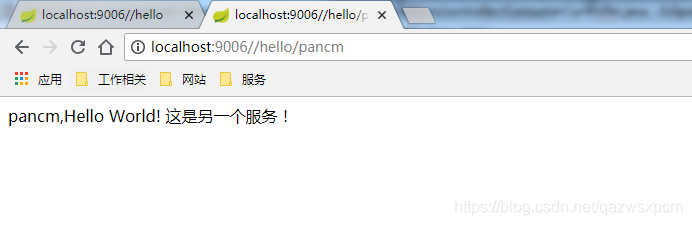
添加完之后,重启springcloud-ribbon-consumer服务,然后依旧重复访问 http://localhost:9006//hello/pancm 该地址,
访问的结果如下:
pancm,Hello World!

pancm,Hello World! 这是另一个服务!

pancm,Hello World!

pancm,Hello World! 这是另一个服务!

pancm,Hello World!

pancm,Hello World! 这是另一个服务!
示例图:

其他
项目地址
基于SpringBoot2.x、SpringCloud的Finchley版本开发的地址:https://github.com/xuwujing/springcloud-study
基于SpringBoot1.x、SpringCloud 的Dalston版本开发的地址: https://github.com/xuwujing/springcloud-study-old
如果感觉项目不错,希望能给个star,谢谢!
音乐推荐
一首非常棒的纯音乐 NEXT TO YOU ,强烈推荐!
原创不易,如果感觉不错,希望给个推荐!您的支持是我写作的最大动力!
版权声明:
作者:虚无境
博客园出处:http://www.cnblogs.com/xuwujing
CSDN出处:http://blog.csdn.net/qazwsxpcm
个人博客出处:http://www.panchengming.com
SpringCloud学习系列之二 ----- 服务消费者(Feign)和负载均衡(Ribbon)使用详解的更多相关文章
- SpringCloud学习(三)服务消费者(Feign)(Finchley版本)
上一篇文章,讲述了如何通过RestTemplate+Ribbon去消费服务,这篇文章主要讲述如何通过Feign去消费服务. Feign简介 Feign是一个声明式的伪Http客户端,它使得写Http客 ...
- 大数据学习系列之七 ----- Hadoop+Spark+Zookeeper+HBase+Hive集群搭建 图文详解
引言 在之前的大数据学习系列中,搭建了Hadoop+Spark+HBase+Hive 环境以及一些测试.其实要说的话,我开始学习大数据的时候,搭建的就是集群,并不是单机模式和伪分布式.至于为什么先写单 ...
- TortoiseGit学习系列之Windows上本地代码如何通过TortoiserGit提交到GitHub详解(图文)
不多说,直接上干货! 前面博客 TortoiseGit学习系列之Windows上TortoiseGit的安装详解(图文) 上面博文给大家讲解了一下如何本地安装TortoiseGit. 这篇为大家讲一下 ...
- spring cloud微服务快速教程之(三)声明式访问Feign、负载均衡Ribbon
0-前言 eureka实际上已经集成了负载均衡调度框架Ribbon: 我们有了各个微服务了,那怎么来调用他们呢,一种方法是可以使用 RestTemplate(如:String str= restTem ...
- Nginx系列篇二:linux搭建Nginx负载均衡
建议先搭建好Nginx环境 可阅读--->Linux中搭建Nginx 1.准备好三台服务器[标配] 一.nginx负载均衡服务器:192.168.102.110,配置好Nginx 二.tomca ...
- SpringCloud学习系列-Rest微服务构建
总体介绍 承接着我们的springmvc+mybatis+mysql初级高级课程,以Dept部门模块做一个微服务通用案例Consumer消费者(Client)通过REST调用Provider提供者(S ...
- SpringCloud学习系列之三----- 断路器(Hystrix)和断路器监控(Dashboard)
前言 本篇主要介绍的是SpringCloud中的断路器(Hystrix)和断路器指标看板(Dashboard)的相关使用知识. SpringCloud Hystrix Hystrix 介绍 Netfl ...
- SpringCloud学习系列之七 ----- Zuul路由网关的过滤器和异常处理
前言 在上篇中介绍了SpringCloud Zuul路由网关的基本使用版本,本篇则介绍基于SpringCloud(基于SpringBoot2.x,.SpringCloud Finchley版)中的路由 ...
- 学习一下 SpringCloud (三)-- 服务调用、负载均衡 Ribbon、OpenFeign
(1) 相关博文地址: 学习一下 SpringCloud (一)-- 从单体架构到微服务架构.代码拆分(maven 聚合): https://www.cnblogs.com/l-y-h/p/14105 ...
随机推荐
- php坏境安装Xdebug详情步骤
原创,转载请注明出处! Xdebug是一个开放源代码的PHP程序调试器(即一个Debug工具),可以用来跟踪,调试和分析PHP程序的运行状况,可以说是程序员必备的一个工具之一.好了,进入正题: 1.下 ...
- Python黑客泰斗利用aircrack-ng破解 wifi 密码,超详细教程!
开始前,先连上无线网卡,因为虚拟机中的kali系统不用调用笔记本自带的无线网卡,所以需要一个外接无线网卡,然后接入kali系统. 输入 ifconfig -a 查看网卡,多了个 wlan0,说明网卡已 ...
- Flask请求扩展和数据库连接池
1.1.Flask之请求扩展 #!/usr/bin/env python # -*- coding:utf-8 -*- from flask import Flask, Request, render ...
- Django 项目创建之前的环境搭建
安装虚拟管理环境 sudo apt install virtualenv 在项目中运行 virtualenv fruitenv 进入到环境中 source fruitenv/bin/activate ...
- Java开源生鲜电商平台-推荐系统模块的设计与架构(源码可下载)
Java开源生鲜电商平台-推荐系统模块的设计与架构(源码可下载) 业务需求: 对于一个B2B的生鲜电商平台,对于买家而言,他需要更加快速的购买到自己的产品,跟自己的餐饮店不相关的东西,他是不关心的,而 ...
- mysql数据库的权限体系介绍
一.权限体系简介: MySQL的权限体系在实现上比较简单,相关权限信息主要存储在mysql.User.mysql.db.mysql.Host.mysql_table_priv和mysql.column ...
- 项目在tomcat里运行一段时间总是自动崩掉的问题排查与解决
最近的检验系统上线一段时间后,发现系统访问不了,tomcat总是会自动崩掉,一般遇到这种问题,程序员的第一反应都肯定是内存溢出. 确实是,但是java里内存分好几种,堆内存.栈内存.静态内存区等等,下 ...
- Oracle-10:分析函数
------------吾亦无他,唯手熟尔,谦卑若愚,好学若饥------------- 分析函数: 分析函数,可以修改排序的规则!!!!!!!!!!!!!!!!!!!!!!!! 首先把数据库脚本给放 ...
- 关于mui 中popover与下拉刷新冲突问题
最近用mui做app混合式开发时,作为一个后端开发,高前端确实有点吃了,期间遇到的问题肯定也不少.这两天app做更新,为了装逼,将更新的提示搞得好看些,用到了mui中的popover,结果把自己整死了 ...
- python 信息收集器和CMS识别脚本
前言: 信息收集是渗透测试重要的一部分 这次我总结了前几次写的经验,将其 进化了一下 正文: 信息收集脚本的功能: 1.端口扫描 2.子域名挖掘 3.DNS查询 4.whois查询 5.旁站查询 CM ...