
【拥抱鸿蒙】HarmonyOS NEXT实现双路预览并识别文字
我们在许多其他平台看到过OCR功能的应用,那么HarmonyOS在这方面的支持如何呢?我们如何能快速使用这一能力呢?使用这一能力需要注意的点有哪些呢?就让我们一起来探究吧~
【开发环境】
- 版本规则号:HarmonyOS NEXT
- 版本类型:Developer Preview2
- OpenHarmony API Version:11 Release
- compileSdkVersion:4.1.0(11)
- IDE:DevEco Studio 4.1.3.700(Mac)
实现目标
通过对Core Vision Kit的基础功能的实现,完成相册图片获取、OCR、相机预览,图片格式转换等功能,熟悉ArkTS的开发流程和细节,加深对HarmonyOS中各类基础库的理解。
名词解释
- Core Vision Kit:基础视觉服务
- Camera Kit:相机服务
- Core File Kit:文件基础服务
- OCR:Optical Character Recognition,通用文字识别或光学字符识别
- URI: Uniform Resource Identifier,资源标识符,本文中URI指图片资源的访问路径
核心功能
本篇所涉及的核心功能就是通用文字识别(OCR)。
OCR是通过拍照、扫描等光学输入方式,把各种票据、卡证、表格、报刊、书籍等印刷品文字转化为图像信息,再利用文字识别技术将图像信息转化为计算机等设备可以使用的字符信息的技术。
首先,我们实现从相册选取一张图片,并识别图片上的文字的功能。这一功能的实现基于系统提供的Core Vision Kit中的OCR能力。
- 创建一个
ImageOCRUtil类,用于封装OCR相关功能。
从CoreVisionKit中导入textRecognition模块,声明一个名为ImageOCRUtil的类,并创建其new()方法。
import { textRecognition } from '@kit.CoreVisionKit';

export class ImageOCRUtil {}

export default new ImageOCRUtil();
- 在
ImageOCRUtil中实现图片中文字识别功能。
构建一个异步方法:async recognizeText(image: PixelMap | undefined, resultCallback: Function),其中PixelMap为图像像素类,用于读取或写入图像数据以及获取图像信息。目前pixelmap序列化大小最大128MB,超过会送显失败。大小计算方式为:宽 x 高 x 每像素占用字节数。
export class ImageOCRUtil {

  /**

   * 文字识别

   *

   * @param image 图片源数据

   * @param resultCallback 结果返回

   * @returns

   */

  static async recognizeText(image:  PixelMap | undefined, resultCallback: Function) {

    // 非空判断

    if (!image || image === undefined) {

      hilog.error(0x0000, 'OCR', 'the image is not existed');

      return;

    }

    let visionInfo: textRecognition.VisionInfo = {

      pixelMap: image

    };

    let textConfiguration: textRecognition.TextRecognitionConfiguration = {

      isDirectionDetectionSupported: false

    };

    textRecognition.recognizeText(visionInfo, textConfiguration, (error: BusinessError, data: textRecognition.TextRecognitionResult) => {

      // 识别成功,获取结果

      if (error.code == 0) {

        let recognitionRes = data.value.toString();

        // 将识别结果返回

        resultCallback(recognitionRes);

      }

    });

  }

}
- 在
ImageOCRUtil中实现从相册获取图片URI功能。
这里需用到Core File Kit,可借助图片选择器获取图片的存储路径。
import { picker } from '@kit.CoreFileKit';

/**

  * 打开相册选择图片

  * @returns 异步返回图片URI

  */

static openAlbum(): Promise<string> {

    return new Promise<string>((resolve, reject) => {

      let photoPicker = new picker.PhotoViewPicker;

      photoPicker.select({

        MIMEType: picker.PhotoViewMIMETypes.IMAGE_TYPE,

        maxSelectNumber: 1

      }).then((res: picker.PhotoSelectResult) => {

        resolve(res.photoUris[0]);

      }).catch((err: BusinessError) => {

        hilog.error(0x0000, "OCR", `Failed to get photo uri, code: ${err.code}, message: ${err.message}`)

        resolve('')

      })

    })

}
UI与调用
为了验证图片识别的效果,我们可以搭建简单的UI,提供从相册获取图片 -> 文字识别 -> 显示识别结果这一流程的UI与交互。
在Index页面中,UI相关的代码如下:
import { image } from '@kit.ImageKit'

import { hilog } from '@kit.PerformanceAnalysisKit';

import { ImageOCRUtil } from '../common/utils/ImageOCRUtil';

import { CommonUtils } from '../common/utils/CommonUtils';

import { fileIo } from '@kit.CoreFileKit';

@Entry

@Component

struct Index {

  private imageSource: image.ImageSource | undefined = undefined;

  @State selectedImage: PixelMap | undefined = undefined;

  @State dataValues: string = '';

  build() {

    Column() {

      // 选中的图片

      Image(this.selectedImage)

        .objectFit(ImageFit.Fill)

        .height('60%')

      // 识别的内容

      Text(this.dataValues)

        .copyOption(CopyOptions.LocalDevice)

        .height('15%')

        .width('60%')

        .margin(10)

      // 选择图片按钮

      Button('选择图片')

        .type(ButtonType.Capsule)

        .fontColor(Color.White)

        .width('80%')

        .margin(10)

        .onClick(() => {

          this.selectImage();

        })

      Button('开始识别')

        .type(ButtonType.Capsule)

        .fontColor(Color.White)

        .alignSelf(ItemAlign.Center)

        .width('80%')

        .margin(10)

        .onClick(() => {

            // 点击“开始识别”

          });

        })

    }

    .width('100%')

    .height('100%')

    .justifyContent(FlexAlign.Center)

  }

  private async selectImage() {

    let uri = await ImageOCRUtil.openAlbum();

    if (uri === undefined) {

      hilog.error(0x0000, 'OCR', 'Failed to get the uri of photo.')

      return;

    }

    this.loadImage(uri);

  }

  loadImage(path: string) {

    setTimeout(async () => {

      let fileSource = await fileIo.open(path, fileIo.OpenMode.READ_ONLY);

      this.imageSource = image.createImageSource(fileSource.fd);

      this.selectedImage = await this.imageSource.createPixelMap();

    })

  }

}
在“开始识别”的按钮的点击事件中,我们调用ImageOCRUtil的recognizeText,并在其回调中显示识别结果。
并对imageSource和selectedImage进行release()释放内存空间。
ImageOCRUtil.recognizeText(this.selectedImage, (content: string) => {

  if (!CommonUtils.isEmpty(content)) {

    this.dataValues = content;

  }

  // 释放内存空间

  this.imageSource?.release();

  this.selectedImage?.release();

});
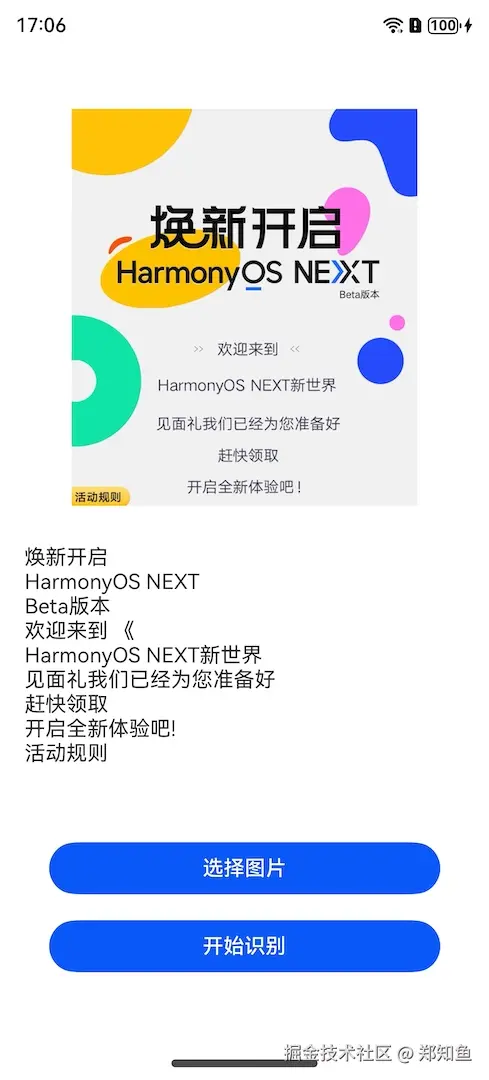
其实现效果如下所示:
双路预览
为了对文字识别这一功能进行扩展,我们可以结合相机的双路预览功能实时获取图片帧,并对图片帧进行文字识别。
我们创建一个XComponentPage的页面,添加一个相机预览视图。
- 获取ImageReceiver组件的SurfaceId。
async getImageReceiverSurfaceId(receiver: image.ImageReceiver): Promise<string | undefined> {

    let ImageReceiverSurfaceId: string | undefined = undefined;

    if (receiver !== undefined) {

      console.info('receiver is not undefined');

      let ImageReceiverSurfaceId: string = await receiver.getReceivingSurfaceId();

      console.info(`ImageReceived id: ${ImageReceiverSurfaceId}`);

    } else {

      console.error('createImageReceiver failed');

    }

    return ImageReceiverSurfaceId;

  }
- 创建XComponent组件Surface。
XComponent({

        // 组件的唯一标识

        id: 'LOXComponent',

        // surface:EGL/OpenGLES和媒体数据写入  component:开发者定制绘制内容

        type: XComponentType.SURFACE,

        // 应用Native层编译输出动态库名称,仅XComponent类型为"surface"时有效

        libraryname: 'SingleXComponent',

        // 给组件绑定一个控制器,通过控制器调用组件方法,仅XComponent类型为"surface"时有效

        controller: this.mXComponentController

      })// 插件加载完成时回调事件

        .onLoad(() => {

          // 设置Surface宽高(1920*1080),预览尺寸设置参考前面 previewProfilesArray 获取的当前设备所支持的预览分辨率大小去设置

          // 预览流与录像输出流的分辨率的宽高比要保持一致

          this.mXComponentController.setXComponentSurfaceSize({ surfaceWidth: 1920, surfaceHeight: 1080 });

          // 获取Surface ID

          this.xComponentSurfaceId = this.mXComponentController.getXComponentSurfaceId();

        })// 插件卸载完成时回调事件

        .onDestroy(() => {

        })

        .width("100%")

        .height(display.getDefaultDisplaySync().width * 9 / 16)
- 实现双路预览。
import camera from '@ohos.multimedia.camera';

async createDualChannelPreview(cameraManager: camera.CameraManager, XComponentSurfaceId: string, receiver: image.ImageReceiver): Promise<void> {

    // 获取支持的相机设备对象

    let camerasDevices: Array<camera.CameraDevice> = cameraManager.getSupportedCameras();

    // 获取支持的模式类型

    let sceneModes: Array<camera.SceneMode> = cameraManager.getSupportedSceneModes(camerasDevices[0]);

    let isSupportPhotoMode: boolean = sceneModes.indexOf(camera.SceneMode.NORMAL_PHOTO) >= 0;

    if (!isSupportPhotoMode) {

      console.error('photo mode not support');

      return;

    }

    // 获取profile对象

    let profiles: camera.CameraOutputCapability = cameraManager.getSupportedOutputCapability(camerasDevices[0], camera.SceneMode.NORMAL_PHOTO); // 获取对应相机设备profiles

    let previewProfiles: Array<camera.Profile> = profiles.previewProfiles;

    // 预览流1

    let previewProfilesObj: camera.Profile = previewProfiles[0];

    // 预览流2

    let previewProfilesObj2: camera.Profile = previewProfiles[0];

    // 创建 预览流1 输出对象

    let previewOutput: camera.PreviewOutput = cameraManager.createPreviewOutput(previewProfilesObj, XComponentSurfaceId);

    // 创建 预览流2 输出对象

    let imageReceiverSurfaceId: string = await receiver.getReceivingSurfaceId();

    let previewOutput2: camera.PreviewOutput = cameraManager.createPreviewOutput(previewProfilesObj2, imageReceiverSurfaceId);

    // 创建cameraInput对象

    let cameraInput: camera.CameraInput = cameraManager.createCameraInput(camerasDevices[0]);

    // 打开相机

    await cameraInput.open();

    // 会话流程

    let photoSession: camera.PhotoSession = cameraManager.createSession(camera.SceneMode.NORMAL_PHOTO) as camera.PhotoSession;

    // 开始配置会话

    photoSession.beginConfig();

    // 把CameraInput加入到会话

    photoSession.addInput(cameraInput);

    // 把 预览流1 加入到会话

    photoSession.addOutput(previewOutput);

    // 把 预览流2 加入到会话

    photoSession.addOutput(previewOutput2);

    // 提交配置信息

    await photoSession.commitConfig();

    // 会话开始

    await photoSession.start();

  }
- 通过ImageReceiver实时获取预览图像。
onImageArrival(receiver: image.ImageReceiver): void {

  receiver.on('imageArrival', () => {

    receiver.readNextImage((err: BusinessError, nextImage: image.Image) => {

      if (err || nextImage === undefined) {

        console.error('readNextImage failed');

        return;

      }

      nextImage.getComponent(image.ComponentType.JPEG, async (err: BusinessError, imgComponent: image.Component) => {

        if (err || imgComponent === undefined) {

          console.error('getComponent failed');

        }

        if (imgComponent && imgComponent.byteBuffer as ArrayBuffer) {

          let imageArrayBuffer = imgComponent.byteBuffer as ArrayBuffer;

          console.log("得到图片数据:" + JSON.stringify(imageArrayBuffer))

          console.log("图片数据长度:" + imageArrayBuffer.byteLength)

          //TODO:OCR识别

        } else {

          console.error('byteBuffer is null');

        }

        nextImage.release();

      })

    })

  })

}
最后,我们对预览返回进行文字识别。预览返回的结果imageArrayBuffer的类型为ArrayBuffer,我们需要将其转换为PixelMap类,然后再调用recognizeText()识别。
// 转换图片格式为PixelMap,并识别其中的文字

let opts: image.InitializationOptions = {

  editable: true,

  pixelFormat: 3,

  size: { height: 320, width: 320 }

}

image.createPixelMap(imageArrayBuffer, opts).then((pixelMap: image.PixelMap) => {

  console.info('Succeeded in creating pixelmap.');

  ImageOCRUtil.recognizeText(pixelMap, (res: string) => {

    console.info("识别结果:" + res);

  });

  }).catch((error: BusinessError) => {

    console.error('Failed to create pixelmap.');

})
这样,运行XComponentPage时,打开预览对准包含文字的物体,就可从Log中看到识别的文字信息。
完整代码见 -> hosgo-vision
拥抱鸿蒙,拥抱未来,选择远方,风雨兼程。
参考
【拥抱鸿蒙】HarmonyOS NEXT实现双路预览并识别文字的更多相关文章
- 3.Magicodes.NET框架之路——预览(一)
3.Magicodes.NET框架之路——预览(一) 前言 一眨眼,已经过去两个多月了 ,哥已经火力全开了(业余时间和精力,甚至为此放弃了各种私活),所以大家不要抱怨慢哈.编程犹如逆水行舟,不进则退. ...
- HarmonyOS 3.0.0开发者预览版全新发布
2021年10月22日在华为开发者大会HDC.Together 2021 主题演讲上,我们发布了HarmonyOS 3.0.0开发者预览版,主要内容包括:Harmony设计系统.ArkUI 3.0.A ...
- js和css实现手机横竖屏预览思路整理
实现效果,如上图. 首先,实现手机页面在PC端预览, 则先在网上找到一个手机的背景图片,算好大概内间距,用来放预览的页面,我这里是给手机预览页面的尺寸按iphone5的尺寸来的: 一个手机页面在这里预 ...
- 最全华为鸿蒙 HarmonyOS 开发资料汇总
开发 本示例基于 OpenHarmony 下的 JavaScript UI 框架,进行项目目录解读,JS FA.常用和自定义组件.用户交互.JS 动画的实现,通过本示例可以基本了解和学习到 JavaS ...
- Oracle使用goldengate分别向Oracle和mysql双路的单向复制
一.Oracle分别向Oracle和mysql双路的单向复制是在: ORACLE-mysql的单向复制基础上做的.http://blog.csdn.net/q947817003/article/det ...
- Codevs 1427 特种部队(双路DP)
1427 特种部队 时间限制: 1 s 空间限制: 64000 KB 题目等级 : 黄金 Gold 题目描述 Description 某特种部队接到一个任务,需要潜入一个仓库.该部队士兵分为两路,第一 ...
- TC358775XBG:MIPI DSI转双路LVDS芯片简介
TC358775XBG是一颗MIPI DSI转双路LVDS芯片,通信方式:IIC/MIPI command mode,分辨率1920*1200,封装形式:BGA64.
- 洛谷P2770 双路DP // 网络流
https://www.luogu.org/problemnew/show/P2770 第一眼看过去,觉得这不是一个经典的双路DP模型吗,将一条过去一条回来互不相交的路径看作是起点出发了两条路径一起走 ...
- Mysql优化_ORDER BY和GROUP BY 的优化讲解(单路排序和双路排序)
ORDER BY 子句尽量使用Index方式排序,避免使用FileSort方式排序,尽可能在索引列上外城排序操作,遵照索引键的最佳左前缀.如果不在索引列上,FileSort有两种算法,Mysql就要启 ...
- java算法面试题:设计一个快速排序。双路快速排序,简单易于理解。
package com.swift; import java.util.ArrayList; import java.util.Collections; import java.util.Compar ...
随机推荐
- allure 报告环境搭建
1.安装 pip install allure-pytest 2.下载allure 地址: https://repo.maven.apache.org/maven2/io/qameta/allure/ ...
- PyCharm一直indexing,且永不停止。
- 通过 API 将Deepseek响应流式内容输出到前端
要实现通过 API 将流式内容输出到前端,可以采用以下技术方案(以 Python 后端 + 前端 JavaScript 为例): 方案一:使用 Server-Sent Events (SSE) 这是浏 ...
- mac上 Kratos 配置 protoc
前言 protoc 是 protobuf 文件(.proto)的编译器,可以借助这个工具把 .proto 文件转译成各种编程语言对应的源码,包含数据类型定义.调用接口等. protoc 在设计上把 p ...
- Java List和Array之间的转换
import java.util.Arrays; import java.util.List; class Test { //Object数组向List的转换 public static List&l ...
- TCP协议详细介绍
TCP报文格式: 字段介绍: 源/目的端口:用来标识主机上的程序 序号(seq):4个byte,指当前tcp报文段中第一个字节的序号(tcp报文中每个字节都有一个编号) 确认号(ack):4个byte ...
- 一文速通Python并行计算:04 Python多线程编程-多线程同步(上)—基于条件变量、事件和屏障
一文速通 Python 并行计算:04 Python 多线程编程-多线程同步(下)-基于条件变量.事件和屏障 摘要: 本文介绍了 Python 多线程同步的三种机制:条件变量(Condition).事 ...
- JLabel展示文本和图片--java进阶day03
1.JLabel 我们想要在窗体中展示图片或者文本是不能直接展示的,文本和图片必须要放在JLabel这个组件中 JLabel实质是窗体中的一块区域,创建了一个JLabel对象意味着在窗体中开辟了一块区 ...
- 【大数据】HBase 集群部署:全流程详细步骤解析
[大数据]HBase 集群部署:全流程详细步骤解析 前言 本文帮助你从零搭建一个三台机器(虚拟机)的HBase集群,适用于大数据专业或者用到HBase的同学查看,由于操作步骤过多,特此记录,完整操作过 ...
- 学习unigui【19】unidbgrid的Group By This Field汉化
上面已经将group by this field 汉化. 由于版本的不断更新,不可避免有汉化遗漏.那么说到 如何汉化问题. 根据ExtJSVersion查找你电脑响应目录文件D:\Program Fi ...