
angular 禁止缓存
angular 单页面开发,会存在和管理很多HTML和JS文件,缓存有时是个麻烦。
在开发和测试阶段,F12调出调试工具,禁止缓存F5刷新下就好了。
但是在客户那里缓存就体验效果不好,甚至认为有问题,联系客服,影响工作效率。
主要做几点就可以了,最主要的一点就是HTML和JS动态加载,点击菜单时再去加载。
项目中的库文件一般不需要管他,一百年不变,解决缓存的主要是经常变化的部分,
如:修改了页面布局,前端js逻辑发生变动。。。
最主要的策略是,为项目加版本号,不管是HTML还是js、css文件,更新发布后,
不需要客户/实施同事 F12清缓存,只需F5刷一下即可。
1、在主页面HTML上禁止缓存
    <meta http-equiv="Expires" content="0">

    <meta http-equiv="Pragma" content="no-cache">

    <meta http-equiv="Cache-control" content="no-cache">

    <meta http-equiv="Cache" content="no-cache">
2、项目主样式,加版本号; <link href="static/iconFont/iconfont.css?v=1" rel="stylesheet">
3、require的main文件管理常用文件的版本号;
var appVersion = '?v=2018.10.1.2';

require.config({

    paths: {

        'lodash': 'static/lodash.min',

        'jquery': 'static/jquery-1.11.3/jquery.min',

        'jqueryMig': 'static/jquery-migrate-1.4.1.min',

        'autocomplete': 'static/jquery-autocomplete/jquery.autocomplete.min',

        'bootstrap': 'static/bootstrap-3.3.7-dist/js/bootstrap.min',

        'angular': 'node_modules/angular/angular.min',

        'ui-router': 'node_modules/angular-ui-router/release/angular-ui-router.min',

        'select': 'static/bootstrap-select.min',

        'select-zh': 'static/bootstrap-select-zh_CN.min',

        'laydate': 'static/laydate/laydate',

        'layer': 'static/layer/layer',

        'app': 'app.js'+appVersion,

        'masterRt': '01-master/masterRouter.js'+appVersion,

        'autoSvc': 'service/autoSvc.js'+appVersion,

        'layerSvc': 'service/layerSvc.js'+appVersion,

        'datefmt': 'prototype/date.js'+appVersion,

    },

    shim: {

        'bootstrap': ['jquery'],

        'jqueryMig': ['jquery'],

        'select': {deps: ['bootstrap'], exports: 'select'},

        'select-zh': {deps: ['select'], exports: 'select-zh'},

        'ui-router': ['angular'],

        'app': ['ui-router'],

        'masterRouter': ['app'],

        'autocomplete': ['jquery','jqueryMig']

    }

});
4、动态加载功能页面HTML时,加版本号;即angular拦截器的request时处理;
    app.factory('interceptor', function ($q, $location) {

        return {

            request: function (config) {

                if (config.url.indexOf('/login/') === -1 && sessionStorage.session) {

                    var session = JSON.parse(sessionStorage.session);

                    config.headers['id'] = session.id;

                    config.headers['token'] = session.token;

                }

                // 禁止HTML缓存

                if(config.url.indexOf('.html') > 0){

                    //var nocache = '?v=' + new Date().getTime();

                    var idx = config.url.indexOf('?v=');

                    if(idx === -1)

                        config.url += appVersion;

                    else{

                        config.url = config.url.substr(0, idx) + appVersion;

                    }

                }

                return config || $q.when(config);

            },

            response: function (response) {

                if (response.config.url.indexOf('service') > -1) {

                    //todo 预处理请求结果

                }

                return response || $q.when(response);

            },

            responseError: function (response) {

                if (response.status === 401) {// If our response status is unauthorized

                    $location.path('/main/index');// Redirect to the login screen

                } else {

                    return $q.reject(response);// Reject our response

                }

            }

        };

    });
5、动态加载功能页面的js控制器和依赖js文件时,加版本号;
    // 延迟加载方法

    app.loadJs = function (files) {

        return {

            ctrl: function ($q) {

                // 禁止业务模块的js缓存

                //var nocache = '?x=' + new Date().getTime();

                for(var i=0; i<files.length; i++){

                    var idx = files[i].indexOf('?v=');

                    if(idx === -1)

                        files[i] += appVersion;

                    else{

                        files[i] = files[i].substr(0, idx) + appVersion;

                    }

                }

                var wait = $q.defer();

                require(files, function () {

                    wait.resolve();

                });

                return wait.promise;

            }

        };

    };
6、路由器的每个state定义时,动态加载js处理;
            .state('main.login', {

                url: '/login',

                templateUrl: modulePath + 'login.html',

                controller: 'loginCtrl',

                resolve: app.loadJs([modulePath + 'login.js'])

            })
这样处理完,发布前端项目时,注意修改项目版本号,我这里测试发布在Nginx,转发后台处理的请求。
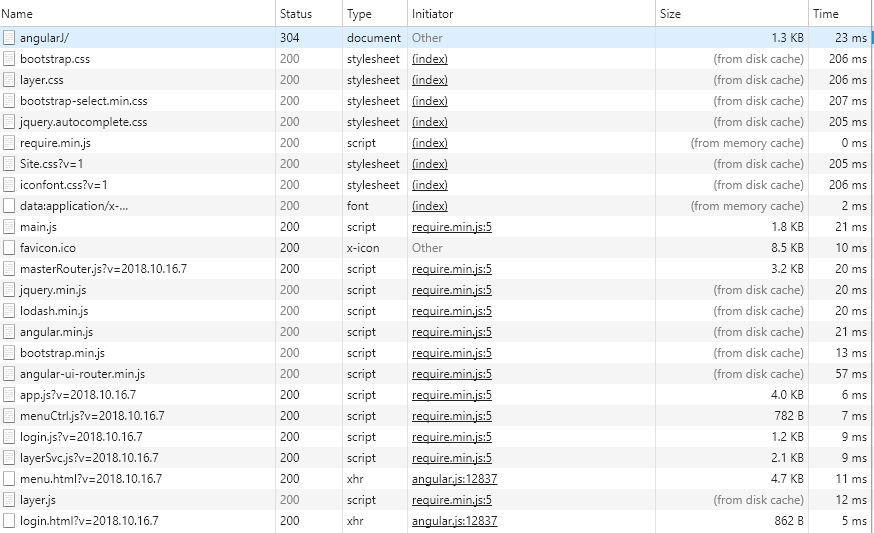
发布后F5刷新即可,效果:
angular 禁止缓存的更多相关文章
- [转]angular 禁止缓存
本文转自:https://www.cnblogs.com/jonney-wang/p/9797906.html angular 单页面开发,会存在和管理很多HTML和JS文件,缓存有时是个麻烦. 在开 ...
- HTML页面和JSP页面禁止缓存
一.JSP页面禁止缓存: 防止浏览器缓存当前访问的JSP动态页面,可以采用如下的方式进行设置,此效果如下的“HTML禁止缓存”: % 将过期日期设置为一个过去时间response.setHeader( ...
- Ajax禁止缓存的几个解决方案
最常用的方法是 方法1:服务器端代码加入 代码如下 复制代码 response.setHeader("Cache-Control", "no-cache, must-r ...
- Chrome调试javacript禁止缓存
/********************************************************************* * Chrome调试javacript禁止缓存 * 说明: ...
- RequireJS禁止缓存
通过配置文件可以禁止加载缓存的JS文件, 这个在开发过程中非常有用具体做法如下 require.config({ paths: { "E":"/Scripts/MyMod ...
- 【前端_js】Chrome禁止缓存的方法
在前端开发中,浏览器缓存使得我们改了代码后页面不变,得经常手动清理缓存. 1.按如下操作即可禁用浏览器缓存, 这种方法基本能够做到完全禁止缓存,然而缺点是必须要将开发模式一直打开,占用屏幕空间.而且, ...
- 网页禁止右键,禁止F12,禁止选中,禁止复制,禁止缓存等操作
一.禁止右键 //方法一 document.onmousedown = function () { ) { return false; } } //方法二 document.oncontextmenu ...
- 使用 Angular RouteReuseStrategy 缓存(路由)组件
使用 Angular RouteReuseStrategy 缓存组件 Cache components with Angular RouteReuseStrategy RouteReuseStrate ...
- angular页面缓存与页面刷新
angularJS学习笔记:页面缓存与页面刷新 遇到的问题 现在存在这样一个问题,登录前与登录成功后是同一个页面,只不过通过ngIf来控制哪部分显示,图像信息如下: 所以,整体工作不是很难,无非就 ...
随机推荐
- ubuntu16.04 下安装 visual studio code 以及利用 g++ 运行 c++程序
参考链接:1. http://www.linuxidc.com/Linux/2016-07/132798.htm(安装vs code) 2.https://blog.csdn.net/qq_28598 ...
- vue中遇到的一个点击展开或收起并且改变背景颜色的问题。
<template> <div class="expense-center"> <div class="fl expense-left&qu ...
- Office365 Manager Plus之报表
Office365 Manager Plus之报表 也许您刚刚开始使用Office 365,对它的各个组件还有很多疑问,如何快速掌握Office 365各种服务的用法?如何管理邮箱?如何监控邮件流量? ...
- Unity的几个特殊文件夹
1.以.开头的文件夹会被unity忽略,资源不会被导入,脚本不会编译. 2.Standard Assets和Pro Standard Assets:在这个文件夹中的脚本最先被编译. 3.Editor: ...
- python模块:hmac
"""HMAC (Keyed-Hashing for Message Authentication) Python module. Implements the HMAC ...
- vue-学习系列之vue双向绑定原理
一.访问器属性 访问器属性是对象中的一种特殊属性,它不能直接在对象中设置,而必须通过 defineProperty() 方法单独定义. var obj = { }; // 为obj定义一个名为 hel ...
- JavaScript基础视频教程总结(011-020章)
<!DOCTYPE html> <html> <head> <meta charset="utf-8" /> <title&g ...
- Linux使用MentoHust联网线上校园网, 回到普通有线网络却连不上?
我的解决方法如下: 在有线网的设置(Wired Settings)那里, 弹出Network窗口, 点击右下角的设置图标, 选择Security, 然后关掉802.1x Security. 然后就可以 ...
- java jar 包加载文件问题
场景: A 项目是一个服务,然后部署到本地 maven 仓库里,然后 B 项目依赖 A 项目,调用 A 项目的方法,但是发现,报错,说找不到文件(config.xsv).这就很奇怪了,怎么会呢, ...
- nlog 的手动配置
使用nlog的时候,有时候需要手动配置.比如数据库链接和密码不配在文件里,或者统计配置在一个位置之类的. var config = new NLog.Config.LoggingConfigurati ...