
angular 禁止缓存
angular 单页面开发,会存在和管理很多HTML和JS文件,缓存有时是个麻烦。
在开发和测试阶段,F12调出调试工具,禁止缓存F5刷新下就好了。
但是在客户那里缓存就体验效果不好,甚至认为有问题,联系客服,影响工作效率。
主要做几点就可以了,最主要的一点就是HTML和JS动态加载,点击菜单时再去加载。
项目中的库文件一般不需要管他,一百年不变,解决缓存的主要是经常变化的部分,
如:修改了页面布局,前端js逻辑发生变动。。。
最主要的策略是,为项目加版本号,不管是HTML还是js、css文件,更新发布后,
不需要客户/实施同事 F12清缓存,只需F5刷一下即可。
1、在主页面HTML上禁止缓存
    <meta http-equiv="Expires" content="0">

    <meta http-equiv="Pragma" content="no-cache">

    <meta http-equiv="Cache-control" content="no-cache">

    <meta http-equiv="Cache" content="no-cache">
2、项目主样式,加版本号; <link href="static/iconFont/iconfont.css?v=1" rel="stylesheet">
3、require的main文件管理常用文件的版本号;
var appVersion = '?v=2018.10.1.2';

require.config({

    paths: {

        'lodash': 'static/lodash.min',

        'jquery': 'static/jquery-1.11.3/jquery.min',

        'jqueryMig': 'static/jquery-migrate-1.4.1.min',

        'autocomplete': 'static/jquery-autocomplete/jquery.autocomplete.min',

        'bootstrap': 'static/bootstrap-3.3.7-dist/js/bootstrap.min',

        'angular': 'node_modules/angular/angular.min',

        'ui-router': 'node_modules/angular-ui-router/release/angular-ui-router.min',

        'select': 'static/bootstrap-select.min',

        'select-zh': 'static/bootstrap-select-zh_CN.min',

        'laydate': 'static/laydate/laydate',

        'layer': 'static/layer/layer',

        'app': 'app.js'+appVersion,

        'masterRt': '01-master/masterRouter.js'+appVersion,

        'autoSvc': 'service/autoSvc.js'+appVersion,

        'layerSvc': 'service/layerSvc.js'+appVersion,

        'datefmt': 'prototype/date.js'+appVersion,

    },

    shim: {

        'bootstrap': ['jquery'],

        'jqueryMig': ['jquery'],

        'select': {deps: ['bootstrap'], exports: 'select'},

        'select-zh': {deps: ['select'], exports: 'select-zh'},

        'ui-router': ['angular'],

        'app': ['ui-router'],

        'masterRouter': ['app'],

        'autocomplete': ['jquery','jqueryMig']

    }

});
4、动态加载功能页面HTML时,加版本号;即angular拦截器的request时处理;
    app.factory('interceptor', function ($q, $location) {

        return {

            request: function (config) {

                if (config.url.indexOf('/login/') === -1 && sessionStorage.session) {

                    var session = JSON.parse(sessionStorage.session);

                    config.headers['id'] = session.id;

                    config.headers['token'] = session.token;

                }

                // 禁止HTML缓存

                if(config.url.indexOf('.html') > 0){

                    //var nocache = '?v=' + new Date().getTime();

                    var idx = config.url.indexOf('?v=');

                    if(idx === -1)

                        config.url += appVersion;

                    else{

                        config.url = config.url.substr(0, idx) + appVersion;

                    }

                }

                return config || $q.when(config);

            },

            response: function (response) {

                if (response.config.url.indexOf('service') > -1) {

                    //todo 预处理请求结果

                }

                return response || $q.when(response);

            },

            responseError: function (response) {

                if (response.status === 401) {// If our response status is unauthorized

                    $location.path('/main/index');// Redirect to the login screen

                } else {

                    return $q.reject(response);// Reject our response

                }

            }

        };

    });
5、动态加载功能页面的js控制器和依赖js文件时,加版本号;
    // 延迟加载方法

    app.loadJs = function (files) {

        return {

            ctrl: function ($q) {

                // 禁止业务模块的js缓存

                //var nocache = '?x=' + new Date().getTime();

                for(var i=0; i<files.length; i++){

                    var idx = files[i].indexOf('?v=');

                    if(idx === -1)

                        files[i] += appVersion;

                    else{

                        files[i] = files[i].substr(0, idx) + appVersion;

                    }

                }

                var wait = $q.defer();

                require(files, function () {

                    wait.resolve();

                });

                return wait.promise;

            }

        };

    };
6、路由器的每个state定义时,动态加载js处理;
            .state('main.login', {

                url: '/login',

                templateUrl: modulePath + 'login.html',

                controller: 'loginCtrl',

                resolve: app.loadJs([modulePath + 'login.js'])

            })
这样处理完,发布前端项目时,注意修改项目版本号,我这里测试发布在Nginx,转发后台处理的请求。
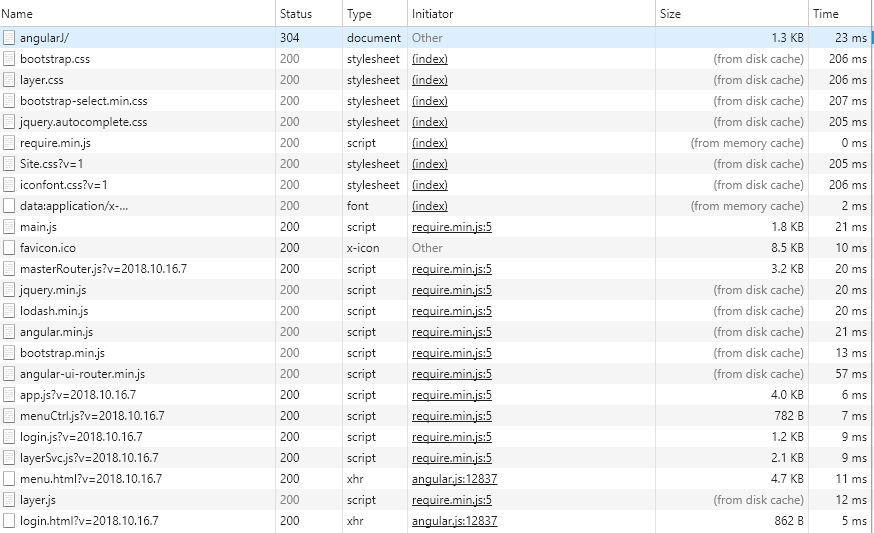
发布后F5刷新即可,效果:
angular 禁止缓存的更多相关文章
- [转]angular 禁止缓存
本文转自:https://www.cnblogs.com/jonney-wang/p/9797906.html angular 单页面开发,会存在和管理很多HTML和JS文件,缓存有时是个麻烦. 在开 ...
- HTML页面和JSP页面禁止缓存
一.JSP页面禁止缓存: 防止浏览器缓存当前访问的JSP动态页面,可以采用如下的方式进行设置,此效果如下的“HTML禁止缓存”: % 将过期日期设置为一个过去时间response.setHeader( ...
- Ajax禁止缓存的几个解决方案
最常用的方法是 方法1:服务器端代码加入 代码如下 复制代码 response.setHeader("Cache-Control", "no-cache, must-r ...
- Chrome调试javacript禁止缓存
/********************************************************************* * Chrome调试javacript禁止缓存 * 说明: ...
- RequireJS禁止缓存
通过配置文件可以禁止加载缓存的JS文件, 这个在开发过程中非常有用具体做法如下 require.config({ paths: { "E":"/Scripts/MyMod ...
- 【前端_js】Chrome禁止缓存的方法
在前端开发中,浏览器缓存使得我们改了代码后页面不变,得经常手动清理缓存. 1.按如下操作即可禁用浏览器缓存, 这种方法基本能够做到完全禁止缓存,然而缺点是必须要将开发模式一直打开,占用屏幕空间.而且, ...
- 网页禁止右键,禁止F12,禁止选中,禁止复制,禁止缓存等操作
一.禁止右键 //方法一 document.onmousedown = function () { ) { return false; } } //方法二 document.oncontextmenu ...
- 使用 Angular RouteReuseStrategy 缓存(路由)组件
使用 Angular RouteReuseStrategy 缓存组件 Cache components with Angular RouteReuseStrategy RouteReuseStrate ...
- angular页面缓存与页面刷新
angularJS学习笔记:页面缓存与页面刷新 遇到的问题 现在存在这样一个问题,登录前与登录成功后是同一个页面,只不过通过ngIf来控制哪部分显示,图像信息如下: 所以,整体工作不是很难,无非就 ...
随机推荐
- Apache ab性能测试结果分析
Apache ab性能测试结果分析 测试场景:模拟10个用户,对某页发起总共100次请求. 测试命令: ab -n 100 -c 10 地址 测试报告: Server Software: 被测服务器软 ...
- 孤岛营救问题 (BFS+状压)
https://loj.ac/problem/6121 BFS + 状压 写过就好想,注意细节debug #include <bits/stdc++.h> #define read rea ...
- MYSQL 开发总结
1.mysql中,VARCHAR(N)中的N代表的是字符数,而不是字节数.例如VARCHAR(255)表示可以保存255的中文 2.过大的长度会消耗更多的内存.VARCHAR(N),存储时是按照数据实 ...
- CUDA[4] sample program: matrix-vector multiplication
Use Compressed Sparse Row Format (CSR) to represent matrix #include "cuda_runtime.h" #incl ...
- powershell ParameterSet解析
自定义PowerShell函数,在设置参数的时候中,可以将参数设置为某些情况下可选,某些条件下又设置为必选. 示例代码从网站复制的. function Connect-Somewhere { [Cmd ...
- Apache Thrift的C++多线程编程定式
Facebook贡献给Apache的开源RPC组件Thrift有着广泛的应用,C++中使用Thrift也十分普遍,但由于Thrift的Handler会被多个线程调用,因而多线程中应用并不直接的友好,利 ...
- Maven的多mirrors的配置
repo1 central Human Readable Name for this Mirror. http://repo1.maven.org/maven2/ repo2 central Huma ...
- Ehcache3开发入门简介
在高并发应用中缓存就是核心机制.最近在研究Ehcache,发现这是一个更加灵活易用的缓存框架(相对于Redis.Memcache),Ehcache更加小巧轻便.而且都有持久化机制,不用担心JVM和服务 ...
- 【leetcode】20.有效的括号
题目 给定一个只包括 '(',')','{','}','[',']' 的字符串,判断字符串是否有效.有效字符串需满足:左括号必须用相同类型的右括号闭合.左括号必须以正确的顺序闭合.注意空字符串可被认为 ...
- Oracle.ManagedDataAccess 提示ORA-01017 错误【解决方案】
Oracle.ManagedDataAccess 提示ORA-01017 错误[解决方案] Oracle.ManagedDataAccess 提示ORA-01017 错误[解决方案] [HKEY_LO ...