
k8s Nodeport方式下service访问,iptables处理逻辑(转)
原文 https://www.myf5.net/post/2330.htm
k8s Nodeport方式下service访问,iptables处理逻辑
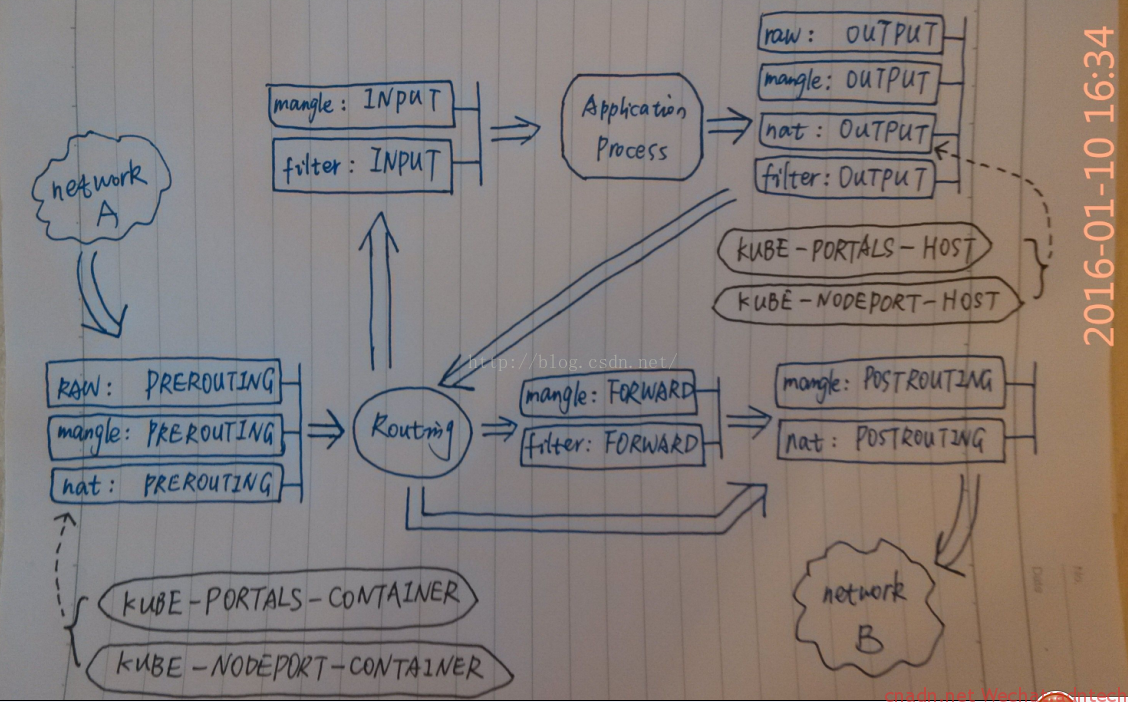
借用网上一张图,画的挺好~ 来自http://blog.csdn.net/xinghun_4/article/details/50492041
对应解释如下
Chain PREROUTING (policy ACCEPT 2 packets, 1152 bytes)
pkts bytes target prot opt in out source destination
10837 3999K KUBE-SERVICES all -- * * 0.0.0.0/0 0.0.0.0/0 /* kubernetes service portals */
====》1. 进入的请求,首先匹配PREROUTING 链里的该规则,并进入KUBE-SERVICES链
238 27286 DOCKER all -- * * 0.0.0.0/0 0.0.0.0/0 ADDRTYPE match dst-type LOCAL
Chain INPUT (policy ACCEPT 2 packets, 1152 bytes)
pkts bytes target prot opt in out source destination
Chain OUTPUT (policy ACCEPT 8 packets, 480 bytes)
pkts bytes target prot opt in out source destination
61563 3722K KUBE-SERVICES all -- * * 0.0.0.0/0 0.0.0.0/0 /* kubernetes service portals */
0 0 DOCKER all -- * * 0.0.0.0/0 !127.0.0.0/8 ADDRTYPE match dst-type LOCAL
Chain POSTROUTING (policy ACCEPT 8 packets, 480 bytes)
pkts bytes target prot opt in out source destination
61840 3742K KUBE-POSTROUTING all -- * * 0.0.0.0/0 0.0.0.0/0 /* kubernetes postrouting rules */
====》6. 需要路由到另一个主机的连接经由POSTROUTING该规则,进入KUBE-POSTROUTING 链
62 4323 MASQUERADE all -- * !docker0 10.2.39.0/24 0.0.0.0/0
0 0 MASQUERADE all -- * !docker0 10.1.33.0/24 0.0.0.0/0
Chain DOCKER (2 references)
pkts bytes target prot opt in out source destination
0 0 RETURN all -- docker0 * 0.0.0.0/0 0.0.0.0/0
Chain KUBE-MARK-DROP (0 references)
pkts bytes target prot opt in out source destination
0 0 MARK all -- * * 0.0.0.0/0 0.0.0.0/0 MARK or 0x8000
Chain KUBE-MARK-MASQ (6 references)
pkts bytes target prot opt in out source destination
2 128 MARK all -- * * 0.0.0.0/0 0.0.0.0/0 MARK or 0x4000
Chain KUBE-NODEPORTS (1 references)
pkts bytes target prot opt in out source destination
2 128 KUBE-MARK-MASQ tcp -- * * 0.0.0.0/0 0.0.0.0/0 /* default/k8s-nginx: */ tcp dpt:30780
2 128 KUBE-SVC-2RMP45C4XWDG5BGC tcp -- * * 0.0.0.0/0 0.0.0.0/0 /* default/k8s-nginx: */ tcp dpt:30780
====》3.请求命中上述两个规则,一个进行进入KUBE-MARK-MASQ 链进行标记,一个进入KUBE-SVC-2RMP45C4XWDG5BGC链
Chain KUBE-POSTROUTING (1 references)
pkts bytes target prot opt in out source destination
1 64 MASQUERADE all -- * * 0.0.0.0/0 0.0.0.0/0 /* kubernetes service traffic requiring SNAT */ mark match 0x4000/0x4000
====》7. 执行源地址转换(在flannel网络这里转换的地址是flannel.1即flannel在ifconfig里输出接口的地址),发往另一个node
Chain KUBE-SEP-D5T62RWZFFOCR77Q (1 references)
pkts bytes target prot opt in out source destination
0 0 KUBE-MARK-MASQ all -- * * 10.2.39.3 0.0.0.0/0 /* default/k8s-nginx: */
1 64 DNAT tcp -- * * 0.0.0.0/0 0.0.0.0/0 /* default/k8s-nginx: */ tcp to:10.2.39.3:80
====》5-2. DNAT到本机,交给INPUT
Chain KUBE-SEP-IK3IYR4STYKRJP77 (1 references)
pkts bytes target prot opt in out source destination
0 0 KUBE-MARK-MASQ all -- * * 10.2.39.2 0.0.0.0/0 /* kube-system/kube-dns:dns-tcp */
0 0 DNAT tcp -- * * 0.0.0.0/0 0.0.0.0/0 /* kube-system/kube-dns:dns-tcp */ tcp to:10.2.39.2:53
Chain KUBE-SEP-WV6S37CDULKCYEVE (1 references)
pkts bytes target prot opt in out source destination
0 0 KUBE-MARK-MASQ all -- * * 10.2.39.2 0.0.0.0/0 /* kube-system/kube-dns:dns */
0 0 DNAT udp -- * * 0.0.0.0/0 0.0.0.0/0 /* kube-system/kube-dns:dns */ udp to:10.2.39.2:53
Chain KUBE-SEP-X7YOSBI66WAQ7F6X (2 references)
pkts bytes target prot opt in out source destination
0 0 KUBE-MARK-MASQ all -- * * 172.16.199.17 0.0.0.0/0 /* default/kubernetes:https */
0 0 DNAT tcp -- * * 0.0.0.0/0 0.0.0.0/0 /* default/kubernetes:https */ recent: SET name: KUBE-SEP-X7YOSBI66WAQ7F6X side: source mask: 255.255.255.255 tcp to:172.16.199.17:6443
Chain KUBE-SEP-YXWG4KEJCDIRMCO5 (1 references)
pkts bytes target prot opt in out source destination
0 0 KUBE-MARK-MASQ all -- * * 10.2.4.2 0.0.0.0/0 /* default/k8s-nginx: */
1 64 DNAT tcp -- * * 0.0.0.0/0 0.0.0.0/0 /* default/k8s-nginx: */ tcp to:10.2.4.2:80
====》5-1. DNAT到另一个node,随后执行postrouting
Chain KUBE-SERVICES (2 references)
pkts bytes target prot opt in out source destination
0 0 KUBE-SVC-2RMP45C4XWDG5BGC tcp -- * * 0.0.0.0/0 169.169.148.143 /* default/k8s-nginx: cluster IP */ tcp dpt:80
0 0 KUBE-SVC-NPX46M4PTMTKRN6Y tcp -- * * 0.0.0.0/0 169.169.0.1 /* default/kubernetes:https cluster IP */ tcp dpt:443
0 0 KUBE-SVC-TCOU7JCQXEZGVUNU udp -- * * 0.0.0.0/0 169.169.0.53 /* kube-system/kube-dns:dns cluster IP */ udp dpt:53
0 0 KUBE-SVC-ERIFXISQEP7F7OF4 tcp -- * * 0.0.0.0/0 169.169.0.53 /* kube-system/kube-dns:dns-tcp cluster IP */ tcp dpt:53
2 128 KUBE-NODEPORTS all -- * * 0.0.0.0/0 0.0.0.0/0 /* kubernetes service nodeports; NOTE: this must be the last rule in this chain */ ADDRTYPE match dst-type LOCAL
====》2.连接随后并该规则匹配,进入KUBE-NODEPORTS 链
Chain KUBE-SVC-2RMP45C4XWDG5BGC (2 references)
pkts bytes target prot opt in out source destination
1 64 KUBE-SEP-D5T62RWZFFOCR77Q all -- * * 0.0.0.0/0 0.0.0.0/0 /* default/k8s-nginx: */ statistic mode random probability 0.50000000000
1 64 KUBE-SEP-YXWG4KEJCDIRMCO5 all -- * * 0.0.0.0/0 0.0.0.0/0 /* default/k8s-nginx: */
====》4.请求被该链中两个规则匹配,这里只有两个规则,按照50% RR规则进行负载均衡分发,两个目标链都是进行DNAT,一个转到本node的pod IP上,一个转到另一台宿主机的pod上,因为该service下只有两个pod
==========》乱入的广告,www.myf5.net《==================
Chain KUBE-SVC-ERIFXISQEP7F7OF4 (1 references)
pkts bytes target prot opt in out source destination
0 0 KUBE-SEP-IK3IYR4STYKRJP77 all -- * * 0.0.0.0/0 0.0.0.0/0 /* kube-system/kube-dns:dns-tcp */
Chain KUBE-SVC-NPX46M4PTMTKRN6Y (1 references)
pkts bytes target prot opt in out source destination
0 0 KUBE-SEP-X7YOSBI66WAQ7F6X all -- * * 0.0.0.0/0 0.0.0.0/0 /* default/kubernetes:https */ recent: CHECK seconds: 10800 reap name: KUBE-SEP-X7YOSBI66WAQ7F6X side: source mask: 255.255.255.255
0 0 KUBE-SEP-X7YOSBI66WAQ7F6X all -- * * 0.0.0.0/0 0.0.0.0/0 /* default/kubernetes:https */
Chain KUBE-SVC-TCOU7JCQXEZGVUNU (1 references)
pkts bytes target prot opt in out source destination
0 0 KUBE-SEP-WV6S37CDULKCYEVE all -- * * 0.0.0.0/0 0.0.0.0/0 /* kube-system/kube-dns:dns */
|
1
2
3
4
5
6
7
8
9
10
11
12
13
14
15
16
17
18
19
20
21
22
23
24
25
26
27
28
29
30
31
32
33
34
35
36
37
38
39
40
41
42
43
44
45
46
47
48
49
50
51
52
53
54
55
56
57
58
59
60
61
62
63
64
65
66
67
68
69
70
71
72
73
74
75
76
77
78
79
80
81
82
83
84
85
86
87
88
89
90
91
92
93
94
95
96
97
98
99
|
[root@docker3 ~]# iptables -nL -t nat -v
Chain PREROUTING (policy ACCEPT 2 packets, 1152 bytes)
pkts bytes target prot opt in out source destination
10837 3999K KUBE-SERVICES all -- * * 0.0.0.0/0 0.0.0.0/0 /* kubernetes service portals */
====》1. 进入的请求,首先匹配PREROUTING 链里的该规则,并进入KUBE-SERVICES链
238 27286 DOCKER all -- * * 0.0.0.0/0 0.0.0.0/0 ADDRTYPE match dst-type LOCAL
Chain INPUT (policy ACCEPT 2 packets, 1152 bytes)
pkts bytes target prot opt in out source destination
Chain OUTPUT (policy ACCEPT 8 packets, 480 bytes)
pkts bytes target prot opt in out source destination
61563 3722K KUBE-SERVICES all -- * * 0.0.0.0/0 0.0.0.0/0 /* kubernetes service portals */
0 0 DOCKER all -- * * 0.0.0.0/0 !127.0.0.0/8 ADDRTYPE match dst-type LOCAL
Chain POSTROUTING (policy ACCEPT 8 packets, 480 bytes)
pkts bytes target prot opt in out source destination
61840 3742K KUBE-POSTROUTING all -- * * 0.0.0.0/0 0.0.0.0/0 /* kubernetes postrouting rules */
====》6. 需要路由到另一个主机的连接经由POSTROUTING该规则,进入KUBE-POSTROUTING 链
62 4323 MASQUERADE all -- * !docker0 10.2.39.0/24 0.0.0.0/0
0 0 MASQUERADE all -- * !docker0 10.1.33.0/24 0.0.0.0/0
Chain DOCKER (2 references)
pkts bytes target prot opt in out source destination
0 0 RETURN all -- docker0 * 0.0.0.0/0 0.0.0.0/0
Chain KUBE-MARK-DROP (0 references)
pkts bytes target prot opt in out source destination
0 0 MARK all -- * * 0.0.0.0/0 0.0.0.0/0 MARK or 0x8000
Chain KUBE-MARK-MASQ (6 references)
pkts bytes target prot opt in out source destination
2 128 MARK all -- * * 0.0.0.0/0 0.0.0.0/0 MARK or 0x4000
Chain KUBE-NODEPORTS (1 references)
pkts bytes target prot opt in out source destination
2 128 KUBE-MARK-MASQ tcp -- * * 0.0.0.0/0 0.0.0.0/0 /* default/k8s-nginx: */ tcp dpt:30780
2 128 KUBE-SVC-2RMP45C4XWDG5BGC tcp -- * * 0.0.0.0/0 0.0.0.0/0 /* default/k8s-nginx: */ tcp dpt:30780
====》3.请求命中上述两个规则,一个进行进入KUBE-MARK-MASQ 链进行标记,一个进入KUBE-SVC-2RMP45C4XWDG5BGC链
Chain KUBE-POSTROUTING (1 references)
pkts bytes target prot opt in out source destination
1 64 MASQUERADE all -- * * 0.0.0.0/0 0.0.0.0/0 /* kubernetes service traffic requiring SNAT */ mark match 0x4000/0x4000
====》7. 执行源地址转换(在flannel网络这里转换的地址是flannel.1即flannel在ifconfig里输出接口的地址),发往另一个node
Chain KUBE-SEP-D5T62RWZFFOCR77Q (1 references)
pkts bytes target prot opt in out source destination
0 0 KUBE-MARK-MASQ all -- * * 10.2.39.3 0.0.0.0/0 /* default/k8s-nginx: */
1 64 DNAT tcp -- * * 0.0.0.0/0 0.0.0.0/0 /* default/k8s-nginx: */ tcp to:10.2.39.3:80
====》5-2. DNAT到本机,交给INPUT
Chain KUBE-SEP-IK3IYR4STYKRJP77 (1 references)
pkts bytes target prot opt in out source destination
0 0 KUBE-MARK-MASQ all -- * * 10.2.39.2 0.0.0.0/0 /* kube-system/kube-dns:dns-tcp */
0 0 DNAT tcp -- * * 0.0.0.0/0 0.0.0.0/0 /* kube-system/kube-dns:dns-tcp */ tcp to:10.2.39.2:53
Chain KUBE-SEP-WV6S37CDULKCYEVE (1 references)
pkts bytes target prot opt in out source destination
0 0 KUBE-MARK-MASQ all -- * * 10.2.39.2 0.0.0.0/0 /* kube-system/kube-dns:dns */
0 0 DNAT udp -- * * 0.0.0.0/0 0.0.0.0/0 /* kube-system/kube-dns:dns */ udp to:10.2.39.2:53
Chain KUBE-SEP-X7YOSBI66WAQ7F6X (2 references)
pkts bytes target prot opt in out source destination
0 0 KUBE-MARK-MASQ all -- * * 172.16.199.17 0.0.0.0/0 /* default/kubernetes:https */
0 0 DNAT tcp -- * * 0.0.0.0/0 0.0.0.0/0 /* default/kubernetes:https */ recent: SET name: KUBE-SEP-X7YOSBI66WAQ7F6X side: source mask: 255.255.255.255 tcp to:172.16.199.17:6443
Chain KUBE-SEP-YXWG4KEJCDIRMCO5 (1 references)
pkts bytes target prot opt in out source destination
0 0 KUBE-MARK-MASQ all -- * * 10.2.4.2 0.0.0.0/0 /* default/k8s-nginx: */
1 64 DNAT tcp -- * * 0.0.0.0/0 0.0.0.0/0 /* default/k8s-nginx: */ tcp to:10.2.4.2:80
====》5-1. DNAT到另一个node,随后执行postrouting
Chain KUBE-SERVICES (2 references)
pkts bytes target prot opt in out source destination
0 0 KUBE-SVC-2RMP45C4XWDG5BGC tcp -- * * 0.0.0.0/0 169.169.148.143 /* default/k8s-nginx: cluster IP */ tcp dpt:80
0 0 KUBE-SVC-NPX46M4PTMTKRN6Y tcp -- * * 0.0.0.0/0 169.169.0.1 /* default/kubernetes:https cluster IP */ tcp dpt:443
0 0 KUBE-SVC-TCOU7JCQXEZGVUNU udp -- * * 0.0.0.0/0 169.169.0.53 /* kube-system/kube-dns:dns cluster IP */ udp dpt:53
0 0 KUBE-SVC-ERIFXISQEP7F7OF4 tcp -- * * 0.0.0.0/0 169.169.0.53 /* kube-system/kube-dns:dns-tcp cluster IP */ tcp dpt:53
2 128 KUBE-NODEPORTS all -- * * 0.0.0.0/0 0.0.0.0/0 /* kubernetes service nodeports; NOTE: this must be the last rule in this chain */ ADDRTYPE match dst-type LOCAL
====》2.连接随后并该规则匹配,进入KUBE-NODEPORTS 链
Chain KUBE-SVC-2RMP45C4XWDG5BGC (2 references)
pkts bytes target prot opt in out source destination
1 64 KUBE-SEP-D5T62RWZFFOCR77Q all -- * * 0.0.0.0/0 0.0.0.0/0 /* default/k8s-nginx: */ statistic mode random probability 0.50000000000
1 64 KUBE-SEP-YXWG4KEJCDIRMCO5 all -- * * 0.0.0.0/0 0.0.0.0/0 /* default/k8s-nginx: */
====》4.请求被该链中两个规则匹配,这里只有两个规则,按照50% RR规则进行负载均衡分发,两个目标链都是进行DNAT,一个转到本node的pod IP上,一个转到另一台宿主机的pod上,因为该service下只有两个pod
==========》乱入的广告,www.myf5.net《==================
Chain KUBE-SVC-ERIFXISQEP7F7OF4 (1 references)
pkts bytes target prot opt in out source destination
0 0 KUBE-SEP-IK3IYR4STYKRJP77 all -- * * 0.0.0.0/0 0.0.0.0/0 /* kube-system/kube-dns:dns-tcp */
Chain KUBE-SVC-NPX46M4PTMTKRN6Y (1 references)
pkts bytes target prot opt in out source destination
0 0 KUBE-SEP-X7YOSBI66WAQ7F6X all -- * * 0.0.0.0/0 0.0.0.0/0 /* default/kubernetes:https */ recent: CHECK seconds: 10800 reap name: KUBE-SEP-X7YOSBI66WAQ7F6X side: source mask: 255.255.255.255
0 0 KUBE-SEP-X7YOSBI66WAQ7F6X all -- * * 0.0.0.0/0 0.0.0.0/0 /* default/kubernetes:https */
Chain KUBE-SVC-TCOU7JCQXEZGVUNU (1 references)
pkts bytes target prot opt in out source destination
0 0 KUBE-SEP-WV6S37CDULKCYEVE all -- * * 0.0.0.0/0 0.0.0.0/0 /* kube-system/kube-dns:dns */
|
本地下载 在被转发目标node的物理网口抓包(需decode as vxlan)
k8s Nodeport方式下service访问,iptables处理逻辑(转)的更多相关文章
- 解决在编程方式下无法访问Spark Master问题
我们可以选择使用spark-shell,spark-submit或者编写代码的方式运行Spark.在产品环境下,利用spark-submit将jar提交到spark,是较为常见的做法.但是在开发期间, ...
- mfc 类三种继承方式下的访问
知识点 public private protected 三种继承方式 三种继承方式的区别 public 关键字意味着在其后声明的所有成员及对象都可以访问. private 关键字意味着除了该类型的创 ...
- k8s service NodePort 方式向外发布
k8s service NodePort 方式向外发布 k8s 无头service 方式向内发布 k8s service 服务发现 {ServiceName}.{Namespace}.svc.{Clu ...
- Kubernetes K8S在IPVS代理模式下Service服务的ClusterIP类型访问失败处理
Kubernetes K8S使用IPVS代理模式,当Service的类型为ClusterIP时,如何处理访问service却不能访问后端pod的情况. 背景现象 Kubernetes K8S使用IPV ...
- k8s通过Service访问Pod
如何创建服务 1.创建Deployment #启动三个pod,运行httpd镜像,label是run:mcw-httpd,Seveice将会根据这个label挑选PodapiVersion: apps ...
- linux运维、架构之路-K8s通过Service访问Pod
一.通过Service访问Pod 每个Pod都有自己的IP地址,当Controller用新的Pod替换发生故障的Pod时,新Pod会分配到新的IP地址,例如:有一组Pod对外提供HTTP服务,它们的I ...
- k8s通过service访问pod(五)--技术流ken
service 每个 Pod 都有自己的 IP 地址.当 controller 用新 Pod 替代发生故障的 Pod 时,新 Pod 会分配到新的 IP 地址.这样就产生了一个问题: 如果一组 Pod ...
- k8s通过service访问pod(五)
service 每个 Pod 都有自己的 IP 地址.当 controller 用新 Pod 替代发生故障的 Pod 时,新 Pod 会分配到新的 IP 地址.这样就产生了一个问题: 如果一组 Pod ...
- k8s~k8s里的服务Service
k8s用命名空间namespace把资源进行隔离,默认情况下,相同的命名空间里的服务可以相互通讯,反之进行隔离. 服务Service 1.1 Service Kubernetes中一个应用服务会有一个 ...
随机推荐
- 获取当前页面url并截取所需字段
let url = window.location.href; // 动态获取当前url // 例: "http://i.cnblogs.com/henanyundian/web/app/# ...
- 使用blas做矩阵乘法
#define min(x,y) (((x) < (y)) ? (x) : (y)) #include <stdio.h> #include <stdlib.h> # ...
- zabbix3.4.7远程命令例子详解
zabbix可以通过远程发送执行命令或脚本来对部分的服务求故障进行修复 zabbix客户端配置 设置zabbix客户端用户的sudo权限 执行命令visudo: Defaults:zabbix !re ...
- 内建函数之:reduce()使用
#!/usr/bin/python#coding=utf-8'''Created on 2017年11月2日 from home @author: James zhan ''' print reduc ...
- Java覆盖
Java的覆盖: 源代码: package dijia;class Parent1{ void f() { System.out.println("迪迦奥特曼1"); } void ...
- python: super原理
super() 的入门使用 在类的继承中,如果重定义某个方法,该方法会覆盖父类的同名方法,但有时,我们希望能同时实现父类的功能,这时,我们就需要调用父类的方法了,可通过使用 super 来实现,比如: ...
- html页面调用js文件里的函数报错-->方法名 is not defined处理方法
前几天写了一个时间函数setInterval,然后出现了这个错误:Uncaught ReferenceError: dosave is not defined(…) 找了半天都没发现错在哪,最后找到解 ...
- box-sizing的用法
默认情况下设置盒子的width是指内容区域,所以在设置边框会使得盒子往外扩张,如果要让css设置的width就是盒子最终的宽度,那么就要设置box-sizing:border-box, ...
- Python编程--类的分析
一.类的概念 python是面向对象的编程语言,详细来说,我们把一类相同的事物叫做类,其中用相同的属性(其实就是变量描述),里面封装了相同的方法,比如:汽车是一个类,它包括价格.品牌等属性.那么我们如 ...
- mysql错误集合
一.This function has none of DETERMINISTIC, NO SQL, or READS SQL DATA in its de 错误解决办法 这是我们开启了bin-log ...