
k8s Nodeport方式下service访问,iptables处理逻辑(转)
原文 https://www.myf5.net/post/2330.htm
k8s Nodeport方式下service访问,iptables处理逻辑
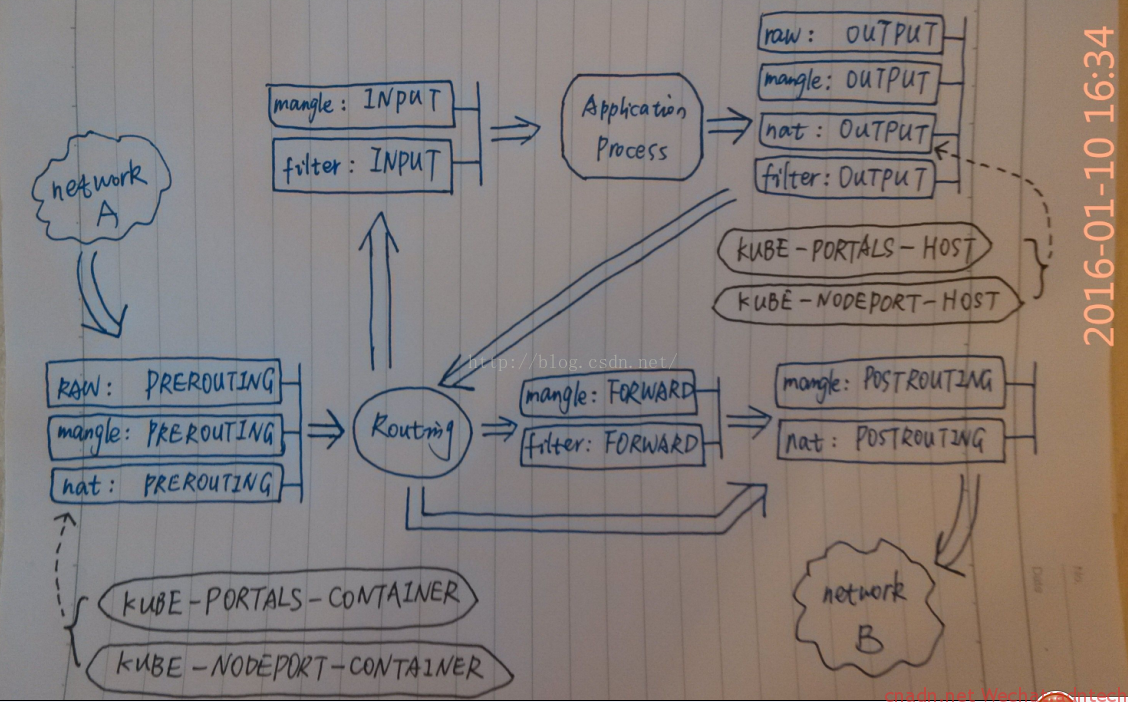
借用网上一张图,画的挺好~ 来自http://blog.csdn.net/xinghun_4/article/details/50492041
对应解释如下
Chain PREROUTING (policy ACCEPT 2 packets, 1152 bytes)
pkts bytes target prot opt in out source destination
10837 3999K KUBE-SERVICES all -- * * 0.0.0.0/0 0.0.0.0/0 /* kubernetes service portals */
====》1. 进入的请求,首先匹配PREROUTING 链里的该规则,并进入KUBE-SERVICES链
238 27286 DOCKER all -- * * 0.0.0.0/0 0.0.0.0/0 ADDRTYPE match dst-type LOCAL
Chain INPUT (policy ACCEPT 2 packets, 1152 bytes)
pkts bytes target prot opt in out source destination
Chain OUTPUT (policy ACCEPT 8 packets, 480 bytes)
pkts bytes target prot opt in out source destination
61563 3722K KUBE-SERVICES all -- * * 0.0.0.0/0 0.0.0.0/0 /* kubernetes service portals */
0 0 DOCKER all -- * * 0.0.0.0/0 !127.0.0.0/8 ADDRTYPE match dst-type LOCAL
Chain POSTROUTING (policy ACCEPT 8 packets, 480 bytes)
pkts bytes target prot opt in out source destination
61840 3742K KUBE-POSTROUTING all -- * * 0.0.0.0/0 0.0.0.0/0 /* kubernetes postrouting rules */
====》6. 需要路由到另一个主机的连接经由POSTROUTING该规则,进入KUBE-POSTROUTING 链
62 4323 MASQUERADE all -- * !docker0 10.2.39.0/24 0.0.0.0/0
0 0 MASQUERADE all -- * !docker0 10.1.33.0/24 0.0.0.0/0
Chain DOCKER (2 references)
pkts bytes target prot opt in out source destination
0 0 RETURN all -- docker0 * 0.0.0.0/0 0.0.0.0/0
Chain KUBE-MARK-DROP (0 references)
pkts bytes target prot opt in out source destination
0 0 MARK all -- * * 0.0.0.0/0 0.0.0.0/0 MARK or 0x8000
Chain KUBE-MARK-MASQ (6 references)
pkts bytes target prot opt in out source destination
2 128 MARK all -- * * 0.0.0.0/0 0.0.0.0/0 MARK or 0x4000
Chain KUBE-NODEPORTS (1 references)
pkts bytes target prot opt in out source destination
2 128 KUBE-MARK-MASQ tcp -- * * 0.0.0.0/0 0.0.0.0/0 /* default/k8s-nginx: */ tcp dpt:30780
2 128 KUBE-SVC-2RMP45C4XWDG5BGC tcp -- * * 0.0.0.0/0 0.0.0.0/0 /* default/k8s-nginx: */ tcp dpt:30780
====》3.请求命中上述两个规则,一个进行进入KUBE-MARK-MASQ 链进行标记,一个进入KUBE-SVC-2RMP45C4XWDG5BGC链
Chain KUBE-POSTROUTING (1 references)
pkts bytes target prot opt in out source destination
1 64 MASQUERADE all -- * * 0.0.0.0/0 0.0.0.0/0 /* kubernetes service traffic requiring SNAT */ mark match 0x4000/0x4000
====》7. 执行源地址转换(在flannel网络这里转换的地址是flannel.1即flannel在ifconfig里输出接口的地址),发往另一个node
Chain KUBE-SEP-D5T62RWZFFOCR77Q (1 references)
pkts bytes target prot opt in out source destination
0 0 KUBE-MARK-MASQ all -- * * 10.2.39.3 0.0.0.0/0 /* default/k8s-nginx: */
1 64 DNAT tcp -- * * 0.0.0.0/0 0.0.0.0/0 /* default/k8s-nginx: */ tcp to:10.2.39.3:80
====》5-2. DNAT到本机,交给INPUT
Chain KUBE-SEP-IK3IYR4STYKRJP77 (1 references)
pkts bytes target prot opt in out source destination
0 0 KUBE-MARK-MASQ all -- * * 10.2.39.2 0.0.0.0/0 /* kube-system/kube-dns:dns-tcp */
0 0 DNAT tcp -- * * 0.0.0.0/0 0.0.0.0/0 /* kube-system/kube-dns:dns-tcp */ tcp to:10.2.39.2:53
Chain KUBE-SEP-WV6S37CDULKCYEVE (1 references)
pkts bytes target prot opt in out source destination
0 0 KUBE-MARK-MASQ all -- * * 10.2.39.2 0.0.0.0/0 /* kube-system/kube-dns:dns */
0 0 DNAT udp -- * * 0.0.0.0/0 0.0.0.0/0 /* kube-system/kube-dns:dns */ udp to:10.2.39.2:53
Chain KUBE-SEP-X7YOSBI66WAQ7F6X (2 references)
pkts bytes target prot opt in out source destination
0 0 KUBE-MARK-MASQ all -- * * 172.16.199.17 0.0.0.0/0 /* default/kubernetes:https */
0 0 DNAT tcp -- * * 0.0.0.0/0 0.0.0.0/0 /* default/kubernetes:https */ recent: SET name: KUBE-SEP-X7YOSBI66WAQ7F6X side: source mask: 255.255.255.255 tcp to:172.16.199.17:6443
Chain KUBE-SEP-YXWG4KEJCDIRMCO5 (1 references)
pkts bytes target prot opt in out source destination
0 0 KUBE-MARK-MASQ all -- * * 10.2.4.2 0.0.0.0/0 /* default/k8s-nginx: */
1 64 DNAT tcp -- * * 0.0.0.0/0 0.0.0.0/0 /* default/k8s-nginx: */ tcp to:10.2.4.2:80
====》5-1. DNAT到另一个node,随后执行postrouting
Chain KUBE-SERVICES (2 references)
pkts bytes target prot opt in out source destination
0 0 KUBE-SVC-2RMP45C4XWDG5BGC tcp -- * * 0.0.0.0/0 169.169.148.143 /* default/k8s-nginx: cluster IP */ tcp dpt:80
0 0 KUBE-SVC-NPX46M4PTMTKRN6Y tcp -- * * 0.0.0.0/0 169.169.0.1 /* default/kubernetes:https cluster IP */ tcp dpt:443
0 0 KUBE-SVC-TCOU7JCQXEZGVUNU udp -- * * 0.0.0.0/0 169.169.0.53 /* kube-system/kube-dns:dns cluster IP */ udp dpt:53
0 0 KUBE-SVC-ERIFXISQEP7F7OF4 tcp -- * * 0.0.0.0/0 169.169.0.53 /* kube-system/kube-dns:dns-tcp cluster IP */ tcp dpt:53
2 128 KUBE-NODEPORTS all -- * * 0.0.0.0/0 0.0.0.0/0 /* kubernetes service nodeports; NOTE: this must be the last rule in this chain */ ADDRTYPE match dst-type LOCAL
====》2.连接随后并该规则匹配,进入KUBE-NODEPORTS 链
Chain KUBE-SVC-2RMP45C4XWDG5BGC (2 references)
pkts bytes target prot opt in out source destination
1 64 KUBE-SEP-D5T62RWZFFOCR77Q all -- * * 0.0.0.0/0 0.0.0.0/0 /* default/k8s-nginx: */ statistic mode random probability 0.50000000000
1 64 KUBE-SEP-YXWG4KEJCDIRMCO5 all -- * * 0.0.0.0/0 0.0.0.0/0 /* default/k8s-nginx: */
====》4.请求被该链中两个规则匹配,这里只有两个规则,按照50% RR规则进行负载均衡分发,两个目标链都是进行DNAT,一个转到本node的pod IP上,一个转到另一台宿主机的pod上,因为该service下只有两个pod
==========》乱入的广告,www.myf5.net《==================
Chain KUBE-SVC-ERIFXISQEP7F7OF4 (1 references)
pkts bytes target prot opt in out source destination
0 0 KUBE-SEP-IK3IYR4STYKRJP77 all -- * * 0.0.0.0/0 0.0.0.0/0 /* kube-system/kube-dns:dns-tcp */
Chain KUBE-SVC-NPX46M4PTMTKRN6Y (1 references)
pkts bytes target prot opt in out source destination
0 0 KUBE-SEP-X7YOSBI66WAQ7F6X all -- * * 0.0.0.0/0 0.0.0.0/0 /* default/kubernetes:https */ recent: CHECK seconds: 10800 reap name: KUBE-SEP-X7YOSBI66WAQ7F6X side: source mask: 255.255.255.255
0 0 KUBE-SEP-X7YOSBI66WAQ7F6X all -- * * 0.0.0.0/0 0.0.0.0/0 /* default/kubernetes:https */
Chain KUBE-SVC-TCOU7JCQXEZGVUNU (1 references)
pkts bytes target prot opt in out source destination
0 0 KUBE-SEP-WV6S37CDULKCYEVE all -- * * 0.0.0.0/0 0.0.0.0/0 /* kube-system/kube-dns:dns */
|
1
2
3
4
5
6
7
8
9
10
11
12
13
14
15
16
17
18
19
20
21
22
23
24
25
26
27
28
29
30
31
32
33
34
35
36
37
38
39
40
41
42
43
44
45
46
47
48
49
50
51
52
53
54
55
56
57
58
59
60
61
62
63
64
65
66
67
68
69
70
71
72
73
74
75
76
77
78
79
80
81
82
83
84
85
86
87
88
89
90
91
92
93
94
95
96
97
98
99
|
[root@docker3 ~]# iptables -nL -t nat -v
Chain PREROUTING (policy ACCEPT 2 packets, 1152 bytes)
pkts bytes target prot opt in out source destination
10837 3999K KUBE-SERVICES all -- * * 0.0.0.0/0 0.0.0.0/0 /* kubernetes service portals */
====》1. 进入的请求,首先匹配PREROUTING 链里的该规则,并进入KUBE-SERVICES链
238 27286 DOCKER all -- * * 0.0.0.0/0 0.0.0.0/0 ADDRTYPE match dst-type LOCAL
Chain INPUT (policy ACCEPT 2 packets, 1152 bytes)
pkts bytes target prot opt in out source destination
Chain OUTPUT (policy ACCEPT 8 packets, 480 bytes)
pkts bytes target prot opt in out source destination
61563 3722K KUBE-SERVICES all -- * * 0.0.0.0/0 0.0.0.0/0 /* kubernetes service portals */
0 0 DOCKER all -- * * 0.0.0.0/0 !127.0.0.0/8 ADDRTYPE match dst-type LOCAL
Chain POSTROUTING (policy ACCEPT 8 packets, 480 bytes)
pkts bytes target prot opt in out source destination
61840 3742K KUBE-POSTROUTING all -- * * 0.0.0.0/0 0.0.0.0/0 /* kubernetes postrouting rules */
====》6. 需要路由到另一个主机的连接经由POSTROUTING该规则,进入KUBE-POSTROUTING 链
62 4323 MASQUERADE all -- * !docker0 10.2.39.0/24 0.0.0.0/0
0 0 MASQUERADE all -- * !docker0 10.1.33.0/24 0.0.0.0/0
Chain DOCKER (2 references)
pkts bytes target prot opt in out source destination
0 0 RETURN all -- docker0 * 0.0.0.0/0 0.0.0.0/0
Chain KUBE-MARK-DROP (0 references)
pkts bytes target prot opt in out source destination
0 0 MARK all -- * * 0.0.0.0/0 0.0.0.0/0 MARK or 0x8000
Chain KUBE-MARK-MASQ (6 references)
pkts bytes target prot opt in out source destination
2 128 MARK all -- * * 0.0.0.0/0 0.0.0.0/0 MARK or 0x4000
Chain KUBE-NODEPORTS (1 references)
pkts bytes target prot opt in out source destination
2 128 KUBE-MARK-MASQ tcp -- * * 0.0.0.0/0 0.0.0.0/0 /* default/k8s-nginx: */ tcp dpt:30780
2 128 KUBE-SVC-2RMP45C4XWDG5BGC tcp -- * * 0.0.0.0/0 0.0.0.0/0 /* default/k8s-nginx: */ tcp dpt:30780
====》3.请求命中上述两个规则,一个进行进入KUBE-MARK-MASQ 链进行标记,一个进入KUBE-SVC-2RMP45C4XWDG5BGC链
Chain KUBE-POSTROUTING (1 references)
pkts bytes target prot opt in out source destination
1 64 MASQUERADE all -- * * 0.0.0.0/0 0.0.0.0/0 /* kubernetes service traffic requiring SNAT */ mark match 0x4000/0x4000
====》7. 执行源地址转换(在flannel网络这里转换的地址是flannel.1即flannel在ifconfig里输出接口的地址),发往另一个node
Chain KUBE-SEP-D5T62RWZFFOCR77Q (1 references)
pkts bytes target prot opt in out source destination
0 0 KUBE-MARK-MASQ all -- * * 10.2.39.3 0.0.0.0/0 /* default/k8s-nginx: */
1 64 DNAT tcp -- * * 0.0.0.0/0 0.0.0.0/0 /* default/k8s-nginx: */ tcp to:10.2.39.3:80
====》5-2. DNAT到本机,交给INPUT
Chain KUBE-SEP-IK3IYR4STYKRJP77 (1 references)
pkts bytes target prot opt in out source destination
0 0 KUBE-MARK-MASQ all -- * * 10.2.39.2 0.0.0.0/0 /* kube-system/kube-dns:dns-tcp */
0 0 DNAT tcp -- * * 0.0.0.0/0 0.0.0.0/0 /* kube-system/kube-dns:dns-tcp */ tcp to:10.2.39.2:53
Chain KUBE-SEP-WV6S37CDULKCYEVE (1 references)
pkts bytes target prot opt in out source destination
0 0 KUBE-MARK-MASQ all -- * * 10.2.39.2 0.0.0.0/0 /* kube-system/kube-dns:dns */
0 0 DNAT udp -- * * 0.0.0.0/0 0.0.0.0/0 /* kube-system/kube-dns:dns */ udp to:10.2.39.2:53
Chain KUBE-SEP-X7YOSBI66WAQ7F6X (2 references)
pkts bytes target prot opt in out source destination
0 0 KUBE-MARK-MASQ all -- * * 172.16.199.17 0.0.0.0/0 /* default/kubernetes:https */
0 0 DNAT tcp -- * * 0.0.0.0/0 0.0.0.0/0 /* default/kubernetes:https */ recent: SET name: KUBE-SEP-X7YOSBI66WAQ7F6X side: source mask: 255.255.255.255 tcp to:172.16.199.17:6443
Chain KUBE-SEP-YXWG4KEJCDIRMCO5 (1 references)
pkts bytes target prot opt in out source destination
0 0 KUBE-MARK-MASQ all -- * * 10.2.4.2 0.0.0.0/0 /* default/k8s-nginx: */
1 64 DNAT tcp -- * * 0.0.0.0/0 0.0.0.0/0 /* default/k8s-nginx: */ tcp to:10.2.4.2:80
====》5-1. DNAT到另一个node,随后执行postrouting
Chain KUBE-SERVICES (2 references)
pkts bytes target prot opt in out source destination
0 0 KUBE-SVC-2RMP45C4XWDG5BGC tcp -- * * 0.0.0.0/0 169.169.148.143 /* default/k8s-nginx: cluster IP */ tcp dpt:80
0 0 KUBE-SVC-NPX46M4PTMTKRN6Y tcp -- * * 0.0.0.0/0 169.169.0.1 /* default/kubernetes:https cluster IP */ tcp dpt:443
0 0 KUBE-SVC-TCOU7JCQXEZGVUNU udp -- * * 0.0.0.0/0 169.169.0.53 /* kube-system/kube-dns:dns cluster IP */ udp dpt:53
0 0 KUBE-SVC-ERIFXISQEP7F7OF4 tcp -- * * 0.0.0.0/0 169.169.0.53 /* kube-system/kube-dns:dns-tcp cluster IP */ tcp dpt:53
2 128 KUBE-NODEPORTS all -- * * 0.0.0.0/0 0.0.0.0/0 /* kubernetes service nodeports; NOTE: this must be the last rule in this chain */ ADDRTYPE match dst-type LOCAL
====》2.连接随后并该规则匹配,进入KUBE-NODEPORTS 链
Chain KUBE-SVC-2RMP45C4XWDG5BGC (2 references)
pkts bytes target prot opt in out source destination
1 64 KUBE-SEP-D5T62RWZFFOCR77Q all -- * * 0.0.0.0/0 0.0.0.0/0 /* default/k8s-nginx: */ statistic mode random probability 0.50000000000
1 64 KUBE-SEP-YXWG4KEJCDIRMCO5 all -- * * 0.0.0.0/0 0.0.0.0/0 /* default/k8s-nginx: */
====》4.请求被该链中两个规则匹配,这里只有两个规则,按照50% RR规则进行负载均衡分发,两个目标链都是进行DNAT,一个转到本node的pod IP上,一个转到另一台宿主机的pod上,因为该service下只有两个pod
==========》乱入的广告,www.myf5.net《==================
Chain KUBE-SVC-ERIFXISQEP7F7OF4 (1 references)
pkts bytes target prot opt in out source destination
0 0 KUBE-SEP-IK3IYR4STYKRJP77 all -- * * 0.0.0.0/0 0.0.0.0/0 /* kube-system/kube-dns:dns-tcp */
Chain KUBE-SVC-NPX46M4PTMTKRN6Y (1 references)
pkts bytes target prot opt in out source destination
0 0 KUBE-SEP-X7YOSBI66WAQ7F6X all -- * * 0.0.0.0/0 0.0.0.0/0 /* default/kubernetes:https */ recent: CHECK seconds: 10800 reap name: KUBE-SEP-X7YOSBI66WAQ7F6X side: source mask: 255.255.255.255
0 0 KUBE-SEP-X7YOSBI66WAQ7F6X all -- * * 0.0.0.0/0 0.0.0.0/0 /* default/kubernetes:https */
Chain KUBE-SVC-TCOU7JCQXEZGVUNU (1 references)
pkts bytes target prot opt in out source destination
0 0 KUBE-SEP-WV6S37CDULKCYEVE all -- * * 0.0.0.0/0 0.0.0.0/0 /* kube-system/kube-dns:dns */
|
本地下载 在被转发目标node的物理网口抓包(需decode as vxlan)
k8s Nodeport方式下service访问,iptables处理逻辑(转)的更多相关文章
- 解决在编程方式下无法访问Spark Master问题
我们可以选择使用spark-shell,spark-submit或者编写代码的方式运行Spark.在产品环境下,利用spark-submit将jar提交到spark,是较为常见的做法.但是在开发期间, ...
- mfc 类三种继承方式下的访问
知识点 public private protected 三种继承方式 三种继承方式的区别 public 关键字意味着在其后声明的所有成员及对象都可以访问. private 关键字意味着除了该类型的创 ...
- k8s service NodePort 方式向外发布
k8s service NodePort 方式向外发布 k8s 无头service 方式向内发布 k8s service 服务发现 {ServiceName}.{Namespace}.svc.{Clu ...
- Kubernetes K8S在IPVS代理模式下Service服务的ClusterIP类型访问失败处理
Kubernetes K8S使用IPVS代理模式,当Service的类型为ClusterIP时,如何处理访问service却不能访问后端pod的情况. 背景现象 Kubernetes K8S使用IPV ...
- k8s通过Service访问Pod
如何创建服务 1.创建Deployment #启动三个pod,运行httpd镜像,label是run:mcw-httpd,Seveice将会根据这个label挑选PodapiVersion: apps ...
- linux运维、架构之路-K8s通过Service访问Pod
一.通过Service访问Pod 每个Pod都有自己的IP地址,当Controller用新的Pod替换发生故障的Pod时,新Pod会分配到新的IP地址,例如:有一组Pod对外提供HTTP服务,它们的I ...
- k8s通过service访问pod(五)--技术流ken
service 每个 Pod 都有自己的 IP 地址.当 controller 用新 Pod 替代发生故障的 Pod 时,新 Pod 会分配到新的 IP 地址.这样就产生了一个问题: 如果一组 Pod ...
- k8s通过service访问pod(五)
service 每个 Pod 都有自己的 IP 地址.当 controller 用新 Pod 替代发生故障的 Pod 时,新 Pod 会分配到新的 IP 地址.这样就产生了一个问题: 如果一组 Pod ...
- k8s~k8s里的服务Service
k8s用命名空间namespace把资源进行隔离,默认情况下,相同的命名空间里的服务可以相互通讯,反之进行隔离. 服务Service 1.1 Service Kubernetes中一个应用服务会有一个 ...
随机推荐
- Lua 语言基本语法
第一个 Lua 程序 .交互式编程 Lua 提供了交互式编程模式.我们可以在命令行中输入程序并立即查看效果. Lua 交互式编程模式可以通过命令 lua -i 或 lua 来启用 .脚本式编程 我们可 ...
- 从rnn到lstm,再到seq2seq(一)
rnn的的公式很简单: 对于每个时刻,输入上一个时刻的隐层s和这个时刻的文本x,然后输出这个时刻的隐层s.对于输出的隐层s 做个ws+b就是这个时刻的输出y. tf.scan(fn, elems, i ...
- MapReduce(五)
MapReduce的(五) 1.MapReduce的多表关联查询. 根据文本数据格式.查询多个文本中的内容关联.查询. 2.MapReduce的多任务窜执行的使用 多任务的串联执行问题,主要是要建立c ...
- echarts和highcharts比较
echarts底层为canvas,highcharts底层为svg canvas特点: ①依赖分辨率 ②不支持事件处理器 ③弱的文本渲染能力 ④能够以.jpg..png格式保存结果图像 ⑤最适合图像密 ...
- decltype typename
decltype((variable))总是引用类型,但是decltype(variable)只有当variable是引用类型时才是引用类型. #include <iostream> #i ...
- 简单excel导入导出
import java.io.File;import java.io.IOException; import jxl.Cell;import jxl.Sheet;import jxl.Workbook ...
- windows server 2016 安装iis
- python_day4
昨日回顾: 1. 整型 python2 有长整型 python3 没有长整型 2.布尔值 转换 3.字符串详解 下 ...
- ui学习心得
软工课上我分配的任务是界面设计,但是对于初期一个ps从没接触的人来说我觉得还是有点困难,所以要从头学起. PS的功能是什么呢?对于业余爱好者来说,主要还是做一些简单的处理照片.绘图.设计一些皮肤等, ...
- 输入、输出与Mad Libs游戏
name1 = input('请输入一个名字:') name2 = input('再输入一个名字:') article = input('请输入一种物品:') print('{}掉进了{},{}去救她 ...