
WebApi上传文件
上网搜了下Web Api上传文件的功能,发现都写的好麻烦,就自己写了一个,比较简单,直接上传文件就可以,可以用Postman测试。
简单的举例
/// <summary>

/// 超级简单的文件上传

/// </summary>

public class EasyUploadFileController : ApiController

{

    /// <summary>

    /// 上传文件

    /// </summary>

    /// <returns></returns>

    [HttpPost]

    public string PostWithFile()

    {

        UploadWithFile(HttpContext.Current.Request);

        return "文件上传成功";

    }

    /// <summary>

    /// 上传文件

    /// </summary>

    /// <param name="request"></param>

    private void UploadWithFile(HttpRequest request)

    {

        for (int i = ; i < request.Files.Count; i++)

        {

            var file = request.Files[i];

            if (file.ContentLength <= ) continue;

            var ext = new FileInfo(file.FileName).Extension;

            var fullPath = Path.Combine(@"G:\Image", Path.GetFileName(Guid.NewGuid() + ext));

            file.SaveAs(fullPath);

        }

    }

}
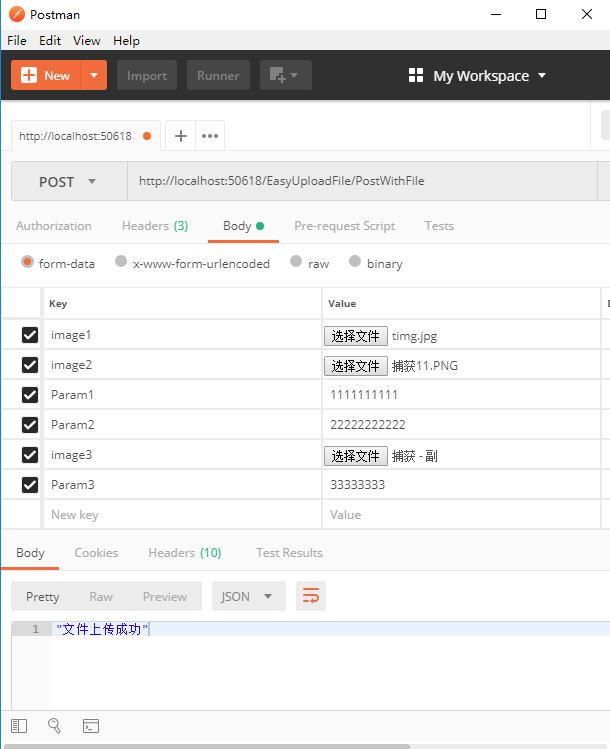
结果
复杂举例带参数
public class UploadFileController : ApiController

{

    /// <summary>

    /// 8M

    /// </summary>

    public const int MAX_LENGTH =  *  * ;

    public const int MIN_WIDTH = ;

    public const int MIN_HEIGHR = ;

    /// <summary>

    /// 上传文件

    /// </summary>

    /// <returns></returns>

    [HttpPost]

    public string PostWithFile()

    {

        JObject jObject = GetParam(HttpContext.Current.Request);

        ParamModel model = GetParamModel(jObject);

        Tuple<bool, string> upload = UploadWithFile(HttpContext.Current.Request);

        return upload.Item2 + " 参数:" + JsonConvert.SerializeObject(model);

    }

    /// <summary>

    /// 上传文件

    /// </summary>

    /// <param name="request"></param>

    private Tuple<bool, string> UploadWithFile(HttpRequest request)

    {

        bool success = true;

        string message = string.Empty;

        for (int i = ; i < request.Files.Count; i++)

        {

            var file = request.Files[i];

            if (file.ContentLength <= ) continue;

            #region check的代码

            if (!FitFileLength(file))

            {

                message = message + file.FileName + "文件大小不能超过8M;";

                continue;

            }

            if (!FitImageSize(file))

            {

                message = message + file.FileName + "图片长宽分别不能小于600像素;";

                continue;

            }

            #endregion

            var ext = new FileInfo(file.FileName).Extension;

            var fullPath = Path.Combine(@"G:\Image", Path.GetFileName(Guid.NewGuid() + ext));

            file.SaveAs(fullPath);

        }

        if (string.IsNullOrEmpty(message))

        {

            message = "上传成功";

        }

        Tuple<bool, string> result = new Tuple<bool, string>(success, message);

        return result;

    }

    /// <summary>

    /// 符合文件大小

    /// </summary>

    /// <param name="file"></param>

    /// <returns></returns>

    private bool FitFileLength(HttpPostedFile file)

    {

        bool result = true;

        if (file.ContentLength >= MAX_LENGTH)

        {

            result = false;

        }

        return result;

    }

    /// <summary>

    /// 符合图片尺寸

    /// </summary>

    /// <param name="file"></param>

    /// <returns></returns>

    private bool FitImageSize(HttpPostedFile file)

    {

        bool result = true;

        var ext = new FileInfo(file.FileName).Extension;

        if (IsImage(ext))

        {

            Image image = Image.FromStream(file.InputStream);

            if (image.Height <= MIN_HEIGHR || image.Width <= MIN_WIDTH)

            {

                result = false;

            }

        }

        return result;

    }

    /// <summary>

    /// 监测是否是图片

    /// </summary>

    /// <param name="ext"></param>

    /// <returns></returns>

    public bool IsImage(string ext)

    {

        bool result = false;

        switch (ext.ToLower())

        {

            case (".jpg"):

            case (".png"):

            case (".gif"):

            case (".bmp"):

                result = true;

                break;

            default:

                result = false;

                break;

        }

        return result;

    }

    /// <summary>

    /// 获得参数

    /// </summary>

    /// <param name="request"></param>

    /// <returns></returns>

    private JObject GetParam(HttpRequest request)

    {

        JObject jObject = new JObject();

        foreach (string key in request.Form)

        {

            jObject[key] = request.Form[key];

        }

        return jObject;

    }

    /// <summary>

    /// 简单的Model转换

    /// </summary>

    /// <param name="request"></param>

    /// <returns></returns>

    private ParamModel GetParamModel(JObject jObject)

    {

        ParamModel model = new ParamModel();

        model.Param1 = jObject["Param1"] != null ? jObject["Param1"].ToString() : "";

        model.Param2 = jObject["Param2"] != null ? jObject["Param2"].ToString() : "";

        model.Param3 = jObject["Param3"] != null ? jObject["Param3"].ToString() : "";

        return model;

    }

}
Html测试
<div class="jumbotron">

    <form action="/UploadFile/PostWithFile" method="post" enctype="multipart/form-data" class="form-horizontal">

        <div class="form-group">

            <label for="Param1" class="col-xs-2">Param1</label>

            <input type="text" class="form-control col-xs-8" name="Param1" placeholder="Param1">

        </div>

        <div class="form-group">

            <label for="Param2" class="col-xs-2">Param2</label>

            <input type="text" class="form-control" name="Param2" placeholder="Param2">

        </div>

        <div class="form-group">

            <label for="Param3" class="col-xs-2">Param3</label>

            <input type="text" class="form-control" name="Param3" placeholder="Param3">

        </div>

        <div class="form-group">

            <label for="exampleInputFile" class="col-xs-2">File input</label>

            <input type="file" name="f1" />

            <input type="file" name="f2" />

            <input type="file" name="f3" />

        </div>

        <button type="submit" class="btn btn-default">上传图片</button>

    </form>

</div>
源码
https://github.com/jasonhua95/WebApiUploadFile.git
WebApi上传文件的更多相关文章
- Owin WebAPI上传文件
Owin是微软出了几年的东东了,一直没时间学习.大概了解了下,是一个脱离IIS环境,快速搭建WebAPI服务的东西. 刚好想尝试下尽量脱离IIS创建简单快捷配置的项目,就是用了Nginx+Owin的模 ...
- Asp.Net Core WebApi 和Asp.Net WebApi上传文件
public class UpLoadController : ControllerBase { private readonly IHostingEnvironment _hostingEnviro ...
- webAPI 上传文件 404错误(转载)
webAPI文件上传时文件过大404错误的问题 来源:https://www.cnblogs.com/dzhengyang/p/9149157.html 背景:最近公司有个需求,外网希望自动保存数据 ...
- .Net Core2.2 WebApi上传文件
基于.net core2.2的webapi程序,接收客户端上传的文件.按照以下写法,file的值永远是null [HttpPost] public void Post([FromForm] IForm ...
- C# WebApi 上传文件
本文转载自:http://www.cnblogs.com/zj1111184556/p/3494502.html public class FileUploadController : ApiCont ...
- (转)WebApi 上传文件
本文转载自:http://www.cnblogs.com/zj1111184556/p/3494502.html public class FileUploadController : ApiCont ...
- 使用swagger上传文件
经常使用swagger,可以通过设置[ProducesResponseType]标记接口的返回信息:swagger也能通过接口的参数列表,自动获得发送的数据结构信息. 不过有一个例外,就是上传文件的时 ...
- webApi上传下载文件
上传文件通过webApi html端调用时包含(form提交包含 enctype="multipart/form-data",才可以启作用获取到文件) public class U ...
- WebAPI通过multipart/form-data方式同时上传文件以及数据(含HttpClient上传Demo)
简单的Demo,用于了解WebAPI如何同时接收文件及数据,同时提供HttpClient模拟如何同时上传文件和数据的Demo,下面是HttpClient上传的Demo界面 1.HttpClient部分 ...
随机推荐
- zombodb 配置设置
主要是关于es 集群地址以及分片,复制副本的配置,配置主要在postgresql.conf,当然我们可以在函数中指定 postgresql.conf 级别的配置 es 配置 格式 zdb.defaul ...
- 虚拟化cpu
vmware的虚拟机cpu [root@84-monitor ~]# lscpuArchitecture: x86_64CPU op-mode(s): 32-bit, ...
- Intellij IDEA 为常用代码添加快捷代码,补全代码
- springboot 集成mybatis plus3
gradle: compile group: 'com.baomidou', name: 'mybatis-plus-boot-starter', version: '3.0.1' MybatisPl ...
- Maven项目构建过程练习
转载于:http://www.cnblogs.com/xdp-gacl/p/4051690.html 上一篇只是简单介绍了一下maven入门的一些相关知识,这一篇主要是体验一下Maven高度自动化构建 ...
- MySQL内存使用查看方式
使用版本:MySQL 5.7 官方文档 在performance_schema有如下表记录内存使用情况 mysql> show tables like '%memory%summary%'; + ...
- flutter环境配置
java环境安装 做基于android的原生app,首先需要安装java环境,需要到官网https://www.oracle.com/technetwork/java/javase/downloads ...
- 关于CPU CACHE工作机制的学习
转自:http://blog.csdn.net/notbaron/article/details/48143409 1. 存储层次结构 由于两个不谋而合的因素如下: l 硬件:由于不同存储技术的访 ...
- web.xml的加载过程配置详解
一:web.xml加载过程 简单说一下,web.xml的加载过程.当我们启动一个WEB项目容器时,容器包括(JBoss,Tomcat等).首先会去读取web.xml配置文件里的配置,当这一步骤没有 ...
- java GC是在什么时候,对什么东西,做了什么事情
面试题:“你能不能谈谈,java GC是在什么时候,对什么东西,做了什么事情?” 面试题目:地球人都知道,Java有个东西叫垃圾收集器,它让创建的对象不需要像c/cpp那样delete.free掉,你 ...