
android UI:Fragment碎片
碎片(Fragment) 嵌入与活动中的UI片段,为了合理的分配布局而存在,这是我的简单理解。多用于兼顾手机与平板的UI,也适用于灵活高级的UI制作。
Demo 简单的按键切换两片不同的Demo
新建left_fragment.xml
<?xml version="1.0" encoding="utf-8"?>

<LinearLayout xmlns:android="http://schemas.android.com/apk/res/android"

    android:orientation="vertical" android:layout_width="match_parent"

    android:layout_height="match_parent">

    <Button

        android:id="@+id/button"

        android:layout_width="match_parent"

        android:layout_height="wrap_content"

        android:layout_gravity="center_horizontal"

        android:text="Button"

        />

</LinearLayout>
新建right_fragment.xml
<?xml version="1.0" encoding="utf-8"?>

<LinearLayout xmlns:android="http://schemas.android.com/apk/res/android"

    android:background="#00ff00"

    android:orientation="vertical" android:layout_width="match_parent"

    android:layout_height="match_parent">

<TextView

    android:layout_width="wrap_content"

    android:layout_height="wrap_content"

    android:layout_gravity="center_horizontal"

    android:textSize="20sp"

    android:text="This is right fragment"/>

</LinearLayout>
新建another_right_fragment.xml
<?xml version="1.0" encoding="utf-8"?>

<LinearLayout xmlns:android="http://schemas.android.com/apk/res/android"

    android:orientation="vertical" android:layout_width="match_parent"

    android:layout_height="match_parent"

    android:background="#ffff00">

    <TextView

        android:layout_width="wrap_content"

        android:layout_height="wrap_content"

        android:layout_gravity="center_horizontal"

        android:textSize="20sp"

        android:text="This is right fragment"/>

</LinearLayout>
main_Activity.xml
<?xml version="1.0" encoding="utf-8"?>

<LinearLayout xmlns:android="http://schemas.android.com/apk/res/android"

    android:id="@+id/activity_main"

    android:orientation="horizontal"

    android:layout_width="match_parent"

    android:layout_height="match_parent"

    >

    <fragment

        android:layout_width="0dp"

        android:name="test.example.com.fragmenttest.LeftFragment"

        android:layout_height="match_parent"

        android:layout_weight="1"

        android:id="@+id/left_fragment"/>

    <FrameLayout

        android:id="@+id/right_layout"

        android:layout_width="0dp"

        android:layout_height="match_parent"

        android:layout_weight="1"></FrameLayout>

</LinearLayout>
分别新建对应的类
package test.example.com.fragmenttest;

import android.app.Fragment;

import android.os.Bundle;

import android.view.LayoutInflater;

import android.view.View;

import android.view.ViewGroup;

/**

 * Created by hs769 on 2017/4/4.

 */

public class LeftFragment extends Fragment {

    @Override

    public View onCreateView(LayoutInflater inflater, ViewGroup container, Bundle savedInstanceState){

        View view=inflater.inflate(R.layout.lift_fregment,container,false);

        return view;

    }

}
package test.example.com.fragmenttest;

//import android.app.Fragment;

import android.support.v4.app.Fragment;

import android.os.Bundle;

import android.view.LayoutInflater;

import android.view.View;

import android.view.ViewGroup;

/**

 * Created by hs769 on 2017/4/4.

 */

public class RightFragment extends Fragment{

    @Override

    public View onCreateView(LayoutInflater inflater, ViewGroup container, Bundle savedInstanceState){

        View view=inflater.inflate(R.layout.right_fragment,container,false);

        return view;

    }

}
package test.example.com.fragmenttest;

import android.support.v4.app.Fragment;

import android.os.Bundle;

import android.view.LayoutInflater;

import android.view.View;

import android.view.ViewGroup;

/**

 * Created by hs769 on 2017/4/4.

 */

public class AnotherRightFragment extends Fragment {

    @Override

    public View onCreateView(LayoutInflater inflater, ViewGroup container, Bundle savedInstanceState){

        View view=inflater.inflate(R.layout.another_right_fragment,container,false);

        return view;

    }

}
package test.example.com.fragmenttest;

import android.support.v4.app.Fragment;

import android.support.v4.app.FragmentManager;

import android.support.v4.app.FragmentTransaction;

import android.support.v7.app.AppCompatActivity;

import android.os.Bundle;

import android.view.View;

import android.widget.Button;

public class MainActivity extends AppCompatActivity implements View.OnClickListener{

    @Override

    protected void onCreate(Bundle savedInstanceState) {

        super.onCreate(savedInstanceState);

        setContentView(R.layout.activity_main);

        Button button=(Button)findViewById(R.id.button);

        button.setOnClickListener(this);

        replaceFragment(new RightFragment());

    }

    @Override

    public void onClick(View v) {

        switch(v.getId()){

            case R.id.button:

                replaceFragment(new AnotherRightFragment());

                break;

            default:

                break;

        }

    }

    private void replaceFragment(Fragment fragment){

        FragmentManager fragmentManager=getSupportFragmentManager();

        FragmentTransaction transaction=fragmentManager.beginTransaction();

        transaction.replace(R.id.right_layout,fragment);

        transaction.commit();

    }

}

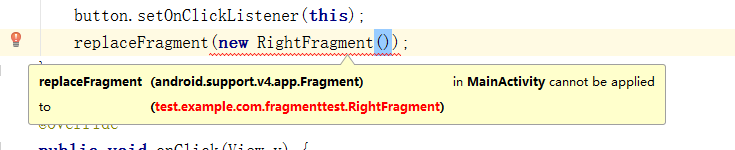
LeftFragment,RightFragment和another_Right_Fragment这三个类分别extends(继承)Fragment类,这是一个关键,因为有两个包中含有Fragment,建议选择android.support.v4.app.Fragment
如果包选择不一样会出现如下错误(MainAcitvity.java),如图更改即可:找到出问题的类,更换包,完毕


最终效果实现点击button切换碎片(下图为点击前后的变化,分别为两个Fragment)


android UI:Fragment碎片的更多相关文章
- Android之Fragment(碎片)方方面面
Fragment简介碎片(Fragment)是一种可以嵌入到活动当中的UI片段,它能让程序更加合理和充分的利用大屏幕的空间. Fragment的生命周期 它与Activity生命周期的关系: 可以看到 ...
- Android Fragment(碎片)的使用
简介 在Android中Fragment为一种可以嵌入活动中的UI片段.能让程序更加合理地利用大屏幕的空间. 使用方法 1.我们首先新建的一个onefragment.xml文件. <?xml v ...
- 【转】【Android UI设计与开发】第07期:底部菜单栏(二)Fragment的详细介绍和使用方法
原始地址:http://blog.csdn.net/yangyu20121224/article/category/1431917/1 由于TabActivity在Android4.0以后已经被完全弃 ...
- Android UI开发第三十篇——使用Fragment构建灵活的桌面
http://www.lupaworld.com/article-222973-1.html 当我们设计应用程序时,希望能够尽最大限度的适配各种设备,包括4寸屏.7寸屏. 10寸屏等等,Android ...
- Android UI开发第二十八篇——Fragment中使用左右滑动菜单
Fragment实现了Android UI的分片管理,尤其在平板开发中,好处多多.这一篇将借助Android UI开发第二十六篇——Fragment间的通信. Android UI开发第二十七篇——实 ...
- Android中Fragment与Activity之间的交互(两种实现方式)
(未给Fragment的布局设置BackGound) 之前关于Android中Fragment的概念以及创建方式,我专门写了一篇博文<Android中Fragment的两种创建方式>,就如 ...
- Fragment碎片
布局文件中添加碎片 1.在onCteate()方法中调用inflater.inflate()加载Fragment布局 2.在xml的<fragment>中需要显示指明碎片名称(androi ...
- Android入门(六)碎片
原文链接:http://www.orlion.ga/493/ 一.碎片 碎片(Fragment)是一种可以嵌入在活动当中的 UI片段,它能让程序更加合理和充分地利用大屏幕的空间,因而在平板上应用的非常 ...
- Android之Fragment学习笔记①
Android Fragment完全解析,关于碎片你所需知道的一切 一. 什么是FragmentFragment(碎片)就是小型的Activity,它是在Android3.0时出现的.Fragment ...
随机推荐
- [leetcode]4. Median of Two Sorted Arrays俩有序数组的中位数
There are two sorted arrays nums1 and nums2 of size m and n respectively. Find the median of the two ...
- [字符串][NOIP2012]Vigenère密码
Vigenère密码 题目描述 16世纪法国外交家Blaise de Vigenère设计了一种多表密码加密算法——Vigenère密码.Vigenère密码的加密解密算法简单易用,且破译难度比较高, ...
- Spring MVC 的国际化和本地化
国际化: i18n 本地化: l10n java.util.Locale 类表示一个语言区域.一个 Locale 对象包含 3 个主要元件:language.country.variant java. ...
- [杂谈]杂谈章1 问几个JAVA问题
1.面向对象.面向过程 区别 2.Java 如何实现的平台无关 和C/C++不同的是,Java语言提供的编译器不针对特定的操作系统和CPU芯片进行编程,而是针对Java虚拟机把Java源程序编译成称为 ...
- linux上安装zookeeper
本文先讲述Linux下单机版的安装流程,集群的配置后续再补上.关于Zookeeper的基本介绍和原来在本文不做更多介绍,可以自行查找.本文的操作流程相对简单,仅做备忘而已. 第一步 安装JDK: ...
- GPU、CPU、FPGA
一.计算核心增加 二者都由寄存器.控制器.逻辑单元构成,但比例很大不同,决定了CPU擅长指令处理,函数调用上:GPU在数据处理(算数运算/逻辑运算)强力很多. NIVIDA基于Maxwell构架的GP ...
- kubernetes中filebeat以sidecar方式和应用一起部署,并且传入环境变量
本文的环境介绍 [root@m-30-1 ~]# kubectl version Client Version: version.Info{Major:"1", Minor:&qu ...
- Python自动化开发 - MySQL(一)
本节内容 一.概述 二.下载安装 三.数据库操作 四.数据表操作 五.表内容操作 一.概述 1.什么是数据库 ? 答:数据的仓库,如:在ATM的示例中我们创建了一个 db 目录,称其为数据库 2.什么 ...
- Jquery 图片走马灯效果原理
本篇只讲解水平走马灯效果,垂直向上走马灯效果不讲解,原理一样,但是水平走马灯效果有一个小坑.待会讲解 照例先上代码: HTML: <div class="box"> & ...
- 制作Visual Studio 2019 (VS 2019) 离线安装包
与制作Visual Studio 2017的离线安装包(https://www.cnblogs.com/danzhang/p/6534341.html)类似,可以使用--layout的参数在安装前先下 ...