
android UI:Fragment碎片
碎片(Fragment) 嵌入与活动中的UI片段,为了合理的分配布局而存在,这是我的简单理解。多用于兼顾手机与平板的UI,也适用于灵活高级的UI制作。
Demo 简单的按键切换两片不同的Demo
新建left_fragment.xml
<?xml version="1.0" encoding="utf-8"?>

<LinearLayout xmlns:android="http://schemas.android.com/apk/res/android"

    android:orientation="vertical" android:layout_width="match_parent"

    android:layout_height="match_parent">

    <Button

        android:id="@+id/button"

        android:layout_width="match_parent"

        android:layout_height="wrap_content"

        android:layout_gravity="center_horizontal"

        android:text="Button"

        />

</LinearLayout>
新建right_fragment.xml
<?xml version="1.0" encoding="utf-8"?>

<LinearLayout xmlns:android="http://schemas.android.com/apk/res/android"

    android:background="#00ff00"

    android:orientation="vertical" android:layout_width="match_parent"

    android:layout_height="match_parent">

<TextView

    android:layout_width="wrap_content"

    android:layout_height="wrap_content"

    android:layout_gravity="center_horizontal"

    android:textSize="20sp"

    android:text="This is right fragment"/>

</LinearLayout>
新建another_right_fragment.xml
<?xml version="1.0" encoding="utf-8"?>

<LinearLayout xmlns:android="http://schemas.android.com/apk/res/android"

    android:orientation="vertical" android:layout_width="match_parent"

    android:layout_height="match_parent"

    android:background="#ffff00">

    <TextView

        android:layout_width="wrap_content"

        android:layout_height="wrap_content"

        android:layout_gravity="center_horizontal"

        android:textSize="20sp"

        android:text="This is right fragment"/>

</LinearLayout>
main_Activity.xml
<?xml version="1.0" encoding="utf-8"?>

<LinearLayout xmlns:android="http://schemas.android.com/apk/res/android"

    android:id="@+id/activity_main"

    android:orientation="horizontal"

    android:layout_width="match_parent"

    android:layout_height="match_parent"

    >

    <fragment

        android:layout_width="0dp"

        android:name="test.example.com.fragmenttest.LeftFragment"

        android:layout_height="match_parent"

        android:layout_weight="1"

        android:id="@+id/left_fragment"/>

    <FrameLayout

        android:id="@+id/right_layout"

        android:layout_width="0dp"

        android:layout_height="match_parent"

        android:layout_weight="1"></FrameLayout>

</LinearLayout>
分别新建对应的类
package test.example.com.fragmenttest;

import android.app.Fragment;

import android.os.Bundle;

import android.view.LayoutInflater;

import android.view.View;

import android.view.ViewGroup;

/**

 * Created by hs769 on 2017/4/4.

 */

public class LeftFragment extends Fragment {

    @Override

    public View onCreateView(LayoutInflater inflater, ViewGroup container, Bundle savedInstanceState){

        View view=inflater.inflate(R.layout.lift_fregment,container,false);

        return view;

    }

}
package test.example.com.fragmenttest;

//import android.app.Fragment;

import android.support.v4.app.Fragment;

import android.os.Bundle;

import android.view.LayoutInflater;

import android.view.View;

import android.view.ViewGroup;

/**

 * Created by hs769 on 2017/4/4.

 */

public class RightFragment extends Fragment{

    @Override

    public View onCreateView(LayoutInflater inflater, ViewGroup container, Bundle savedInstanceState){

        View view=inflater.inflate(R.layout.right_fragment,container,false);

        return view;

    }

}
package test.example.com.fragmenttest;

import android.support.v4.app.Fragment;

import android.os.Bundle;

import android.view.LayoutInflater;

import android.view.View;

import android.view.ViewGroup;

/**

 * Created by hs769 on 2017/4/4.

 */

public class AnotherRightFragment extends Fragment {

    @Override

    public View onCreateView(LayoutInflater inflater, ViewGroup container, Bundle savedInstanceState){

        View view=inflater.inflate(R.layout.another_right_fragment,container,false);

        return view;

    }

}
package test.example.com.fragmenttest;

import android.support.v4.app.Fragment;

import android.support.v4.app.FragmentManager;

import android.support.v4.app.FragmentTransaction;

import android.support.v7.app.AppCompatActivity;

import android.os.Bundle;

import android.view.View;

import android.widget.Button;

public class MainActivity extends AppCompatActivity implements View.OnClickListener{

    @Override

    protected void onCreate(Bundle savedInstanceState) {

        super.onCreate(savedInstanceState);

        setContentView(R.layout.activity_main);

        Button button=(Button)findViewById(R.id.button);

        button.setOnClickListener(this);

        replaceFragment(new RightFragment());

    }

    @Override

    public void onClick(View v) {

        switch(v.getId()){

            case R.id.button:

                replaceFragment(new AnotherRightFragment());

                break;

            default:

                break;

        }

    }

    private void replaceFragment(Fragment fragment){

        FragmentManager fragmentManager=getSupportFragmentManager();

        FragmentTransaction transaction=fragmentManager.beginTransaction();

        transaction.replace(R.id.right_layout,fragment);

        transaction.commit();

    }

}

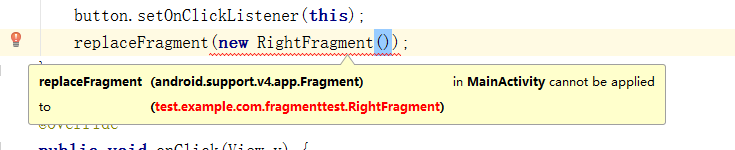
LeftFragment,RightFragment和another_Right_Fragment这三个类分别extends(继承)Fragment类,这是一个关键,因为有两个包中含有Fragment,建议选择android.support.v4.app.Fragment
如果包选择不一样会出现如下错误(MainAcitvity.java),如图更改即可:找到出问题的类,更换包,完毕


最终效果实现点击button切换碎片(下图为点击前后的变化,分别为两个Fragment)


android UI:Fragment碎片的更多相关文章
- Android之Fragment(碎片)方方面面
Fragment简介碎片(Fragment)是一种可以嵌入到活动当中的UI片段,它能让程序更加合理和充分的利用大屏幕的空间. Fragment的生命周期 它与Activity生命周期的关系: 可以看到 ...
- Android Fragment(碎片)的使用
简介 在Android中Fragment为一种可以嵌入活动中的UI片段.能让程序更加合理地利用大屏幕的空间. 使用方法 1.我们首先新建的一个onefragment.xml文件. <?xml v ...
- 【转】【Android UI设计与开发】第07期:底部菜单栏(二)Fragment的详细介绍和使用方法
原始地址:http://blog.csdn.net/yangyu20121224/article/category/1431917/1 由于TabActivity在Android4.0以后已经被完全弃 ...
- Android UI开发第三十篇——使用Fragment构建灵活的桌面
http://www.lupaworld.com/article-222973-1.html 当我们设计应用程序时,希望能够尽最大限度的适配各种设备,包括4寸屏.7寸屏. 10寸屏等等,Android ...
- Android UI开发第二十八篇——Fragment中使用左右滑动菜单
Fragment实现了Android UI的分片管理,尤其在平板开发中,好处多多.这一篇将借助Android UI开发第二十六篇——Fragment间的通信. Android UI开发第二十七篇——实 ...
- Android中Fragment与Activity之间的交互(两种实现方式)
(未给Fragment的布局设置BackGound) 之前关于Android中Fragment的概念以及创建方式,我专门写了一篇博文<Android中Fragment的两种创建方式>,就如 ...
- Fragment碎片
布局文件中添加碎片 1.在onCteate()方法中调用inflater.inflate()加载Fragment布局 2.在xml的<fragment>中需要显示指明碎片名称(androi ...
- Android入门(六)碎片
原文链接:http://www.orlion.ga/493/ 一.碎片 碎片(Fragment)是一种可以嵌入在活动当中的 UI片段,它能让程序更加合理和充分地利用大屏幕的空间,因而在平板上应用的非常 ...
- Android之Fragment学习笔记①
Android Fragment完全解析,关于碎片你所需知道的一切 一. 什么是FragmentFragment(碎片)就是小型的Activity,它是在Android3.0时出现的.Fragment ...
随机推荐
- C#使用 params object[] 将参数个数不一样的方法 集成一个
getChange("1"); getChange("1","2"); public string getChange(params obj ...
- 异常解决 Unable to write generated Java files for schemas: null
错误是在使用cxf调用其他系统接口时报出的.而且问题很诡异,只有服务器调用时才报错,本地直接写main方法直接调用却正常的.以下是异常的堆栈: ERROR c.k.p.webservice.WebSe ...
- BootStrap常用组件及响应式开发
BootStrap常用组件 PS:所有的代码必须写在<class="container/container-fluid">容器当中 常用组件包含内容: 字体图标 下拉菜 ...
- 【Spark2.0源码学习】-7.Driver与DriverRunner
承接上一节内容,Client向Master发起RequestSubmitDriver请求,Master将DriverInfo添加待调度列表中(waitingDrivers),下面针对于Dri ...
- Linux module 添加到bashrc 和临时ifort编译器 以及python2和3的配置
第一步vim ~/.bashrc按键盘的i然后source /home/export/online1/bjpara/para/modules/scripts/cn-module.sh最后:x! bas ...
- 查看memcached连接数
netstat -n | grep : | wc -l
- 模板学习实践三 functor
#include <iostream>#include <typeinfo> void foo(){ std::cout << "foo() called ...
- assetBundle 中的prefeb资源图片显示粉色方框
assetBundle打包的资源是有平台属性的,当移动端iOS或者Android AssetBundle资源 在editor 加载的时候,比如TextMeshPro中的字体就不能正确加载 pc端调试, ...
- 《C#从现象到本质》读书笔记(三)第3章C#类型基础(下)
<C#从现象到本质>读书笔记第3章C#类型基础(下) 常量以关键字const修饰.C#支持静态字段(类型字段)和实例字段. 无参属性的get方法不支持参数,而有参属性的get方法支持传入一 ...
- django学习install apps注册错了的影响
今天在学习例子的时候 不注意吧settings.py里面的INSTALL APPS 的APP应用名称写错了 应该是blog 写成了myblog 结果导致python manage.py makemi ...