
grid - 隐式网格
当网格项目确认在显式网格之外时就会创建隐性网格,当没有足够的空间或者显式的网格轨道来设置网格项目,此时网格项目就会自动创建隐式网格.
隐式网格可以定义:grid-auto-rows、grid-auto-columns和grid-auto-flow属性
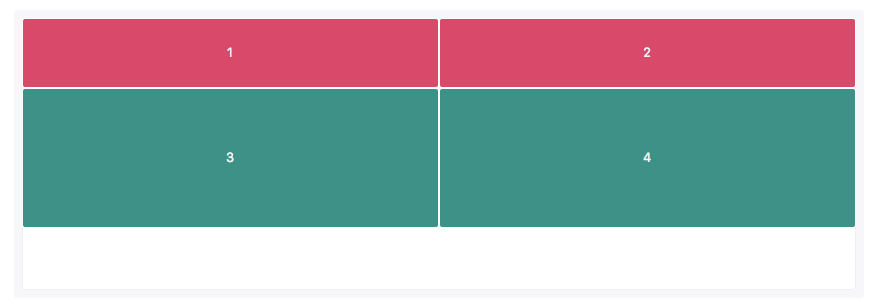
1.在这个例子中我们只定义了一行(轨道),所以item1和item2的高都是70px。
第二行(轨道)自动创建了item3和item4空间。grid-auto-rows定义隐式网格中的行(轨道)的大小,因此item3和item4的高度是140px。
 <view class="grid">

   <view class='item1'>1</view>

   <view class='item'>2</view>

   <view class='item'>3</view>

   <view class='item'>4</view>

   <!-- <view class='item'>5</view>

   <view class='item'>6</view>

   <view class='item'>7</view>

   <view class='item'>8</view>

   <view class='item'>9</view> -->

 </view>
 page {

   color: #fff;

   font-size: 16px;

 }

 .grid {

   /* padding: 1%; */

   display: grid;

   grid-gap: 1px;

   line-height: 100px;

   grid-template-rows: 70px;

   grid-template-columns: repeat(2, 1fr);

   grid-auto-rows: 140px;

 }

 .item1 {

 }

 .item {

   text-align: center;

   background-color: #d94a6a;

 }

 .item1 {

   text-align: center;

   /* line-height: 300px; */

   background-color: #1aa034;

 }
2.更改默认流方向(默认row)
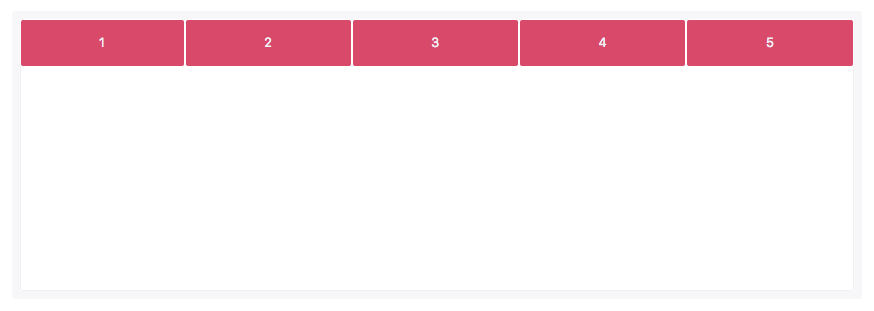
grid-auto-flow: column;
 <view class="grid">

   <view class='item1'>1</view>

   <view class='item'>2</view>

   <view class='item'>3</view>

   <view class='item'>4</view>

   <!-- <view class='item'>5</view>

   <view class='item'>6</view>

   <view class='item'>7</view>

   <view class='item'>8</view>

   <view class='item'>9</view> -->

 </view>
 page {

   color: #fff;

   font-size: 16px;

 }

 .grid {

   /* padding: 1%; */

   display: grid;

   grid-gap: 1px;

   line-height: 100px;

   grid-template-rows: 70px;

   grid-template-columns: repeat(2, 1fr);

   grid-auto-rows: 140px;

   grid-auto-flow: column;

 }

 .item1 {

 }

 .item {

   text-align: center;

   background-color: #d94a6a;

 }

 .item1 {

   text-align: center;

   /* line-height: 300px; */

   background-color: #1aa034;

 }
row

column
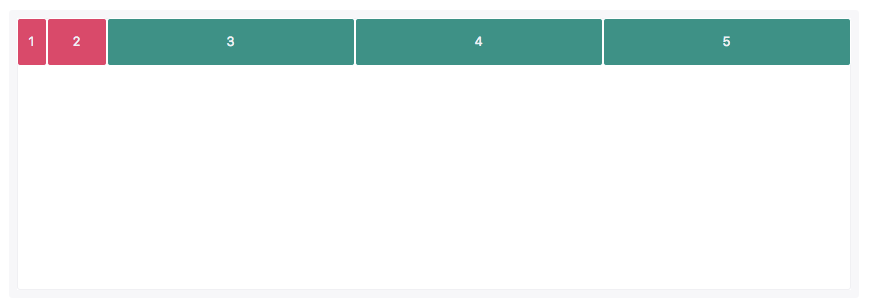
3.在这个例子中,我们只定义了前两列的轨道尺寸。item1的尺寸是30px,item2的尺寸是60px。
 page {

   color: #fff;

   font-size: 16px;

 }

 .grid {

   /* padding: 1%; */

   display: grid;

   grid-gap: 1px;

   line-height: 100px;

   grid-template-columns: 30px 60px;

   grid-auto-flow: column;

   grid-auto-columns: 1fr;

 }

 .item1 {

 }

 .item {

   text-align: center;

   background-color: #d94a6a;

 }

 .item1 {

   text-align: center;

   /* line-height: 300px; */

   background-color: #1aa034;

 }
使用grid-auto-flow:column自动创建了隐式网格,用来放置item3、item4和item5,并且这三个列(轨道)的尺寸由grid-auto-columns来定义
grid - 隐式网格的更多相关文章
- grid - 隐式地命名网格区域名称
通常可以将网格线命名成任何你想命名的名称,如果网格线名称添加-start和-end的后缀,其实也隐式的创建一个网格区域,可以用来设置网格项目的位置. 在这个示例中,行和列都具有inner-start和 ...
- CSS3 网格布局(grid layout)基础知识 - 隐式网格自己主动布局(grid-auto-rows/grid-auto-columns/grid-auto-flow)
网格模板(grid-template)属性及其普通写法(longhands)定义了一个固定数量的轨道.构成显式网格. 当网格项目定位在这些界限之外.网格容器通过添加隐式网格线生成隐式网格轨道. 这些隐 ...
- grid - 隐式命名网格线名称
1.隐式的指定网格线反向指定了隐式的网格区域名称,命名的网格区域隐式的命名了网格线名称. 指定网格区域会给网格区域边线添加隐式的网格线名称.这些网格线的命名是基于网格区域来命名,只是在网格区域名称的后 ...
- grid - 显式网格
显式网格布局包含:行.列 列 grid-template-columns page { color: #fff; } .grid { padding:1%; display: grid; grid-g ...
- Matlab:显(隐)式Euler和Richardson外推法变步长求解刚性问题
一.显示Euler 函数文件:Euler.m function f=Euler(h,Y) f(1,1)=Y(1)+h*(0.01-(1+(Y(1)+1000)*(Y(1)+1))*(0.01+Y(1) ...
- SQL Server中提前找到隐式转换提升性能的办法
http://www.cnblogs.com/shanksgao/p/4254942.html 高兄这篇文章很好的谈论了由于数据隐式转换造成执行计划不准确,从而造成了死锁.那如果在事情出现之前 ...
- js条件判断时隐式类型转换
Javascript 中,数字 0 为假,非0 均为真 在条件判断运算 == 中的转换规则是这样的: 如果比较的两者中有布尔值(Boolean),会把 Boolean 先转换为对应的 Number,即 ...
- 非RootLayer的隐式动画
非RootLayer都有隐式动画,默认0.25秒. // 1.开启 [CATransaction begin]; // 2.设置关闭 YES-关闭:NO-开启 [CATransaction setDi ...
- C#接口的显示和隐式实现
早上骑车上班走到半路发现手机忘带了,这年代兜里没装一分现金,吃饭都要刷手机,上班时间无聊了不能玩手机更是大问题,所以果断掉头拿手机.取完手机刚出门看这天阴沉沉的貌似要下雨,没雨衣,骑车又不能打伞,上次 ...
随机推荐
- Addition Chains POJ - 2248 (bfs / dfs / 迭代加深)
An addition chain for n is an integer sequence <a0, a1,a2,...,am=""> with the follow ...
- Linux学习之RPM包管理-yum管理(十七)
Linux学习之RPM包管理-yum管理 目录 IP地址配置 网络yum源 yum命令 光盘yum源搭建 IP地址配置 IP+子网掩码就可以在局域网(内网)使用. IP+子网掩码+网关+DNS就可以访 ...
- cmd使用notepad++为打开方式打开文件
想放一个txt进入vstart中,但是又不想用系统自带的记事本打开,想在vstart中双击时使用notepad++打开. cmd命令如下: "D:\notepad++\notepad++.e ...
- http Content-Type 知多少
前言 作为前端开发,工作中少不了与接口请求打交道.对于常见的content-type,也能说上来几个,感觉还算了解.直到有一天,我要在查看google的批量接口合并时发现Content-Type: m ...
- 大数据小白系列——HDFS(3)
这里是大数据小白系列,这是本系列的第三篇,介绍HDFS中NameNode选举,JournalNode等概念. 上一期我们说到了为解决NameNode(下称NN)单点失败问题,HDFS中使用了双NN的机 ...
- git命令详解( 五 )
此篇只会来介绍rebase和merge的区别 rebase merge 区别 rebase 下面我们进行一个小练习来练习一下rebase 看一下题目要求: 共有三个特性分支 —— side1 side ...
- XamarinSQLite教程下载安装SQLite/SQL Server Compact Toolbox
XamarinSQLite教程下载安装SQLite/SQL Server Compact Toolbox SQLite/SQL Server Compact Toolbox是一个Visual Stud ...
- OI考试需注意的
能用结构体就用结构体,特别是队列之类的数据结构:类别相同的变量或数组名字不要太相近,最好在名字后面加上标识符(e.g:hash[]&HASH[]就不好,hash1[]&hash2[]正 ...
- C语言实现密码修改
/* *修改密码 *描述: *1.本来已经存在密码 *2.很多时候需要输入两次密码,对比是否正确,才能确认修改密码正确 *敲代码思路: *1.输入旧的密码判断是否正确 *2.提示输入修改后的密码 *3 ...
- CY7C68013 USB接口相机开发记录 - 第二天:驱动修改
上次写了资料的下载,并对资料进行了分类,分完类看起来就比较清晰.同时通过强大的百度,也可以得到不少资料. 这里对比较关键的几个文件进行罗列: 一.驱动相关 cyusb.inf: 修改CYUSB.INF ...