
egg.js基础入门
之前一直使用koa, 刚刚接触egg, 做了一些入门的笔记
准备工作
1 首先安装脚手架,,并创建项目。
 $ npm i egg-init -g

 $ egg-init egg-demo --type=simple

 $ cd egg-demo

 $ npm i   // 也可以使用yarn
2 . 启动项目
$ npm run dev
浏览器打开http://127.0.0.1:7001/即可进入默认的首页。
3 . 项目目录
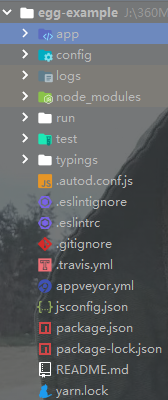
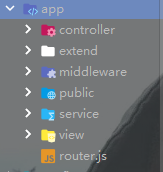
1 ) /app ----------- 主要工作目录
/controller ------------- 控制器,比如获取service的数据和渲染view的模板
/extend ------------- 方法扩展,比如封装时间格式化方法
/middleware ----------- 中间件,比如登录权限设置
/public ------------ 静态文件目录,比如css, js, image
/service ------------- 服务,操作数据库增删改查等
/view ------------- 模板目录,存放模板文件,如ejs, jade, pug, nunjucks等
-router.js ------------- 路由文件
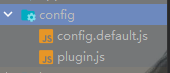
2 ) /config ---------- 主要配置目录
-config.default.js ------------ 配置文件,
-plugin.js ----------- 配置插件, 如开启模板引擎
开发阶段
1 . 新建路由
# app/router.js
 module.exports = app => {

   const { router, controller } = app;

   router.get('/', controller.home.index);  // 脚手架默认路由

   router.get('/user', controller.user.index)   // 新建路由

 };
访问路径 http://127.0.0.1:7001/user时会指向controller.user.index控制器
controller是app应用的一个属性对象,直接指向controller目录,上面的controller.user.index表示,指向app/controller/user.js的index方法
2 . 新建控制器
# app/controller/user.js
 /* egg内置控制器 */

 const Controller = require('egg').Controller;

 /*声明控制器类,并继承与Controller */

 class UserController extends Controller {

   /*声明异步方法*/

   async index() {

     /*ctx与koa中的一样,表示整个应用的上下文环境*/

     const ctx = this.ctx;

     ctx.body = '用户列表'

   }

 }

 module.exports = UserController;
3 . 新建服务
# app/service/user.js
 const Service = require('egg').Service;

 class UserService extends Service {

   async findAll() {

     /*这里暂时未从数据库获取数据,而是使用了静态数据填充*/

     const users = [

       {id: 1, name: '兰陵王'},

       {id: 2, name: '程咬金'},

       {id: 3, name: '诸葛亮'},

     ]

     return users;

   }

 }

 module.exports = UserService;
5. 修改控制器(获取service中的数据, 并渲染到view的模板中)
# app/controller/user.js
 const Controller = require('egg').Controller;

 class UserController extends Controller {

   async index() {

     const ctx = this.ctx;

     // ctx.body = '用户列表'

     const title = '用户列表';

     const users = await ctx.service.user.findAll();

     await ctx.render('user/index.ejs', {users: users, title})

   }

 }

 module.exports = UserController;
这里使用async..await作为异步获取,可以参考ES6教程,意思是users获取成功了,才会执行下一步。
使用ctx.render()渲染ejs模板, 并带有参数传递。
4 . 新建模板
# app/view/user/index.ejs
 <!doctype html>

 <html lang="en">

 <head>

     <meta charset="UTF-8">

     <meta name="viewport"

           content="width=device-width, user-scalable=no, initial-scale=1.0, maximum-scale=1.0, minimum-scale=1.0">

     <meta http-equiv="X-UA-Compatible" content="ie=edge">

     <title>Document</title>

 </head>

 <body>

 <h2><%= title %></h2>

 <ul>

     <% users.forEach(function (item) { %>

         <li><%= item.name %></li>

     <% }) %>

 </ul>

 </body>

 </html>
此时重启服务访问 http://127.0.0.1:7001/user会报错,原因是还没配置模板引擎。
5 . 安装并配置模板引擎
 $ yarn add egg-view-ejs

 $ yarn add egg-view
# config/plugin.js
 module.exports = {

   // had enabled by egg

   static: {

     enable: true,

   },

   // 开启ejs模板插件

   ejs: {

     enable: true,

     package: 'egg-view-ejs',

   }

 };

 // 简化形式 exports.key = value

 // exports.ejs = {

 //   enable: true,

 //   package: 'egg-view-ejs'

 // }

 // 函数形式

 // module.exports = () => {

 //   return {

 //     ejs: {

 //

 //     }

 //   }

 // }
# config/config.default.js
 module.exports = appInfo => {

   /*其他代码*/

   config.view = {

     // 设置ejs为默认的模板引擎

     defaultViewEngine: '.ejs',

     mapping: {

       '.ejs': 'ejs'

     }

   };

   /*其他代码*/

 }
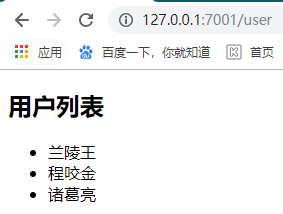
最后,重启服务器,并访问http://127.0.0.1:7001/user
结束:
该入门还未连接数据库,如mongodb, mysql
egg.js基础入门的更多相关文章
- JS基础入门篇(三十五)—面向对象(二)
如果没有面向对象这种抽象概念的小伙伴,建议先看一下我写的JS基础入门篇(三十四)-面向对象(一)
- JS基础入门篇(二十七)—BOM
虽然上次写到js基础篇(二十四),这次直接写到(二十七).是为了提醒自己中间有几篇没写.特此说明一下啊. 1.window.open() 使用a标签呢,点击一下a标签页面才会跳转,有时候我们需要做的操 ...
- Nuxt.js 基础入门教程
原文链接 Vue 开发一个单页面应用,相信很多前端工程师都已经学会了,但是单页面应用有一个致命的缺点,就是 SEO 极不友好.除非,vue 能在服务端渲染(ssr)并直接返回已经渲染好的页面,而并非只 ...
- JS基础入门篇(六)— 数据类型
1.数据类型 数据类型:我感觉就是对数据的种类进行分类.就好比把人分为儿童,青少年,中年,老年一样. 基础数据类型: Number(数字),String(字符串),Null(空),Undefined( ...
- Underscore.js基础入门
公司产品集成了对Underscore.js,所以需要对这个库有一定的了解.通过查阅资料,发现这个库主是对Array和JSON的处理支持.通过Underscore.js库,可以方便的对Array和JSO ...
- gulp.js基础入门
安装 Node 去 nodejs.org 根据系统选择性按照教程安装Node. 创建项目 创建项目文件夹 进入项目文件夹 初始化项目 使用npm命令:npm init,根据提示完成. 安装 Gulp ...
- JS 基础 入门
JS做弹窗效果 //单行注释/*多行注释*/// 网页 标签语言 js语言是脚本语言/* 数据类型: 容器 1.整型 (int) 2.小数类型: float: 单精度的小数: double: ...
- JS基础——入门必备
·首先,来简单的说一下,JS是啥,JS是JavaScript的简写,是 基于浏览器的 基于对象的 事件驱动 脚本语言 ·那么JS有什么用呢?ta可以实现: 表单验证 添加动画效果 动态更改页面内容 A ...
- React.js基础入门
本文主要是针对React的一些demo教程.参考了菜鸟教程中的react教程,做了一些总结.Demo的下载链接是 https://github.com/RealAndMe/react-demo 下面要 ...
随机推荐
- 【转】Cowboy 开源 WebSocket 网络库
原文链接: http://www.cnblogs.com/gaochundong/p/cowboy_websockets.html
- Android 8 蓝牙 扫描流程
记录android 8 蓝牙扫描设备的流程 src/com/android/settings/bluetooth/BluetoothSettings.java @Override protected ...
- SortedSet的实现类是TreeSet:它的作用是字为添加到TreeSet中的元素排序。
SortedSet可自动为元素排序. SortedSet的实现类是TreeSet:它的作用是字为添加到TreeSet中的元素排序. 练习:自定义类用TreeSet排序. 与HashSet不同, ...
- error connecting: Timeout expired 超时时间已到. 达到了最大池大小 错误及Max Pool Size设置
[参考]Timeout expired 超时时间已到. 达到了最大池大小 错误及Max Pool Size设置 [参考][数据库-MySql] MySqlConnection error connec ...
- apache2.4 httpd.conf httpd-vhost.conf配置
extra / httpd-vhost.conf <VirtualHost *:81> DocumentRoot "/data/sda1_data/" ServerNa ...
- Library弱依赖打包
为减少强依赖,运行时动态监测依赖是否存在. 例如:内置的 HTTP client 可以是 OkHttpClient 或者是 HttpURLConnection.前者拥有更高的性能,但需要引入 OkHt ...
- csrf 攻击和防御
CSRF概念:CSRF跨站点请求伪造(Cross—Site Request Forgery),跟XSS攻击一样,存在巨大的危害性,你可以这样来理解: 攻击者盗用了你的身份,以你的名义发送恶 ...
- 禅道docker化(Centos7.2)
操作步骤 确认服务器禅道版本及容器禅道版本 服务器禅道版本:9.6.2 容器禅道版本:9.6.3 版本sql比对 下载官方9.6.3源码包url:http://dl.cnezsoft.com/zent ...
- 漏洞预警:Linux内核9年高龄的“脏牛”0day漏洞
这个名叫Dirty COW,也就是脏牛的漏洞,存在Linux内核中已经有长达9年的时间,也就说2007年发布的Linux内核版本中就已经存在此漏洞.Linux kernel团队已经对此进行了修复. 漏 ...
- 11.15luffycity(7)
2018-11-15 17:43:50 还有一点路飞项目就结束啦! 周日打算回去! 双十一的耳机到啦,音质确实不错!2333! 等着项目做完,完整总结一下! 越努力,越幸运!永远不要高估自己!!!! ...