
npm install报错 npm ERR! enoent ENOENT: no such file or directory
在npm之后出现如下错误:
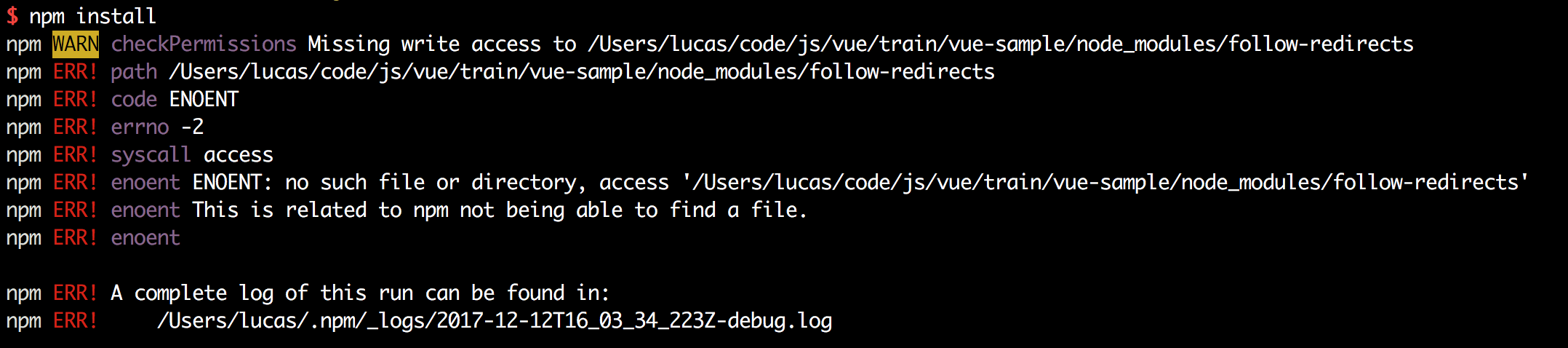
$ npm install

npm WARN checkPermissions Missing write access to /Users/lucas/code/js/vue/train/vue-sample/node_modules/follow-redirects

npm ERR! path /Users/lucas/code/js/vue/train/vue-sample/node_modules/follow-redirects

npm ERR! code ENOENT

npm ERR! errno -2

npm ERR! syscall access

npm ERR! enoent ENOENT: no such file or directory, access '/Users/lucas/code/js/vue/train/vue-sample/node_modules/follow-redirects'

npm ERR! enoent This is related to npm not being able to find a file.

npm ERR! enoent

npm ERR! A complete log of this run can be found in:

npm ERR!     /Users/lucas/.npm/_logs/2017-12-12T16_03_34_223Z-debug.log
关于这个错误,网上有很多解决方法,但是都不适用在我这里。
解决方法
从错误来看, 是 /Users/lucas/code/js/vue/train/vue-sample/node_modules/follow-redirects 这个文件没有权限或者没有找到。
然后 ls 了一下这个文件, 得到如下结果:
$ ls -lt | grep follow-redirects

lrwxr-xr-x    1 lucas  staff     40 12 12 23:39 follow-redirects -> _follow-redirects@1.2.6@follow-redirects
可以看到这个是一个软连接,链接到 _follow-redirects@1.2.6@follow-redirects 这个上面,很明显,在这个目录是没有follow-redirects 这个东西的。
怎么办呢? 很简单 npm install follow-redirects 把这个东西安装上去就好了。
安装完成之后, 再 ls 一把
$ ls -lt | grep follow

drwxr-xr-x   10 lucas  staff    320 12 13 00:22 _follow-redirects@1.2.6@follow-redirects

lrwxr-xr-x    1 lucas  staff     40 12 12 23:39 follow-redirects -> _follow-redirects@1.2.6@follow-redirects
可以看到已经有了。
然后在 npm install 就没有错了。
npm install报错 npm ERR! enoent ENOENT: no such file or directory的更多相关文章
- npm install 报错:node-pre-gyp ERR! 问题解决
npm install报错问题解决 问题: E:\CodeSpace\GitlabTest\desktop>npm install > lifeccp-desktop@1.1.9 post ...
- npm install 报错:ERR! code EINTEGRITY 解决方案
npm升级后,npm install 报错了,报错信息:ERR! code EINTEGRITY到处百度搜索解决方案,终于找到了!“npm cache verify”这条命令帮助了不少人 npm ca ...
- 『奇葩问题集锦』npm install 报错 node-pre-gyp ERR! node-pre-gyp -v v0.6.25
gyp ERR! configure error gyp ERR! stack Error: Can't find Python executable "python", you ...
- 输入npm install 报错npm ERR! code ELIFECYCLE npm ERR! errno 1 npm ERR! node-sass@4.13.1 postinstall: `node scripts/build.js`
输入npm install 报以下错误 npm ERR! code ELIFECYCLE npm ERR! errno 1 npm ERR! node-sass@4.13.1 postinstall: ...
- npm install报错npm ERR! Maximum call stack size exceeded解决
给npm降级或者升级 比如: 降级 : npm install -g npm@6.1.0 升级 : npm install -g npm 升级到最新版
- 执行npm install报错:npm ERR! code EINTEGRITY
命令行执行npm install报错如下: D:\frontend\viewsdev>npm install npm ERR! code EINTEGRITY npm ERR! sha512-8 ...
- npm install 报错 error Unexpected end of JSON input while parsing near '...sShrinkwrap":false,"d' 解决办法
npm install 报错 : error Unexpected end of JSON input while parsing near '...sShrinkwrap":false,& ...
- 在运行vue项目时,执行npm install报错小记
在运行vue项目时,执行npm install 报错,导致后续的执行报各种错误,根据报错,尝试了网上的各种办法,最后发现时网络问题下载失败导致,解决办法: 安装cnpm==>npm instal ...
- npm install 报错解决办法
npm install 报错解决办法 原因是因为node_modules可能有意外改动,导致依赖库不完整,删除项目下的node_modules,在你的项目目录下,重新执行npm install,这会重 ...
随机推荐
- python常用模块之pickle
python1个json模块和1个pickle模块都是用于序列化的模块. 其中前文介绍过json模块.json模块只能序列化普通字符,比如字典.列表等.但是如果是函数呢?json其实是无法序列化的.这 ...
- C#语言————第二章 C#语言快速热身
第二章 C#语言快速热身 ***********一.选择结构**************** 1:if选择结构与java的if选择结构语法完全相同 2:switch选择结构 ①:常量表达式的值可 ...
- SMP多核启动
在 Linux系统中,对于多核的ARM芯片而言,在Biotron代码中,每个CPU都会识别自身ID,如果ID是0,则引导Bootloader和 Linux内核执行,如果ID不是0,则Biotron一般 ...
- 【PAT】B1037 在霍格沃茨找零钱(20 分)
#include<stdio.h> #include<string.h> #include<algorithm> using namespace std; int ...
- 八皇后问题的Python实现和C#实现
看到八皇后问题的解决思路, 感觉很喜欢. 我用C#实现的版本之前贴在了百度百科上(https://baike.baidu.com/item/%E5%85%AB%E7%9A%87%E5%90%8E%E9 ...
- GsonUtil工具类
import java.util.ArrayList; import java.util.List; import java.util.Map; import com.google.gson.Gson ...
- P4478 [BJWC2018]上学路线
Description 小B 所在的城市的道路构成了一个方形网格,它的西南角为(0,0),东北角为(N,M). 小B 家住在西南角,学校在东北角.现在有T 个路口进行施工,小B 不能通过这些路口.小B ...
- VCS双机+oracle 11gR2+ASM主机名修改
----------------------------------------------------------------------------VCS修改主机名---------------- ...
- CSS3渐变——线性渐变
渐变背景一直以来在Web页面中都是一种常见的视觉元素.但一直以来,Web设计师都是通过图形软件设计这些渐变效果,然后以图片形式或者背景图片的形式运用到页面中.Web页面上实现的效果,仅从页面的视觉效果 ...
- linux(centos 7)下安装elasticsearch - head插件(端口占用,防火墙关闭)
本文章来自网络仅供个人学习记录之用 一:安装Git(如果未安装) 1, yum install git 2, git --version #查看版本 二:安装node(如果未安装) node安装 三: ...