
HDFS API编程
3.1常用类
3.1.1Configuration
Hadoop配置文件的管理类,该类的对象封装了客户端或者服务器的配置(配置集群时,所有的xml文件根节点都是configuration)
创建一个Configuration对象时,其构造方法会默认加载hadoop中的两个配置文件,分别是hdfs-site.xml以及core-site.xml,这两个文件中会有访问hdfs所需的参数值,主要是fs.default.name,指定了hdfs的地址,有了这个地址客户端就可以通过这个地址访问hdfs了。即可理解为configuration就是hadoop中的配置信息。
3.1.2 FileSystem
该类的对象是一个文件系统对象,对HDFS中的文件进行的一系列操作,如创建等
3.1.3FileStatus
获取文件或者文件夹的元信息!比如:文件路径,文件大小,文件所有者,所在的块大小,文件修改时间,备份数量,权限等!
3.1.4FSDataInputStream
输入流对象! 可以将HDFS中的文件或者文件夹读取到本地!
3.1.5FSDataOutputStream
输出流对象! 可以将本地的文件或者文件夹上传到HDFS中!
3.1.6构建工程

指定工程路径
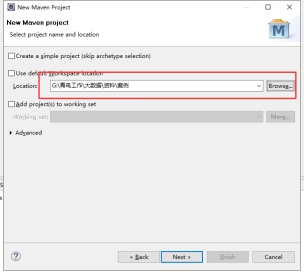
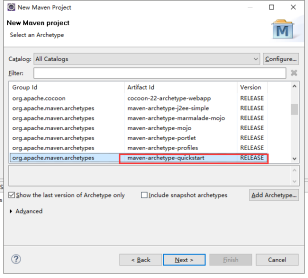

框架结构:
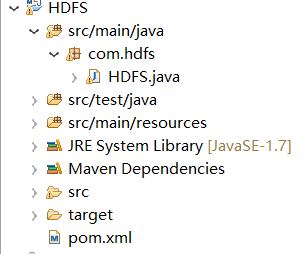
导入依赖节点
<dependency>

            <groupId>org.apache.hadoop</groupId>

            <artifactId>hadoop-common</artifactId>

            <version>2.8.</version>

        </dependency>

        <dependency>

            <groupId>org.apache.hadoop</groupId>

            <artifactId>hadoop-hdfs</artifactId>

            <version>2.8.</version>

        </dependency>

        <dependency>

            <groupId>org.apache.hadoop</groupId>

            <artifactId>hadoop-client</artifactId>

            <version>2.8.</version>

</dependency>
查询文件信息
// 查询文件信息

    private static void catFile() throws IOException, FileNotFoundException {

        // TODO Auto-generated method stub

        // 指定集群当中主机的IP+端口

        String uri = "hdfs://192.168.77.99:9000";

        // 加载Hadoop的配置文件

        Configuration con = new Configuration();

        // 创建一个可以操作的HDFS对象

        FileSystem fileSystem = FileSystem.get(URI.create(uri), con);

        FileStatus[] listStatus = fileSystem.listStatus(new Path("/input/"));

        for (FileStatus fileStatus : listStatus) {

            /**

             * 快捷键Syso

             */

            System.out.print("file文件信息------》" + fileStatus);

        }

        /**

         * 获取单个文件

         */

        /**

         * FileStatus fileStatus = fileSystem.getFileStatus(new Path(

         * "input/file1.txt")); System.out.println(fileStatus);

         */

    }
查询文件内容
public static void getFile(String fileName) throws Exception {

        // 指定集群中的主机IP+端口号

        String uri = "hdfs://192.168.77.99:9000";

        // 加载Hadoop的配置文件

        Configuration con = new Configuration();

        // 创建一个可以操作的HDFS对象

        FileSystem fileSystem = FileSystem.get(URI.create(uri), con);

        // 获取指定的文件

        FSDataInputStream open = fileSystem.open(new Path(fileName));

        // 将文件的内容装载到BufferedReader对象中去

        BufferedReader reader = new BufferedReader(new InputStreamReader(open));

        String line = "";

        // 循环读取文件内容

        while ((line = reader.readLine()) != null) {

            System.out.println(line);

        }

        // 关闭资源

        reader.close();

        open.close();

        fileSystem.close();

    }
创建一个空的文件
public static void createNewFile(String fileName) throws Exception {

        // 指定集群中的主机IP+端口号

        String uri = "hdfs://192.168.77.99:9000";

        // 加载Hadoop的配置文件

        Configuration con = new Configuration();

        // 创建一个可以操作的HDFS对象

        FileSystem fileSystem = FileSystem.get(URI.create(uri), con);

        if (fileSystem.exists(new Path(fileName))) {

            System.out.println("文件已经存在");

        } else {

            boolean createNewFile = fileSystem

                    .createNewFile(new Path(fileName));

            if (createNewFile) {

                System.out.println("成功");

            } else {

                System.out.println("失败");

            }

        }

        fileSystem.close();

    }
在新创建的文件夹写入内容
public static void createFile(String fileName) throws Exception {

        // 指定集群中的主机IP+端口号

        String uri = "hdfs://192.168.77.99:9000";

        // 加载Hadoop的配置文件

        Configuration con = new Configuration();

        // 创建一个可以操作的HDFS对象

        FileSystem fileSystem = FileSystem.get(URI.create(uri), con);

        if (fileSystem.exists(new Path(fileName))) {

            System.out.println("文件已经存在");

        } else {

            FSDataOutputStream create = fileSystem.create(new Path(fileName));

            String str = "老黑今天又黑了";

            create.write(str.getBytes());

            create.flush();

            create.close();

        }

        fileSystem.close();

    }
创建文件夹
public static void mkdirFile(String fileName) throws Exception {

        // 指定集群中的主机IP+端口号

        String uri = "hdfs://192.168.77.99:9000";

        // 加载Hadoop的配置文件

        Configuration con = new Configuration();

        // 创建一个可以操作的HDFS对象

        FileSystem fileSystem = FileSystem.get(URI.create(uri), con);

        boolean mkdirs = fileSystem.mkdirs(new Path(fileName));

        if (mkdirs) {

            System.out.println("成功!");

        } else {

            System.out.println("失败!");

        }

        fileSystem.close();

    }
重名文件的名字
public static void renameFile(String ordername, String newname)

            throws Exception {

        // 指定集群中的主机IP+端口号

        String uri = "hdfs://192.168.77.99:9000";

        // 加载Hadoop的配置文件

        Configuration con = new Configuration();

        // 创建一个可以操作的HDFS对象

        FileSystem fileSystem = FileSystem.get(URI.create(uri), con);

        boolean rename = fileSystem.rename(new Path(ordername), new Path(

                newname));

        if (rename) {

            System.out.println("成功!");

        } else {

            System.out.println("失败!");

        }

        fileSystem.close();

    }
删除文件夹
@SuppressWarnings("deprecation")

    public static void deleteFile(String filename) throws Exception {

        // 指定集群中的主机IP+端口号

        String uri = "hdfs://192.168.77.99:9000";

        // 加载Hadoop的配置文件

        Configuration con = new Configuration();

        // 创建一个可以操作的HDFS对象

        FileSystem fileSystem = FileSystem.get(URI.create(uri), con);

        boolean delete = fileSystem.delete(new Path(filename));

        if (delete) {

            System.out.println("成功!");

        } else {

            System.out.println("失败!");

        }

        fileSystem.close();

    }
上传文件 Windows上传到HDFS上
public static void fromFile(String localName, String fromName)

            throws Exception {

        // 指定集群中的主机IP+端口号

        String uri = "hdfs://192.168.77.99:9000";

        // 加载Hadoop的配置文件

        Configuration con = new Configuration();

        // 创建一个可以操作的HDFS对象

        FileSystem fileSystem = FileSystem.get(URI.create(uri), con);

        fileSystem.copyFromLocalFile(new Path(localName), new Path(fromName));

        fileSystem.close();

    }
从hdfs下载到Windows
    public static void downLoad(String defsFile,String localFile) throws Exception {

        String uri = "hdfs://192.168.77.99:9000";

        // 加载hadoop配置文件

        Configuration con = new Configuration();

        // 创建一个可以操作HDFS对象

        FileSystem fileSystem = FileSystem.get(URI.create(uri), con);

         fileSystem.copyToLocalFile(new Path(defsFile),new Path (localFile));

        fileSystem.close();

    }
注意:要记得调用方法
完整的代码结构--各种操作的方法
package com.hdfs;

import java.io.BufferedReader;

import java.io.FileNotFoundException;

import java.io.IOException;

import java.io.InputStreamReader;

import java.net.URI;

import org.apache.hadoop.conf.Configuration;

import org.apache.hadoop.fs.FSDataInputStream;

import org.apache.hadoop.fs.FSDataOutputStream;

import org.apache.hadoop.fs.FileStatus;

import org.apache.hadoop.fs.FileSystem;

import org.apache.hadoop.fs.Path;

public class HDFS {

    public static void main(String[] args) throws Exception {

        // catFile();

        // getFile("/input/file1.txt");// 查询单个文件信息

        // createNewFile("/input/file3.txt");

        // createFile("/input/file4.txt");

        // mkdirFile("/MKDIRS");//创建文件夹

        // renameFile("/input/file5.txt","/input/file4.txt");//重命名文件的名字

        //deleteFile("/MKDIRS");// 删除文件夹

        //fromFile("C:\\Users\\70424\\Desktop\\1.txt","/input");//上传文件Windows到HDFS上

        downLoad("/input/file1.txt","C:\\Users\\70424\\Desktop");//从hdfs下载到Windows

    }

    // 查询文件信息

    private static void catFile() throws IOException, FileNotFoundException {

        // TODO Auto-generated method stub

        // 指定集群当中主机的IP+端口

        String uri = "hdfs://192.168.77.99:9000";

        // 加载Hadoop的配置文件

        Configuration con = new Configuration();

        // 创建一个可以操作的HDFS对象

        FileSystem fileSystem = FileSystem.get(URI.create(uri), con);

        FileStatus[] listStatus = fileSystem.listStatus(new Path("/input/"));

        for (FileStatus fileStatus : listStatus) {

            /**

             * 快捷键Syso

             */

            System.out.print("file文件信息------》" + fileStatus);

        }

        /**

         * 获取单个文件

         */

        /**

         * FileStatus fileStatus = fileSystem.getFileStatus(new Path(

         * "input/file1.txt")); System.out.println(fileStatus);

         */

    }

    // 查询文件内容

    public static void getFile(String fileName) throws Exception {

        // 指定集群中的主机IP+端口号

        String uri = "hdfs://192.168.77.99:9000";

        // 加载Hadoop的配置文件

        Configuration con = new Configuration();

        // 创建一个可以操作的HDFS对象

        FileSystem fileSystem = FileSystem.get(URI.create(uri), con);

        // 获取指定的文件

        FSDataInputStream open = fileSystem.open(new Path(fileName));

        // 将文件的内容装载到BufferedReader对象中去

        BufferedReader reader = new BufferedReader(new InputStreamReader(open));

        String line = "";

        // 循环读取文件内容

        while ((line = reader.readLine()) != null) {

            System.out.println(line);

        }

        // 关闭资源

        reader.close();

        open.close();

        fileSystem.close();

    }

    // 创建一个空的文件

    public static void createNewFile(String fileName) throws Exception {

        // 指定集群中的主机IP+端口号

        String uri = "hdfs://192.168.77.99:9000";

        // 加载Hadoop的配置文件

        Configuration con = new Configuration();

        // 创建一个可以操作的HDFS对象

        FileSystem fileSystem = FileSystem.get(URI.create(uri), con);

        if (fileSystem.exists(new Path(fileName))) {

            System.out.println("文件已经存在");

        } else {

            boolean createNewFile = fileSystem

                    .createNewFile(new Path(fileName));

            if (createNewFile) {

                System.out.println("成功");

            } else {

                System.out.println("失败");

            }

        }

        fileSystem.close();

    }

    // 在新创建的文件夹写入内容

    public static void createFile(String fileName) throws Exception {

        // 指定集群中的主机IP+端口号

        String uri = "hdfs://192.168.77.99:9000";

        // 加载Hadoop的配置文件

        Configuration con = new Configuration();

        // 创建一个可以操作的HDFS对象

        FileSystem fileSystem = FileSystem.get(URI.create(uri), con);

        if (fileSystem.exists(new Path(fileName))) {

            System.out.println("文件已经存在");

        } else {

            FSDataOutputStream create = fileSystem.create(new Path(fileName));

            String str = "老黑今天又黑了";

            create.write(str.getBytes());

            create.flush();

            create.close();

        }

        fileSystem.close();

    }

    // 创建文件夹

    public static void mkdirFile(String fileName) throws Exception {

        // 指定集群中的主机IP+端口号

        String uri = "hdfs://192.168.77.99:9000";

        // 加载Hadoop的配置文件

        Configuration con = new Configuration();

        // 创建一个可以操作的HDFS对象

        FileSystem fileSystem = FileSystem.get(URI.create(uri), con);

        boolean mkdirs = fileSystem.mkdirs(new Path(fileName));

        if (mkdirs) {

            System.out.println("成功!");

        } else {

            System.out.println("失败!");

        }

        fileSystem.close();

    }

    // 重名文件的名字

    public static void renameFile(String ordername, String newname)

            throws Exception {

        // 指定集群中的主机IP+端口号

        String uri = "hdfs://192.168.77.99:9000";

        // 加载Hadoop的配置文件

        Configuration con = new Configuration();

        // 创建一个可以操作的HDFS对象

        FileSystem fileSystem = FileSystem.get(URI.create(uri), con);

        boolean rename = fileSystem.rename(new Path(ordername), new Path(

                newname));

        if (rename) {

            System.out.println("成功!");

        } else {

            System.out.println("失败!");

        }

        fileSystem.close();

    }

    // 删除文件夹

    @SuppressWarnings("deprecation")

    public static void deleteFile(String filename) throws Exception {

        // 指定集群中的主机IP+端口号

        String uri = "hdfs://192.168.77.99:9000";

        // 加载Hadoop的配置文件

        Configuration con = new Configuration();

        // 创建一个可以操作的HDFS对象

        FileSystem fileSystem = FileSystem.get(URI.create(uri), con);

        boolean delete = fileSystem.delete(new Path(filename));

        if (delete) {

            System.out.println("成功!");

        } else {

            System.out.println("失败!");

        }

        fileSystem.close();

    }

    // 上传文件 Windows上传到HDFS上

    public static void fromFile(String localName, String fromName)

            throws Exception {

        // 指定集群中的主机IP+端口号

        String uri = "hdfs://192.168.77.99:9000";

        // 加载Hadoop的配置文件

        Configuration con = new Configuration();

        // 创建一个可以操作的HDFS对象

        FileSystem fileSystem = FileSystem.get(URI.create(uri), con);

        fileSystem.copyFromLocalFile(new Path(localName), new Path(fromName));

        fileSystem.close();

    }

    //从hdfs下载到Windows

    public static void downLoad(String defsFile,String localFile) throws Exception {

        String uri = "hdfs://192.168.77.99:9000";

        // 加载hadoop配置文件

        Configuration con = new Configuration();

        // 创建一个可以操作HDFS对象

        FileSystem fileSystem = FileSystem.get(URI.create(uri), con);

         fileSystem.copyToLocalFile(new Path(defsFile),new Path (localFile));

        fileSystem.close();

    }

}
HDFS API编程的更多相关文章
- 【HDFS API编程】从本地拷贝文件,从本地拷贝大文件,拷贝HDFS文件到本地
接着之前继续API操作的学习 CopyFromLocalFile: 顾名思义,从本地文件拷贝 /** * 使用Java API操作HDFS文件系统 * 关键点: * 1)create Configur ...
- 【HDFS API编程】查看HDFS文件内容、创建文件并写入内容、更改文件名
首先,重点重复重复再重复: /** * 使用Java API操作HDFS文件系统 * 关键点: * 1)创建 Configuration * 2)获取 FileSystem * 3)...剩下的就是 ...
- 【HDFS API编程】jUnit封装-改写创建文件夹
首先:什么是jUnit 回顾: https://www.cnblogs.com/Liuyt-61/p/10374732.html 上一节我们知道: /** * 使用Java API操作HDFS文件系 ...
- 【HDFS API编程】第一个应用程序的开发-创建文件夹
/** * 使用Java API操作HDFS文件系统 * 关键点: * 1)创建 Configuration * 2)获取 FileSystem * 3)...剩下的就是 HDFS API的操作了*/ ...
- 【HDFS API编程】开发环境搭建
使用HDFS API的方式来操作HDFS文件系统 IDEA Java 使用Maven来管理项目 先打开IDEA,New Project 创建GAV然后next 默认使用的有idea内置的Maven,可 ...
- 【HDFS API编程】查看文件块信息
现在我们把文件都存在HDFS文件系统之上,现在有一个jdk.zip文件存储在上面,我们想知道这个文件在哪些节点之上?切成了几个块?每个块的大小是怎么样?先上测试类代码: /** * 查看文件块信息 * ...
- 【HDFS API编程】查看目标文件夹下的所有文件、递归查看目标文件夹下的所有文件
使用hadoop命令:hadoop fs -ls /hdfsapi/test 我们能够查看HDFS文件系统/hdfsapi/test目录下的所有文件信息 那么使用代码怎么写呢?直接先上代码:(这之后 ...
- 【HDFS API编程】副本系数深度剖析
上一节我们使用Java API操作HDFS文件系统创建了文件a.txt并写入了hello hadoop(回顾:https://www.cnblogs.com/Liuyt-61/p/10739018.h ...
- 干货--安装eclipse-hadoop-plugin插件及HDFS API编程两个遇到的重要错误的解决
在Windows的eclipse上写hdfs的API程序,都会遇到两个错误,在网上查了很多资料,都没有解决的办法,经过了很多时间的研究,终于把这个问题解决了 错误是 1.java.io.IOExcep ...
随机推荐
- linux----------linux的scp命令介绍
1.scp是有Security的文件copy,基于ssh登录. 命令基本格式: scp [OPTIONS] file_source file_target OPTIONS: -v 和大多数 linux ...
- ThinkPHP数据库操作相关
- sed command
https://blog.csdn.net/solaraceboy/article/details/79272344
- GoldenGate抽取Informix数据库安装及配置
GoldenGate抽取Informix数据库安装及配置 本次测试架构 l 在中间机上安装informix csdk4.10版本,并编译配置unixODBC; l 在中间机上安装ogg for I ...
- php 数组数字 补零
$hour_list = range(0,24); foreach($hour_list as $key=>$val){ $hour_list[$key] = str_pad($val, 2, ...
- Vertical viewport was given unbounded height
new Expanded( child: new ListView( ..... ) ); +++++++++++++++ 可以通过指定shrinkWrap = true为了你ListView. Li ...
- K8S学习笔记之二进制部署Kubernetes v1.13.4 高可用集群
0x00 概述 本次采用二进制文件方式部署,本文过程写成了更详细更多可选方案的ansible部署方案 https://github.com/zhangguanzhang/Kubernetes-ansi ...
- Html h1-h6 标签
Html h1-h6 标签 <html> <body> <!-- h1-h6标签:标题标签 --> <h1>XSK</h1> <h2& ...
- Linux 查看内存状态
# 查看系统内存 命令:free 注:默认k单位显示 注:-m 以MB 注:-g以GB 单位显示 total used free shared buffers cached Mem: -/+ buff ...
- Splay详解
平衡树实际很简单的 以下讲解都以Luogu P3369 [模板]普通平衡树为例 我不会带指针的Splay,所以我就写非指针型的Splay Splay是基于二叉查找树(bst)实现的 什么是二叉查找树呢 ...