
python自动化运维之路~DAY8
HTML&CSS基础-文本样式
作者:尹正杰
版权声明:原创作品,谢绝转载!否则将追究法律责任。
一.HTML源代码
<!DOCTYPE html>

<html>

    <head>

        <meta charset="UTF-8">

        <title>文本样式</title>

        <style type="text/css">

            .p1{

                /**

                 *     text-transform可以用来设置文本的大小写,有以下可选值:

                 *         none:

                 *             默认值,该怎么显示就怎么显示,不做任何处理

                 *         capitalize:

                 *             单词的首字母大写,通过空格来识别单词

                 *         uppercase:

                 *             所有的字母都大写

                 *         lowercase:

                 *             所有的字母都小写

                 */

                text-transform: lowercase;

            }

            .p2{

                /**

                 *     text-decoration可以用来设置文本的修饰,有以下可选值:

                 *         none:

                 *             默认值,不添加任何修饰,正常显示

                 *         underline:

                 *             为文本添加下划线

                 *         overline:

                 *             为文本添加上划线

                 *         line-through:

                 *             为文本添加删除线

                 */

                text-decoration: line-through;

            }

            a{

                /**

                 *     超链接会默认添加下划线,也就是超链接的text-decoration的默认值时underline,如果需要去除掉超链接的下划线则需要将该样式设置为none

                 */

                text-decoration: none;

            }

            .p3{

                /**

                 *     letter-spacing:

                 *         可以指定字符间距

                 *     word-spacing:

                 *         可以设置单词之间的距离,实际上就是设置词与词之间空格的大小

                 *

                 */

                letter-spacing: 10px;

                word-spacing: 50px;

            }

            .p4{

                /**

                 *     text-align用于设置文本的对齐方式,有以下可选值:

                 *         left:

                 *             默认值,文本靠左对齐。

                 *         right:

                 *             文本靠右对齐

                 *         center:

                 *             居中对齐

                 *         justify:

                 *             两端对齐,实际上是通过调整文本之间的空格大小,来达到一个两端对齐的目的

                 */

                text-align:justify;

            }

            .p5{

                /**

                 *     字体默认大小时16px

                 */

                font-size: 20px;

                /**

                 *     text-indent用来设置首行缩进:

                 *         当给它指定一个正值时,会自动向右缩进指定的像素,我们设置为2em时,不管字体大小怎么变化,都会留出两个字符空间的。

                 *         如果给它指定一个负值时,则会向左移动指定的像素,通过这种方式可以将一些不想显示的文字隐藏起来

                 *

                 */

                text-indent: 2em;

            }

        </style>

    </head>

    <body>

        <a href="#">我是超链接</a>

        <p class="p1">The Apache Hadoop software library is a framework that allows for the distributed processing of large data sets across clusters of computers using simple programming models. It is designed to scale up from single servers to thousands of machines, each offering local computation and storage. Rather than rely on hardware to deliver high-availability, the library itself is designed to detect and handle failures at the application layer, so delivering a highly-available service on top of a cluster of computers, each of which may be prone to failures.</p>

        <p class="p2">The Apache Hadoop software library is a framework that allows for the distributed processing of large data sets across clusters of computers using simple programming models. It is designed to scale up from single servers to thousands of machines, each offering local computation and storage. Rather than rely on hardware to deliver high-availability, the library itself is designed to detect and handle failures at the application layer, so delivering a highly-available service on top of a cluster of computers, each of which may be prone to failures.</p>

        <p class="p3">The Apache Hadoop software library is a framework that allows for the distributed processing of large data sets across clusters of computers using simple programming models. It is designed to scale up from single servers to thousands of machines, each offering local computation and storage. Rather than rely on hardware to deliver high-availability, the library itself is designed to detect and handle failures at the application layer, so delivering a highly-available service on top of a cluster of computers, each of which may be prone to failures.</p>

        <p class="p4">The Apache Hadoop software library is a framework that allows for the distributed processing of large data sets across clusters of computers using simple programming models. It is designed to scale up from single servers to thousands of machines, each offering local computation and storage. Rather than rely on hardware to deliver high-availability, the library itself is designed to detect and handle failures at the application layer, so delivering a highly-available service on top of a cluster of computers, each of which may be prone to failures.</p>

        <p class="p5">

            噫吁嚱,危乎高哉!蜀道之难,难于上青天!蚕丛及鱼凫,开国何茫然!尔来四万八千岁,不与秦塞通人烟。西当太白有鸟道,可以横绝峨眉巅。地崩山摧壮士死,然后天梯石栈相钩连。上有六龙回日之高标,下有冲波逆折之回川。黄鹤之飞尚不得过,猿猱欲度愁攀援。青泥何盘盘,百步九折萦岩峦。扪参历井仰胁息,以手抚膺坐长叹。问君西游何时还?畏途巉岩不可攀。但见悲鸟号古木,雄飞雌从绕林间。又闻子规啼夜月,愁空山。蜀道之难,难于上青天,使人听此凋朱颜!连峰去天不盈尺,枯松倒挂倚绝壁。飞湍瀑流争喧豗,砯崖转石万壑雷。其险也如此,嗟尔远道之人胡为乎来哉!剑阁峥嵘而崔嵬,一夫当关,万夫莫开。所守或匪亲,化为狼与豺。朝避猛虎,夕避长蛇;磨牙吮血,杀人如麻。锦城虽云乐,不如早还家。蜀道之难,难于上青天,侧身西望长咨嗟!

        </p>

    </body>

</html>
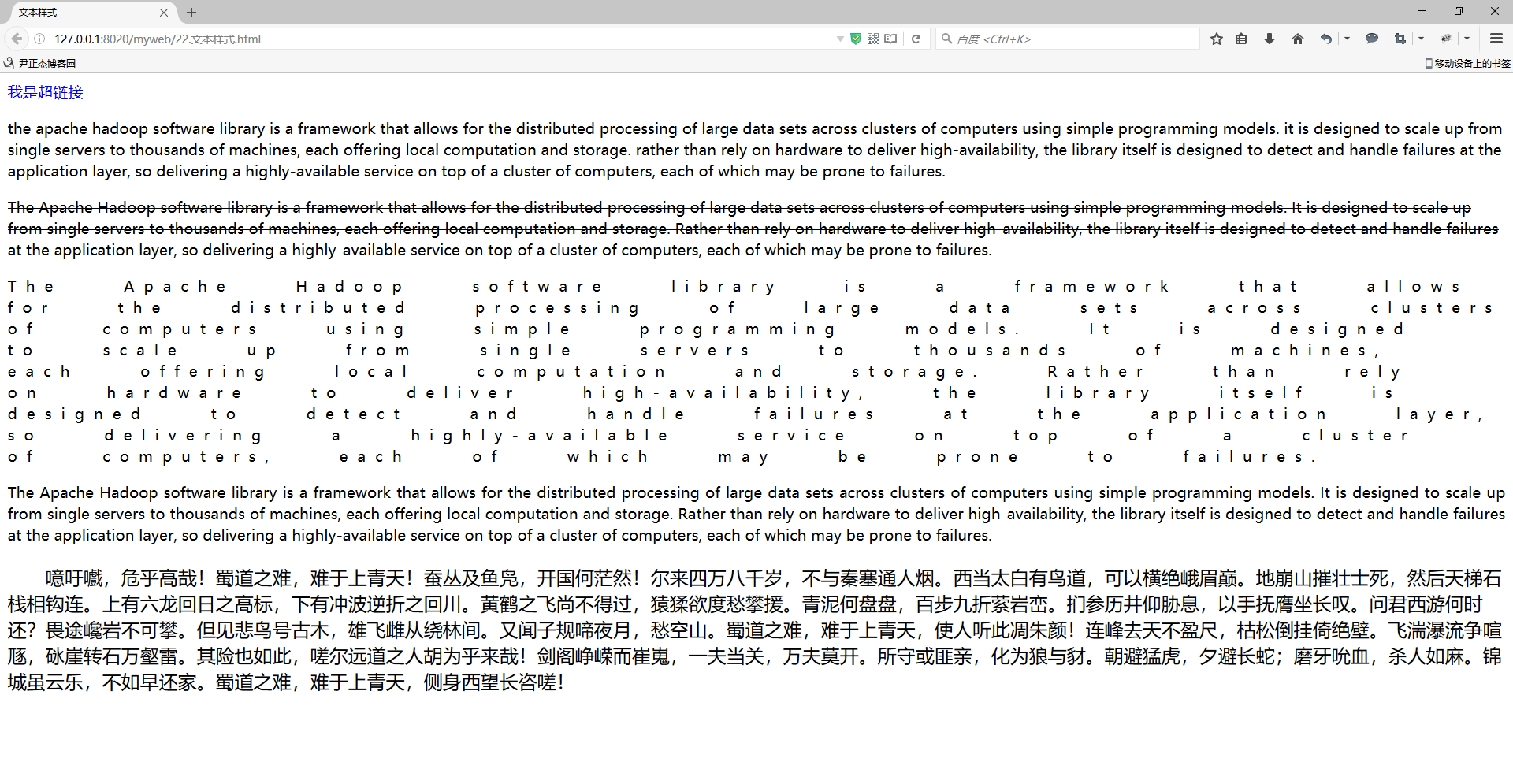
二.浏览器打开以上代码渲染结果
python自动化运维之路~DAY8的更多相关文章
- python自动化运维之路~DAY5
python自动化运维之路~DAY5 作者:尹正杰 版权声明:原创作品,谢绝转载!否则将追究法律责任. 一.模块的分类 模块,用一砣代码实现了某个功能的代码集合. 类似于函数式编程和面向过程编程,函数 ...
- 《Python自动化运维之路》 业务服务监控(二)
文件内容差异对比方法 使用diffie模块实现文件内容差异对比.dmib作为 Python的标准库模块,无需安装,作用是对比文本之间的差异,且支持输出可读性比较强的HTML文档,与 Linux下的di ...
- Python自动化运维之路-01
python的主要应用 python的擅长领域 学python有没有前途?python的语言排名 语言选择 运维会了开发后可以干什么? python的最大优势就是什么都能做. 课程概述 毕业目标 周五 ...
- 【Python自动化运维之路Day9】Socket
socket也可以认为是套接字是一种源IP地址和目的IP地址以及源端口号和目的端口号的组合.网络化的应用程序在开始任何通讯之前都必须要创建套接字.就像电话的插口一样,没有它就没办法通讯. socket ...
- 【Python自动化运维之路Day7】
1. configparser模块 import configparser config = configparser.ConfigParser() #先把config应用一下configparser ...
- 【Python自动化运维之路Day6】
1.递归思考题,阶乘 使用递归方式(函数)计算: 1*2*3*4*5*6*7*8*9*10的值 def func(num): if num==1: return 1 return num*func(n ...
- 【Python自动化运维之路Day4】
abs() 取绝对值all() 所有为真,则为真,否则为假any() 至少有一个为真,就为真,否则为假callable() 判断函数是否可以被调用,如果可以返回True,否则返回False ...
- 【Python自动化运维之路Day2】
1. 常量命名规则 在Python中,会在变量命名上标明某变量是常量,通常采用全是大写的方式来标明,如: CONNECT= '127.0.0.1' PORT = ' 2.Python编译 python ...
- 《Python自动化运维之路》 系统基础信息模块(一)
系统性能收集模块Psutil 目录: 系统性能信息模块psutil 系统性能信息模块psutil psutil能够轻松实现获取系统运行的进程和系统利用率包括(CPU,内存,磁盘 和网络)等.主要用于系 ...
随机推荐
- Cocos2d-x项目创建方式
刚接触cocos2d-x的时候,还只有2.x版本,尝试着将cocos2d-x项目创建功能加入到vs里面去,后来,引擎用Python封装好了好多个脚本文件,其中就包括create_project.py文 ...
- Java提高篇(1)封装
三大特性之---封装 封装从字面上来理解就是包装的意思,专业点就是信息隐藏,是指利用抽象数据类型将数据和基于数据的操作封装在一起,使其构成一个不可分割的独立实体,数据被保护在抽象数据类型的内部,尽可能 ...
- 第三个Sprint冲刺第3天
成员:罗凯旋.罗林杰.吴伟锋.黎文衷 组内各成员加紧完成自己的工作.
- 开源通用爬虫框架YayCrawler-页面的抽取规则定义
本节我将向大家介绍一下YayCrawler的核心-页面的抽取规则定义,这也是YayCrawler能够做到通用的主要原因之一.如果我要爬去不同的网站的数据,尽管他们的网站采用的开发技术不同.页面的结构不 ...
- 业务-----修改Service常用逻辑
注意:修改时唯一属性不能重复 //num==null 时,没有修改Num,不用考虑重复问题.//num!=null 时,修改了num.考虑重复问题 if(!StringUtils.isEmpty(re ...
- shell脚本--逻辑判断与字符串比较
涉及到比较和判断的时候,要注意 整数比较使用-lt,-gt,ge等比较运算符,详情参考:整数比较 文件测试使用 -d, -f, -x等运算发,详情参考:文件测试 逻辑判断使用 && ...
- Spring MVC (Java),强制页面不缓存
response.setDateHeader("Expires",0); response.setHeader("Buffer","Tr ...
- 关于js中this指向的理解总结!
关于js中this指向的理解! this是什么?定义:this是包含它的函数作为方法被调用时所属的对象. 首先,this的指向在函数定义的时候是确定不了的,只有函数执行的时候才能确定this到底指向谁 ...
- MSTSC 3389 端口修改
1. 启动注册表编辑器. 2. 找到并单击以下注册表子项: 3. HKEY_LOCAL_MACHINE\System\CurrentControlSet\Control\Terminal Server ...
- CentOS 关闭烦人的屏保
1. VNC连接到服务器 2.打开 system tools - settings 在power处 将 Power Saving 设置改一下