
Hbase 与mapreduce结合
Hbase和mapreduce结合
为什么需要用mapreduce去访问hbase的数据?
——加快分析速度和扩展分析能力
Mapreduce访问hbase数据作分析一定是在离线分析的场景下应用
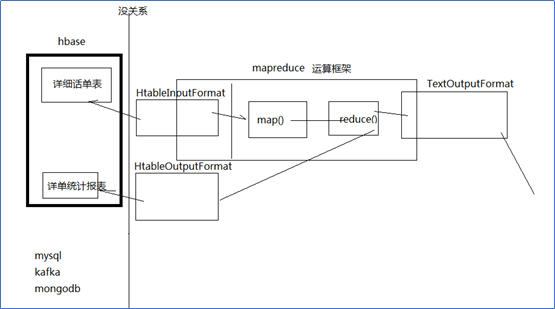
案例1、HBase表数据的转移
在Hadoop阶段,我们编写的MR任务分别进程了Mapper和Reducer两个类,而在HBase中我们需要继承的是TableMapper和TableReducer两个类。
目标:将fruit表中的一部分数据,通过MR迁入到fruit_mr表中
Step1、构建ReadFruitMapper类,用于读取fruit表中的数据
import java.io.IOException;
import org.apache.hadoop.hbase.Cell;
import org.apache.hadoop.hbase.CellUtil;
import org.apache.hadoop.hbase.client.Put;
import org.apache.hadoop.hbase.client.Result;
import org.apache.hadoop.hbase.io.ImmutableBytesWritable;
import org.apache.hadoop.hbase.mapreduce.TableMapper;
import org.apache.hadoop.hbase.util.Bytes;
public class ReadFruitMapper extends TableMapper<ImmutableBytesWritable, Put> {
@Override
protected void map(ImmutableBytesWritable key, Result value, Context context)
throws IOException, InterruptedException {
//将fruit的name和color提取出来,相当于将每一行数据读取出来放入到Put对象中。
Put put = new Put(key.get());
//遍历添加column行
for(Cell cell: value.rawCells()){
//添加/克隆列族:info
if("info".equals(Bytes.toString(CellUtil.cloneFamily(cell)))){
//添加/克隆列:name
if("name".equals(Bytes.toString(CellUtil.cloneQualifier(cell)))){
//将该列cell加入到put对象中
put.add(cell);
//添加/克隆列:color
}else if("color".equals(Bytes.toString(CellUtil.cloneQualifier(cell)))){
//向该列cell加入到put对象中
put.add(cell);
}
}
}
//将从fruit读取到的每行数据写入到context中作为map的输出
context.write(key, put);
}
}
Step2、构建WriteFruitMRReducer类,用于将读取到的fruit表中的数据写入到fruit_mr表中
import java.io.IOException;
import org.apache.hadoop.hbase.client.Put;
import org.apache.hadoop.hbase.io.ImmutableBytesWritable;
import org.apache.hadoop.hbase.mapreduce.TableReducer;
import org.apache.hadoop.io.NullWritable;
public class WriteFruitMRReducer extends TableReducer<ImmutableBytesWritable, Put, NullWritable> {
@Override
protected void reduce(ImmutableBytesWritable key, Iterable<Put> values, Context context)
throws IOException, InterruptedException {
//读出来的每一行数据写入到fruit_mr表中
for(Put put: values){
context.write(NullWritable.get(), put);
}
}
}
Step3、构建Fruit2FruitMRJob extends Configured implements Tool,用于组装运行Job任务
//组装Job
public int run(String[] args) throws Exception {
//得到Configuration
Configuration conf = this.getConf();
//创建Job任务
Job job = Job.getInstance(conf, this.getClass().getSimpleName());
job.setJarByClass(Fruit2FruitMRJob.class);
//配置Job
Scan scan = new Scan();
scan.setCacheBlocks(false);
scan.setCaching(500);
//设置Mapper,注意导入的是mapreduce包下的,不是mapred包下的,后者是老版本
TableMapReduceUtil.initTableMapperJob(
"fruit", //数据源的表名
scan, //scan扫描控制器
ReadFruitMapper.class,//设置Mapper类
ImmutableBytesWritable.class,//设置Mapper输出key类型
Put.class,//设置Mapper输出value值类型
job//设置给哪个JOB
);
//设置Reducer
TableMapReduceUtil.initTableReducerJob("fruit_mr", WriteFruitMRReducer.class, job);
//设置Reduce数量,最少1个
job.setNumReduceTasks(1);
boolean isSuccess = job.waitForCompletion(true);
if(!isSuccess){
throw new IOException("Job running with error");
}
return isSuccess ? 0 : 1;
}
Step4、主函数中调用运行该Job任务
public static void main( String[] args ) throws Exception{
Configuration conf = HBaseConfiguration.create();
int status = ToolRunner.run(conf, new Fruit2FruitMRJob(), args);
System.exit(status);
}
案例2:从Hbase中读取数据、分析,写入hdfs
|
/** public abstract class TableMapper<KEYOUT, VALUEOUT> extends Mapper<ImmutableBytesWritable, Result, KEYOUT, VALUEOUT> { } * @author duanhaitao@gec.cn * */ public class HbaseReader { public static String flow_fields_import = "flow_fields_import"; static class HdfsSinkMapper extends TableMapper<Text, NullWritable>{ @Override protected void map(ImmutableBytesWritable key, Result value, Context context) throws IOException, InterruptedException { byte[] bytes = key.copyBytes(); String phone = new String(bytes); byte[] urlbytes = value.getValue("f1".getBytes(), "url".getBytes()); String url = new String(urlbytes); context.write(new Text(phone + "\t" + url), NullWritable.get()); } } static class HdfsSinkReducer extends Reducer<Text, NullWritable, Text, NullWritable>{ @Override protected void reduce(Text key, Iterable<NullWritable> values, Context context) throws IOException, InterruptedException { context.write(key, NullWritable.get()); } } public static void main(String[] args) throws Exception { Configuration conf = HBaseConfiguration.create(); conf.set("hbase.zookeeper.quorum", "spark01"); Job job = Job.getInstance(conf); job.setJarByClass(HbaseReader.class); // job.setMapperClass(HdfsSinkMapper.class); Scan scan = new Scan(); TableMapReduceUtil.initTableMapperJob(flow_fields_import, scan, HdfsSinkMapper.class, Text.class, NullWritable.class, job); job.setReducerClass(HdfsSinkReducer.class); FileOutputFormat.setOutputPath(job, new Path("c:/hbasetest/output")); job.setOutputKeyClass(Text.class); job.setOutputValueClass(NullWritable.class); job.waitForCompletion(true); } } |
2.3.2 从hdfs中读取数据写入Hbase
q
|
/** public abstract class TableReducer<KEYIN, VALUEIN, KEYOUT> extends Reducer<KEYIN, VALUEIN, KEYOUT, Writable> { } * @author duanhaitao@gec.cn * */ public class HbaseSinker { public static String flow_fields_import = "flow_fields_import"; static class HbaseSinkMrMapper extends Mapper<LongWritable, Text, FlowBean, NullWritable>{ @Override protected void map(LongWritable key, Text value, Context context) throws IOException, InterruptedException { String line = value.toString(); String[] fields = line.split("\t"); String phone = fields[0]; String url = fields[1]; FlowBean bean = new FlowBean(phone,url); context.write(bean, NullWritable.get()); } } static class HbaseSinkMrReducer extends TableReducer<FlowBean, NullWritable, ImmutableBytesWritable>{ @Override protected void reduce(FlowBean key, Iterable<NullWritable> values, Context context) throws IOException, InterruptedException { Put put = new Put(key.getPhone().getBytes()); put.add("f1".getBytes(), "url".getBytes(), key.getUrl().getBytes()); context.write(new ImmutableBytesWritable(key.getPhone().getBytes()), put); } } public static void main(String[] args) throws Exception { Configuration conf = HBaseConfiguration.create(); conf.set("hbase.zookeeper.quorum", "spark01"); HBaseAdmin hBaseAdmin = new HBaseAdmin(conf); boolean tableExists = hBaseAdmin.tableExists(flow_fields_import); if(tableExists){ hBaseAdmin.disableTable(flow_fields_import); hBaseAdmin.deleteTable(flow_fields_import); } HTableDescriptor desc = new HTableDescriptor(TableName.valueOf(flow_fields_import)); HColumnDescriptor hColumnDescriptor = new HColumnDescriptor ("f1".getBytes()); desc.addFamily(hColumnDescriptor); hBaseAdmin.createTable(desc); Job job = Job.getInstance(conf); job.setJarByClass(HbaseSinker.class); job.setMapperClass(HbaseSinkMrMapper.class); TableMapReduceUtil.initTableReducerJob(flow_fields_import, HbaseSinkMrReducer.class, job); FileInputFormat.setInputPaths(job, new Path("c:/hbasetest/data")); job.setMapOutputKeyClass(FlowBean.class); job.setMapOutputValueClass(NullWritable.class); job.setOutputKeyClass(ImmutableBytesWritable.class); job.setOutputValueClass(Mutation.class); job.waitForCompletion(true); } } |
Hbase 与mapreduce结合的更多相关文章
- 《OD大数据实战》HBase整合MapReduce和Hive
一.HBase整合MapReduce环境搭建 1. 搭建步骤1)在etc/hadoop目录中创建hbase-site.xml的软连接.在真正的集群环境中的时候,hadoop运行mapreduce会通过 ...
- HBase概念学习(七)HBase与Mapreduce集成
这篇文章是看了HBase权威指南之后,依据上面的解说搬下来的样例,可是略微有些不一样. HBase与mapreduce的集成无非就是mapreduce作业以HBase表作为输入,或者作为输出,也或者作 ...
- hbase运行mapreduce设置及基本数据加载方法
hbase与mapreduce集成后,运行mapreduce程序,同时需要mapreduce jar和hbase jar文件的支持,这时我们需要通过特殊设置使任务可以同时读取到hadoop jar和h ...
- Hbase框架原理及相关的知识点理解、Hbase访问MapReduce、Hbase访问Java API、Hbase shell及Hbase性能优化总结
转自:http://blog.csdn.net/zhongwen7710/article/details/39577431 本blog的内容包含: 第一部分:Hbase框架原理理解 第二部分:Hbas ...
- HBase结合MapReduce批量导入(HDFS中的数据导入到HBase)
HBase结合MapReduce批量导入 package hbase; import java.text.SimpleDateFormat; import java.util.Date; import ...
- 《HBase in Action》 第三章节的学习总结 ---- 如何编写和运行基于HBase的MapReduce程序
HBase之所以与Hadoop是最好的伙伴,我理解就因为两点:1.HADOOP的HDFS,为HBase提供了分布式的存储方式:2.HADOOP的MR为HBase提供的分布式的计算方法.u 其中第一点, ...
- 2.8-2.10 HBase集成MapReduce
一.HBase集成MapReduce 1.查看HBase集成MapReduce需要的jar包 [root@hadoop-senior hbase-0.98.6-hadoop2]# bin/hbase ...
- Hadoop之——HBASE结合MapReduce批量导入数据
转载请注明出处:http://blog.csdn.net/l1028386804/article/details/46463889 废话不多说.直接上代码,你懂得 package hbase; imp ...
- HBase 与 MapReduce 集成
6. HBase 与 MapReduce 集成 6.1 官方 HBase 与 MapReduce 集成 查看 HBase 的 MapReduce 任务的执行:bin/hbase mapredcp; 环 ...
随机推荐
- 机器学习 之LightGBM算法
目录 1.基本知识点简介 2.LightGBM轻量级提升学习方法 2.1 leaf-wise分裂策略 2.2 基于直方图的排序算法 2.3 支持类别特征和高效并行处理 1.基本知识点简介 在集成学习的 ...
- python 利用selectors实现异步I/O
它的功能与linux的epoll,还是select模块,poll等类似:实现高效的I/O multiplexing, 常用于非阻塞的socket的编程中: 简单介绍一下这个模块,更多内容查看 pyt ...
- 使用python来访问Hadoop HDFS存储实现文件的操作
原文:http://rfyiamcool.blog.51cto.com/1030776/1258292 在调试环境下,咱们用hadoop提供的shell接口测试增加删除查看,但是不利于复杂的逻辑编程 ...
- Quartz的时间配置
在公司要开发一个定时任务, 使用的quartz库, 其中的时间配置方式如下: 格式: [秒] [分] [小时] [日] [月] [周] [年] 序号 说明 是否必填 允许填写的值 允许的通配符 1 秒 ...
- python -- 内置模块02
1.os 所有和操作系统相关的内容都在os模块,一般用来操作文件系统 import os os.makedirs('dirname1/dirname2') # 可生成多层递归目录 os.removed ...
- STL 小白学习(3) vector
#include <iostream> using namespace std; #include <vector> void printVector(vector<in ...
- ie 下date对象
var t = '2014-02-26T21:18:02.497' var a = t.replace(/(\d{4})-(\d{2})-(\d{2})T(.*)?\.(.*)/, "$1/ ...
- css清除常用默认样式表
/*公共样式*/ html, body, div, ul, li, h1, h2, h3, h4, h5, h6, p, dl, dt, dd, ol, form, input, textarea, ...
- 在Linux终端安装Julia
官方参考文档:https://julialang.org/downloads/platform.html#generic-binaries 一.centos终端安装 打开Linux终端输入 sudo ...
- base64详解及实现
概述 base64 说起来大家应该都是很熟悉的,很多类型的数据都可以转成base64的编码规则,例如图片,pdf,文本,邮件内容等. 什么是base64 根据RFC2045的定义,base64被定义为 ...