
jshint-eclipse: JavaScript Code Quality Plugin for Eclipse

jshint-eclipse: JavaScript Code Quality Plugin for Eclipse
JavaScript has a lot of pitfalls, so it is very important to have a code analysis tool that detects errors and bad programming style.
jshint-eclipse is an Eclipse plugin that uses the static code analysis tool JSHint to analyze your JavaScript sources.
JSHint is a community-driven tool to detect errors and potential problems in JavaScript code and to enforce your team’s coding conventions.
It is very flexible so you can easily adjust it to your particular
coding guidelines and the environment you expect your code to execute
in.
To install it, use the Eclipse update site: http://github.eclipsesource.com/jshint-eclipse/updates/
To activate JSHint for your project, open the project properties dialog, select JSHint and check “Enable JSHint for this project“.
From now on, all your .js files will be checked.
To exclude files or complete directory trees from the analysis, right
click on the file/folder to exclude in the Navigator. Select Properties -> JSHint and check “Exclude this folder from jshint validation“. You should exclude third party javascript libraries like jQuery.
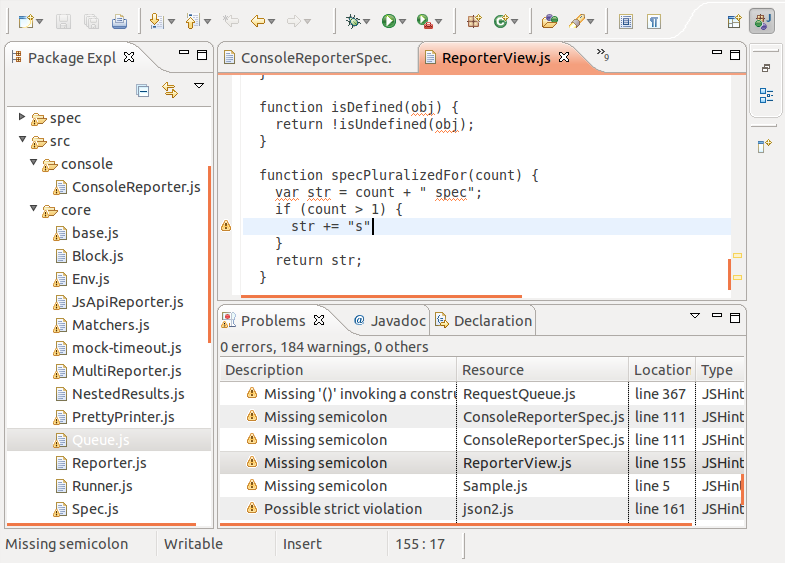
Here is a screenshot that shows JSHint in action. You can see warning
icons next to lines that violate rules. The problem view shows all the
violations with a description of the problem.
The default configuration of JSHint is not that strict, so you probably want to provide your own configuration. The configuration page shows all possible settings. To adjust these settings in Eclipse, open the preferences page and navigate to JSHint -> Options.

Here is my personal config that is a lot stricter than the default configuration:
|
1
2
3
4
5
6
7
8
9
10
11
12
13
|
devel: true,browser: true,curly: true,eqeqeq: true,forin: true,immed: true,latedef: newcap,noarg: true,noempty: true,undef: true,strict: true,trailing: true,newcap: true |
JSHint directly supports some famous JavaScript frameworks. If you are using jQuery, you should add this to your config:
|
1
|
jquery: true |
Like this:
Related
JavaScript Lint - checks your JavaScript source code for common mistakes21. August 2011In "Java and Quality"
Dynamic Reloading of Vaadin Applications With Maven and Eclipse, Pt. I23. August 2012In "Build, config and deploy"
TypeScript Plug-in for Eclipse5. August 2013In "Eclipse Universe"
Leave a Reply

OIO ‘s Developer Blog
This is the publication playground for these guys from Orientation in Objects, a Java Competence Center based in Germany.


Tag cloud
Agile Methods and development
Atlassian Tools
Build, config and deploy
Did you know?
Eclipse Universe
Groovy and Grails
Java and Quality
Java Basics
Java EE
Java modularization
Java Persistence
Java Runtimes - VM, Appserver & Cloud
Java Web Frameworks
MDSD
Open Source BI
Other languages for the Java VM
Politics
Security
SOA / Webservices
Spring Universe
Web as a Platform
XML Universe
 OIO news
- OIO Braintime Blog
- Confluence 5.9: Wissen für alle, auch für JIRA Service Desk-Nutzer
- Erfahrungsbericht Architektur-Kata
- Confluence 5.9: Neues Dashboard, CQL-Filter und bessere Performance
- Portfolio für JIRA – Einführung für Projektmanager
- Portfolio für JIRA – Eine Einführung für Entwicklungsleiter
- Portfolio for JIRA – Eine Einführung für Produktmanager
- JIRA Plugins für den Projektalltag (10/10): Structure – The Issue Organizer
- JIRA Plugins für den Projektalltag (9/10): Create on Transition
- JIRA Plugins für den Projektalltag (8/10): Repeating Issues
- JIRA Plugins für den Projektalltag (7/10): The Scheduler
Email Subscription
Click to subscribe to this blog and receive notifications of new posts by email.
Join 59 other subscribers
Email Address
Top Posts & Pages
- Integrating PDF.js as PDF viewer in your web application
- An introduction to TypeScript's module system
- Java Profilers - A short comparison between JProfiler, YourKit and Java’s VisualVM
- How to create a Loading Animation / Spinner using jQuery
- Add Support for Java 8 Date & Time API to Jackson Serialized REST Web Services
- Split comma-separated Strings in Java
- Logging additional information like SessionID in every Log4j message
- Grails Database Queries - Criteria Builder vs. Where Queries [updated]
- A comprehensive example of JSF's Faces Flow
- Mapping ISO2 and ISO3 Country Codes with Java
Latest Comments
- Pierluigi Vernetto on Java Profilers – A short comparison between JProfiler, YourKit and Java’s VisualVM
- Texte aufsplitten und zusammenführen in Java 8 – Teil 2 | techscouting through the java news on Texte aufsplitten und zusammenführen in Java 8 – Teil 1
- Roland Krüger on Accessing Maven Properties From Your Code
- Chris Passante on Accessing Maven Properties From Your Code
- Srikanth on Integrating PDF.js as PDF viewer in your web application
RSS
Archiv
- December 2015 (1)
- November 2015 (9)
- October 2015 (1)
- September 2015 (2)
- August 2015 (5)
- July 2015 (3)
- June 2015 (4)
- May 2015 (4)
- April 2015 (3)
- March 2015 (4)
- February 2015 (4)
- January 2015 (4)
- December 2014 (2)
- November 2014 (3)
- October 2014 (3)
- September 2014 (10)
- August 2014 (2)
- July 2014 (19)
- June 2014 (1)
- May 2014 (5)
- April 2014 (5)
- March 2014 (16)
- February 2014 (20)
- January 2014 (6)
- December 2013 (6)
- November 2013 (2)
- October 2013 (3)
- September 2013 (1)
- August 2013 (7)
- July 2013 (15)
- June 2013 (11)
- May 2013 (17)
- April 2013 (9)
- March 2013 (8)
- February 2013 (16)
- January 2013 (8)
- December 2012 (9)
- November 2012 (8)
- October 2012 (12)
- September 2012 (7)
- August 2012 (9)
- July 2012 (9)
- June 2012 (11)
- May 2012 (9)
- April 2012 (8)
- March 2012 (6)
- February 2012 (16)
- January 2012 (4)
- December 2011 (24)
- November 2011 (2)
- October 2011 (3)
- September 2011 (7)
- August 2011 (6)
- July 2011 (10)
- June 2011 (5)
- May 2011 (26)
- April 2011 (13)
- March 2011 (19)
- February 2011 (11)
- January 2011 (7)
- December 2010 (8)
- November 2010 (19)
- October 2010 (32)
- September 2010 (2)
- August 2010 (5)
- July 2010 (7)
- June 2010 (1)
- May 2010 (21)
- April 2010 (9)
- March 2010 (9)
- February 2010 (17)
- January 2010 (14)
- June 2009 (1)
- May 2009 (2)

Categories
- Agile Methods and development
- Atlassian Tools
- Build, config and deploy
- Did you know?
- Eclipse Universe
- Groovy and Grails
- Java and Quality
- Java Basics
- Java EE
- Java modularization
- Java Persistence
- Java Runtimes – VM, Appserver & Cloud
- Java Web Frameworks
- MDSD
- Open Source BI
- Other languages for the Java VM
- Politics
- Security
- SOA / Webservices
- Someone thinks I fit nowhere else
- Spring Universe
- Uncategorized
- Web as a Platform
- XML Universe
Subscribe to Blog via Email
Enter your email address to subscribe to this blog and receive notifications of new posts by email.
Join 59 other subscribers
Email Address
jshint-eclipse: JavaScript Code Quality Plugin for Eclipse的更多相关文章
- eclipse启动报错 Problems occurred when invoking code from plug-in: "org.eclipse.jface"
eclipse在使用中可能会发生错误: Problems occurred when invoking code from plug-in: "org.eclipse.jface" ...
- Problems occurred when invoking code from plug-in: "org.eclipse.jface".
java.lang.NullPointerException at com.genuitec.eclipse.easie.core.AppServer.getServerLabel(Unknown S ...
- view class source code with JAD plugin in Eclipse
The default class viewer doesn't decompile the class file so you cannot open and check the source co ...
- eclipse's code assist
突然发现有个类没有code assist功能了,而别的类都还有,新建的类也有,可是当把代码拷贝到新建的类还是不行:尝试了各种办法,包括删除workspace/.metadata/.plugin/org ...
- Plug-in 'org.eclipse.cdt.ui' contributed an invalid Menu Extension
终于在mac上配置了最新的eclipse和adt(Win和Mac oxs通用),然后就Error Log报这种错误,运行了hello word,没有影响,但是依旧有这种错误! 记录下错误: eclip ...
- tip use view.isineditmode() in your custom views to skip code when shown in eclipse
tip use view.isineditmode() in your custom views to skip code when shown in eclipse
- Use View.isInEditMode() in your custom views to skip code when shown in Eclipse
今天在做自定义ViewGroup中,出现了一下错误提示Use View.isInEditMode() in your custom views to skip code when shown in E ...
- (办公)plug-in org.eclipse.jdt.ui was unable to load class org.eclipse.jdt.internal
今天上午开发环境遇到这个问题,解决方案如下,(解决了之后,项目并没有丢失.) 因为Eclipse的这个plug-in org.eclipse.jdt.ui was unable to load cla ...
- eclipse中无法新建Android工程 出现问题:Plug-in org.eclipse.ajdt.ui was unable to load
转自:http://www.bubuko.com/infodetail-757338.html eclipse中打开后新建Android项目区仍无法创建,出现下列提示对话框: Plug-in org. ...
随机推荐
- vs已停止工作的解决方案
解决办法 第一步: 开始-->所有程序-->Microsoft Visual Studio 2013(2015)-->VisualStudio Tools-->VS2013(2 ...
- fiddler抓包出现错误 creation of the root certificate was not successful
fiddler安装完要配置才可以抓取HTTP 1.首先 找到Tools——>Options,在弹出的菜单中 选择https项 勾选捕捉https,这样配置完OK之后 一般会弹窗提示安装证书,点击 ...
- Sqlite和mysql的区别及优缺点
小型嵌入式,跟mysql差不多,但更小,功能也少,属于本地数据库多用于读多写少,100W以下的数据压力不大,不支持分布式. 真正开源的小型嵌入式数据库,支持事务.触发器器 性能至少优于mysql ...
- CROSS APPLY和 OUTER APPLY 区别详解
SQL Server 2005 新增 cross apply 和 outer apply 联接语句,增加这两个东东有啥作用呢? 我们知道有个 SQL Server 2000 中有个 cross joi ...
- C# 序列化(Binary、Xml、Soap)
using System; using System.Collections.Generic; using System.Linq; using System.Text; using System.I ...
- android Activity启动过程(二)从ActivityManagerService的startActivity到栈顶Activity的onPause过程
ActivityManagerService.startActivity() ActvityiManagerService.startActivityAsUser() ActivityStackSup ...
- Play on Words UVA - 10129 (欧拉回路)
题目链接:https://vjudge.net/problem/UVA-10129 题目大意:输入N 代表有n个字符串 每个字符串最长1000 要求你把所有的字符串连成一个序列 每个字符串的第 ...
- Java基础13-数组算法
1.数组的复制 //复制算法,将arr1数组的值复制给arr2数组 import java.util.Arrays; public class Test1{ public static void ma ...
- Linux下wget下载软件小技巧以及安装jdk、tomcat与ftp服务器
一.ftp的安装 装个ftp搞了一下午,感觉以前没那么麻烦的呀,结果到晚上才发现是实验室网的问题,换连手机的热点马上可以了,真是尴尬,把基本安装步骤记录一下: 1.检查安装vsftpd软件 使用如下命 ...
- DP:凑零钱问题/最长非降子序列(C++)
你给出一定数额的钱 i 元给我,我利用手中的硬币(m元, j元, k元...)兑换等值的钱给你,要求硬币数最少. 举例:给出1-11的钱,手中硬币有1元,3元,5元. 重点是找到状态和状态转移方程. ...