
源码安装zabbix3.2.7时PHP ldap Warning
问题如下:
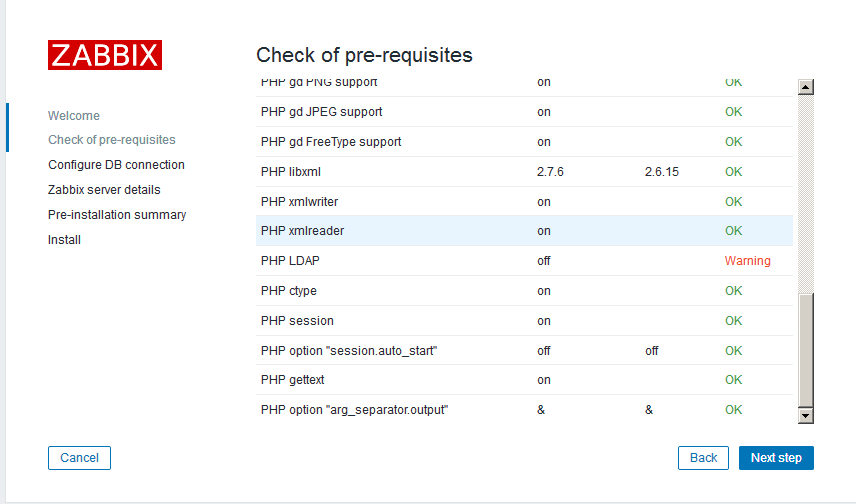
解决方法:
1、首先查看源码安装的php模块中是否有ldap.so
[root@nms ldap]# ll  /usr/local/php/lib/php/extensions/no-debug-non-zts-20160303/
total 1576
-rwxr-xr-x 1 root root  129484 Aug 22 10:18 ldap.so               # 出现告警是因为此模块不存在,须要编译生成此模块并重新加载
-rwxr-xr-x 1 root root 1430846 Aug 21 19:38 opcache.so
[root@nms ldap]#
2、如何本机中已经有ldap.so,只须要在php.ini文件中添加extension=ldap.so
     ; Dynamic Extensions ;

     ;;;;;;;;;;;;;;;;;;;;;;

     ; If you wish to have an extension loaded automatically, use the following

     ; syntax:

         extension=ldap.so          #新添加内容

     ;

     ;   extension=modulename.extension

     ;

     ; For example, on Windows:

     ;

     ;   extension=msql.dll

     ;

     ; ... or under UNIX:

     ;

     ;   extension=msql.so

     ;

     ; ... or with a path:

     ;

     ;   extension=/path/to/extension/msql.so

     ;
3、如果相应的模块不存在
3.1下载相应的php版本源码到主目录,进行源码编译ldap模块(重点,其他模块如果缺失编译方法一样)
[root@nms ~]# tar jxvf php-7.1..tar.bz2

[root@nms ~]# ls

anaconda-ks.cfg                  install.log         lnmp-install.log  php-7.1..tar.bz2

databases_backup_20170821115223  install.log.syslog  php-7.1.
[root@nms ldap]# cd /root/php-7.1.7/ext/ldap/            #进入模块所在的源码位置
[root@nms ldap]# ll
total 144
-rw-rw-r-- 1 1000 1000   7374 Jul  6 17:30 config.m4
-rw-rw-r-- 1 1000 1000   1008 Jul  6 17:30 config.w32
-rw-rw-r-- 1 1000 1000     77 Jul  6 17:30 CREDITS
-rw-rw-r-- 1 1000 1000 102189 Jul  6 17:30 ldap.c
-rw-rw-r-- 1 1000 1000   4464 Jul  6 17:30 ldap.mak
-rw-rw-r-- 1 1000 1000   1546 Jul  6 17:30 LDAP_Win32_HOWTO.txt
-rw-rw-r-- 1 1000 1000   2315 Jul  6 17:30 php_ldap.h
drwxrwxr-x 2 1000 1000  12288 Jul  6 17:30 tests
[root@nms ldap]# /usr/local/php/bin/phpize             #编译PHP扩展的工具,主要是根据系统信息生成对应的configure文件
Configuring for:
PHP Api Version:         20160303
Zend Module Api No:      20160303
Zend Extension Api No:   320160303
[root@nms ldap]# ./configure  --with-php-config=/usr/local/php/bin/php-config  --with-ldap   #编译
checking for grep that handles long lines and -e... /bin/grep
checking for egrep... /bin/grep -E
checking for a sed that does not truncate output... /bin/sed
........

[root@nms ldap]# make && make install                                                #安装
/bin/sh /root/php-7.1.7/ext/ldap/libtool --mode=compile cc -DLDAP_DEPRECATED=1 -I. -I/root/php-7.1.7/ext/ldap -DPHP_ATOM_INC -I/root/php-7.1.7/ext/ldap/include -I/root/php-7.1.7/ext/ldap/main -I/root/php-7.1.7/ext/ldap -I/usr/local/php/include/php -I/usr/local/php/include/php/main -I/usr/local/php/include/php/TSRM -I/usr/local/php/include/php/Zend -I/usr/local/php/include/php/ext -I/usr/local/php/include/php/ext/date/lib  -DHAVE_CONFIG_H  -g -O2   -c /root/php-7.1.7/ext/ldap/ldap.c -o ldap.lo
mkdir .libs
 cc -DLDAP_DEPRECATED=1 -I. -I/root/php-7.1.7/ext/ldap -DPHP_ATOM_INC -I/root/php-7.1.7/ext/ldap/include -I/root/php-7.1.7/ext/ldap/main -I/root/php-7.1.7/ext/ldap -I/usr/local/php/include/php -I/usr/local/php/include/php/main -I/usr/local/php/include/php/TSRM -I/usr/local/php/include/php/Zend -I/usr/local/php/include/php/ext -I/usr/local/php/include/php/ext/date/lib -DHAVE_CONFIG_H -g -O2 -c /root/php-7.1.7/ext/ldap/ldap.c  -fPIC -DPIC -o .libs/ldap.o
/bin/sh /root/php-7.1.7/ext/ldap/libtool --mode=link cc -DPHP_ATOM_INC -I/root/php-7.1.7/ext/ldap/include -I/root/php-7.1.7/ext/ldap/main -I/root/php-7.1.7/ext/ldap -I/usr/local/php/include/php -I/usr/local/php/include/php/main -I/usr/local/php/include/php/TSRM -I/usr/local/php/include/php/Zend -I/usr/local/php/include/php/ext -I/usr/local/php/include/php/ext/date/lib  -DHAVE_CONFIG_H  -g -O2   -o ldap.la -export-dynamic -avoid-version -prefer-pic -module -rpath /root/php-7.1.7/ext/ldap/modules  ldap.lo -lldap -llber
cc -shared  .libs/ldap.o  -lldap -llber  -Wl,-soname -Wl,ldap.so -o .libs/ldap.so
creating ldap.la
(cd .libs && rm -f ldap.la && ln -s ../ldap.la ldap.la)
/bin/sh /root/php-7.1.7/ext/ldap/libtool --mode=install cp ./ldap.la /root/php-7.1.7/ext/ldap/modules
cp ./.libs/ldap.so /root/php-7.1.7/ext/ldap/modules/ldap.so
cp ./.libs/ldap.lai /root/php-7.1.7/ext/ldap/modules/ldap.la
PATH="$PATH:/sbin" ldconfig -n /root/php-7.1.7/ext/ldap/modules
----------------------------------------------------------------------
Libraries have been installed in:
   /root/php-7.1.7/ext/ldap/modules

If you ever happen to want to link against installed libraries
in a given directory, LIBDIR, you must either use libtool, and
specify the full pathname of the library, or use the `-LLIBDIR'
flag during linking and do at least one of the following:
   - add LIBDIR to the `LD_LIBRARY_PATH' environment variable
     during execution
   - add LIBDIR to the `LD_RUN_PATH' environment variable
     during linking
   - use the `-Wl,--rpath -Wl,LIBDIR' linker flag
   - have your system administrator add LIBDIR to `/etc/ld.so.conf'

See any operating system documentation about shared libraries for
more information, such as the ld(1) and ld.so(8) manual pages.
----------------------------------------------------------------------

Build complete.
Don't forget to run 'make test'.

Installing shared extensions:     /usr/local/php/lib/php/extensions/no-debug-non-zts-20160303/          #make 生成模块安装位置
[root@nms ldap]#
[root@nms php-7.1.7]# ll /usr/local/php/lib/php/extensions/no-debug-non-zts-20160303/                   #确认ldap.so模块存在
total 1576
-rwxr-xr-x 1 root root  129484 Aug 22 10:18 ldap.so
-rwxr-xr-x 1 root root 1430846 Aug 21 19:38 opcache.so

[root@nms php-7.1.7]# vi /usr/local/php/etc/php.ini                                         #编辑php.ini,添加新生成的ldap.so模块

    853 default_socket_timeout = 60
    854
    855 ; If your scripts have to deal with files from Macintosh systems,
    856 ; or you are running on a Mac and need to deal with files from
    857 ; unix or win32 systems, setting this flag will cause PHP to
    858 ; automatically detect the EOL character in those files so that
    859 ; fgets() and file() will work regardless of the source of the file.
    860 ; http://php.net/auto-detect-line-endings
    861 ;auto_detect_line_endings = Off
    862
    863 ;;;;;;;;;;;;;;;;;;;;;;
    864 ; Dynamic Extensions ;
    865 ;;;;;;;;;;;;;;;;;;;;;;
    866
    867 ; If you wish to have an extension loaded automatically, use the following
    868 ; syntax:
    869     extension=ldap.so                                     #新添加模块
    870 ;
    871 ;   extension=modulename.extension
    872 ;
    873 ; For example, on Windows:
    874 ;
    875 ;   extension=msql.dll
    876 ;
    877 ; ... or under UNIX:
    878 ;
    879 ;   extension=msql.so
    880 ;

[root@nms php-7.1.7]# service httpd restart           #重启httpd
restart apache...  done
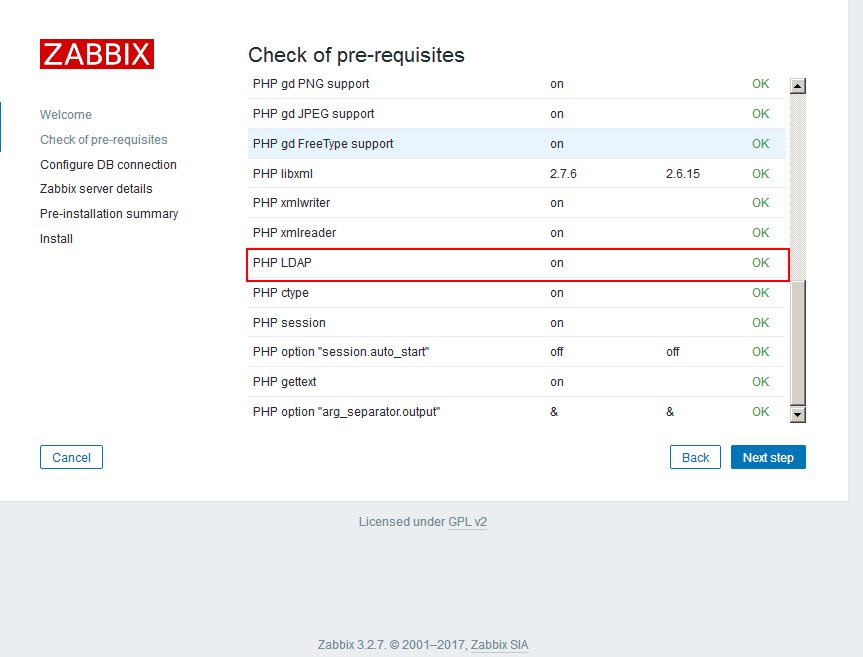
4、http://192.168.0.198/zabbix/setup.php再次进入前端安装
发现PHP LDAP模块 OK!!
5、至此zabbix 前面安装 “Check of pre-requisites”全部OK
源码安装zabbix3.2.7时PHP ldap Warning的更多相关文章
- 如何解决源码安装软件中make时一直重复打印configure信息
在通过源码安装软件时,会出现执行./configure后再make时总是重复打印configure的信息,无法进入下一阶段的安装. 主要原因是系统当前的时间与实际时间不一致,特别是在虚拟机上经常会出现 ...
- Linux MySQL源码安装缺少ncurses-devel包
在Red Hat Enterprise Linux Server release 5.7 上用源码安装MySQL-5.6.23时,遇到了" remove CMakeCache.txt and ...
- CentOS Linux release 7.3源码安装zabbix
CentOS Linux release 7.3安装zabbix 作者:尹正杰 版权声明:原创作品,谢绝转载!否则将追究法律责任. 前言: 我去年用用centos6的环境搭建了一下 zabbix3.0 ...
- zabbix3.4.6之源码安装
LAMP部署环境搭建: Linux+apache(httpd)+mysql(mariadb)+php: 版本要求:apache-1.3.12,mysql-5.0.3,php-5.4.0<http ...
- zabbix-3.4.14源码安装
此次介绍一下,zabbix的源码安装,因为zabbix的依赖很多,所以源码安装有很多依赖需要安装 首先,下载zabbix源码包 wget https://nchc.dl.sourceforge.net ...
- odoo 使用源码安装时的注意
odoo 使用源码安装时的注意 使用 odoo 源安装 odoo 时,会增加 odoo 官方的 odoo 源. 安装时直接输入 yum install odoo 即可安装 odoo. 但是更新时就要注 ...
- zabbix3.4源码安装步骤
zabbix3.4源码安装步骤1.安装环境: 安装机器:22.224.9.227 以下简称监控机: 操作系统信息:内核版本: Linux version 2.6.18-194.1.AXS3 (pack ...
- mono-3.4.0 源码安装时出现的问题 [do-install] Error 2 [install-pcl-targets] Error 1 解决方法
Mono 3.4修复了很多bug,继续加强稳定性和性能(其实Mono 3.2.8 已经很稳定,性能也很好了),但是从http://download.mono-project.com/sources/m ...
- zabbix源码安装实例
环境 系统 Centos7 zabbix版本 Zabbix 3.4.15 (revision 86739) zabbix源码安装 .tar.gz cd zab ...
随机推荐
- svg path 路径
许多字母命令(例如:M m)(但不是全部)成对.有一个大写和一个小写版本.大写版本是绝对版本,小写是相对版本.让我们继续以M为例: M 100,100 意思是“拿起笔并将其移动到确切的坐标100,10 ...
- 2016 Multi-University Training Contest 10 [HDU 5861] Road (线段树:区间覆盖+单点最大小)
HDU 5861 题意 在n个村庄之间存在n-1段路,令某段路开放一天需要交纳wi的费用,但是每段路只能开放一次,一旦关闭将不再开放.现在给你接下来m天内的计划,在第i天,需要对村庄ai到村庄bi的道 ...
- BZOJ1725】[Usaco2006 Nov]Corn Fields牧场的安排 状压DP
Description Farmer John新买了一块长方形的牧场,这块牧场被划分成M列N行(1<=M<=12; 1<=N<=12),每一格都是一块正方形的土地.FJ打算在牧 ...
- 百度判断手机终端并自动跳转uaredirect.js代码及使用实例
百度siteapp下的一款跳转的产品,使用起来很方便.你可以用这款JS跳转到手机版,也可以跳转到任何你想跳转的位置. js代码如下: function uaredirect(f) { try { if ...
- 实时同步sersync
1.1 sersync+rsync实现实时同步过程 第一个历程:安装sersync软件 将软件进行下载,上传到系统/server/tools目录中 下载软件地址:https://github.com/ ...
- python3 多线程笔记
import threadingimport time #继承 class threading.Threadclass MyThread(threading.Thread): #类做初始化 def _ ...
- Why do you need a new Launch X431 scan tool?
1- 2017 Launch x431 v supports “Special Functions” The 2017 version of Launch x431 v diagnostic tool ...
- vue+iview中的table表格导出excel表格
一.iveiw框架中table中有exportCsv()方法可以导出.csv后缀文件,类似于excel文件,但是并不是excel文件. 二.实现table表格导出excel文件利用Blob.js 和 ...
- shiro【filter】
alt+7 OncePerRequestFilter public final void doFilter(ServletRequest request, ServletResponse respon ...
- DataFrame的数据类型转换
dfxxx['username']=pd.to_numeric(dfxxx['username'],errors='coerce')#将不能转换数据类型的值强制转换成NaN dfxxx['userna ...