
httpd虚拟主机、站点访问控制、基于用户的访问控制、持久链接等应用配置实例
httpd配置内容
httpd2.2

配置文件:

    /etc/httpd/conf/httpd.conf

    /etc/httpd/conf.d/*.conf

服务脚本:

    /etc/rc.d/init.d/httpd

脚本配置文件:

    /etc/sysconfig/httpd

主程序文件:

    /usr/sbin/httpd

    /usr/sbin/httpd.event

    /usr/sbin/httpd.worker

日志文件:

    /var/log/httpd:access_log:访问日志,error_log:错误日志

站点文档:

    /var/www/html

模块文件路径:

    /usr/lib64/httpd/modules

服务控制和启动:

    chkconfig  httpd  on|off

    service {start|stop|restart|status|configtest|reload} httpd

httpd2.4

配置文件:

    /etc/httpd/conf/httpd.conf

    /etc/httpd/conf.d/*.conf

模块相关的配置文件:

    /etc/httpd/conf.modules.d/*.conf

systemd unit file:

    /usr/lib/systemd/system/httpd.service

主程序文件:

    /usr/sbin/httpd(httpd-2.4支持MPM的动态切换)

日志文件:

    /var/log/httpd: access_log:访问日志,    error_log:错误日志

站点文档:

    /var/www/html

模块文件路径:

    /usr/lib64/httpd/modules

服务控制:

    systemctl enable|disable httpd.service

    systemctl {start|stop|restart|status} httpd.service
httpd的基础配置
1)修改监听的ip和port,在主配置文件/etc/httpd/conf/httpd.conf中修改,格式如:Listen [IP:]PORT。需要注意的有3点:
①省略IP表示匹配本机全部ip;
②Listen指令可重复出现多次;
③修改监听socket,重启服务进程方可生效。
示例:
[root@happiness ~]# vim /etc/httpd/conf/httpd.conf

    Listen 80

    Listen 192.168.4.50:8090

[root@happiness ~]# systemctl start httpd.service

[root@happiness ~]# ss -tan

State       Recv-Q Send-Q             Local Address:Port                            Peer Address:Port

LISTEN      0      128                 192.168.4.50:8080                                       *:*

LISTEN      0      5                  192.168.122.1:53                                         *:*

LISTEN      0      128                            *:22                                         *:*

LISTEN      0      128                    127.0.0.1:631                                        *:*

LISTEN      0      100                    127.0.0.1:25                                         *:*

ESTAB       0      52                 192.168.4.119:22                              192.168.4.93:49948

LISTEN      0      128                           :::80                                        :::*

LISTEN      0      128                           :::22                                        :::*

LISTEN      0      128                          ::1:631                                       :::*

LISTEN      0      100                          ::1:25                                        :::*
2)长连接。tcp连续建立后,每个资源获取完成后不全断开连接,而是继续等待其它资源请求的进行。对并发访问量较大的服务器,长连接机制会使得后续某些请求无法得到正常响应,对这种情况,我们可以使用较短的持久连接时长,以及较少的请求数量。
配置指令:
KeepAlive On|Off #是否启用长连接
KeepAliveTimeout Seconds #超时时长
MaxKeepAliveRequests Number #最多保持多少个长连接的请求
示例:
[root@happiness ~]# vim /etc/httpd/conf.d/keepalive.conf  #新建

    KeepAlive On

    KeepAliveTimeout 30

    MaxKeepAliveRequests 200

[root@happiness ~]# systemctl restart httpd.service

[root@happiness ~]# telnet 192.168.4.50 8080

Trying 192.168.4.50...

Connected to 192.168.4.50.

Escape character is '^]'.

GET /index.html HTTP/1.1

HOST:192.168.4.50    #输入后连按两次Enter

HTTP/1.1 200 OK

Date: Fri, 08 Jun 2018 04:25:03 GMT

Server: Apache/2.4.6 (CentOS)

Last-Modified: Fri, 08 Jun 2018 01:50:41 GMT

ETag: "17-56e17a0a33249"

Accept-Ranges: bytes

Content-Length: 23

Content-Type: text/html; charset=UTF-8

<h2>hello, world.</h2>

#注意:此处因为启用了KeepAlive,连接没有断开,可以继续输入内容;如果没有启用KeepAlive则请求成功后会直接退出telnet
3)自定义web站点。在httpd服务的主配置文件中,默认情况下DocumentRoot "/var/www/html"定义了默认web站点目录的路径。如需自定义站点,需按如下格式进行添加:
httpd-2.2:
DocumentRoot "/PATH/TO/FILE"
<Directory "/PATH/TO/FILE">
Options Indexes FollowSymLinks
AllowOverride None #用于定义每个目录下.htaccess文件中的指令类型,但通常设置None
Order allow,deny #定义默认的访问权限与Allow和Deny语句的处理顺序,此处先匹配allow再匹配deny
Allow from all #针对客户机的域名或IP地址进行访问限制,如:Allow from all或者Deny from 192.168等
</Directory>
httpd-2.4:
DocumentRoot "/PATH/TO/FILE"
<Directory "/PATH/TO/FILE">
Options Indexes FollowSymLinks
AllowOverride None
Require all granted #http-2.4中的允许所有人访问,如果要禁止某个IP或域名的访问,如:Require not ip 1.1.1.1、Require not host xxxx.com或者禁止所有人访问Require all denied
</Directory>
其中options包括以下的可选参数:
| 参数 | 说明 |
|---|---|
| Indexes | 允许目录浏览,当客户仅指定要访问的目录,但没有指定要访问的文件,且目录下不存在默认文档时,显示该目录中的文件及子目录列表索引 |
| MultiViews | 允许内容协商的多重视图,允许返回指定的访问目录下的相关联的文件 |
| All | All包含了除MultiViews之外的所有特性,如没有指定options,默认为All |
| ExecCGI | 允许在该目录下执行CGI脚本 |
| FollowSymLinks | 允许跟踪符号链接到源文件 |
| Includes | 允许服务器端包含功能 |
| IncludesNoExec | 允许服务器端包含功能,但禁止执行CGI脚本 |
| None | 不调用options参数 |
示例:
[root@happiness ~]# mkdir -p /test/html

[root@happiness ~]# vim /test/html/test.html

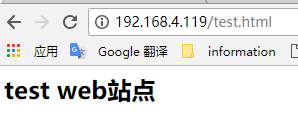
   <h2>test web站点</h2>

[root@happiness ~]# chcon -R --reference /var/www/html /test/html #复制/var/www/html的selinux安全上下文到/data/html,如果没复制安全上下文可能会导致访问index.html出现403的提示

[root@happiness ~]# vim /etc/httpd/conf/httpd.conf

   #DocumentRoot "/var/www/html"  #注释默认的web根站点

   DocumentRoot "/test/html"  #定义要启用的web根站点

   <Directory "/test/html">

        Options None

        AllowOverride None

        Require all granted

   </Directory>

[root@happiness ~]# systemctl restart httpd.service
结果:
httpd的访问控制
1)在Directory中基于IP地址实现访问控制
http-2.2中基于IP地址的访问控制是利用Allow和Deny来实现的,如:
<Directory "/PATH/TO/FILE">
Options Indexes FollowSymLinks
AllowOverride None
Order allow, deny
Allow from IP | NetAddr
Deny from IP | NetAddr
</Directory>
其中NetAddr的格式可类似:172.16、172.16.0.0、172.16.0.0/16、172.16.0.0/255.255.0.0。
httpd-2.4中基于Ip地址访问的控制是利用Require实现,如:
<Directory "/PATH/TO/FILE">
AllowOverride none
Options none
<RequireAll>
Require ip IP | NetAddr #允许访问的IP或网段
Require not ip IP | NetAddr #拒绝访问的Ip或网段
</RequireAll>
</Directory>
此外httpd-2.4版本中还可以利用host名来进行访问控制,如:
<Directory "/PATH/TO/FILE">
AllowOverride none
Options none
<RequireAll>
Require host google.com #允许来自域名为google.com所有主机的访问
Require not host www.xxxx.com #不允许来自主机名为www.xxxx.com的访问
</RequireAll>
</Directory>
示例:
[root@happiness ~]# mkdir /test/virtualhtml

[root@happiness ~]# vim /test/virtualhtml/virtualtest.html

     <h2>test for virtual</h2>

[root@happiness ~]# vim /etc/httpd/conf.d/virualhost.conf

  <VirtualHost 192.168.4.50:8080>

      DocumentRoot "/test/virtualhtml"

      <Directory "/test/virtualhtml">

          AllowOverride None

          Options None

          <RequireAll>

              Require all granted

              Require not ip 192.168.4.154    #禁止ip192.168.4.154的主机访问

          </RequireAll>

      </Directory>

  </VirtualHost>
结果:
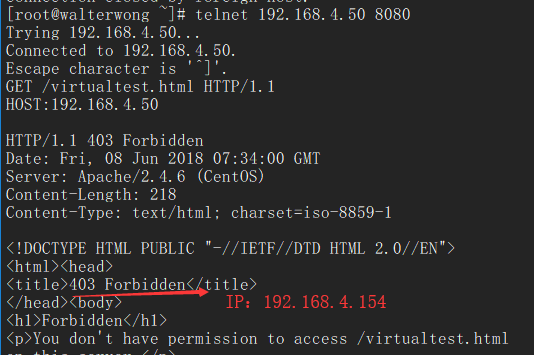
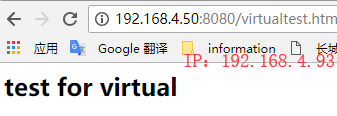
2)在Directory中基于用户的访问控制
在Directory中支持的认证方式有两种 basic明文认证和 digest消息摘要认证,不是所有浏览器都支持摘要认证,因此一般来说用的较多的是 basic明文认证。
用htpasswd命令生成认证的配置文件:
[root@happiness ~]# htpasswd -cb /data/httpduser walter 123456

[root@happiness ~]# htpasswd -b /data/httpduser alex 123456

[root@happiness ~]# cat /data/httpduser

  walter:$apr1$CYZpqBy5$gxnNCiKSIX.qN8LRI809L.

  alex:$apr1$vGncT2dc$.S0TsnDFINqf5BhHP0Hvi.

[root@happiness ~]# chcon -R --reference /var/www /data/httpduser
编辑主配置文件:
[root@happiness ~]# vim /etc/httpd/conf/httpd.conf

DocumentRoot "/test/html"

<Directory "/test/html">

    Options None

    AllowOverride None

    AuthType Basic  #认证方式Basic

    AuthName "user test"    #授权机制名称

    AuthUserFile "/data/httpduser"  #授权文件位置

    Require user alex  #允许访问的用户

</Directory>

[root@happiness ~]# systemctl restart httpd.service
结果:
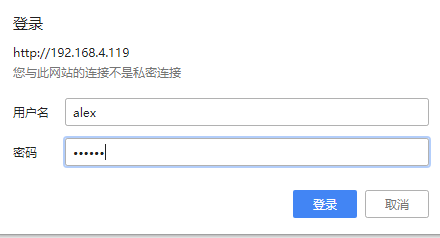
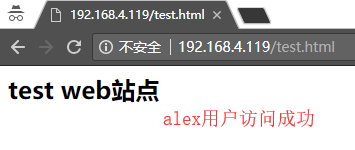
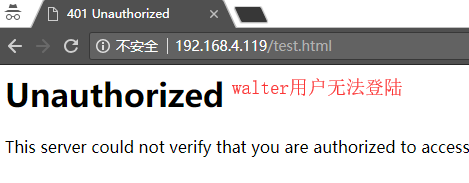
3)基于组的用户访问控制
除了对用户做访问控制之外,还能将用户划分为相应的组从而根据组来做相应的访问控制,接着上一个例子中的用户来做组访问控制。
创建组文件:
[root@happiness ~]# vim /data/httpdgroup

   groupA:walter

   groupB:alex

[root@happiness ~]# chcon -R --reference /var/www /data/httpdgroup
编辑主配置文件:
[root@happiness ~]# vim /etc/httpd/conf/httpd.conf

DocumentRoot "/test/html"

<Directory "/test/html">

    Options None

    AllowOverride None

    AuthType Basic  #认证方式Basic

    AuthName "user test"    #授权机制名称

    AuthUserFile "/data/httpduser"  #授权用户文件位置

    AuthGroupFile "/data/httpdgroup"  #授权用户组文件位置

    Require group groupA  #允许访问的组

</Directory>

[root@happiness ~]# systemctl restart httpd.service
结果:
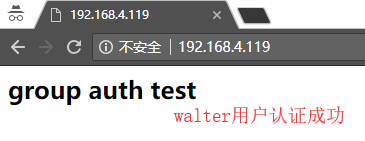

httpd的虚拟主机VirtualHost
通常在一台服务器安装Apache后,我们只能访问一个web站点,如果我们需要在一台服务器访问多个web站点,则需要通过Apache的VirtualHost虚拟主机实现,其实就是通过VirtualHost实现访问同一个服务器上的不同目录。
虚拟主机支持三种建立方式:
- 基于ip的方式,需要为每个虚拟主机准备至少一个ip地址,配置格式如:
<VirtualHost IP:PORT>
ServerName "www.xxx.cn" #虚拟主机域名
DocumentRoot "/www/xxx" #虚拟主机web目录
</VirtualHost>
示例:
#创建目录

  [root@happiness ~]# mkdir -p /data/Vip/test1

  [root@happiness ~]# mkdir -p /data/Vip/test2

  [root@happiness ~]# chcon -R --reference /var/www/html /data/Vip #复制安全上下文

#创建index.html文件

  [root@happiness ~]# vim /data/Vip/test1/index.html

      <h1>virtual test based on ip. one</h1>

  [root@happiness ~]# vim /data/Vip/test2/index.html

      <h1>virtual test based on ip. two</h1>

#注释/var/www/html作为根路径

  [root@happiness ~]# vim /etc/httpd/conf/httpd.conf

      #DocumentRoot /var/www/html

#添加virtualhost.conf配置文件(文件名自定义)

  [root@happiness ~]# vim /etc/httpd/conf.d/virtualhost.conf

    <VirtualHost 192.168.4.119:80>

         DocumentRoot "/data/Vip/test1"

         <Directory "/data/Vip/test1">

             AllowOverride None

             Options None

             Require all granted

         </Directory>

    </VirtualHost>

    <VirtualHost 192.168.4.120:80>

        DocumentRoot "/data/Vip/test2"

        <Directory "/data/Vip/test2">

           AllowOverride None

           Options None

           Require all granted

         </Directory>

    </VirtualHost>

#启动httpd服务

  [root@happiness ~]# systemctl start httpd.service
#清空防火墙规则
  [root@happiness ~]# iptables -F

访问结果: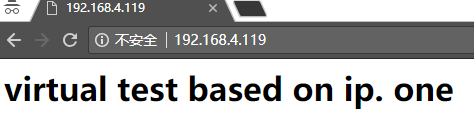

- 基于port的方式,需要为每个虚拟主机配置一个独立的port,配置格式如:
Listen 8080 #指定其它端口时,需要添加监听该端口
<VirtualHost IP:PORT>
ServerName "www.xxx.cn" #虚拟主机域名
DocumentRoot "/www/xxx" #虚拟主机web目录
</VirtualHost>
示例:
#在上面的基础上直接修改virtualhost文件

[root@happiness ~]# vim /etc/httpd/conf.d/virtualhost.conf

Listen 8080

<VirtualHost 192.168.4.119:80>

    DocumentRoot "/data/Vip/test1"

    <Directory "/data/Vip/test1">

        AllowOverride None

        Options None

        Require all granted

    </Directory>

</VirtualHost>

<VirtualHost 192.168.4.119:8080>

    DocumentRoot "/data/Vip/test2"

    <Directory "/data/Vip/test2">

        AllowOverride None

        Options None

        Require all granted

    </Directory>

</VirtualHost>

访问结果:

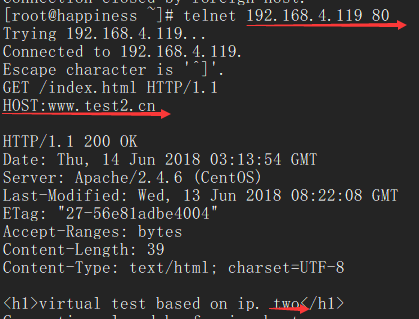
- 基于FQDN的方式,需要为每个虚拟主机配置一个FQDN,配置格式如:
NameVirtualHost 172.16.100.6:80 #httpd-2.2需要在配置文件中添加此句
<VirtualHost 172.16.100.6:80>
ServerName www.xxx.com #指定FQDN
DocumentRoot "/www/xxxcom"
</VirtualHost>
<VirtualHost 172.16.100.6:80>
ServerName www.xxx.cn #指定FQDN
DocumentRoot "/www/xxxcn"
</VirtualHost>
示例:
#在上面的基础上直接修改virtualhost文件

[root@happiness ~]# vim /etc/httpd/conf.d/virtualhost.conf

<VirtualHost 192.168.4.119:80>

    ServerName www.test1.cn

    DocumentRoot "/data/Vip/test1"

    <Directory "/data/Vip/test1">

        AllowOverride None

        Options None

        Require all granted

    </Directory>

</VirtualHost>

<VirtualHost 192.168.4.119:80>

    ServerName www.test2.cn

    DocumentRoot "/data/Vip/test2"

    <Directory "/data/Vip/test2">

        AllowOverride None

        Options None

        Require all granted

    </Directory>

</VirtualHost>

访问结果: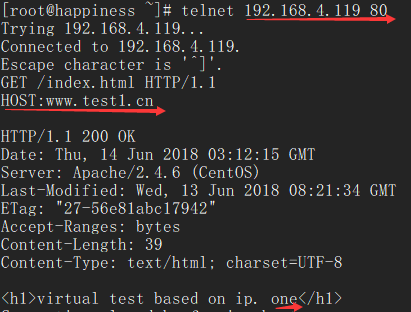
httpd虚拟主机、站点访问控制、基于用户的访问控制、持久链接等应用配置实例的更多相关文章
- 简述站点访问控制、基于用户的访问控制、httpd虚拟主机、持久链接等应用配置实例
1 站点访问控制 可基于两种机制指明对哪些资源进行何种访问控制: 文件系统路径 URL路径 注意: 从上到下匹配,匹配到一个就立即执行 如果没有子目录的访问控制,但是有父目录的访问控制,则子目录继承父 ...
- centos LAMP第二部分apache配置 下载discuz!配置第一个虚拟主机 安装Discuz! 用户认证 配置域名跳转 配置apache的访问日志 配置静态文件缓存 配置防盗链 访问控制 apache rewrite 配置开机启动apache tcpdump 第二十节课
centos LAMP第二部分apache配置 下载discuz!配置第一个虚拟主机 安装Discuz! 用户认证 配置域名跳转 配置apache的访问日志 配置静态文件缓存 配置防盗链 ...
- Nginx三种模式的虚拟主机(附Apache基于域名的虚拟主机)
1.安装nginx # pcre中文"perl兼容正则表达式",安装pcre库是为了让nginx支持具备URL重写功能 # 的Rewrite模块,rewrite可以实现动态页面转成 ...
- CentOS 7 配置虚拟主机站点
1.进入/etc/httpd/conf 下 将httpd.conf 打开. 2.将DocumentRoot注释掉.(将ServerName 打开要不会有错误警告). 3.将虚拟主机站点配置包含进来:I ...
- 基于Apache在本地配置多个虚拟主机站点
简单的说,打开httpd.conf 在最后加入如下内容: <VirtualHost 127.0.0.2:80> DocumentRoot d:/AppServ/www2 Ser ...
- CentOS7配置httpd虚拟主机
本实验旨在CentOS7系统中,httpd-2.4配置两台虚拟主机,主要有以下要求: (1) 提供两个基于名称的虚拟主机: www1.stuX.com,页面文件目录为/web/vhosts/www1: ...
- httpd 虚拟主机建立之访问机制及其日志定义
注:关闭防火墙,selinux VirtualHost定义: 基于IP地址VirtualHost: 编辑httpd.conf文件: #DocumentRoot "/web/html" ...
- 配置httpd虚拟主机
轻松配置httpd的虚拟主机 httpd使用VirtualHost指令进行虚拟主机的定义.支持三种虚拟主机:基于ip,基于端口和基于名称.其中基于端口的虚拟主机在httpd的术语上(例如官方手册)也属 ...
- Apache的虚拟主机功能(基于IP、域名、端口号)
Apache虚拟主机就是在一个Apache服务器上配置多个虚拟主机,实现一个服务器提供多站点服务,其实就是访问同一个服务器上的不同目录. 主要有三种方法: 1.通过不同的IP地址 2.通过不同的域名 ...
随机推荐
- redis 读写锁实现
一 先搞清楚读写锁要做什么. 基本就是 读读不互斥,读写互斥,写写互斥.可重入. 关于redis读写锁,我写了一次之后,总觉得很怪,然后就上网看到大神的redisson了,果断借鉴一番. 二 读行为 ...
- MySQL锁行锁表
select..for update; 给数据库表手动上锁 --锁行Begin; for update; --给 id=1 的行加上排它锁且 id 有索引 ; Commit; -- 锁表 BEGIN; ...
- Asp.Net中ObjectDataSource控件传参绑定数据
最近在实习,在上头交付的任务中,由于需要使用Asp.Net的ListView控件,因此必然得就使用了ObjectDataSource控件,由于在使用过程中,需要网页中的参数发送到后台后,运行该参数进行 ...
- vue-样式问题
问题: 今天在用vue开发单页面应用的时候,遇到一个问题,在A页面,直接刷新,页面的布局样式之类的是没有问题的,不过在B页面跳转到A页面,那么A页面有一些样式就不是预期的效果. 发现解决问题: 用调试 ...
- CSS基础必备盒模型及清除浮动
盒模型 盒模型是有两种标准的,一个是标准模型,一个是IE模型. css如何设置两种模型 这里用到了CSS3 的属性 box-sizing /* 标准模型 */ box-sizing:content-b ...
- Elmah 数据库脚本
/* 错误管理工具 SQL代码 */ CREATE TABLE dbo.ELMAH_Error ( ErrorId UNIQUEIDENTIFIER NOT NULL, Application NVA ...
- check_mk手动安装
官方omd rpm包安装 yum -y install /tmp/check-mk-raw-1.2.6p2.demo-el6-34.x86_64.rpm omd create la omd confi ...
- Scikit Learn
Scikit Learn Scikit-Learn简称sklearn,基于 Python 语言的,简单高效的数据挖掘和数据分析工具,建立在 NumPy,SciPy 和 matplotlib 上.
- 罗技G502设置
这个鼠标默认内置了3个档案模式,用G9键来调节. p2 蓝色 1个灯 p2 蓝色 2个灯 p3 蓝色 3个灯 如此循环设置
- for循环研究
for循环和递归是算法设计的重要结构之一: 两者具有相同的设计准则: 1.范围:开始和结束条件: 2.步增条件: 两者都用来处理顺序数据结构和计数计算: 递归也用于分而治之: for循环用于线性扫描: ...