nagios分为监控机和被监控机两类机器
 
   监控主机:gserver150(192.168.111.150)
被监控主机:gserver151(192.168.111.151)
 
一.  监控机器
1. 创建nagios组和用户
  #groupadd nagcmd
  #/usr/sbin/useradd -m nagios
  #passwd nagios
  #/usr/sbin/usermod -a -G nagcmd nagios
 
2. 安装nagios软件
  #tar zxvf nagios-3.4.3.tar.gz
  #./configure --with-command-group=nagcmd
  #make all
  #make install
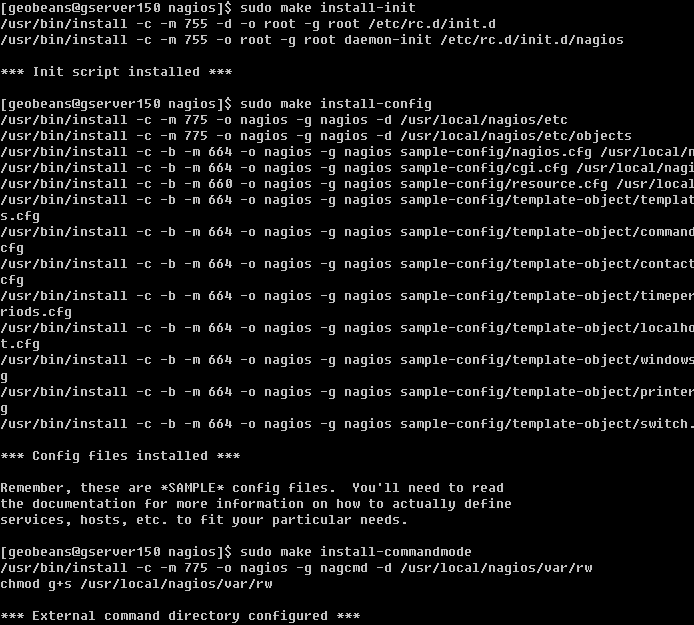
  #make install-init
  #make install-config
  #make install-commandmode
 
 
3. 配置nagios
 安装完成后配置信息在:/usr/local/nagios/etc
 修改 /usr/local/nagios/etc/objects/contacts.cfg文件的email,修改为实际邮件地址。
 
4. 配置web接口
  # make install-webconf
   
  nagios在http上的配置文件为/etc/httpd/conf.d/nagios.conf
  将该文件内容补充到httpd的conf的结尾,重启httpd即可。
  
  修改nagiosadmin的密码
  #htpasswd -c /usr/local/nagios/etc/htpasswd.users nagiosadmin
    
    新密码为:qwer1234
 
5. 配置、启动nagios服务
    
 
6. 浏览器访问http://192.168.111.150/nagios
    
 
7. 安装nagios插件
   # ./configure --with-nagios-user=nagios \
                          --with-nagios-group=nagios \
                          --with-mysql=/opt/mysql-5.5.29 \
                          --with-pgsql=/opt/pgsql-9.1.2
  #make
  #make install
更改httpd.conf中打开cgi module
   
   安装完成后,重新启动apache,就可以看到nagios开始监控本机
   
二. 被监控机
1. 创建nagios用户
    #sudo /usr/sbin/useradd nagios
    #sudo passwd nagios
    
    
2. 安装nagios插件
    #tar zxvf nagios-plugins-1.4.16.tar.gz
    #./configure
    #make
    #make install
    安装完成后再/usr/local/nagios下生成两个目录
    
    
3. 修改目录权限
   #chown nagios.nagios /usr/local/nagios
   #chown -R nagios.nagios /usr/local/nagios/libexec
4. 安装nrpe
   #tar zxvf nrpe-2.13.tar.gz 
   
   #./configure
   #make
   #make install
   
   安装check_nrpe插件(监控机需安装check_nrpe这个插件,被监控机不需要,安装它是为了测试的目的)
   #make install-plugin
   
   安装deamon
   #make install-daemon
   
   安装配置文件
   #make install-daemon-config
   
   现在再查看nagios目录就会发现有4个目录了
   
 
5. 安装xinetd
   按照安装文档的说明,是将NRPE deamon作为xinetd下的一个服务运行的.在这样的情况下xinetd就必须要先安装好,不过一般系统已经默认装了。
   安装xinetd(如果没有安装的话)
   #yum install xinetd.x86_64
   
   安装xinetd脚本
   #make install-xinetd
   
   编辑/etc/services文件,增加NRPE服务
 
   #vi /etc/services
   nrpe            5666/tcp                # nrpe
   
   重启xinetd服务
   #sudo /sbin/service xinetd restart
   
   用netstat命令查看端口,可以看到 nrpe已经运行
   #netstat -at | grep nrpe
   #netstat -ant | grep 5666
   
6.检查nrpe是否工作正常
   #/usr/local/nagios/libexec/check_nrpe -H localhost
   
  显示nrpe的版本号,说明nrpe工作正常
  
三. 在监控机上添加被监控主机
1. 编写cfg_file文件(gserver)
    登录gserver150,进入目录/usr/local/nagios/etc/objects,localhost.cfg即为本机的cfg_file。
    复制localhost.cfg为gserver151.cfg
    并修改gserver151.cfg文件里面的127.0.0.1为192.168.111.151, localhost为gserver151
    在service里面的host_name都需要相应的修改为gserver151,附件为配置文件 
    
    屏蔽掉
    
    否则可能出现nagios不能启动的问题。利用下面的命令检查nagios.conf可以发现问题是hostgroup定义重了。
    
2. 将localhost.cfg设置到gserver150上
    打开/usr/local/nagios/etc/nagios.cfg文件,在下面位置添加一行
    
    重启nagios服务
    #service nagios restart
    即可看到下图。(刚开始gserver151是灰色的,过一会儿nagios获取数据后,开始变为绿色)
    
 
四. nagios监控
1. 监控cpu使用率
2. 监控memory使用率
 
 
FAQ
1. 如果出现如下提示,说明nagios服务没有启动。
   
   执行以下命令
   sudo chkconfig --add nagios
   sudo chkconfig nagios on
   sudo servcie nagios start
   启动nagios服务即可
2. 如果出现以下情况,可能是httpd的cgi模块没有打开,此时需要在httpd.conf中打开mod_cgid.so模块即可
   

CentOS 6.2安装nagios的更多相关文章

  1. Centos 6.x 安装Nagios及WEB管理nagiosql实现windows及linux监控指南

    一.Nagios简介 Nagios是一款开源的电脑系统和网络监视工具,能有效监控Windows.Linux和Unix的主机状态,交换机路由器等网络设置,打印机等.在系统或服务状态异常时发出邮件或短信报 ...

  2. CentOS 安装nagios

    Nagios的介绍: 1.Nagios是一个监控系统运行状态和网络信息的监控系统.它能监控所指定的本地或远程主机的系统状态以及运行的服务,同时提供异常通知的功能. 2. Nagios可运行在Linux ...

  3. CentOS 6.7 安装配置 nagios

    一.简介    Nagios是一款开源的免费网络监视工具,能有效监控Windows.Linux和Unix的主机状态,交换机路由器等网络设置,打印机等.在系统或服务状态异常时发出邮件或短信报警,第一时间 ...

  4. Nagios监控平台之一:在Centos上安装Nagios服务

    1.安装依赖包 #yum install httpd httpd-devel php openssl-devel #yum install gcc glibc glibc-common #yum in ...

  5. centos下安装nagios

    摘要Nagios是一款开源的免费网络监视工具,能有效监控Windows.Linux和Unix的主机状态,交换机路由器等网络设置,打印机等. Nagios是一款开源的免费网络监视工具,能有效监控Wind ...

  6. CentOS下一键安装Openstack

    CentOS下一键安装Openstack 系统环境:Oracle VirtualBox 4.38CentOS-6.5-x86_64-bin-DVD1.iso 安装前需要修改 /etc/hosts文件, ...

  7. 通过yum安装Nagios

    通过yum安装Nagios 2012年04月05日 ⁄ Nagios ⁄ 暂无评论   QQ空间新浪微博腾讯微博人人网更多3   前提先自行安装好Apache+php 测试环境主监控机:CentOS ...

  8. CentOS 6.2+Nginx+Nagios,手机短信和qq邮箱提醒

    http://chenhao6.blog.51cto.com/6228054/1323192 标签:软件包 配置文件 nagios 服务端 监控 原创作品,允许转载,转载时请务必以超链接形式标明文章  ...

  9. CentOS 6.7 安装配置 nagios-server

    作者博文地址:https://www.cnblogs.com/liu-shuai/ 一.简介    Nagios是一款开源的免费网络监视工具,能有效监控Windows.Linux和Unix的主机状态, ...

随机推荐

  1. J2EE 工作中注意事项

    [转载于http://www.cnblogs.com/hemingwang0902/archive/2012/01/06/2314215.html] 根据当前项目中代码存在的一些问题,编写了一个编码注 ...

  2. ARC097D Equals

    传送门 题目 We have a permutation of the integers from 1 through N, p1, p2, .., pN. We also have M pairs ...

  3. 8、泛型程序设计与c++标准模板库4.标准c++库中的算法

    标准c++算法是通过迭代器和模板来实现的,其实算法本身就是一种函数模板. 算法从迭代器那里获得一个元素,而迭代器则知道一个元素在容器中的什么位置.迭代器查找元素的位置并将这些信息提供给算法以便算法能够 ...

  4. Entity Framework Code-First(3):Setup Environment

    Setup Development Environment for EF Code-First: Let's setup the development environment for Code-Fi ...

  5. MapperScan的工作,Spring-Mybatis怎么自动getMapper

    @MapperScan @Import(MapperScannerRegistrar.class) @Repeatable(MapperScans.class) public @interface M ...

  6. Makefiles

    A tutorial by example Compiling your source code files can be tedious, specially when you want to in ...

  7. Error creating form bean of class com.onlinebookstore.presentation.CatalogBean

    Error creating form bean of class com.onlinebookstore.presentation.CatalogBean 可能是action form未编译 这个问 ...

  8. js注册

    ScriptManager.RegisterStartupScript(this, GetType(), "", "alert('修改失败!')", true) ...

  9. Win10访问不了Samba网络共享的解决办法

    一,首先安装SMB功能 1.打开"应用和功能",选择“程序和功能” 2.选择"开启或关闭windows功能" 3.选中下面红框中三个选项,点击确定,然后重启,就 ...

  10. Python包管理工具setuptools详解及entry point

    1.什么是setuptools? setuptools是Python distutils增强版的集合,它可以帮助我们更简单的创建和分发Python包,尤其是拥有依赖关系的.用户在使用setuptool ...