
springMvc配置 中文api
http://7xvpsh.com1.z0.glb.clouddn.com/publish/21-2/the-dispatcher-servlet.html
springmvc4.1.7:配置
复制转载大神笔记
https://blog.csdn.net/lpch0825/article/details/79391982
1、导入jar包
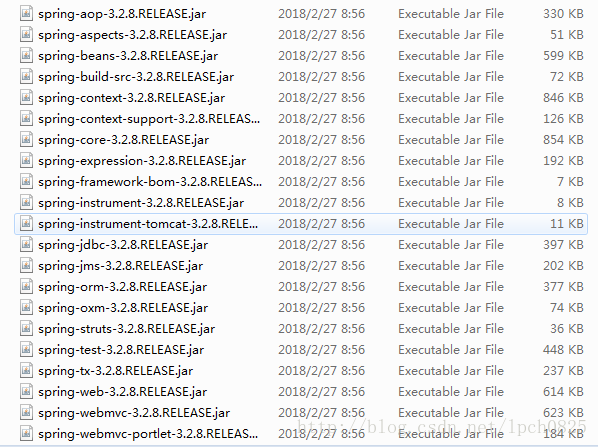
注解主要在spring-webmvc-3.2.8.RELEASE.jar中
2、web.xml配置文件
web.xml中主要配置springMVC的前端控制器(核心控制器)
注:这里采用xxx-servlet.xml默认命名方式,并且文件位于/WEB-INF目录下,所以在web.xml中不需要配置<init-param></init-param>
- <?xml version="1.0" encoding="UTF-8"?>
- <web-app xmlns:xsi="http://www.w3.org/2001/XMLSchema-instance" xmlns="http://java.sun.com/xml/ns/javaee" xsi:schemaLocation="http://java.sun.com/xml/ns/javaee http://java.sun.com/xml/ns/javaee/web-app_3_0.xsd" version="3.0">
- <display-name>spring_mvc_annotation</display-name>
- <!-- springMVC的前端控制器 -->
- <servlet>
- <servlet-name>springmvc</servlet-name>
- <servlet-class>org.springframework.web.servlet.DispatcherServlet</servlet-class>
- </servlet>
- <servlet-mapping>
- <servlet-name>springmvc</servlet-name>
- <url-pattern>/</url-pattern>
- </servlet-mapping>
- </web-app>
3、springmvc-servlet.xml配置文件
注意:表头这里添加mvc声明,声明的地址在 spring-webmvc-3.2.8.RELEASE.jar 中的 META-INF/spring.schemas 中。这样以后<mvc:xxx>标签才会有效
- <?xml version="1.0" encoding="UTF-8"?>
- <beans xmlns="http://www.springframework.org/schema/beans"
- xmlns:xsi="http://www.w3.org/2001/XMLSchema-instance"
- xmlns:mvc="http://www.springframework.org/schema/mvc" <!-- 注意添加mvc声明 -->
- xmlns:aop="http://www.springframework.org/schema/aop"
- xmlns:tx="http://www.springframework.org/schema/tx"
- xmlns:context="http://www.springframework.org/schema/context"
- xsi:schemaLocation="
- http://www.springframework.org/schema/beans
- http://www.springframework.org/schema/beans/spring-beans-3.0.xsd
- http://www.springframework.org/schema/aop
- http://www.springframework.org/schema/aop/spring-aop-3.0.xsd
- http://www.springframework.org/schema/tx
- http://www.springframework.org/schema/tx/spring-tx-3.0.xsd
- http://www.springframework.org/schema/mvc <!-- 注意添加mvc声明 -->
- http://www.springframework.org/schema/mvc/spring-mvc-3.0.xsd <!-- 注意添加mvc声明,注意版本,不写版本会有默认版本 -->
- http://www.springframework.org/schema/context
- http://www.springframework.org/schema/context/spring-context-3.0.xsd">
- <mvc:annotation-driven/>
- <context:component-scan base-package="com.hfxt.controller"></context:component-scan>
- <!-- 配置视图解析器 如何把handler 方法返回值解析为实际的物理视图 根据控制器返回的字符串拼接成jsp路径:/WEB-INF/page/xx.jsp -->
- <bean class="org.springframework.web.servlet.view.InternalResourceViewResolver">
- <property name="prefix" value="/WEB-INF/page/"/><!-- 前缀 -->
- <property name="suffix" value=".jsp"/><!-- 后缀 -->
- </bean>
- </beans>
4、控制层(controller层)
注意:这里的login.jsp已经放入/WEB-INF/page目录下,为了方便视图解析器处理:是进入index.jsp页面还是返回login.jsp登录页面。这时初次进入login.jsp就需要利用toLogin()方法了。
- package com.hfxt.controller;
- import javax.servlet.http.HttpSession;
- import org.springframework.stereotype.Controller;
- import org.springframework.ui.Model;
- import org.springframework.web.bind.annotation.RequestMapping;
- import org.springframework.web.bind.annotation.RequestMethod;
- @Controller //在类上面定义,表明该类为控制器,返回字符串与redirect:xxx
- @RequestMapping(value="/") //在类或方法上面使用此注解,设置URL访问地址。它有两个属性,value指定访问路径,method指定指定请求方式,请求方式在RequestMethod这个类中,全部以常量形式定义,它默认使用GET请求。
- public class LoginController {
- @RequestMapping(value="/login",method=RequestMethod.GET) //访问.../login,方式为get时,该方法处理请求
- public String toLogin(){
- return "login";
- }
- @RequestMapping(value="/login",method=RequestMethod.POST)
- public String doLogin(String username , String password , Model model , HttpSession session){ //访问.../login,方式为post时,该方法处理请求
- if("admin".equals(username)&&"123".equals(password)){
- session.setAttribute("username", username);
- model.addAttribute("message", "登录成功!");
- return "index";
- }else{
- model.addAttribute("message", "登录失败!");
- return "login";
- }
- }
- }
5、jsp页面
login.jsp页面代码
- <?xml version="1.0" encoding="UTF-8" ?>
- <%@ page language="java" contentType="text/html; charset=UTF-8"
- pageEncoding="UTF-8"%>
- <!DOCTYPE html >
- <html xmlns="http://www.w3.org/1999/xhtml">
- <head>
- <meta http-equiv="Content-Type" content="text/html; charset=UTF-8" />
- <title>Insert title here</title>
- </head>
- <body>
- <form action="/spring_mvc_annotation/login" method="post">
- 用户名:<input type="text" name="username" value=""/><br />
- 密码:<input type="password" name="password" value=""/><br />
- <input type="submit" value="登录"/>
- </form>
- <div style="color: red">${message }</div>
- </body>
- </html>
index.jsp页面代码
- <?xml version="1.0" encoding="UTF-8" ?>
- <%@ page language="java" contentType="text/html; charset=UTF-8"
- pageEncoding="UTF-8"%>
- <!DOCTYPE html>
- <html xmlns="http://www.w3.org/1999/xhtml">
- <head>
- <meta http-equiv="Content-Type" content="text/html; charset=UTF-8" />
- <title>Insert title here</title>
- </head>
- <body>
- <h1>${sessionScope.username },${message }</h1>
- </body>
- </html>
Spring MVC是当前最优秀的MVC框架,自从Spring 2.5版本发布后,由于支持注解配置,易用性有了大幅度的提高。上一篇博文已经介绍了最简单的配置文件的详情,这里再介绍一下最简单的注解配置详情,毕竟springMVC是鼓励使用注解的。
1、导入jar包
注解主要在spring-webmvc-3.2.8.RELEASE.jar中
2、web.xml配置文件
web.xml中主要配置springMVC的前端控制器(核心控制器)
注:这里采用xxx-servlet.xml默认命名方式,并且文件位于/WEB-INF目录下,所以在web.xml中不需要配置<init-param></init-param>
- <?xml version="1.0" encoding="UTF-8"?>
- <web-app xmlns:xsi="http://www.w3.org/2001/XMLSchema-instance" xmlns="http://java.sun.com/xml/ns/javaee" xsi:schemaLocation="http://java.sun.com/xml/ns/javaee http://java.sun.com/xml/ns/javaee/web-app_3_0.xsd" version="3.0">
- <display-name>spring_mvc_annotation</display-name>
- <!-- springMVC的前端控制器 -->
- <servlet>
- <servlet-name>springmvc</servlet-name>
- <servlet-class>org.springframework.web.servlet.DispatcherServlet</servlet-class>
- </servlet>
- <servlet-mapping>
- <servlet-name>springmvc</servlet-name>
- <url-pattern>/</url-pattern>
- </servlet-mapping>
springMvc配置 中文api的更多相关文章
- [转载]fullPage.js中文api 配置参数~
fullPage.js中文api 配置参数 选项 类型 默认值 说明 verticalCentered 字符串 true 内容是否垂直居中 resize 布尔值 false 字体是否随着窗口缩放而缩放 ...
- [置顶] COcos2d-X 中文API
本文来自http://blog.csdn.net/runaying ,引用必须注明出处! COcos2d-X 中文API 温馨提醒:使用二维码扫描软件,就可以在手机上访问我的博客啦!另外大家可以访问另 ...
- SpringMVC配置实例
一.SpringMVC概述 MVCII模式实现的框架技术 Model--业务模型(Biz,Dao...) View--jsp及相关的jquery框架技术(easyui) Contraller--Dis ...
- Spring-MVC配置Gson做为Message Converter解析Json
Spring-MVC配置Gson做为Message Converter解析Json 在学习Spring的时候看到可以使用@RequestBody 和@ResponseBody注解来是的Spring自动 ...
- redis中文API
1.学习文档地址:http://www.redisdoc.com/en/latest/index.html 2.redis中文API REDIS所有的命令 <<ABOUT LIST> ...
- ElasticSearch搜索引擎安装配置中文分词器IK插件
近几篇ElasticSearch系列: 1.阿里云服务器Linux系统安装配置ElasticSearch搜索引擎 2.Linux系统中ElasticSearch搜索引擎安装配置Head插件 3.Ela ...
- FreeMarker学习(springmvc配置)
springMvc配置 <bean id="freemarkerConfig" class="org.springframework.web.servlet.vie ...
- springmvc字符 中文乱码问题
springmvc字符 中文乱码问题 1.字符过滤器 输入中文测试,发现乱码 以前乱码问题通过过滤器解决 , 而SpringMVC给我们提供了一个过滤器 , 可以在web.xml中配置,修改了xml文 ...
- Slackware Linux or FreeBSD 配置中文环境。
配置中文环境. Slackware Linux 如果在控制面板的语言与地区选项中没有找到中文,那说明在安装系统选择软件的时候没有将国际语言支持包选上,可以从slackware的安装盘或ISO文件中提取 ...
随机推荐
- ACM学习历程—HDU 5072 Coprime(容斥原理)
Description There are n people standing in a line. Each of them has a unique id number. Now the Ragn ...
- bzoj 2160: 拉拉队排练 回文自动机
题目: Description 艾利斯顿商学院篮球队要参加一年一度的市篮球比赛了.拉拉队是篮球比赛的一个看点,好的拉拉队往往能帮助球队增加士气,赢得最终的比赛.所以作为拉拉队队长的楚雨荨同学知道,帮助 ...
- 在Debug中使用断点调试程序
我最近在学习汇编的程序,所以很多都需要动手写点代码去测试,如果是测试三五行代码的还比较简单,可以在debug中直接按T进行单步调试,但是到后来调试的代码越来越复杂,越来越长,如果再使用单步调试不知道要 ...
- 洛谷【P1873】砍树
我对二分的理解:https://www.cnblogs.com/AKMer/p/9737477.html 题目传送门:https://www.luogu.org/problemnew/show/P18 ...
- javascript中string的用法总结
javascript中很经常的会用到string类型的变量,对此,总结了几种常用操作或者方法:创建.拼接.子串.大小写转换.判断字符串相等.字符串查找等几种.下面将一一简单描述. 一.js中strin ...
- Poj_1004_FinancialManagement
一.Description Larry graduated this year and finally has a job. He's making a lot of money, but someh ...
- 问题4:对dict、list、tuple中的元素排序
一)对字典中元素排序 方法一:利用sorted的key参数进行排序 from random import randint date = {k:randint(0, 20) for k in ran ...
- 【转】Pro Android学习笔记(十一):了解Intent(中)
Intent的构成 Intent可以带有action,data(由URI表达),extra data(key/value map,键值对),指定的类名(成为component name).一个inte ...
- JavaScript接口
JavaScript中实现接口的方法有三种: 第一种,使用注释的方法实现接口 特点:(1)最简单,但是功能最弱(2)利用 interface和 implement"文字"(3)把他 ...
- iOS使用VideoToolbox硬编码录制H264视频
http://blog.csdn.net/shawnkong/article/details/52045894