
Intent创建Activity
1,布局
<?xml version="1.0" encoding="utf-8"?>

<LinearLayout xmlns:android="http://schemas.android.com/apk/res/android"

    xmlns:tools="http://schemas.android.com/tools"

    android:layout_width="match_parent"

    android:layout_height="match_parent"

    android:paddingBottom="@dimen/activity_vertical_margin"

    android:paddingLeft="@dimen/activity_horizontal_margin"

    android:paddingRight="@dimen/activity_horizontal_margin"

    android:paddingTop="@dimen/activity_vertical_margin"

    tools:context="com.example.administrator.app.MainActivity">

   <Button

       android:layout_width="match_parent"

       android:layout_height="wrap_content"

       android:id="@+id/open"

       android:text="open"/>

</LinearLayout>
<?xml version="1.0" encoding="utf-8"?>

<LinearLayout xmlns:android="http://schemas.android.com/apk/res/android"

    android:layout_width="match_parent"

    android:orientation="vertical"

    android:layout_height="match_parent">

    <TextView

        android:layout_width="match_parent"

        android:layout_height="wrap_content"

        android:id="@+id/tv_show"

        />

    <Button

        android:layout_width="match_parent"

        android:layout_height="wrap_content"

        android:text="close"

        android:id="@+id/close"/>

</LinearLayout>
2.逻辑
package com.example.administrator.app;

import android.content.Intent;

import android.support.v7.app.AppCompatActivity;

import android.os.Bundle;

import android.view.View;

import android.widget.Button;

public class MainActivity extends AppCompatActivity {

private Button btn;

    @Override

    protected void onCreate(Bundle savedInstanceState) {

        super.onCreate(savedInstanceState);

        setContentView(R.layout.activity_main);

        btn=(Button)findViewById(R.id.open);

        btn.setOnClickListener(new View.OnClickListener() {

            @Override

            public void onClick(View v) {

                Intent intent= new Intent(MainActivity.this,SActivity.class);

                intent.putExtra("info","title");

                startActivity(intent);

            }

        });

    }

}
package com.example.administrator.app;

import android.app.Activity;

import android.content.Intent;

import android.os.Bundle;

import android.view.View;

import android.widget.Button;

import android.widget.TextView;

/**

 * Created by Administrator on 2018/5/22.

 */

public class SActivity extends Activity {

    private Button btn;

    private TextView tv_show;

    @Override

    protected void onCreate(Bundle savedInstanceState) {

        super.onCreate(savedInstanceState);

        setContentView(R.layout.slayout);

        btn=(Button)findViewById(R.id.close);

        tv_show=(TextView)findViewById(R.id.tv_show);

        btn.setOnClickListener(new View.OnClickListener() {

            @Override

            public void onClick(View v) {

                finish();

            }

        });

        Intent intent=getIntent();

        tv_show.setText(intent.getStringExtra("info"));

    }

}
3,配置
<?xml version="1.0" encoding="utf-8"?>

<manifest xmlns:android="http://schemas.android.com/apk/res/android"

    package="com.example.administrator.app">

    <application

        android:allowBackup="true"

        android:icon="@mipmap/ic_launcher"

        android:label="@string/app_name"

        android:supportsRtl="true"

        android:theme="@style/AppTheme">

        <activity android:name=".MainActivity">

            <intent-filter>

                <action android:name="android.intent.action.MAIN" />

                <category android:name="android.intent.category.LAUNCHER" />

            </intent-filter>

        </activity>

        <activity android:name=".SActivity"></activity>

    </application>

</manifest>
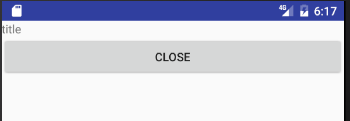
4,效果图

Intent创建Activity的更多相关文章
- Intent和Activity知识点总结
1.Intent的跳转传值2.Intent的隐式启动(用于不同应用中)与显示启动(同一应用中)3.Activity的生命周期 void onCreate()——Activity已经被创建完毕,创 ...
- 【Android进阶】为什么要创建Activity基类以及Activity基类中一般有哪些方法
现在也算是刚刚基本完成了自己的第一个商业项目,在开发的过程中,参考了不少人的代码风格,然而随着工作经验的积累,终于开始慢慢的了解到抽象思想在面向对象编程中的重要性,这一篇简单的介绍一下我的一点收获. ...
- 【Android先进】我们为什么要创建Activity基类Activity什么是一般的基类方法
今天,它可以被视为只是基本完成了其首个商业项目,在发展过程中,风格,然而随着工作经验的积累.最终開始慢慢的了解到抽象思想在面向对象编程中的重要性,这一篇简单的介绍一下我的一点收获. 首先,在如今的项目 ...
- 使用Intent创建Tab页面
前面已经介绍了如何使用TabActivity来创建Activity布局,前面添加Tab页面使用了TabHost.TabSpec如下方法. setContent(int viewId):直接将指定Vie ...
- Android学习笔记三:用Intent串联activity
转载请注明原文地址:http://www.cnblogs.com/ygj0930/p/7513399.html 一:Intent Intent可以理解为 意图. 我们可以通过创建intent实例来定义 ...
- Android(java)学习笔记73:Intent启动Activity
1. Intent启动Activity案例 (1)首先是main.xml和other.xml文件如下: main.xml文件: <?xml version="1.0" enc ...
- 从0系统学Android-2.3使用 Intent 在 Activity 之间穿梭
2.3 使用 Intent 在 Activity 之间穿梭 在上一节中我们已经学会了如何创建一个 Activity 了.对于一个应用程序来说,肯定不可能只有一个 Activity.下面就来学习多个 A ...
- Intent实现Activity组件之间的通信
今天讲解的是使用Intent实现Activity组件之间的通信. 一. 使用Intent显式启动Activity,Activity1àActivity2 1. ...
- 创建Activity
创建Activity 创建 Activity 分为3个步骤: 1.创建一个扩展子Activity的class 2.创建一个Layout 3.在 AndroidMainfest 中 配置这个Activ ...
随机推荐
- linux shell 总结 (整理)
ls /usr/bin/ info #路径操作 dirname basename #“”和‘’与 ` ` 在shell变量中的区别 “ ” 允许通过$符引用其他变量 ‘’禁止引用其他变量符,视为普通字 ...
- hnust py road
问题 C: Py Road 时间限制: 1 Sec 内存限制: 128 MB提交: 125 解决: 34[提交][状态][讨论版] 题目描述 Life is short,you need Pyth ...
- 转:npm install 时总是报phantomjs-prebuilt@2.1.14安装失败
该文章转自:http://www.cnblogs.com/alice626/p/6206722.html 在npm install时总是报如下错误, 尝试单独安装:npm install phanto ...
- atom下python好用的几个插件
atom下python好用的几个插件 atom-beautify 代码优化 atom-python-run 运行 autocomplete-python 代码补全 file-icons 图标优化 hi ...
- 像Excel的表格table
推荐:Spread.js 地址:点击打开链接 Demo:点击打开链接
- Hexo添加字数统计、阅读时长
统计插件 配置 NexT 主题默认已经集成了文章[字数统计].[阅读时长]统计功能,如果我们需要使用,只需要在主题配置文件 _config.yml 中打开 wordcount 统计功能即可.如下所示: ...
- BZOJ 2730:[HNOI2012]矿场搭建(割点+连通块)
[HNOI2012]矿场搭建 Description 煤矿工地可以看成是由隧道连接挖煤点组成的无向图.为安全起见,希望在工地发生事故时所有挖煤点的工人都能有一条出路逃到救援出口处.于是矿主决定在某些挖 ...
- LACP链路聚合控制协议
LACP链路聚合控制协议 来源: https://www.cnblogs.com/taosim/articles/4378691.html http://storage.chinabyte.com/6 ...
- tomcat + apache 动静分离
原文地址:http://blog.csdn.net/gengv/article/details/5739438 从网上查了不少资料,想了解一下如何整合Apache和Tomcat,以便让Apache的h ...
- gitHub优秀android项目
转自:http://blog.csdn.net/shulianghan/article/details/18046021 主要介绍那些不错个性化的View,包括ListView.ActionBar.M ...