
asp.net 网站监控方案
前言:监控web网站方法有很多种,这篇文章说一下对windows服务器 asp.net网站的监控
采用的方案,Powershell + Influxdb + Grafana
1、PowerShell + Influxdb
PowerShell用来收集IIS指标,10秒采集一次,然后写入Influxdb,主要代码如下:需要注意PowerShell需要升级到5.0才能支持influxdb
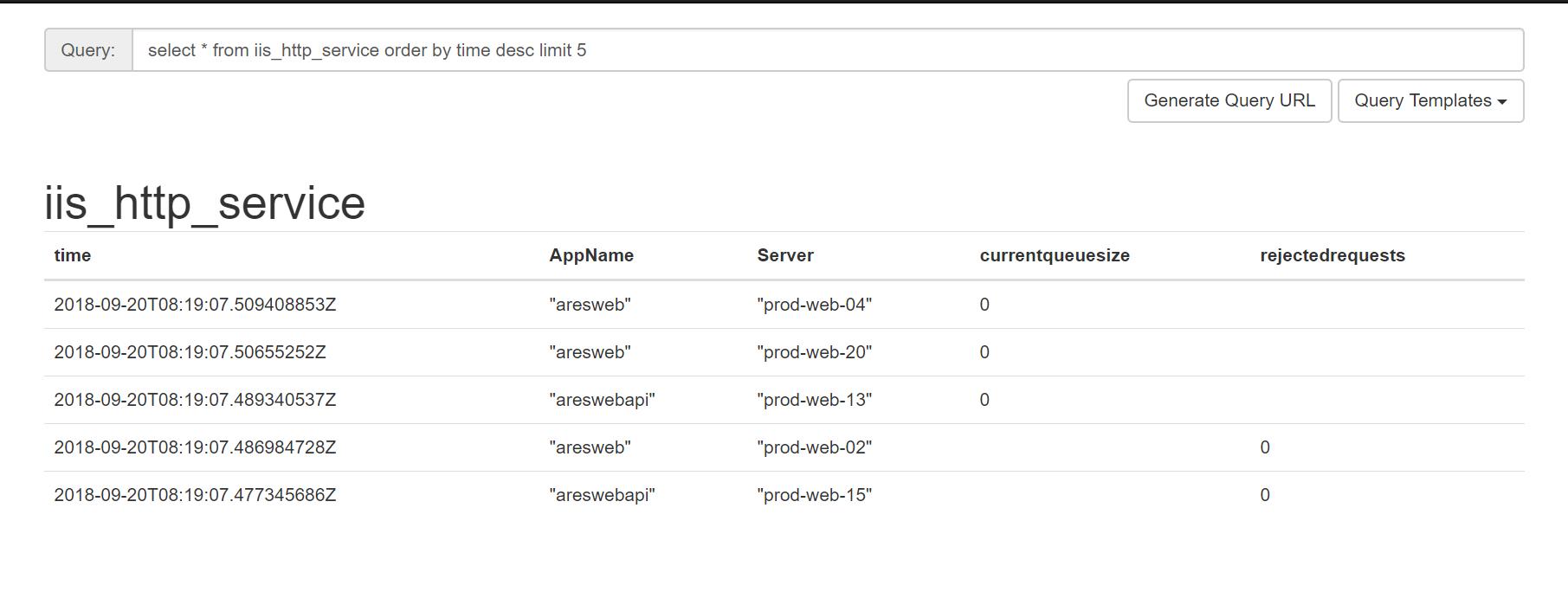
标签分别是:Server主机名 ,AppName是网站名称
 function waitsec{

     $step= #设置间隔

     $add= #设置延时

     $t=(get-date)

     $step-(($t.Hour*+$t.Minute*+$t.Second)%$step)+$add

 }

 function GetData($cluster,$dept,$group,$project,$type)

 {

     $commandSet=@(

     "\Web Service(*)\Current Anonymous Users",

     "\Web Service(*)\Current Connections",

     "\Web Service(*)\Current NonAnonymous Users",

     "\Web Service(*)\Current Blocked Async I/O Requests",

     "\Web Service(*)\Maximum Anonymous Users",

     "\Web Service(*)\Measured Async I/O Bandwidth Usage",

     "\Web Service(*)\Total Blocked Async I/O Requests",

     "\Web Service(*)\Total Get Requests",

     "\Web Service(*)\Total Method Requests",

     "\Web Service(*)\Total Method Requests/sec",

     "\Web Service(*)\Total Post Requests",

     "\Web Service(*)\Total Put Requests",

     "\Web Service(*)\Delete Requests/sec",

     "\Web Service(*)\Get Requests/sec",

     "\Web Service(*)\Options Requests/sec",

     "\Web Service(*)\Post Requests/sec",

     "\Web Service(*)\Put Requests/sec",

     "\Web Service(*)\Other Request Methods/sec",

     "\HTTP Service Request Queues(*)\CurrentQueueSize",

     "\HTTP Service Request Queues(*)\RejectedRequests",

     "\.NET CLR Exceptions(*)\# of Exceps Thrown / sec",

     "\Process(w3wp*)\Thread Count",

     "\Process(w3wp*)\% Processor Time",

     "\Process(w3wp*)\Working Set - Private",

     "\Process(w3wp*)\Working Set",

     "\Process(w3wp*)\Private Bytes"

     )

     $res= get-counter -counter $commandSet

     $index=

     $metricAppName=""

     $timestamp=[int] (Get-Date (Get-Date).ToUniversalTime() -uformat "%s")

     $host_name = hostname

     $table_name=""

     while($res.countersamples[$index])

     {

         $Metrics1=@{}

         $value= $res.countersamples[$index].cookedvalue

         $metric=$res.countersamples[$index].path

         $metricAppName=$res.countersamples[$index].InstanceName

         $tempArray=$metric.replace("\\","").split("\")

         $metric=$tempArray[]

         $Metrics1.$metric = $value

         if($tempArray[].startswith('web service'))

         {

             $table_name = "iis_web_service"

         }

         Elseif($tempArray[].startswith('http service'))

         {

             $table_name = "iis_http_service"

         }

         Elseif($tempArray[].startswith('.net clr exceptions'))

         {

             $table_name = "iis_net_clr_exceptions"

         }

         Elseif($tempArray[].startswith('process(w3wp'))

         {

             $table_name = "iis_process"

         }

            Write-Influx -Measure $table_name -Tags @{Server = $host_name;  AppName = $metricAppName;} -Metrics $Metrics1 -Database monitor -Server http://influxdb:9096

         $index = $index +

     }

 }

 write-host "running...... please wait" (waitsec)"S"

 Start-Sleep -s (waitsec)

 while(){

     #执行代码

     get-date

     (GetData)

     #……

     Start-Sleep -s (waitsec)

 }
写入influxdb后的iis_http_service表的数据格式:
2、Grafana 配置展示
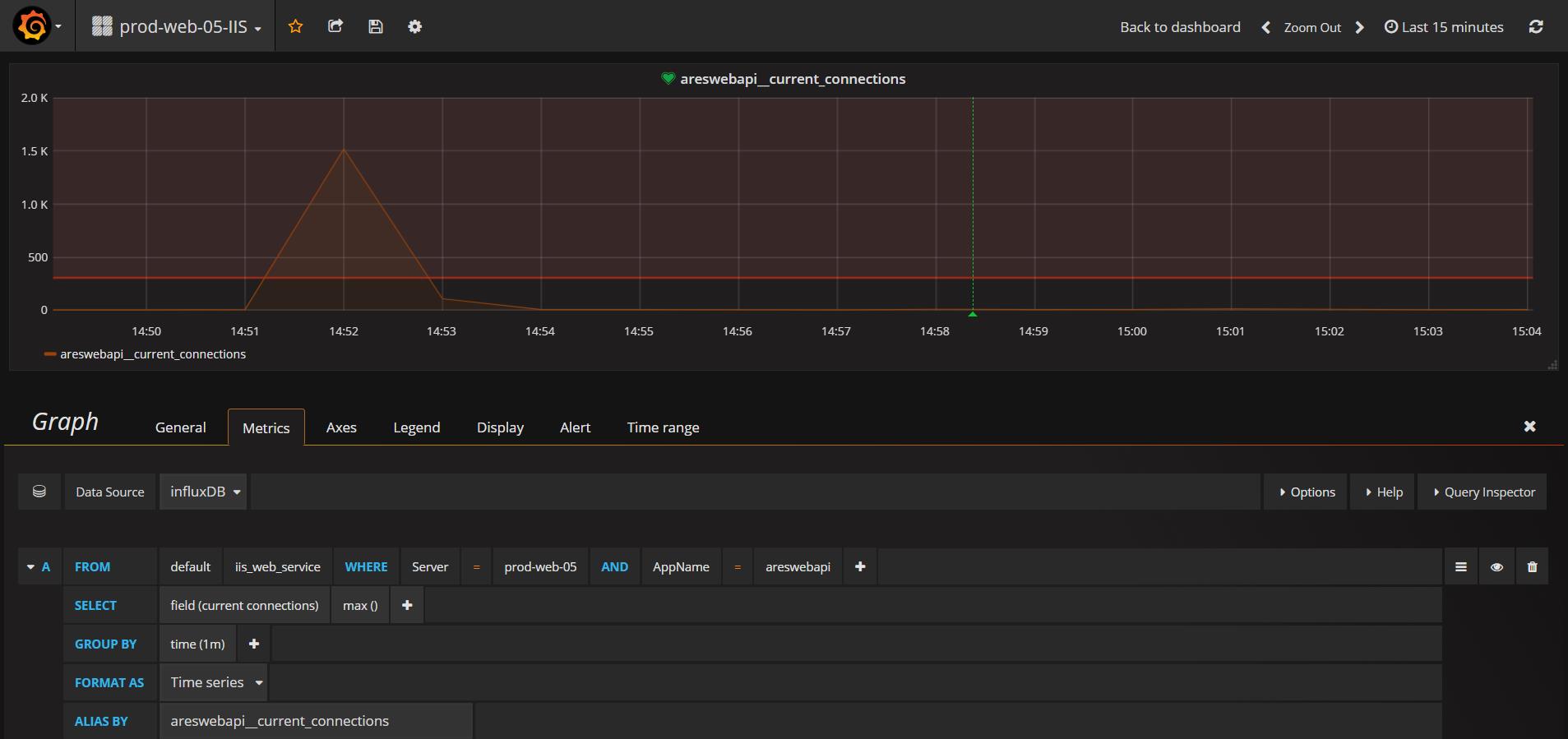
这里主要对webapi展示了当前连接数,当前排队数,和请求速率。
整体效果:
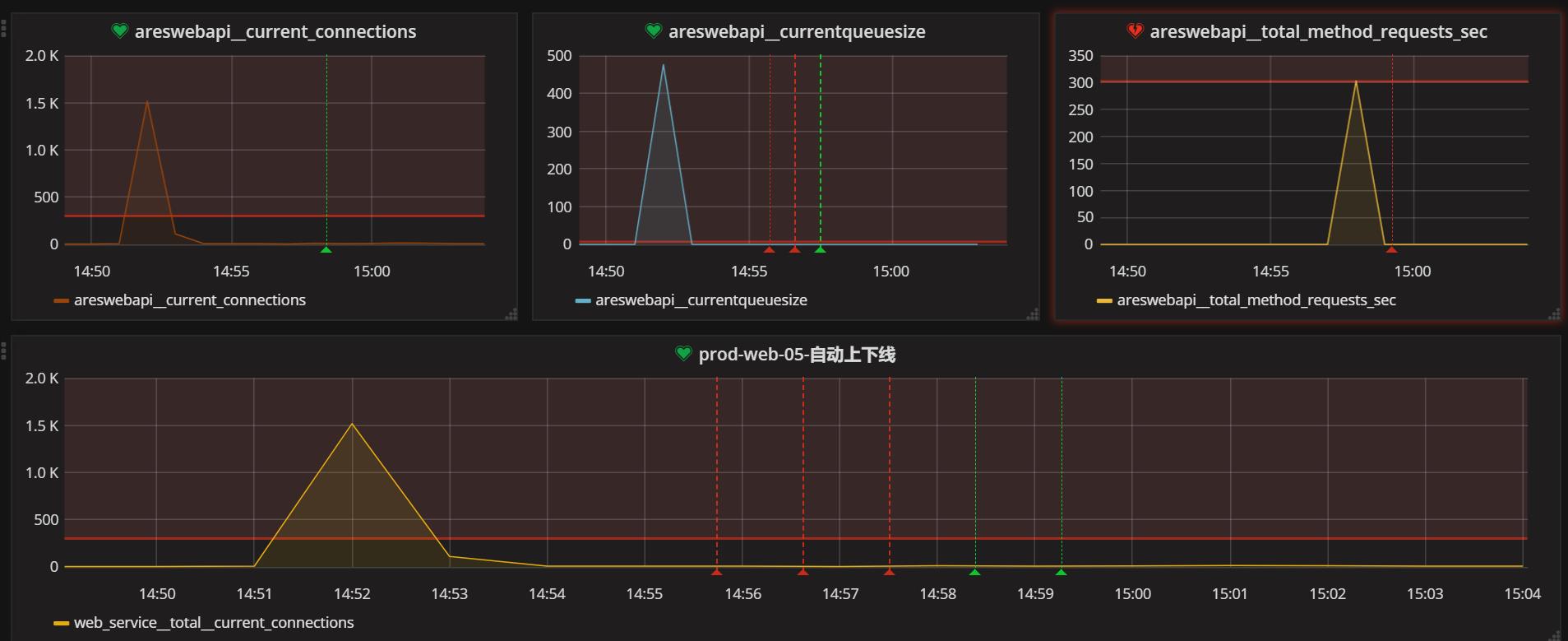
还可以在grafana告警里面设置一个WebHook,进行处理告警后的逻辑,比如:当这台机器压力比较大时可以对其进行从负载均衡移除 等等。

asp.net 网站监控方案的更多相关文章
- 前端性能监控方案window.performance 调研(转)
1. 业界案例 目前前端性能监控系统大致为分两类:以GA为代表的代码监控和以webpagetest为代表的工具监控. 代码监控依托于js代码并部署到需监控的页面,手动计算时间差或者使用浏览器的的API ...
- ASP.NET MVC 监控诊断、本地化和缓存
这篇博客主要是针对asp.net mvc项目的一些常用的东东做一个讲解,他们分别是监控诊断.本地化和缓存.虽然前两者跟asp.net mvc看上去好像是没什么关联. 但其实如果真正需要做asp.net ...
- 记一次ASP.NET网站的入侵和如何避免被入侵
ASP.NET网站入侵第二波(LeaRun.信息化快速开发框架 已被笔者拿下) 详细介绍请看第二波 首先我要申明的是不是什么语言写出来的程序就不安全,而是得看写代码的人如何去写这个程序 前些日子我去客 ...
- 如何真正提高ASP.NET网站的性能
摘要:前言 怎么才能让asp.net网站飞得更快,有更好的性能?这是很多开发者常常思考的一个问题.我有时候会做大量的测试,或请求别人帮忙采集一些数据,希望能够验证网上一些专家的建议或证明 前言 怎么才 ...
- 构建ASP.NET网站十大必备工具(2)
正常运行时间 当一个网站发布以后,你肯定希望你的网站不会遇到任何问题,一直处在正常运行状态之中.现在,我使用下面这些工具来监控“Superexpert.com”网站,确保它一直处在正常运行状态之中. ...
- 26种提高ASP.NET网站访问性能的优化方法 .
1. 数据库访问性能优化 数据库的连接和关闭 访问数据库资源需要创建连接.打开连接和关闭连接几个操作.这些过程需要多次与数据库交换信息以通过身份验证,比较耗费服务器资源. ASP.NET中提供了连接池 ...
- ASP.NET 网站管理工具
ylbtech-Miscellaneos:ASP.NET 网站管理工具 1. 网站管理工具概述返回顶部 网站管理工具概述 介绍 使用网站管理工具,可以通过一个简单的 Web 界面来查看和管理网站配置. ...
- 构建ASP.NET网站十大必备工具
最近使用ASP.NET为公司构建了一个简单的公共网站(该网站的地址:http://superexpert.com/).在这个过程中,我们使用了数量很多的免费工具,如果把构建ASP.NET网站的必备工具 ...
- C# -- HttpWebRequest 和 HttpWebResponse 的使用 C#编写扫雷游戏 使用IIS调试ASP.NET网站程序 WCF入门教程 ASP.Net Core开发(踩坑)指南 ASP.Net Core Razor+AdminLTE 小试牛刀 webservice创建、部署和调用 .net接收post请求并把数据转为字典格式
C# -- HttpWebRequest 和 HttpWebResponse 的使用 C# -- HttpWebRequest 和 HttpWebResponse 的使用 结合使用HttpWebReq ...
随机推荐
- vprintf 和 vsnpintf 的用法
函数定义: int vprintf ( const char * format, va_list arg ); printf() and friends are for normal use. vpr ...
- C/C++堆、栈及静态数据区详解
转自:https://www.cnblogs.com/hanyonglu/archive/2011/04/12/2014212.html 做略微修改 C/C++堆.栈及静态数据区详解 本文介绍C ...
- 矩形最小路径和 · Minimum Path Sum
[抄题]: 给定一个只含非负整数的m*n网格,找到一条从左上角到右下角的可以使数字和最小的路径. [思维问题]: [一句话思路]: 和数字三角形基本相同 [输入量]:空: 正常情况:特大:特小:程序里 ...
- 8-导弹拦截一(n^2 and nlogn)
/*某国为了防御敌国的导弹袭击,研发出一套导弹拦截系统.但是这种导弹拦截系统有一个缺陷:虽然它的第一发拦截炮弹能够到达任意的高度,但是以后每一发拦截炮弹都不能高于前一发的高度.某天,雷达捕捉到敌国的多 ...
- requestFullscreen()事件全屏不好使怎么解决
标明:我在360和火狐中全屏requestFullscreen()事件不好使: 解释:我后来发现我的页面是在iframe框架中使用的并且没有设置allowfullscreen="true&q ...
- 解压查看二进制rpm包的方法
详细参考: man cpio 具体方法: rpm2cpio qt5-qtbase-5.6.0-13.fc21.x86_64.rpm | cpio -dium 执行后可在当前目录查看 安装目录 etc ...
- sql转化为时间戳
1.转化为时间戳 UNIX_TIMESTAMP():执行使用时间格式如:2009-08-06 10:10:40 .2009-08-06
- Maven系列(二)exec-maven-plugin
Maven系列(二)exec-maven-plugin 1. mvn 命令行运行 # exec:java 不会自动编译代码,你需要手动执行 mvn compile 来完成编译 mvn compile ...
- 想到的regular方法果然已经被sklearn实现了就是L1和L2组合rugular
- C++ 面向对象基本释义
public:子类继承,子类亦可以访问.本类函数可以访问,本类对象可以访问. private:子类继承,子类不可访问.本类(所有)函数以及友员函数可以访问,本类对象不可以访问. protect:子类继 ...